
Pasirinkite kalbą

Form 1120-F Schedule V – Fillable PDF

  1. Šalis JAV
  2. Kalba Anglų
  3. Veikla Mokesčiai
  4. skyrius Vidaus pajamų tarnyba
Form 1120-F Schedule V – Fillable PDF

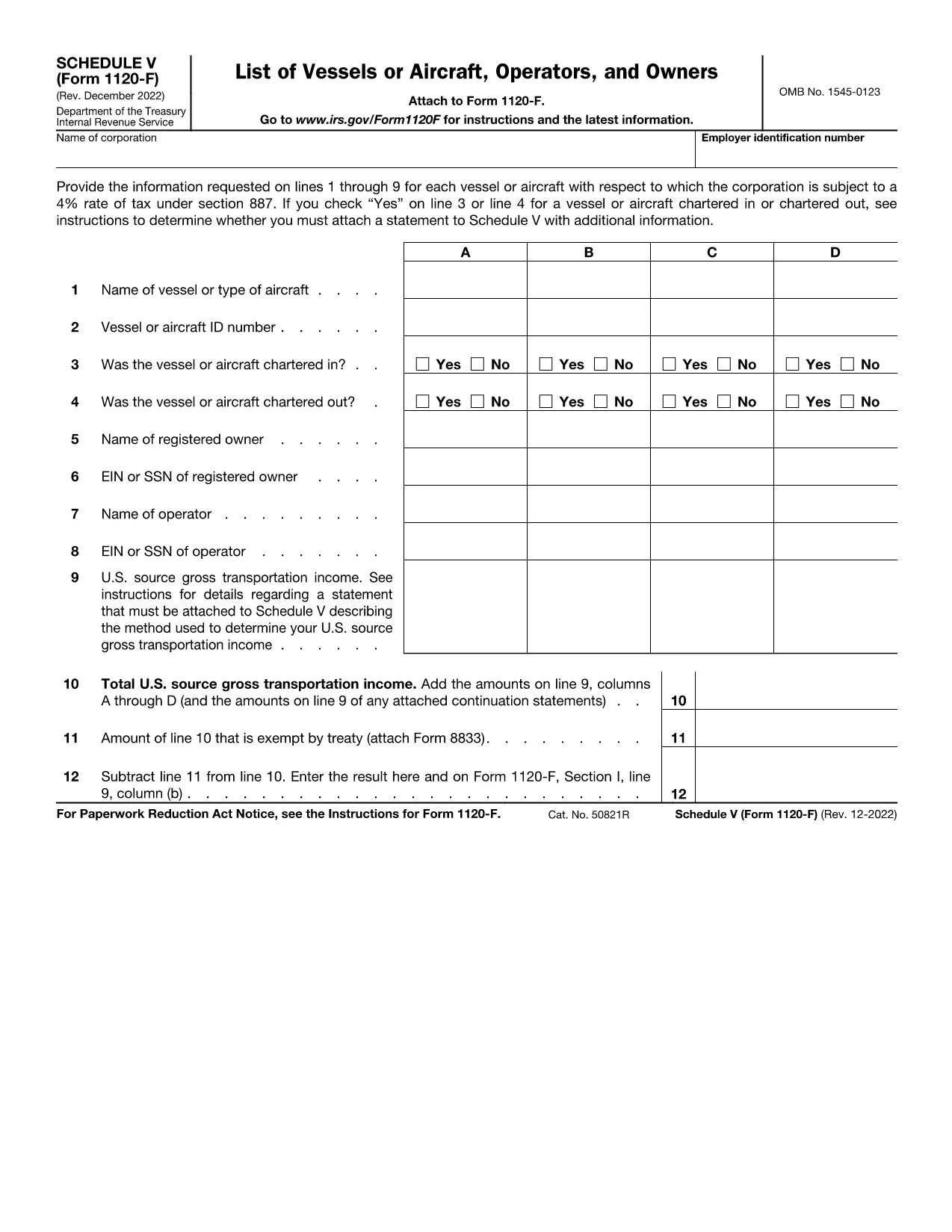
Schedule V (Form 1120-F) is the supplemental schedule used by foreign corporations to report vessel or aircraft activities that are subject to the 4% tax rate under IRC §887. If your corporation owns, charters, or operates any qualifying vessel or aircraft, you must fill out lines 1‑9 for each asset.

What Is Schedule V?

Schedule V captures detailed information about each vessel or aircraft, including identification numbers, charter status, and the amount of tax owed. The IRS requires this schedule to be attached to Form 1120-F when the 4% tax applies.

How to Complete Schedule V Online

With Formize’s fillable PDF, you can complete Schedule V directly in your browser—no download‑edit‑upload cycle needed. Simply click the "Fill out this form" button, wait for the Formize PDF Filler app to load, and start entering your data.

  • Enter the vessel or aircraft name and identification number.
  • Indicate whether the asset was chartered in, chartered out, or both.
  • Provide the tax‑calculating figures for each line as instructed.
  • Review the completed schedule and use the built‑in validation to catch common errors.

Common Mistakes to Avoid

Even experienced filers slip up. Keep an eye on these frequent errors:

  • Leaving line 3 or line 4 blank when a charter exists.
  • Entering the wrong vessel identification number (e.g., IMO vs. registration).
  • Mis‑calculating the 4% tax amount—use the Formize calculator for accuracy.
  • Forgetting to attach an additional statement when the schedule requires it.

Where to Submit Your Completed Form

After you’ve saved the filled Schedule V, attach it to your Form 1120-F filing. Submit the combined package to the IRS address listed in the Form 1120-F instructions or upload it through the IRS e‑file system if you’re filing electronically.

Need a printable copy? The fillable PDF also offers a Download button so you can keep a hard copy for your records.

Instrukcijos

  • Forma V grafikas - Instrukcijos dėl V priedo (forma 1120- F), Laivų arba orlaivių sąrašas, Operatoriai, ir savininkai
DUK
  • What is the purpose of Schedule V on Form 1120-F?

    Schedule V reports vessel or aircraft activities that trigger the 4% foreign corporation tax under IRC §887. It must be attached to Form 1120‑F when applicable.

  • Can I fill out Schedule V directly in my browser?

    Yes. Using Formize’s fillable PDF, you can complete Schedule V online without downloading any software.

  • Do I need to attach a separate statement if I answer “Yes” on line 3 or 4?

    If you answer “Yes” to chartering in or out, the IRS instructions require an additional statement with more details. The Formize app provides a template you can fill and attach.

  • Is the fillable PDF version the same as the IRS paper form?

    The fillable PDF is an exact replica of the IRS Schedule V (Form 1120‑F) with interactive fields, ensuring compliance with the official format.

  • How do I submit the completed Schedule V with my Form 1120-F?

    Attach the saved PDF to your Form 1120‑F filing and submit it either by mail to the IRS address in the instructions or electronically through the IRS e‑file system.

  • What if I make a mistake after submitting?

    You can file an amended Form 1120‑F with a corrected Schedule V. Keep a copy of the original filing for reference.

KAIP

Kaip nemokamai užpildyti Form 1120-F Schedule V internete, atlikdami 4 paprastus veiksmus:

  1. 1
    Open the Fillable Form
    Click the “Fill out this form” button on the page. The Formize PDF Filler app will load in your browser.
  2. 2
    Enter Vessel or Aircraft Details
    Fill in each line (1‑9) with the required information, such as identification numbers and charter status.
  3. 3
    Validate and Review
    Use the built‑in validation to check for missing fields or calculation errors. Correct any issues before saving.
  4. 4
    Save or Download
    When finished, click “Save” to store the completed Schedule V in your Formize account, or click “Download” to get a PDF copy for printing or offline filing.
Formuokite PDF užpildymo programą
APIE

Mokesčių formos

Form 1120-F Schedule V yra viena iš mokesčių formų, kurios yra dokumentai, naudojami pajamoms, atskaitymams ir mokesčių prievolėms pranešti atitinkamai mokesčių institucijai. Šios formos yra esminė mokesčių pateikimo proceso dalis ir yra naudojamos siekiant užtikrinti, kad asmenys ir įmonės laikytųsi mokesčių įstatymų ir tiksliai apskaičiuotų savo mokestines prievoles.

Reikalingos konkrečios mokesčių formos gali skirtis atsižvelgiant į tokius veiksnius kaip asmens padavimo statusas, pajamų šaltiniai ir šalies mokesčių įstatymai. Tačiau čia yra keletas įprastų mokesčių formų tipų:

Asmens pajamų mokesčio formos: naudojamos šios formos, pvz., 1040 serija Jungtinėse Valstijose. asmenys, norėdami pranešti apie savo pajamas, reikalauti atskaitymų ir kreditų bei apskaičiuoti mokestinę prievolę.

Verslo mokesčių formos: įmonėms, įskaitant individualias įmones, bendrijas, korporacijas ir savarankiškai dirbančius asmenis, gali tekti pateikti įvairias formas, kad praneštų apie savo pajamas, išlaidas ir mokėtinus mokesčius. Pavyzdžiai: C tvarkaraštis (verslo pelnas arba nuostolis) ir 1120 forma (JAV korporacijų pajamų mokesčio deklaracija).

Darbo mokesčių formos: darbdaviai privalo pranešti apie darbuotojų atlyginimus ir išskaičiuoti bei pervesti darbo užmokesčio mokesčius. Šiuo tikslu naudojamos tokios formos kaip W-2 (darbo užmokesčio ir mokesčių ataskaita) ir 941 (darbdavio ketvirtinė federalinė mokesčių deklaracija).

Investicijų ir pensijų sąskaitos formos: šios formos naudojamos norint pranešti apie investicijų pajamas, kapitalo prieaugį ir nuostolius, taip pat įmokas ir paskirstymus iš išėjimo į pensiją sąskaitų. Pavyzdžiai: forma 1099-DIV (dividendai ir paskirstymas) ir 5498 forma (IRA įnašo informacija).

Turto ir dovanų mokesčių formos: kai asmuo miršta arba padovanoja reikšmingų dovanų, specialios formos, pvz., 706 forma a> (Jungtinių Valstijų nekilnojamojo turto (ir kartos perkėlimo) mokesčių deklaracija) ir 709 forma (Jungtinių Valstijų dovana (ir kartos Praleidžiamas pervedimas) Mokesčių deklaracija) naudojami pranešti ir apskaičiuoti visus taikomus turto ar dovanų mokesčius.

Svarbu atkreipti dėmesį į tai, kad mokesčių įstatymai ir formos laikui bėgant gali keistis, todėl asmenys ir įmonės turėtų pasikonsultuoti su atitinkama mokesčių institucija arba kreiptis į profesionalias mokesčių konsultacijas, siekdami užtikrinti, kad būtų laikomasi galiojančių reikalavimų.

FUNKCIJOS

PDF užpildas

Lengviausias būdas užpildyti Form 1120-F Schedule V internete

  • Greitai užpildykite Form 1120-F Schedule V
    Ieškote būdo greitai užpildyti Form 1120-F Schedule V internete? Naudodami internetinį nemokamą PDF formų užpildą sužinosite, kaip redaguoti ir užpildyti šį pdf dokumentą greičiau nei per minutę.
  • Lengva naudoti internetinį PDF redaktorių
    Atsibodo spausdinti PDF failus, kad galėtumėte juos redaguoti prieš nuskaitydami iš naujo ir siųsdami atgal? Redaguoti PDF dokumentus internete nemokamai. Norėdami sutaupyti laiko ir popieriaus, naudokite mūsų internetinį pdf redaktorių.
  • Puikūs įrankiai, visos platformos
    Svarstote, kaip užpildyti Form 1120-F Schedule V „Mac“ kompiuteryje, o gal kaip nemokamai naudoti PDF užpildą? Mūsų internetiniai PDF įrankiai veikia visose platformose.
  • Saugi failų saugykla
    Užbaigti „Form 1120-F Schedule V“ failai saugomi saugioje duomenų bazėje, kurią valdo „Amazon Cloud“ priegloba. Galite bet kada ištrinti failus iš mūsų sistemos. Bet kokiu atveju šie failai automatiškai ištrinami po 24 valandų.
  • Kalbėkitės su Form 1120-F Schedule V
    Kalbėkite su „Form 1120-F Schedule V“ naudodami Chatize, kuri yra nemokama PDF skaitymo priemonė. Užduokite klausimų ir gaukite atsakymus iš „Form 1120-F Schedule V“. Tiesiog spustelėkite aukščiau esantį mygtuką Kalbėtis su dokumentu.

Ištrinti užpildymo seansą

Ištrinti pasirinktą pildymo seansą? Tokiu atveju jūsų pažanga pildant formą bus prarasta.

Ištrinti redagavimo sesiją

Ištrinti pasirinktą redagavimo sesiją? Tokiu atveju jūsų pažanga kuriant ir redaguojant formą bus prarasta.