
Pasirinkite kalbą

Form 1120 Schedule B – Fillable PDF for Corporations

  1. Šalis JAV
  2. Kalba Anglų
  3. Veikla Mokesčiai
  4. skyrius Vidaus pajamų tarnyba
Form 1120 Schedule B – Fillable PDF for Corporations

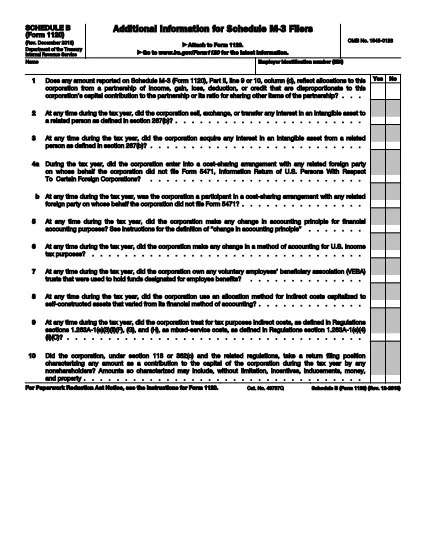
Form 1120 Schedule B is the IRS worksheet that corporations use to report their interest, dividend, and other investment income, as well as to answer a series of tax‑related questions. Having a fillable PDF version saves time, reduces errors, and lets you store the completed form electronically.

What Is Form 1120 Schedule B?

This schedule is attached to the corporate income‑tax return (Form 1120). It captures details such as:

  • Interest and dividend income
  • Balance‑sheet information for the beginning and end of the tax year
  • Answers to questions about foreign accounts, shareholder ownership, and more

How to Fill Out the Schedule B Online

Instead of downloading the PDF and opening a separate editor, simply click the "Fill out this form" button on this page. The Formize PDF Filler app will load in your browser, and you can start entering data immediately.

Common Mistakes to Avoid

  • Leaving required fields blank: The filler will highlight missing entries before you can save.
  • Mismatching dates: Ensure the beginning‑of‑year and end‑of‑year balances match the corporation’s books.
  • Incorrect entity classification: Double‑check that you’re using the corporate version, not the partnership version (Form 1065).

Download the Official PDF

The source document is provided directly by the IRS. You can view or save the original PDF at any time:

IRS Form 1120 Schedule B (PDF)

Need More Help?

For detailed instructions, see the IRS instructions booklet linked on the same page as the PDF. While Formize does not offer live chat, the IRS website includes a comprehensive FAQ section and contact numbers for corporate tax inquiries.

DUK
  • Do I need special software to use the fillable Form 1120 Schedule B?

    No. Formize’s PDF Filler runs completely in your web browser, so you don’t need Adobe Acrobat or any other desktop program.

  • Can I submit the filled Schedule B directly to the IRS?

    The IRS still requires a paper‑filed or e‑filed Form 1120. After completing Schedule B, attach it to your Form 1120 and follow the usual filing method.

  • Is the fillable PDF the same as the official IRS version?

    Yes. The underlying PDF is the exact document published by the IRS (f1120sb.pdf). The only difference is the added form fields for easier data entry.

  • What if I make a mistake after saving?

    Open the saved PDF again with Formize’s filler, correct the fields, and re‑save. The original file is never altered on the server.

  • Are there any fees for using Formize’s filler?

    Filling out the form on Formize is free. There is no charge for downloading or saving the completed PDF.

  • Where can I find the official instructions for Schedule B?

    The IRS provides a detailed instruction booklet on the same page as the PDF. Visit the IRS link above and click “Instructions for Form 1120 Schedule B.”

KAIP

Kaip nemokamai užpildyti Form 1120 Schedule B internete, atlikdami 3 paprastus veiksmus:

  1. 1
    Click the Fill‑Out Button
    Press the "Fill out this form" button on this page. The Formize PDF Filler will open in a new browser tab.
  2. 2
    Wait for the Filler to Load
    The app loads the fillable version of Form 1120 Schedule B. A progress bar shows when the document is ready.
  3. 3
    Complete and Save
    Enter the required information, use the built‑in validation, then click "Save" to download the completed PDF or store it in your cloud folder.
Formuokite PDF užpildymo programą
APIE

Mokesčių formos

Form 1120 Schedule B yra viena iš mokesčių formų, kurios yra dokumentai, naudojami informacijai apie asmens ar įmonės pajamas, atskaitymus ir mokesčių prievolę pranešti atitinkamai mokesčių institucijai. Šios formos būtinos siekiant laikytis mokesčių įstatymų ir įvykdyti mokestines prievoles. Mokesčių formos skiriasi priklausomai nuo šalies ir taikomų konkrečių mokesčių reikalavimų. Štai keletas įprastų mokesčių formų tipų:

Asmens mokesčių formos: šias formas naudoja individualūs mokesčių mokėtojai norėdami pranešti apie savo asmenines pajamas ir reikalauti atskaitymų, kreditų ir atleidimo nuo mokesčių. Pavyzdžiai: 1040 forma Jungtinėse Amerikos Valstijose arba Self-Assessment Tax Return forma Jungtinėje Karalystėje.

Verslo mokesčių formos: verslo mokesčių formas naudoja įmonės, bendrijos arba savarankiškai dirbantys asmenys, norėdami pranešti apie savo verslo pajamas, išlaidas ir kitą su mokesčiais susijusią informaciją. Pavyzdžiai: C grafiko forma (verslo pelnas arba nuostolis) Jungtinėse Amerikos Valstijose arba CT600 forma (įmonės mokesčių deklaracija) Jungtinėje Karalystėje.

Darbo užmokesčio mokesčio formos: šias formas darbdaviai naudoja norėdami pranešti apie darbo užmokestį, atlyginimus ir mokesčius, išskaičiuotus iš darbuotojų atlyginimų. Pavyzdžiui, W-2 forma Jungtinėse Amerikos Valstijose arba P60 forma Jungtinėje Karalystėje.

Pardavimo mokesčio formos: pardavimo mokesčio formas įmonės naudoja pranešdamos ir pervesdamos pardavimo mokestį, surinktą už apmokestinamas prekes ar paslaugas. Konkrečios pardavimo mokesčio formos skiriasi priklausomai nuo jurisdikcijos.

Pridėtinės vertės mokesčio (PVM) formos: PVM formos naudojamos šalyse, kuriose taikomas pridėtinės vertės mokestis, norint pranešti ir pervesti PVM, surinktą už pardavimą, ir reikalauti PVM kreditų už pirkinius. Pavyzdžiui, daugelyje šalių naudojamos PVM deklaracijos formos.

Apskaičiuotų mokesčių formos: apskaičiuotų mokesčių formos naudojamos norint pranešti ir sumokėti apskaičiuotus mokesčius už pajamas, kurios nėra išskaičiuojamos, pvz., individualios veiklos arba investicijų pajamų.

Tai tik keli daugybės galimų mokesčių formų pavyzdžiai. Reikalingos konkrečios formos priklauso nuo jūsų šalies ar jurisdikcijos mokesčių įstatymų ir teisės aktų. Svarbu susipažinti su mokesčių institucijos gairėmis arba kreiptis į profesionalų patarimą, kad nustatytumėte, kurios formos yra taikomos jūsų situacijai.

FUNKCIJOS

PDF užpildas

Lengviausias būdas užpildyti Form 1120 Schedule B internete

  • Greitai užpildykite Form 1120 Schedule B
    Ieškote būdo greitai užpildyti Form 1120 Schedule B internete? Naudodami internetinį nemokamą PDF formų užpildą sužinosite, kaip redaguoti ir užpildyti šį pdf dokumentą greičiau nei per minutę.
  • Lengva naudoti internetinį PDF redaktorių
    Atsibodo spausdinti PDF failus, kad galėtumėte juos redaguoti prieš nuskaitydami iš naujo ir siųsdami atgal? Redaguoti PDF dokumentus internete nemokamai. Norėdami sutaupyti laiko ir popieriaus, naudokite mūsų internetinį pdf redaktorių.
  • Puikūs įrankiai, visos platformos
    Svarstote, kaip užpildyti Form 1120 Schedule B „Mac“ kompiuteryje, o gal kaip nemokamai naudoti PDF užpildą? Mūsų internetiniai PDF įrankiai veikia visose platformose.
  • Saugi failų saugykla
    Užbaigti „Form 1120 Schedule B“ failai saugomi saugioje duomenų bazėje, kurią valdo „Amazon Cloud“ priegloba. Galite bet kada ištrinti failus iš mūsų sistemos. Bet kokiu atveju šie failai automatiškai ištrinami po 24 valandų.
  • Kalbėkitės su Form 1120 Schedule B
    Kalbėkite su „Form 1120 Schedule B“ naudodami Chatize, kuri yra nemokama PDF skaitymo priemonė. Užduokite klausimų ir gaukite atsakymus iš „Form 1120 Schedule B“. Tiesiog spustelėkite aukščiau esantį mygtuką Kalbėtis su dokumentu.

Ištrinti užpildymo seansą

Ištrinti pasirinktą pildymo seansą? Tokiu atveju jūsų pažanga pildant formą bus prarasta.

Ištrinti redagavimo sesiją

Ištrinti pasirinktą redagavimo sesiją? Tokiu atveju jūsų pažanga kuriant ir redaguojant formą bus prarasta.