
Pasirinkite kalbą

IRS Form 12203 – Request for Appeals Review (Fillable PDF)

  1. Šalis JAV
  2. Kalba Anglų
  3. Veikla Mokesčiai
  4. skyrius Vidaus pajamų tarnyba
IRS Form 12203 – Request for Appeals Review (Fillable PDF)

If you received an IRS audit letter and disagree with the proposed adjustments of $25,000 or less, IRS Form 12203 is the official request to have your case reviewed by the Independent Office of Appeals. On Formize.com you can open the form as a fillable PDF, complete it online, and submit it without any extra software.

What Is IRS Form 12203?

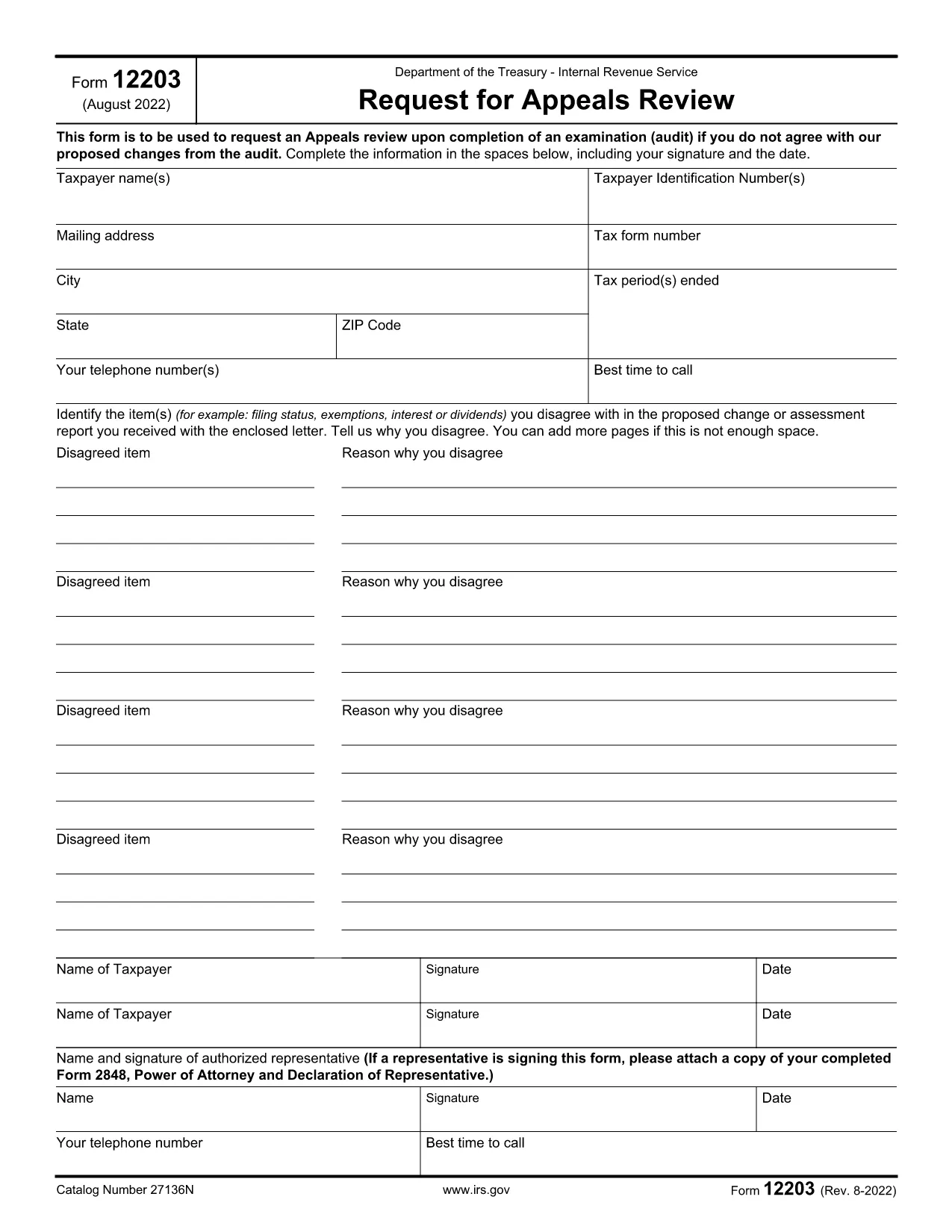
Form 12203, titled Request for Appeals Review, is a one‑page document used by taxpayers to ask the IRS Appeals Office to reconsider audit findings. It is designed for “small‑case” disputes, meaning the total amount in controversy does not exceed $25,000.

When Can You Use Form 12203?

  • After the audit is complete and you have received an audit letter.
  • The disputed amount is $25,000 or less for each tax year.
  • You want to appeal without first filing a formal written protest.

How to Complete the Fillable PDF Online

Instead of downloading the PDF and editing it with a separate editor, simply click the "Fill out this form" button on this page. The Formize PDF Filler app will load, letting you type directly into each field.

  1. Click "Fill out this form" – the fillable version opens in your browser.
  2. Enter your taxpayer information exactly as it appears on your tax return or audit letter.
  3. List each disagreed item (up to four) with a brief explanation and supporting facts.
  4. Sign electronically and provide a contact phone number.
  5. Download the completed PDF or submit it directly to the IRS using the instructions on the final page.

Common Mistakes to Avoid

  • Using the wrong form: Form 12203 is only for cases ≤ $25,000. Larger disputes require Form 12204.
  • Leaving fields blank: Incomplete taxpayer information can delay processing.
  • Not attaching supporting documentation: Include any relevant statements, receipts, or legal citations.
  • Misspelling names or SSNs: Errors cause the IRS to reject the appeal.

By following these steps and double‑checking your entries, you’ll increase the chance that the Appeals Office reviews your case promptly.

DUK
  • What is the purpose of IRS Form 12203?

    Form 12203 is used to request a review by the IRS Independent Office of Appeals when you disagree with audit adjustments of $25,000 or less.

  • Can I use Form 12203 for a case larger than $25,000?

    No. For disputes over $25,000 you must file Form 12204 (Request for Appeals Review – Large Case).

  • Do I need a tax professional to fill out Form 12203?

    You can complete the form yourself, but a qualified tax professional can help ensure accuracy and provide supporting documentation.

  • How many items can I list on the form?

    You can list up to four disagreed items directly on the form. Additional items can be attached as supplemental pages.

  • What happens after I submit Form 12203?

    The Appeals Office will review your request, may contact you for clarification, and will issue a decision in writing.

  • Is the fillable PDF on Formize secure?

    Yes. Formize uses SSL encryption, and the PDF is processed locally in your browser, so your personal data stays private.

  • Can I save my progress and finish later?

    Absolutely. The Formize filler lets you download a partially completed PDF to resume editing at any time.

  • Where do I send the completed Form 12203?

    Follow the mailing address listed in the form’s instructions, which is usually the Appeals Office address for your region.

KAIP

Kaip nemokamai užpildyti IRS Form 12203 internete, atlikdami 5 paprastus veiksmus:

  1. 1
    Open the Fillable Form
    Click the "Fill out this form" button on the page. The Formize PDF Filler loads instantly in your browser.
  2. 2
    Enter Taxpayer Information
    Type your name, SSN/ITIN/EIN, mailing address, and phone number exactly as they appear on your tax return or audit letter.
  3. 3
    List Disagreed Items
    For each item you contest, provide a concise description, the amount in dispute, and the reason you disagree.
  4. 4
    Sign and Review
    Add your electronic signature, review all entries for accuracy, and make sure any supporting documents are attached.
  5. 5
    Download or Submit
    Save the completed PDF to your computer or follow the on‑screen instructions to submit it directly to the IRS.
Formuokite PDF užpildymo programą
APIE

Vidaus pajamų tarnybos (IRS) formos

IRS Form 12203 yra viena iš oficialių mokesčių formų, naudojamų Jungtinėse Valstijose norint pranešti apie pajamas, reikalauti atskaitymų ir kreditų, apskaičiuoti mokestinę prievolę ir vykdyti kitus su mokesčiais susijusius įsipareigojimus. IRS yra federalinė agentūra, atsakinga už vidaus pajamų įstatymų administravimą ir vykdymą JAV.

Štai keletas Vidaus pajamų tarnybos formų pavyzdžių:

1040 forma: tai pagrindinė gyventojų pajamų mokesčio deklaracijos forma, kurią naudoja dauguma mokesčių mokėtojų. Jis naudojamas pranešti apie įvairias pajamas, reikalauti atskaitymų ir kreditų, apskaičiuoti mokestinę prievolę ir nustatyti, ar mokesčių mokėtojas yra skolingas papildomai, ar turi teisę susigrąžinti mokesčius.

1099 forma: yra įvairių 1099 formos variantų, pvz., 1099-MISC, 1099-INT, 1099-DIV ir tt Šios formos naudojamos pajamoms, kurias asmenys ar įmonės gauna iš įvairių šaltinių, išskyrus užimtumą, pvz., savarankiško darbo, pateikti. pajamos, palūkanų pajamos, dividendų pajamos ir nuomos pajamos.

Forma W-2: šią formą naudoja darbdaviai norėdami pranešti apie darbuotojams mokamą atlyginimą ir mokesčius išskaičiuoti iš jų darbo užmokesčio. Darbuotojai naudoja W-2 formoje pateiktą informaciją, kad užpildytų savo individualias mokesčių deklaracijas.

941 forma: darbdaviai naudoja šią formą norėdami pranešti apie savo darbuotojų darbo mokesčius, įskaitant išskaičiuotą federalinį pajamų mokestį, socialinio draudimo mokestį ir medicininės priežiūros mokestį.

1065 forma: šią formą bendrijos naudoja pajamoms, atskaitymams ir mokesčių prievolėms pranešti. Pačios bendrijos pajamų mokesčio nemoka; vietoj to partneriai savo individualiose mokesčių deklaracijose nurodo savo bendrijos pajamų dalį.

1120 forma: tai pelno mokesčio deklaracijos forma, kurią C korporacijos naudoja savo pajamoms pranešti. atskaitymus ir mokestinę prievolę.

990 forma: šią formą naudoja neapmokestinamos organizacijos, pvz., ne pelno ir labdaros organizacijos, pranešti apie savo finansinę informaciją, veiklą ir mokesčių įstatymų laikymąsi.

8862 forma: šią formą naudoja mokesčių mokėtojai, kurie anksčiau pareikalavo uždirbtų pajamų mokesčio kredito (EITC) bet buvo uždrausta, o dabar noriu vėl pareikšti ieškinį.

Tai tik keli pavyzdžiai iš daugybės IRS formų, skirtų įvairioms su mokesčiais susijusioms prievolėms įvykdyti. Asmeniui ar verslui reikalingos konkrečios formos priklauso nuo jų unikalių aplinkybių, pajamų šaltinių ir atskaitymų. Patartina apsilankyti oficialioje Vidaus pajamų tarnybos svetainėje (www.irs.gov) arba kreiptis į profesionalų mokesčių patarimą, kad gautumėte tikslią ir naujausią informaciją apie konkrečią IRS. formas, atitinkančias jūsų mokesčių situaciją.

FUNKCIJOS

PDF užpildas

Lengviausias būdas užpildyti IRS Form 12203 internete

  • Greitai užpildykite IRS Form 12203
    Ieškote būdo greitai užpildyti IRS Form 12203 internete? Naudodami internetinį nemokamą PDF formų užpildą sužinosite, kaip redaguoti ir užpildyti šį pdf dokumentą greičiau nei per minutę.
  • Lengva naudoti internetinį PDF redaktorių
    Atsibodo spausdinti PDF failus, kad galėtumėte juos redaguoti prieš nuskaitydami iš naujo ir siųsdami atgal? Redaguoti PDF dokumentus internete nemokamai. Norėdami sutaupyti laiko ir popieriaus, naudokite mūsų internetinį pdf redaktorių.
  • Puikūs įrankiai, visos platformos
    Svarstote, kaip užpildyti IRS Form 12203 „Mac“ kompiuteryje, o gal kaip nemokamai naudoti PDF užpildą? Mūsų internetiniai PDF įrankiai veikia visose platformose.
  • Saugi failų saugykla
    Užbaigti „IRS Form 12203“ failai saugomi saugioje duomenų bazėje, kurią valdo „Amazon Cloud“ priegloba. Galite bet kada ištrinti failus iš mūsų sistemos. Bet kokiu atveju šie failai automatiškai ištrinami po 24 valandų.
  • Kalbėkitės su IRS Form 12203
    Kalbėkite su „IRS Form 12203“ naudodami Chatize, kuri yra nemokama PDF skaitymo priemonė. Užduokite klausimų ir gaukite atsakymus iš „IRS Form 12203“. Tiesiog spustelėkite aukščiau esantį mygtuką Kalbėtis su dokumentu.

Ištrinti užpildymo seansą

Ištrinti pasirinktą pildymo seansą? Tokiu atveju jūsų pažanga pildant formą bus prarasta.

Ištrinti redagavimo sesiją

Ištrinti pasirinktą redagavimo sesiją? Tokiu atveju jūsų pažanga kuriant ir redaguojant formą bus prarasta.