
Pasirinkite kalbą

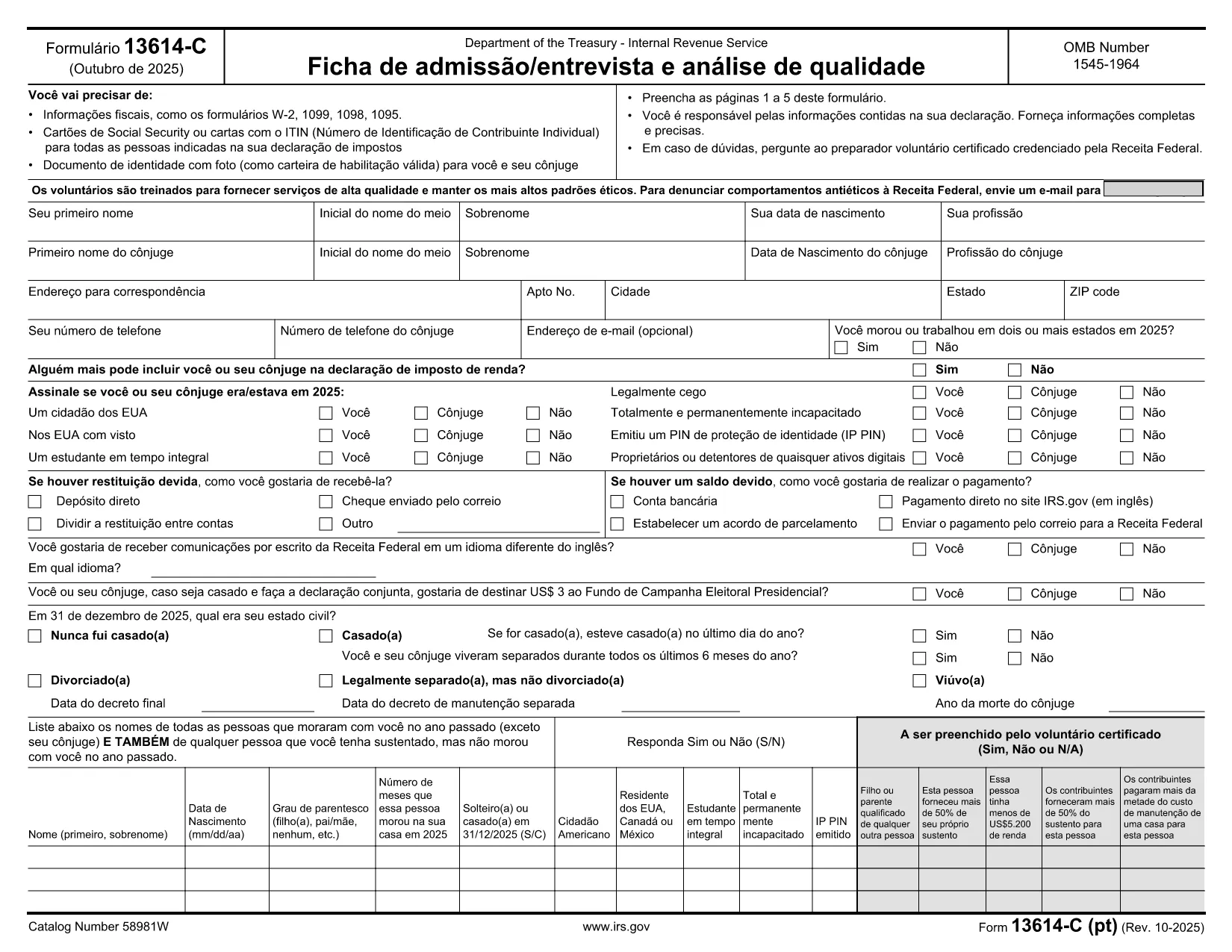
Form 13614-C (PT) – Fillable PDF for IRS Income Tax Interview

  1. Šalis JAV
  2. Kalba portugalų
  3. Veikla Mokesčiai
  4. skyrius Vidaus pajamų tarnyba
Form 13614-C (PT) – Fillable PDF for IRS Income Tax Interview

The IRS Form 13614-C (PT) is the Portuguese version of the Intake/Interview & Quality Review Sheet. Volunteers and tax preparers use it to collect personal information, income details, and eligibility for tax credits during the interview process.

What Is Form 13614-C (PT)?

This form is part of the Volunteer Income Tax Assistance (VITA) program and is required for taxpayers who prefer to complete their interview in Portuguese. It captures the same data as the English version, but all field labels and instructions are translated.

How to Fill the Form Online with Formize

Instead of downloading the PDF and editing it in a separate program, simply click the "Fill out this form" button on this page. The Formize PDF Filler app will load the fillable document directly in your browser.

  • All fields are interactive – just click and type.
  • Use the navigation pane to jump between sections quickly.
  • When you’re done, save a copy to your device or email it directly to the taxpayer.

Common Mistakes to Avoid

  • Leaving required fields blank: The filler highlights missing information in red.
  • Entering numbers in text fields: Follow the format shown in the example boxes.
  • Using the wrong tax year: Verify the year at the top of the form before starting.

Download & Print Options

If you prefer a hard‑copy version, you can still download the PDF using the link below. Print it on standard 8.5" × 11" paper and fill it out by hand.

Where to Submit the Completed Form

After completing the interview, submit the signed Form 13614-C (PT) to your VITA site or attach it to the electronic return you are preparing. The IRS does not require you to mail the form separately unless instructed by a tax professional.

Download the official fillable PDF (Portuguese)

DUK
  • Is Form 13614-C (PT) the same as the English version?

    Yes, it contains identical fields and data requirements; only the labels and instructions are translated into Portuguese.

  • Can I edit the PDF on my phone?

    The Formize PDF Filler works on most modern mobile browsers, allowing you to complete the form on a smartphone or tablet.

  • Do I need to print the form after filling it online?

    Printing is optional. You can submit the digital PDF directly to your VITA site, but a printed copy is acceptable if required.

  • What if I make a mistake while filling the form?

    Use the "Undo" button in the Formize toolbar or simply click the field again and correct the entry before saving.

  • Is the fillable PDF free to use?

    Yes, the official IRS PDF is free, and Formize provides the online filler at no cost.

  • How do I submit the completed form to the IRS?

    Typically you give the completed form to the volunteer or tax preparer handling your return; they will attach it to the electronic filing or mail it if required.

  • Can I save my progress and finish later?

    The Formize filler allows you to download a partially completed PDF, which you can reopen later to finish.

KAIP

Kaip nemokamai užpildyti Form 13614-C PT internete, atlikdami 5 paprastus veiksmus:

  1. 1
    Click the Fill Button
    Press the "Fill out this form" button on the page to launch the Formize PDF Filler.
  2. 2
    Wait for the Filler to Load
    The online filler loads the fillable PDF directly in your browser—no download needed.
  3. 3
    Complete Each Section
    Enter the requested information in each field. Required fields are marked with an asterisk.
  4. 4
    Save or Export
    When finished, click "Save" to download a copy to your computer or choose "Email" to send it directly.
  5. 5
    Submit to the IRS
    Provide the completed PDF to your VITA volunteer or attach it to the electronic return you are filing.
Formuokite PDF užpildymo programą
APIE

Vidaus pajamų tarnybos (IRS) formos

Form 13614-C PT yra viena iš oficialių mokesčių formų, naudojamų Jungtinėse Valstijose norint pranešti apie pajamas, reikalauti atskaitymų ir kreditų, apskaičiuoti mokestinę prievolę ir vykdyti kitus su mokesčiais susijusius įsipareigojimus. IRS yra federalinė agentūra, atsakinga už vidaus pajamų įstatymų administravimą ir vykdymą JAV.

Štai keletas Vidaus pajamų tarnybos formų pavyzdžių:

1040 forma: tai pagrindinė gyventojų pajamų mokesčio deklaracijos forma, kurią naudoja dauguma mokesčių mokėtojų. Jis naudojamas pranešti apie įvairias pajamas, reikalauti atskaitymų ir kreditų, apskaičiuoti mokestinę prievolę ir nustatyti, ar mokesčių mokėtojas yra skolingas papildomai, ar turi teisę susigrąžinti mokesčius.

1099 forma: yra įvairių 1099 formos variantų, pvz., 1099-MISC, 1099-INT, 1099-DIV ir tt Šios formos naudojamos pajamoms, kurias asmenys ar įmonės gauna iš įvairių šaltinių, išskyrus užimtumą, pvz., savarankiško darbo, pateikti. pajamos, palūkanų pajamos, dividendų pajamos ir nuomos pajamos.

Forma W-2: šią formą naudoja darbdaviai norėdami pranešti apie darbuotojams mokamą atlyginimą ir mokesčius išskaičiuoti iš jų darbo užmokesčio. Darbuotojai naudoja W-2 formoje pateiktą informaciją, kad užpildytų savo individualias mokesčių deklaracijas.

941 forma: darbdaviai naudoja šią formą norėdami pranešti apie savo darbuotojų darbo mokesčius, įskaitant išskaičiuotą federalinį pajamų mokestį, socialinio draudimo mokestį ir medicininės priežiūros mokestį.

1065 forma: šią formą bendrijos naudoja pajamoms, atskaitymams ir mokesčių prievolėms pranešti. Pačios bendrijos pajamų mokesčio nemoka; vietoj to partneriai savo individualiose mokesčių deklaracijose nurodo savo bendrijos pajamų dalį.

1120 forma: tai pelno mokesčio deklaracijos forma, kurią C korporacijos naudoja savo pajamoms pranešti. atskaitymus ir mokestinę prievolę.

990 forma: šią formą naudoja neapmokestinamos organizacijos, pvz., ne pelno ir labdaros organizacijos, pranešti apie savo finansinę informaciją, veiklą ir mokesčių įstatymų laikymąsi.

8862 forma: šią formą naudoja mokesčių mokėtojai, kurie anksčiau pareikalavo uždirbtų pajamų mokesčio kredito (EITC) bet buvo uždrausta, o dabar noriu vėl pareikšti ieškinį.

Tai tik keli pavyzdžiai iš daugybės IRS formų, skirtų įvairioms su mokesčiais susijusioms prievolėms įvykdyti. Asmeniui ar verslui reikalingos konkrečios formos priklauso nuo jų unikalių aplinkybių, pajamų šaltinių ir atskaitymų. Patartina apsilankyti oficialioje Vidaus pajamų tarnybos svetainėje (www.irs.gov) arba kreiptis į profesionalų mokesčių patarimą, kad gautumėte tikslią ir naujausią informaciją apie konkrečią IRS. formas, atitinkančias jūsų mokesčių situaciją.

FUNKCIJOS

PDF užpildas

Lengviausias būdas užpildyti Form 13614-C PT internete

  • Greitai užpildykite Form 13614-C PT
    Ieškote būdo greitai užpildyti Form 13614-C PT internete? Naudodami internetinį nemokamą PDF formų užpildą sužinosite, kaip redaguoti ir užpildyti šį pdf dokumentą greičiau nei per minutę.
  • Lengva naudoti internetinį PDF redaktorių
    Atsibodo spausdinti PDF failus, kad galėtumėte juos redaguoti prieš nuskaitydami iš naujo ir siųsdami atgal? Redaguoti PDF dokumentus internete nemokamai. Norėdami sutaupyti laiko ir popieriaus, naudokite mūsų internetinį pdf redaktorių.
  • Puikūs įrankiai, visos platformos
    Svarstote, kaip užpildyti Form 13614-C PT „Mac“ kompiuteryje, o gal kaip nemokamai naudoti PDF užpildą? Mūsų internetiniai PDF įrankiai veikia visose platformose.
  • Saugi failų saugykla
    Užbaigti „Form 13614-C PT“ failai saugomi saugioje duomenų bazėje, kurią valdo „Amazon Cloud“ priegloba. Galite bet kada ištrinti failus iš mūsų sistemos. Bet kokiu atveju šie failai automatiškai ištrinami po 24 valandų.
  • Kalbėkitės su Form 13614-C PT
    Kalbėkite su „Form 13614-C PT“ naudodami Chatize, kuri yra nemokama PDF skaitymo priemonė. Užduokite klausimų ir gaukite atsakymus iš „Form 13614-C PT“. Tiesiog spustelėkite aukščiau esantį mygtuką Kalbėtis su dokumentu.

Ištrinti užpildymo seansą

Ištrinti pasirinktą pildymo seansą? Tokiu atveju jūsų pažanga pildant formą bus prarasta.

Ištrinti redagavimo sesiją

Ištrinti pasirinktą redagavimo sesiją? Tokiu atveju jūsų pažanga kuriant ir redaguojant formą bus prarasta.