
Pasirinkite kalbą

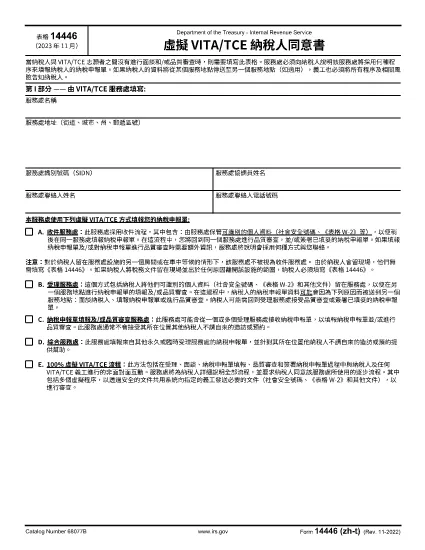
Form 14446 (zh‑t) – Fillable PDF & Instructions

  1. Šalis JAV
  2. Kalba Kinų tradicinis)
  3. Veikla Mokesčiai
  4. skyrius Vidaus pajamų tarnyba
Form 14446 (zh‑t) – Fillable PDF & Instructions

What Is Form 14446 (zh‑t)?

Form 14446, also known as the Taxpayer Site Retention Form, is required when a taxpayer leaves tax documents at an IRS service location and then departs the premises. The zh‑t version is the Traditional Chinese translation, making it accessible for Chinese‑speaking taxpayers.

How to Complete the Form Online

Instead of downloading the PDF and editing it with a desktop editor, use Formize’s built‑in PDF filler:

  1. Click the "Fill out this form" button on this page.
  2. Wait a few seconds while the Formize PDF Filler app loads.
  3. Enter the required information in each fillable field. The interface automatically saves your progress.
  4. When finished, click Submit to download a completed copy or print it directly.

Common Mistakes to Avoid

  • Leaving fields blank: Every required field must be completed; otherwise the form will be rejected.
  • Using the wrong language version: Ensure you are on the zh‑t (Traditional Chinese) PDF if you need it in Chinese.
  • Submitting the form before signing: The signature field is mandatory; use the digital signature option in Formize.
  • Incorrect dates: Use the exact date you left the documents at the site.

Where to Submit the Completed Form

After filling out Form 14446 (zh‑t), mail or deliver the completed form to the IRS office where the documents were left. Keep a copy for your records. If you are unsure which office to send it to, contact the IRS Service Center listed on the notice you received.

Download the PDF

For users who prefer a local copy, the official Traditional Chinese PDF is available below. The file is fully fillable and compatible with most PDF readers.

Download Form 14446 (zh‑t) PDF

DUK
  • Do I need to fill out Form 14446 if I stay on the IRS premises?

    No. The form is required only when the taxpayer leaves the site after leaving documents there. Staying in the same location does not trigger the requirement.

  • Can I submit the form electronically?

    The IRS currently requires a printed and signed copy. Use Formize to fill it out, then print and mail it to the appropriate IRS office.

  • Is the zh‑t version the same as the English version?

    Yes. The content is identical; only the language differs. Use the version that matches your preferred language.

  • What happens if I forget to sign the form?

    An unsigned Form 14446 will be considered incomplete and will be returned, causing delays in processing your tax documents.

  • How long should I keep a copy of the completed form?

    Retain a copy for at least three years, the standard period for IRS record‑keeping.

  • Can I fill out Form 14446 on a mobile device?

    Yes. Formize’s PDF filler works on most modern browsers, including mobile browsers, allowing you to complete the form on a phone or tablet.

  • Where can I find the IRS office address to send the form?

    The address is listed on any notice you received from the IRS service location. If you don’t have a notice, call the IRS helpline for guidance.

KAIP

Kaip nemokamai užpildyti Form 14446 internete, atlikdami 4 paprastus veiksmus:

  1. 1
    Open the Fillable Form
    Click the "Fill out this form" button on the page. The Formize PDF Filler will open in your browser.
  2. 2
    Enter Your Information
    Fill each required field. The filler autosaves, so you won’t lose data if you navigate away.
  3. 3
    Add Your Signature
    Use the digital signature tool inside Formize to sign the form electronically.
  4. 4
    Download or Print
    When all fields are complete, click "Download" to save a copy or "Print" to get a hard‑copy for mailing.
Formuokite PDF užpildymo programą
APIE

Vidaus pajamų tarnybos (IRS) formos

Form 14446 yra viena iš oficialių mokesčių formų, naudojamų Jungtinėse Valstijose norint pranešti apie pajamas, reikalauti atskaitymų ir kreditų, apskaičiuoti mokestinę prievolę ir vykdyti kitus su mokesčiais susijusius įsipareigojimus. IRS yra federalinė agentūra, atsakinga už vidaus pajamų įstatymų administravimą ir vykdymą JAV.

Štai keletas Vidaus pajamų tarnybos formų pavyzdžių:

1040 forma: tai pagrindinė gyventojų pajamų mokesčio deklaracijos forma, kurią naudoja dauguma mokesčių mokėtojų. Jis naudojamas pranešti apie įvairias pajamas, reikalauti atskaitymų ir kreditų, apskaičiuoti mokestinę prievolę ir nustatyti, ar mokesčių mokėtojas yra skolingas papildomai, ar turi teisę susigrąžinti mokesčius.

1099 forma: yra įvairių 1099 formos variantų, pvz., 1099-MISC, 1099-INT, 1099-DIV ir tt Šios formos naudojamos pajamoms, kurias asmenys ar įmonės gauna iš įvairių šaltinių, išskyrus užimtumą, pvz., savarankiško darbo, pateikti. pajamos, palūkanų pajamos, dividendų pajamos ir nuomos pajamos.

Forma W-2: šią formą naudoja darbdaviai norėdami pranešti apie darbuotojams mokamą atlyginimą ir mokesčius išskaičiuoti iš jų darbo užmokesčio. Darbuotojai naudoja W-2 formoje pateiktą informaciją, kad užpildytų savo individualias mokesčių deklaracijas.

941 forma: darbdaviai naudoja šią formą norėdami pranešti apie savo darbuotojų darbo mokesčius, įskaitant išskaičiuotą federalinį pajamų mokestį, socialinio draudimo mokestį ir medicininės priežiūros mokestį.

1065 forma: šią formą bendrijos naudoja pajamoms, atskaitymams ir mokesčių prievolėms pranešti. Pačios bendrijos pajamų mokesčio nemoka; vietoj to partneriai savo individualiose mokesčių deklaracijose nurodo savo bendrijos pajamų dalį.

1120 forma: tai pelno mokesčio deklaracijos forma, kurią C korporacijos naudoja savo pajamoms pranešti. atskaitymus ir mokestinę prievolę.

990 forma: šią formą naudoja neapmokestinamos organizacijos, pvz., ne pelno ir labdaros organizacijos, pranešti apie savo finansinę informaciją, veiklą ir mokesčių įstatymų laikymąsi.

8862 forma: šią formą naudoja mokesčių mokėtojai, kurie anksčiau pareikalavo uždirbtų pajamų mokesčio kredito (EITC) bet buvo uždrausta, o dabar noriu vėl pareikšti ieškinį.

Tai tik keli pavyzdžiai iš daugybės IRS formų, skirtų įvairioms su mokesčiais susijusioms prievolėms įvykdyti. Asmeniui ar verslui reikalingos konkrečios formos priklauso nuo jų unikalių aplinkybių, pajamų šaltinių ir atskaitymų. Patartina apsilankyti oficialioje Vidaus pajamų tarnybos svetainėje (www.irs.gov) arba kreiptis į profesionalų mokesčių patarimą, kad gautumėte tikslią ir naujausią informaciją apie konkrečią IRS. formas, atitinkančias jūsų mokesčių situaciją.

FUNKCIJOS

PDF užpildas

Lengviausias būdas užpildyti Form 14446 internete

  • Greitai užpildykite Form 14446
    Ieškote būdo greitai užpildyti Form 14446 internete? Naudodami internetinį nemokamą PDF formų užpildą sužinosite, kaip redaguoti ir užpildyti šį pdf dokumentą greičiau nei per minutę.
  • Lengva naudoti internetinį PDF redaktorių
    Atsibodo spausdinti PDF failus, kad galėtumėte juos redaguoti prieš nuskaitydami iš naujo ir siųsdami atgal? Redaguoti PDF dokumentus internete nemokamai. Norėdami sutaupyti laiko ir popieriaus, naudokite mūsų internetinį pdf redaktorių.
  • Puikūs įrankiai, visos platformos
    Svarstote, kaip užpildyti Form 14446 „Mac“ kompiuteryje, o gal kaip nemokamai naudoti PDF užpildą? Mūsų internetiniai PDF įrankiai veikia visose platformose.
  • Saugi failų saugykla
    Užbaigti „Form 14446“ failai saugomi saugioje duomenų bazėje, kurią valdo „Amazon Cloud“ priegloba. Galite bet kada ištrinti failus iš mūsų sistemos. Bet kokiu atveju šie failai automatiškai ištrinami po 24 valandų.
  • Kalbėkitės su Form 14446
    Kalbėkite su „Form 14446“ naudodami Chatize, kuri yra nemokama PDF skaitymo priemonė. Užduokite klausimų ir gaukite atsakymus iš „Form 14446“. Tiesiog spustelėkite aukščiau esantį mygtuką Kalbėtis su dokumentu.

Ištrinti užpildymo seansą

Ištrinti pasirinktą pildymo seansą? Tokiu atveju jūsų pažanga pildant formą bus prarasta.

Ištrinti redagavimo sesiją

Ištrinti pasirinktą redagavimo sesiją? Tokiu atveju jūsų pažanga kuriant ir redaguojant formą bus prarasta.