
Pasirinkite kalbą

IRS Form 15230 – Mobility Statement (Fillable PDF)

  1. Šalis JAV
  2. Kalba Anglų
  3. Veikla Mokesčiai
  4. skyrius Vidaus pajamų tarnyba
IRS Form 15230 – Mobility Statement (Fillable PDF)

What Is Form 15230?

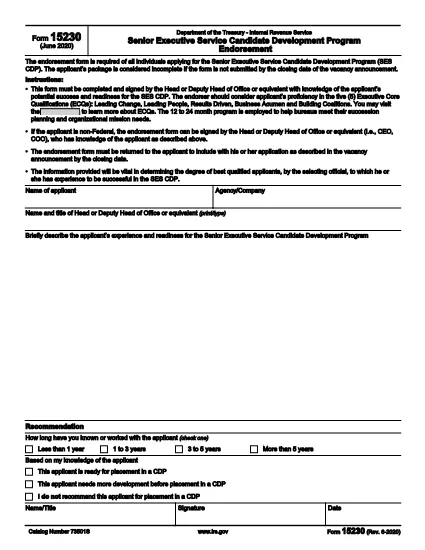
Form 15230, also known as the Mobility Statement for the Senior Executive Service Candidate Development Program (SES CDP), is an official IRS document used to capture a candidate’s willingness and ability to relocate for senior executive positions within the federal government. The form is required during the SES CDP application process and helps selecting officials assess mobility readiness.

How to Fill Out Form 15230 Online

Instead of printing, scanning, or manually editing the PDF, you can complete the form instantly with Formize’s built‑in PDF Filler. Follow these simple steps:

  1. Click the “Fill out this form” button on this page.
  2. Wait a few seconds while the Formize PDF Filler app loads the fillable version of Form 15230.
  3. Enter your personal information, current position, and mobility preferences directly in the browser.
  4. Use the signature field to e‑sign the form with a mouse, touch, or stylus.
  5. Review all entries for accuracy, then click Submit to download the completed PDF or save it to your cloud storage.

Common Mistakes to Avoid

  • Leaving required fields blank – the form will not accept submission if mandatory sections are empty.
  • Mismatching dates and locations – ensure the geographic areas you select match your actual willingness to relocate.
  • Using an outdated version – always start with the latest PDF (Rev. 6‑2020) provided by the IRS.
  • Signing with a scanned image – use the built‑in e‑signature tool for a legally binding signature.

Download the Official PDF

If you prefer to keep a copy of the original document, you can download the official IRS PDF directly from the link below. The file is the same version that Formize loads for online completion.

Download IRS Form 15230 (PDF)

FAQs About Form 15230

Below are answers to the most common questions candidates ask about this mobility statement.

DUK
  • What is the purpose of Form 15230?

    Form 15230 records a candidate’s willingness and ability to relocate for senior executive roles in the SES Candidate Development Program.

  • Do I need to print the PDF to fill it out?

    No. With Formize you can fill, sign, and save the form entirely online – no printing required.

  • Can I use a scanned signature?

    A scanned image is not legally binding. Use the e‑signature field in the Formize filler for a valid signature.

  • Which version of the form should I use?

    Always use the latest revision (Rev. 6‑2020). The link on this page points to the current IRS version.

  • What happens after I submit the form?

    You will receive a completed PDF that you can download or store in the cloud. Submit the file to your agency’s HR or SES CDP office as instructed.

  • Is Form 15230 required for all federal job applications?

    It is required only for candidates applying to the Senior Executive Service Candidate Development Program.

  • Where can I get help if I have questions about the form?

    Contact your agency’s human‑resources office or review the IRS instructions included in the PDF.

KAIP

Kaip nemokamai užpildyti Form 15230 internete, atlikdami 5 paprastus veiksmus:

  1. 1
    Click the Fill‑out Button
    Press the “Fill out this form” button on the page to launch the Formize PDF Filler.
  2. 2
    Wait for the Filler to Load
    The app loads the fillable version of Form 15230 in a few seconds – no download required.
  3. 3
    Enter Your Information
    Complete all required fields: personal details, current position, and mobility preferences.
  4. 4
    Add Your Electronic Signature
    Use the built‑in signature tool to sign with a mouse, finger, or stylus.
  5. 5
    Review and Save
    Check the form for accuracy, then click Submit to download the completed PDF or save it to your cloud storage.
Formuokite PDF užpildymo programą
APIE

Mokesčių formos

Form 15230 yra viena iš mokesčių formų, kurios yra dokumentai, naudojami su mokesčiais susijusiai informacijai pranešti atitinkamai mokesčių institucijai. Yra įvairių tipų mokesčių formų, įskaitant federalines, valstijos ir vietines mokesčių formas, kurios gali skirtis priklausomai nuo mokesčių mokėtojo aplinkybių ir vietos.

FUNKCIJOS

PDF užpildas

Lengviausias būdas užpildyti Form 15230 internete

  • Greitai užpildykite Form 15230
    Ieškote būdo greitai užpildyti Form 15230 internete? Naudodami internetinį nemokamą PDF formų užpildą sužinosite, kaip redaguoti ir užpildyti šį pdf dokumentą greičiau nei per minutę.
  • Lengva naudoti internetinį PDF redaktorių
    Atsibodo spausdinti PDF failus, kad galėtumėte juos redaguoti prieš nuskaitydami iš naujo ir siųsdami atgal? Redaguoti PDF dokumentus internete nemokamai. Norėdami sutaupyti laiko ir popieriaus, naudokite mūsų internetinį pdf redaktorių.
  • Puikūs įrankiai, visos platformos
    Svarstote, kaip užpildyti Form 15230 „Mac“ kompiuteryje, o gal kaip nemokamai naudoti PDF užpildą? Mūsų internetiniai PDF įrankiai veikia visose platformose.
  • Saugi failų saugykla
    Užbaigti „Form 15230“ failai saugomi saugioje duomenų bazėje, kurią valdo „Amazon Cloud“ priegloba. Galite bet kada ištrinti failus iš mūsų sistemos. Bet kokiu atveju šie failai automatiškai ištrinami po 24 valandų.
  • Kalbėkitės su Form 15230
    Kalbėkite su „Form 15230“ naudodami Chatize, kuri yra nemokama PDF skaitymo priemonė. Užduokite klausimų ir gaukite atsakymus iš „Form 15230“. Tiesiog spustelėkite aukščiau esantį mygtuką Kalbėtis su dokumentu.

Ištrinti užpildymo seansą

Ištrinti pasirinktą pildymo seansą? Tokiu atveju jūsų pažanga pildant formą bus prarasta.

Ištrinti redagavimo sesiją

Ištrinti pasirinktą redagavimo sesiją? Tokiu atveju jūsų pažanga kuriant ir redaguojant formą bus prarasta.