
Pasirinkite kalbą

IRS Form 2350 – Fillable PDF for Tax Extension Abroad

  1. Šalis JAV
  2. Kalba Anglų
  3. Veikla Mokesčiai
  4. skyrius Vidaus pajamų tarnyba
IRS Form 2350 – Fillable PDF for Tax Extension Abroad

U.S. citizens and resident aliens who live outside the United States often need extra time to meet the presence requirements for the foreign earned income exclusion or foreign housing exclusion. IRS Form 2350 is the official request for a two‑month filing extension when you are abroad.

When to Use Form 2350

File Form 2350 if you:

  • Expect to claim the foreign earned income exclusion (Form 2555) or foreign housing exclusion.
  • Need additional time to meet the bona fide residence test or the physical presence test.
  • Require extra days to allocate moving expenses.

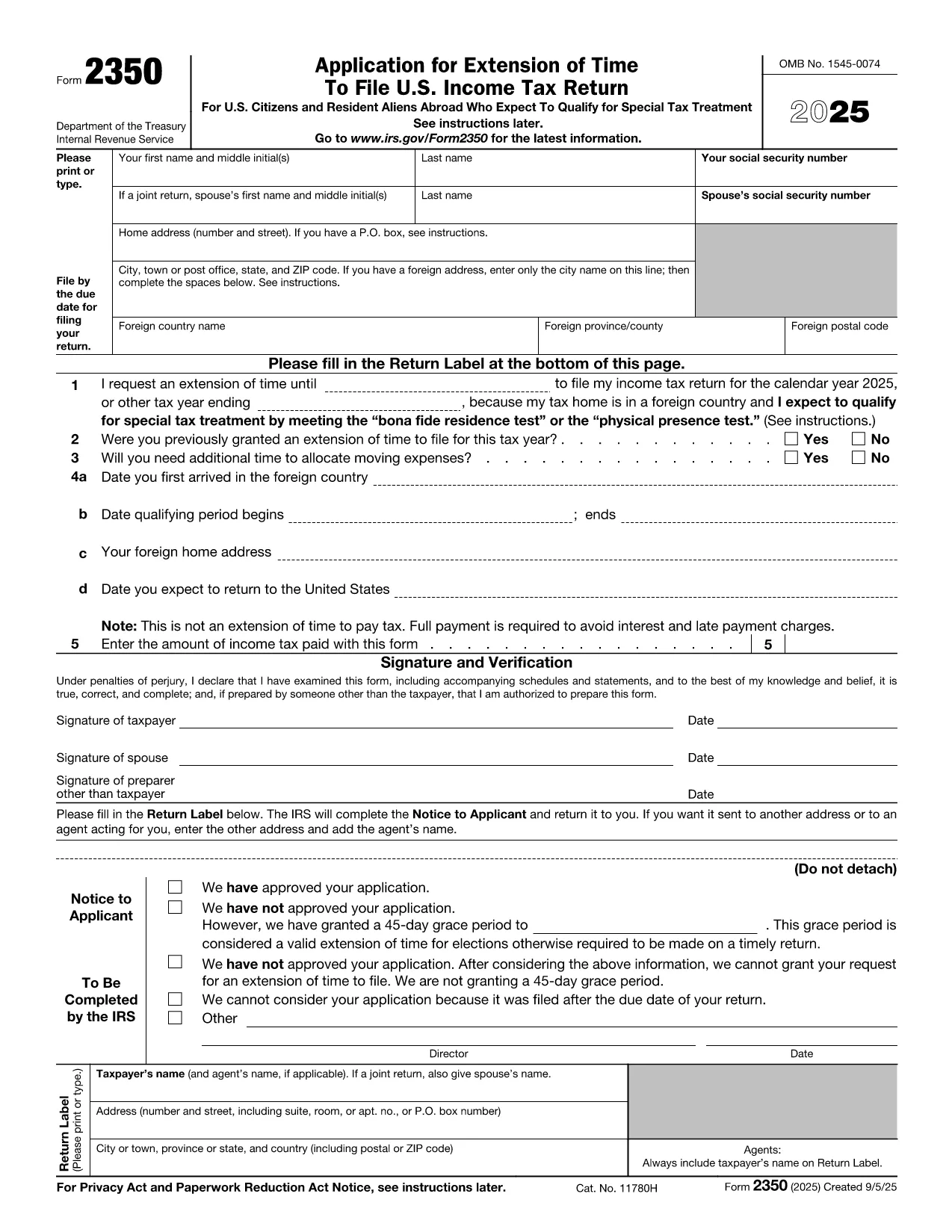
How to Complete the Fillable PDF

Our online Formize fillable PDF loads instantly – just click the "Fill out this form" button and the Formize PDF Filler app will appear. Follow these steps:

  • Enter your personal information (name, SSN, home and foreign addresses).
  • Specify the date you need the extension for (Line 1).
  • Answer whether you have previously received an extension (Line 2).
  • Provide the qualifying period dates for the bona fide residence or physical presence test (Lines 4a‑4b).
  • Indicate any payment you are sending with the extension request (Line 5).
  • Sign and date the form electronically.

Common Mistakes to Avoid

  • Wrong qualifying dates: The extension date must be 12 months + 30 days from the start of your qualifying period.
  • Missing foreign address details: Include city, country, province/state, and postal code.
  • Forgetting the payment: The extension does not extend the payment deadline. Include any tax due to avoid interest.
  • Incorrect signatures: Both spouses must sign on a joint return.

Where to Submit Your Extension Request

After filling out the form, you can:

  • Mail the completed PDF to the IRS address listed in the instructions.
  • Bring it to a local IRS representative office.
  • Keep a digital copy for your records and attach it to an electronic filing if you later e‑file your return.

Need the official PDF? Download Form 2350 (PDF) directly from the IRS.

DUK
  • What is the purpose of IRS Form 2350?

    Form 2350 requests a two‑month extension to file your U.S. individual income tax return when you are living abroad and need extra time to meet the foreign earned income or housing exclusion tests.

  • Who must file Form 2350?

    U.S. citizens or resident aliens abroad who expect to claim the foreign earned income exclusion (Form 2555) or foreign housing exclusion and need more time to meet the qualifying tests.

  • Does Form 2350 extend the payment deadline?

    No. The extension only applies to filing the return. Any tax due must still be paid by the original filing deadline to avoid interest and penalties.

  • Can I file Form 2350 electronically?

    The IRS does not accept an electronic submission for Form 2350. You must mail the completed form or deliver it to a local IRS office.

  • What is the difference between the bona fide residence test and the physical presence test?

    The bona fide residence test requires you to be a resident of a foreign country for an uninterrupted period that includes an entire tax year. The physical presence test requires you to be physically present in a foreign country for at least 330 full days in any 12‑month period.

  • How long is the extension granted by Form 2350?

    Typically, the IRS grants a two‑month extension, but you can request additional days for moving expenses, up to a total of 12 months + 30 days from the start of your qualifying period.

  • What happens if I miss the extended filing deadline?

    If you miss the extension deadline, the IRS may assess a failure‑to‑file penalty and continue to charge interest on any unpaid tax.

  • Do I need to attach Form 2555 with my Form 2350?

    No. Form 2555 is filed with your tax return after the extension is granted. Form 2350 only requests more time to file.

KAIP

Kaip nemokamai užpildyti IRS Form 2350 internete, atlikdami 7 paprastus veiksmus:

  1. 1
    Open the Fillable Form
    Click the “Fill out this form” button on the page. The Formize PDF Filler app loads directly in your browser.
  2. 2
    Enter Personal Information
    Type your name, Social Security number, home address, and foreign address exactly as they appear on your tax documents.
  3. 3
    Set the Extension Date
    In Line 1, enter the date that is 12 months + 30 days after the first day of your qualifying period (or add 90 days if you have moving expenses).
  4. 4
    Answer Eligibility Questions
    Complete Lines 2‑4, indicating prior extensions, moving expenses, and the dates you arrived in and will leave the foreign country.
  5. 5
    Include Your Payment (If Any)
    Enter the amount of tax you are sending with the extension request on Line 5. Remember the extension does not postpone payment.
  6. 6
    Sign Electronically
    Use the built‑in signature field to sign. If filing jointly, both spouses must sign.
  7. 7
    Save and Submit
    Save the completed PDF, print it, and mail it to the IRS address provided in the instructions, or keep a digital copy for your records.
Formuokite PDF užpildymo programą
APIE

Mokesčių formos

IRS Form 2350 yra viena iš mokesčių formų, kurios yra dokumentai, naudojami pajamoms, atskaitymams ir mokesčių prievolėms pranešti atitinkamai mokesčių institucijai. Šios formos yra esminė mokesčių pateikimo proceso dalis ir yra naudojamos siekiant užtikrinti, kad asmenys ir įmonės laikytųsi mokesčių įstatymų ir tiksliai apskaičiuotų savo mokestines prievoles.

Reikalingos konkrečios mokesčių formos gali skirtis atsižvelgiant į tokius veiksnius kaip asmens padavimo statusas, pajamų šaltiniai ir šalies mokesčių įstatymai. Tačiau čia yra keletas įprastų mokesčių formų tipų:

Asmens pajamų mokesčio formos: naudojamos šios formos, pvz., 1040 serija Jungtinėse Valstijose. asmenys, norėdami pranešti apie savo pajamas, reikalauti atskaitymų ir kreditų bei apskaičiuoti mokestinę prievolę.

Verslo mokesčių formos: įmonėms, įskaitant individualias įmones, bendrijas, korporacijas ir savarankiškai dirbančius asmenis, gali tekti pateikti įvairias formas, kad praneštų apie savo pajamas, išlaidas ir mokėtinus mokesčius. Pavyzdžiai: C tvarkaraštis (verslo pelnas arba nuostolis) ir 1120 forma (JAV korporacijų pajamų mokesčio deklaracija).

Darbo mokesčių formos: darbdaviai privalo pranešti apie darbuotojų atlyginimus ir išskaičiuoti bei pervesti darbo užmokesčio mokesčius. Šiuo tikslu naudojamos tokios formos kaip W-2 (darbo užmokesčio ir mokesčių ataskaita) ir 941 (darbdavio ketvirtinė federalinė mokesčių deklaracija).

Investicijų ir pensijų sąskaitos formos: šios formos naudojamos norint pranešti apie investicijų pajamas, kapitalo prieaugį ir nuostolius, taip pat įmokas ir paskirstymus iš išėjimo į pensiją sąskaitų. Pavyzdžiai: forma 1099-DIV (dividendai ir paskirstymas) ir 5498 forma (IRA įnašo informacija).

Turto ir dovanų mokesčių formos: kai asmuo miršta arba padovanoja reikšmingų dovanų, specialios formos, pvz., 706 forma a> (Jungtinių Valstijų nekilnojamojo turto (ir kartos perkėlimo) mokesčių deklaracija) ir 709 forma (Jungtinių Valstijų dovana (ir kartos Praleidžiamas pervedimas) Mokesčių deklaracija) naudojami pranešti ir apskaičiuoti visus taikomus turto ar dovanų mokesčius.

Svarbu atkreipti dėmesį į tai, kad mokesčių įstatymai ir formos laikui bėgant gali keistis, todėl asmenys ir įmonės turėtų pasikonsultuoti su atitinkama mokesčių institucija arba kreiptis į profesionalias mokesčių konsultacijas, siekdami užtikrinti, kad būtų laikomasi galiojančių reikalavimų.

FUNKCIJOS

PDF užpildas

Lengviausias būdas užpildyti IRS Form 2350 internete

  • Greitai užpildykite IRS Form 2350
    Ieškote būdo greitai užpildyti IRS Form 2350 internete? Naudodami internetinį nemokamą PDF formų užpildą sužinosite, kaip redaguoti ir užpildyti šį pdf dokumentą greičiau nei per minutę.
  • Lengva naudoti internetinį PDF redaktorių
    Atsibodo spausdinti PDF failus, kad galėtumėte juos redaguoti prieš nuskaitydami iš naujo ir siųsdami atgal? Redaguoti PDF dokumentus internete nemokamai. Norėdami sutaupyti laiko ir popieriaus, naudokite mūsų internetinį pdf redaktorių.
  • Puikūs įrankiai, visos platformos
    Svarstote, kaip užpildyti IRS Form 2350 „Mac“ kompiuteryje, o gal kaip nemokamai naudoti PDF užpildą? Mūsų internetiniai PDF įrankiai veikia visose platformose.
  • Saugi failų saugykla
    Užbaigti „IRS Form 2350“ failai saugomi saugioje duomenų bazėje, kurią valdo „Amazon Cloud“ priegloba. Galite bet kada ištrinti failus iš mūsų sistemos. Bet kokiu atveju šie failai automatiškai ištrinami po 24 valandų.
  • Kalbėkitės su IRS Form 2350
    Kalbėkite su „IRS Form 2350“ naudodami Chatize, kuri yra nemokama PDF skaitymo priemonė. Užduokite klausimų ir gaukite atsakymus iš „IRS Form 2350“. Tiesiog spustelėkite aukščiau esantį mygtuką Kalbėtis su dokumentu.

Ištrinti užpildymo seansą

Ištrinti pasirinktą pildymo seansą? Tokiu atveju jūsų pažanga pildant formą bus prarasta.

Ištrinti redagavimo sesiją

Ištrinti pasirinktą redagavimo sesiją? Tokiu atveju jūsų pažanga kuriant ir redaguojant formą bus prarasta.