
Pasirinkite kalbą

IRS Form 8879‑C – Fillable Corporate E‑File Signature Authorization

  1. Šalis JAV
  2. Kalba Anglų
  3. Veikla Mokesčiai
  4. skyrius Vidaus pajamų tarnyba
IRS Form 8879‑C – Fillable Corporate E‑File Signature Authorization

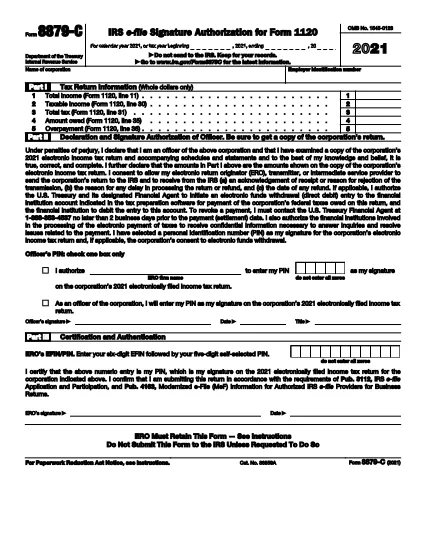
Form 8879‑C, IRS E‑File Signature Authorization for Corporations, is the official document that authorizes the IRS to accept an electronically filed corporate income‑tax return (Form 1120, 1120‑S, 1120‑F, etc.). Instead of mailing a paper signature, corporations can sign electronically using this fillable PDF, saving time and reducing errors.

What is Form 8879‑C?

The form serves as a written declaration that the corporate officer signing the return has reviewed the return, the information is accurate, and the corporation authorizes the IRS to process the e‑filed return. It must be signed by an authorized officer (president, treasurer, or other corporate officer) and attached to the electronic filing.

How to Fill Out Form 8879‑C with Formize

Instead of downloading the PDF and opening a separate editor, simply click the "Fill out this form" button on this page. The Formize PDF Filler app will load instantly, letting you complete every field directly in your browser.

  • Step 1: Click the orange "Fill out this form" button.
  • Step 2: Wait a few seconds for the Formize app to load.
  • Step 3: Enter the corporation’s name, EIN, tax year, and other required data.
  • Step 4: Add the electronic signature of the authorized officer.
  • Step 5: Click "Save" to download the completed PDF, then attach it to your e‑filed return.

Common Mistakes & Tips for a Smooth Submission

  • Incorrect EIN: Double‑check the nine‑digit Employer Identification Number; a typo will cause the return to be rejected.
  • Wrong Tax Year: Use the calendar year or fiscal year that matches the corporate tax return you are filing.
  • Missing Signature: The form is invalid without a clear electronic signature. Use the built‑in signature field—do not draw a signature in a comment box.
  • Unsigned Attachments: If you file multiple returns (e.g., Form 1120‑S and Schedule K‑1), each must have its own Form 8879‑C signed.
  • Saving Errors: After completing the form, click "Download" to store a copy on your computer. Do not rely solely on the browser’s temporary cache.

Where to Find Help and Additional Resources

For detailed instructions, see the IRS Instructions for Form 8879‑C. If you have questions about eligibility, signing authority, or e‑file technical issues, visit the IRS Help & Resources page or contact your tax professional.

DUK
  • Who must sign Form 8879‑C?

    An officer of the corporation who is authorized to sign the tax return (e.g., president, treasurer, CEO) must sign Form 8879‑C.

  • Can I use a handwritten signature on the fillable PDF?

    Yes, you can draw a handwritten signature using the PDF filler’s signature tool, but the signature must be clear and legible.

  • Is Form 8879‑C required for every corporate e‑file?

    Yes, any corporation that files its income‑tax return electronically must submit a signed Form 8879‑C as the electronic signature authorization.

  • What is the deadline for submitting Form 8879‑C?

    Form 8879‑C must be signed and attached before the corporate tax return is transmitted electronically to the IRS, typically by the filing deadline (usually March 15 for calendar‑year corporations).

  • What should I do if I make a mistake after signing?

    Correct the error on a new copy of Form 8879‑C, have the authorized officer re‑sign, and attach the updated form to the e‑filed return.

  • Do I need a separate Form 8879‑C for each state return?

    State tax authorities may have their own signature forms. Form 8879‑C is only for the federal corporate return.

  • Is there a fee to use Formize’s PDF filler?

    Formize offers a free, no‑cost option for filling out and downloading IRS forms like 8879‑C.

  • Where can I find the official instructions for Form 8879‑C?

    The official IRS instructions are available at https://www.irs.gov/instructions/i8879c.

KAIP

Kaip nemokamai užpildyti Form 8879-C internete, atlikdami 5 paprastus veiksmus:

  1. 1
    Open the Fillable Form
    Click the orange "Fill out this form" button on this page. The Formize PDF Filler will load in a new window.
  2. 2
    Enter Required Information
    Complete the corporation’s name, EIN, tax year, and any other fields shown in the form.
  3. 3
    Add Your Electronic Signature
    Use the built‑in signature field to sign as the authorized corporate officer.
  4. 4
    Save and Download
    After all fields are filled, click "Save" to download the completed PDF to your computer.
  5. 5
    Attach to Your E‑File
    Upload the saved Form 8879‑C PDF with your e‑filed corporate tax return (Form 1120, 1120‑S, etc.).
Formuokite PDF užpildymo programą
APIE

Mokesčių formos

Form 8879-C yra viena iš mokesčių formų, kurios yra dokumentai, naudojami pajamoms, atskaitymams ir mokesčių prievolėms pranešti atitinkamai mokesčių institucijai. Šios formos yra esminė mokesčių pateikimo proceso dalis ir yra naudojamos siekiant užtikrinti, kad asmenys ir įmonės laikytųsi mokesčių įstatymų ir tiksliai apskaičiuotų savo mokestines prievoles.

Reikalingos konkrečios mokesčių formos gali skirtis atsižvelgiant į tokius veiksnius kaip asmens padavimo statusas, pajamų šaltiniai ir šalies mokesčių įstatymai. Tačiau čia yra keletas įprastų mokesčių formų tipų:

Asmens pajamų mokesčio formos: naudojamos šios formos, pvz., 1040 serija Jungtinėse Valstijose. asmenys, norėdami pranešti apie savo pajamas, reikalauti atskaitymų ir kreditų bei apskaičiuoti mokestinę prievolę.

Verslo mokesčių formos: įmonėms, įskaitant individualias įmones, bendrijas, korporacijas ir savarankiškai dirbančius asmenis, gali tekti pateikti įvairias formas, kad praneštų apie savo pajamas, išlaidas ir mokėtinus mokesčius. Pavyzdžiai: C tvarkaraštis (verslo pelnas arba nuostolis) ir 1120 forma (JAV korporacijų pajamų mokesčio deklaracija).

Darbo mokesčių formos: darbdaviai privalo pranešti apie darbuotojų atlyginimus ir išskaičiuoti bei pervesti darbo užmokesčio mokesčius. Šiuo tikslu naudojamos tokios formos kaip W-2 (darbo užmokesčio ir mokesčių ataskaita) ir 941 (darbdavio ketvirtinė federalinė mokesčių deklaracija).

Investicijų ir pensijų sąskaitos formos: šios formos naudojamos norint pranešti apie investicijų pajamas, kapitalo prieaugį ir nuostolius, taip pat įmokas ir paskirstymus iš išėjimo į pensiją sąskaitų. Pavyzdžiai: forma 1099-DIV (dividendai ir paskirstymas) ir 5498 forma (IRA įnašo informacija).

Turto ir dovanų mokesčių formos: kai asmuo miršta arba padovanoja reikšmingų dovanų, specialios formos, pvz., 706 forma a> (Jungtinių Valstijų nekilnojamojo turto (ir kartos perkėlimo) mokesčių deklaracija) ir 709 forma (Jungtinių Valstijų dovana (ir kartos Praleidžiamas pervedimas) Mokesčių deklaracija) naudojami pranešti ir apskaičiuoti visus taikomus turto ar dovanų mokesčius.

Svarbu atkreipti dėmesį į tai, kad mokesčių įstatymai ir formos laikui bėgant gali keistis, todėl asmenys ir įmonės turėtų pasikonsultuoti su atitinkama mokesčių institucija arba kreiptis į profesionalias mokesčių konsultacijas, siekdami užtikrinti, kad būtų laikomasi galiojančių reikalavimų.

FUNKCIJOS

PDF užpildas

Lengviausias būdas užpildyti Form 8879-C internete

  • Greitai užpildykite Form 8879-C
    Ieškote būdo greitai užpildyti Form 8879-C internete? Naudodami internetinį nemokamą PDF formų užpildą sužinosite, kaip redaguoti ir užpildyti šį pdf dokumentą greičiau nei per minutę.
  • Lengva naudoti internetinį PDF redaktorių
    Atsibodo spausdinti PDF failus, kad galėtumėte juos redaguoti prieš nuskaitydami iš naujo ir siųsdami atgal? Redaguoti PDF dokumentus internete nemokamai. Norėdami sutaupyti laiko ir popieriaus, naudokite mūsų internetinį pdf redaktorių.
  • Puikūs įrankiai, visos platformos
    Svarstote, kaip užpildyti Form 8879-C „Mac“ kompiuteryje, o gal kaip nemokamai naudoti PDF užpildą? Mūsų internetiniai PDF įrankiai veikia visose platformose.
  • Saugi failų saugykla
    Užbaigti „Form 8879-C“ failai saugomi saugioje duomenų bazėje, kurią valdo „Amazon Cloud“ priegloba. Galite bet kada ištrinti failus iš mūsų sistemos. Bet kokiu atveju šie failai automatiškai ištrinami po 24 valandų.
  • Kalbėkitės su Form 8879-C
    Kalbėkite su „Form 8879-C“ naudodami Chatize, kuri yra nemokama PDF skaitymo priemonė. Užduokite klausimų ir gaukite atsakymus iš „Form 8879-C“. Tiesiog spustelėkite aukščiau esantį mygtuką Kalbėtis su dokumentu.

Ištrinti užpildymo seansą

Ištrinti pasirinktą pildymo seansą? Tokiu atveju jūsų pažanga pildant formą bus prarasta.

Ištrinti redagavimo sesiją

Ištrinti pasirinktą redagavimo sesiją? Tokiu atveju jūsų pažanga kuriant ir redaguojant formą bus prarasta.