
Pasirinkite kalbą

IRS Form 8949 – Fillable PDF for Capital Gains Reporting

  1. Šalis JAV
  2. Kalba Anglų
  3. Veikla Mokesčiai
  4. skyrius Vidaus pajamų tarnyba
IRS Form 8949 – Fillable PDF for Capital Gains Reporting

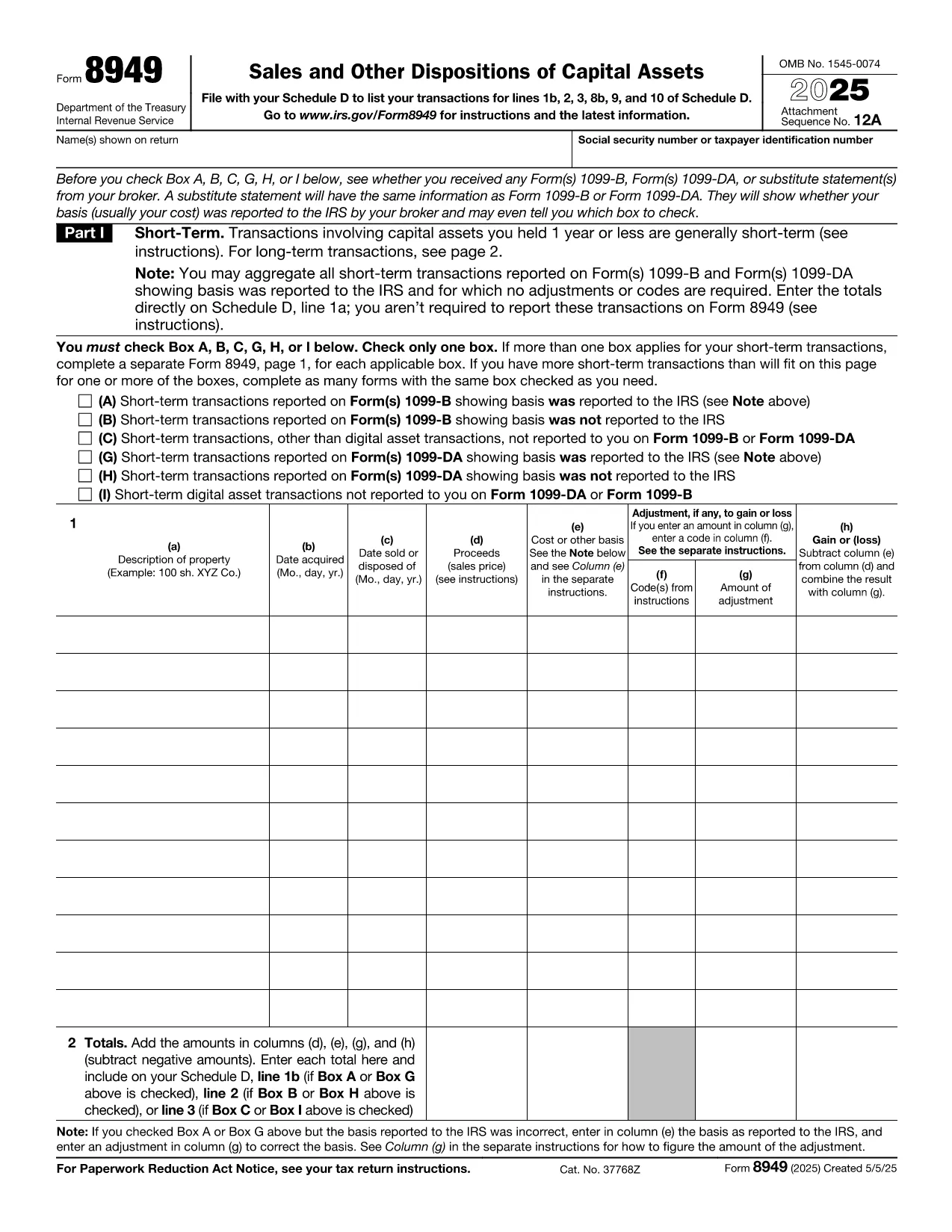
Form 8949, titled Sales and Other Dispositions of Capital Assets, is the IRS form you use to report the sale of stocks, bonds, real estate, and other investment assets. Whether you have a short‑term trade (held ≤ 1 year) or a long‑term investment, each transaction must be listed on Form 8949 before the totals are transferred to Schedule D of your 1040.

What Is Form 8949?

The form captures essential details for every capital‑asset transaction: description of the property, acquisition and sale dates, proceeds, cost basis, adjustments (such as wash‑sale losses), and the resulting gain or loss. The IRS provides three separate boxes (A, B, C) for short‑term sales and three for long‑term sales, letting you indicate whether the basis was reported to the IRS.

How to Fill Out Form 8949 Online with Formize

Formize lets you complete the official PDF without installing any software. Just click the “Fill out this form” button, wait a moment for the Formize PDF Filler to load, and you’ll see an interactive, fillable version of Form 8949 ready for data entry.

Common Mistakes to Avoid

  • Leaving Box A, B, or C unchecked – the IRS will reject the submission.
  • Mismatching dates – acquisition and sale dates must be accurate to determine short‑ vs long‑term status.
  • Incorrect basis adjustments – ensure wash‑sale codes and other adjustments are entered in column (g).
  • Summing totals incorrectly – double‑check the sums before copying them to Schedule D.

When Do You Need to Use Form 8949?

You must file Form 8949 for any capital‑asset transaction that is not already reported on a 1099‑B with a “basis reported to the IRS” checkbox checked, or when you need to report adjustments, codes, or a basis that was not reported.

Download, Print, or Save Your Completed Form

After you finish entering data, you can:

  • Download a completed PDF to attach to your e‑file.
  • Print a hard copy for a mailed return.
  • Save to your cloud storage for future reference.

All actions are performed directly within the browser, keeping your information secure and private.

Instrukcijos

DUK
  • Do I need to fill out Form 8949 if my broker already reported the basis?

    If the broker reported the basis to the IRS and no adjustments or codes are required, you can aggregate the totals on Schedule D. Otherwise, you must list each transaction on Form 8949.

  • What is the difference between Box A, B, and C?

    Box A: Basis reported to the IRS, no adjustments. Box B: Basis reported, but you have adjustments or codes. Box C: Basis not reported to the IRS.

  • Can I use the same Form 8949 for both short‑term and long‑term sales?

    Form 8949 has separate sections: Part I for short‑term (held ≤ 1 year) and Part II for long‑term (held > 1 year). Fill each transaction in the appropriate part.

  • Is the PDF on Formize editable on mobile devices?

    Yes. The Formize PDF Filler works on modern smartphones and tablets, allowing you to complete the form on the go.

  • How do I report a wash‑sale loss on Form 8949?

    Enter the loss in column (g) with code “W” and adjust the basis accordingly. The adjusted amount flows to Schedule D.

  • Do I need a separate Form 8949 for each tax year?

    Yes. Each tax year requires its own Form 8949 reflecting that year’s transactions.

  • Can I e‑file Form 8949 directly from Formize?

    Formize provides a completed PDF that you can upload to your tax‑software’s e‑file portal or attach to your electronic return.

KAIP

Kaip nemokamai užpildyti IRS Form 8949 internete, atlikdami 5 paprastus veiksmus:

  1. 1
    Click the Fill‑out Button
    On the page, click the bright “Fill out this form” button to launch the Formize PDF Filler.
  2. 2
    Wait for the Filler to Load
    The browser will load a secure, interactive version of Form 8949 – this usually takes just a few seconds.
  3. 3
    Enter Transaction Details
    Fill in each row with the description, dates, proceeds, cost basis, and any adjustments. Choose the correct box (A, B, or C) for short‑term or long‑term sales.
  4. 4
    Review and Validate
    Double‑check totals, ensure all required boxes are checked, and use the built‑in calculator to verify gains or losses.
  5. 5
    Save, Download, or Print
    When finished, click “Save” to store the PDF in the cloud, “Download” to get a copy for e‑filing, or “Print” to send a hard copy with your mailed return.
Formuokite PDF užpildymo programą
APIE

Vidaus pajamų tarnybos (IRS) formos

IRS Form 8949 yra viena iš oficialių mokesčių formų, naudojamų Jungtinėse Valstijose norint pranešti apie pajamas, reikalauti atskaitymų ir kreditų, apskaičiuoti mokestinę prievolę ir vykdyti kitus su mokesčiais susijusius įsipareigojimus. IRS yra federalinė agentūra, atsakinga už vidaus pajamų įstatymų administravimą ir vykdymą JAV.

Štai keletas Vidaus pajamų tarnybos formų pavyzdžių:

1040 forma: tai pagrindinė gyventojų pajamų mokesčio deklaracijos forma, kurią naudoja dauguma mokesčių mokėtojų. Jis naudojamas pranešti apie įvairias pajamas, reikalauti atskaitymų ir kreditų, apskaičiuoti mokestinę prievolę ir nustatyti, ar mokesčių mokėtojas yra skolingas papildomai, ar turi teisę susigrąžinti mokesčius.

1099 forma: yra įvairių 1099 formos variantų, pvz., 1099-MISC, 1099-INT, 1099-DIV ir tt Šios formos naudojamos pajamoms, kurias asmenys ar įmonės gauna iš įvairių šaltinių, išskyrus užimtumą, pvz., savarankiško darbo, pateikti. pajamos, palūkanų pajamos, dividendų pajamos ir nuomos pajamos.

Forma W-2: šią formą naudoja darbdaviai norėdami pranešti apie darbuotojams mokamą atlyginimą ir mokesčius išskaičiuoti iš jų darbo užmokesčio. Darbuotojai naudoja W-2 formoje pateiktą informaciją, kad užpildytų savo individualias mokesčių deklaracijas.

941 forma: darbdaviai naudoja šią formą norėdami pranešti apie savo darbuotojų darbo mokesčius, įskaitant išskaičiuotą federalinį pajamų mokestį, socialinio draudimo mokestį ir medicininės priežiūros mokestį.

1065 forma: šią formą bendrijos naudoja pajamoms, atskaitymams ir mokesčių prievolėms pranešti. Pačios bendrijos pajamų mokesčio nemoka; vietoj to partneriai savo individualiose mokesčių deklaracijose nurodo savo bendrijos pajamų dalį.

1120 forma: tai pelno mokesčio deklaracijos forma, kurią C korporacijos naudoja savo pajamoms pranešti. atskaitymus ir mokestinę prievolę.

990 forma: šią formą naudoja neapmokestinamos organizacijos, pvz., ne pelno ir labdaros organizacijos, pranešti apie savo finansinę informaciją, veiklą ir mokesčių įstatymų laikymąsi.

8862 forma: šią formą naudoja mokesčių mokėtojai, kurie anksčiau pareikalavo uždirbtų pajamų mokesčio kredito (EITC) bet buvo uždrausta, o dabar noriu vėl pareikšti ieškinį.

Tai tik keli pavyzdžiai iš daugybės IRS formų, skirtų įvairioms su mokesčiais susijusioms prievolėms įvykdyti. Asmeniui ar verslui reikalingos konkrečios formos priklauso nuo jų unikalių aplinkybių, pajamų šaltinių ir atskaitymų. Patartina apsilankyti oficialioje Vidaus pajamų tarnybos svetainėje (www.irs.gov) arba kreiptis į profesionalų mokesčių patarimą, kad gautumėte tikslią ir naujausią informaciją apie konkrečią IRS. formas, atitinkančias jūsų mokesčių situaciją.

FUNKCIJOS

PDF užpildas

Lengviausias būdas užpildyti IRS Form 8949 internete

  • Greitai užpildykite IRS Form 8949
    Ieškote būdo greitai užpildyti IRS Form 8949 internete? Naudodami internetinį nemokamą PDF formų užpildą sužinosite, kaip redaguoti ir užpildyti šį pdf dokumentą greičiau nei per minutę.
  • Lengva naudoti internetinį PDF redaktorių
    Atsibodo spausdinti PDF failus, kad galėtumėte juos redaguoti prieš nuskaitydami iš naujo ir siųsdami atgal? Redaguoti PDF dokumentus internete nemokamai. Norėdami sutaupyti laiko ir popieriaus, naudokite mūsų internetinį pdf redaktorių.
  • Puikūs įrankiai, visos platformos
    Svarstote, kaip užpildyti IRS Form 8949 „Mac“ kompiuteryje, o gal kaip nemokamai naudoti PDF užpildą? Mūsų internetiniai PDF įrankiai veikia visose platformose.
  • Saugi failų saugykla
    Užbaigti „IRS Form 8949“ failai saugomi saugioje duomenų bazėje, kurią valdo „Amazon Cloud“ priegloba. Galite bet kada ištrinti failus iš mūsų sistemos. Bet kokiu atveju šie failai automatiškai ištrinami po 24 valandų.
  • Kalbėkitės su IRS Form 8949
    Kalbėkite su „IRS Form 8949“ naudodami Chatize, kuri yra nemokama PDF skaitymo priemonė. Užduokite klausimų ir gaukite atsakymus iš „IRS Form 8949“. Tiesiog spustelėkite aukščiau esantį mygtuką Kalbėtis su dokumentu.

Ištrinti užpildymo seansą

Ištrinti pasirinktą pildymo seansą? Tokiu atveju jūsų pažanga pildant formą bus prarasta.

Ištrinti redagavimo sesiją

Ištrinti pasirinktą redagavimo sesiją? Tokiu atveju jūsų pažanga kuriant ir redaguojant formą bus prarasta.