
Pasirinkite kalbą

IRS Form 966 – Fillable PDF for Corporate Dissolution & Liquidation

  1. Šalis JAV
  2. Kalba Anglų
  3. Veikla Mokesčiai
  4. skyrius Vidaus pajamų tarnyba
IRS Form 966 – Fillable PDF for Corporate Dissolution & Liquidation

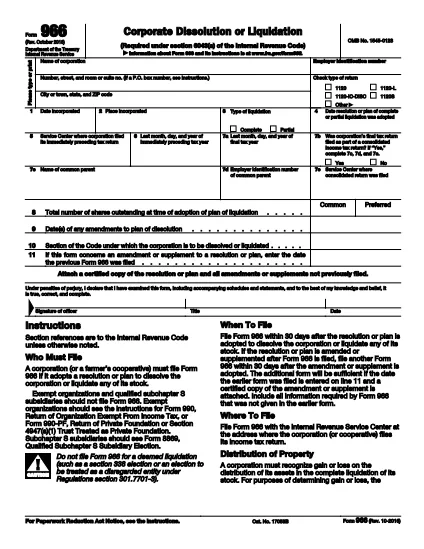
Form 966 is the official IRS document used by a corporation or a farmer’s cooperative to report a resolution or plan to dissolve, liquidate, or otherwise terminate its business. The form must be filed within 30 days of adopting the dissolution plan.

What Is Form 966?

Form 966 collects basic corporate information, the type of liquidation (partial or complete), the adoption date of the resolution, and the IRS service center where the last tax return was filed. It is a single‑page form, making it straightforward to complete when you have the right data.

Who Must File Form 966?

  • Any corporation (including S‑corporations) that adopts a plan to dissolve or liquidate its stock.
  • Farmer’s cooperatives that are winding down operations.
  • Entities that file a final tax return under IRC §6043(a).

How to Complete the Fillable PDF

Instead of printing, editing, and rescanning, use our fillable PDF powered by Formize. Follow these simple steps:

  1. Click the Fill out this form button on the page.
  2. Wait for the Formize PDF Filler app to load – it runs directly in your browser.
  3. Enter the requested information in each field (name, EIN, liquidation type, dates, etc.).
  4. Review the completed form, then click Save or Print to generate a PDF you can submit to the IRS.

Common Mistakes to Avoid

  • Missing dates: Ensure the adoption date and final tax year dates match your corporate records.
  • Incorrect EIN: Double‑check the Employer Identification Number; a typo can delay processing.
  • Wrong liquidation type: Choose “partial” or “complete” accurately; the IRS uses this to determine tax treatment.
  • Signature omission: An authorized officer must sign; electronic signatures are accepted if the PDF supports them.

Download & Fill the Form Instantly

Ready to get started? Click the button below to open the fillable version of Form 966. No software download, no paper copies—just a quick, secure way to meet your filing deadline.

DUK
  • When must Form 966 be filed?

    Form 966 must be filed within 30 days after the corporation adopts a resolution or plan to dissolve or liquidate.

  • Can I file Form 966 electronically?

    The IRS does not accept electronic filing for Form 966; however, you can complete the form online with our fillable PDF, then mail the printed copy.

  • Do I need a signature on Form 966?

    Yes. An authorized corporate officer (president, secretary, treasurer, etc.) must sign the form. Electronic signatures are acceptable if the PDF supports them.

  • What if the dissolution plan changes after filing?

    If the plan is amended or supplemented, you must file a new Form 966 within 30 days of the amendment.

  • Is Form 966 required for a partial liquidation?

    Yes. Both partial and complete liquidations require Form 966 to notify the IRS of the corporate restructuring.

  • Where do I send the completed Form 966?

    Send the signed form to the IRS Service Center where the corporation filed its most recent tax return (see line 5 of the form).

  • Can I use the same Form 966 for multiple shareholders?

    Form 966 is filed by the corporation, not individual shareholders. Shareholders receive separate tax documents based on the liquidation.

KAIP

Kaip nemokamai užpildyti IRS Form 966 internete, atlikdami 3 paprastus veiksmus:

  1. 1
    Open the Fillable Form
    Click the “Fill out this form” button on the page to launch the Formize PDF Filler directly in your browser.
  2. 2
    Enter Your Information
    Fill each field with the corporation’s details, liquidation type, dates, and EIN. The interface guides you field‑by‑field.
  3. 3
    Save, Print, and Submit
    When all sections are complete, click Save to download the finished PDF or Print to send a hard copy to the IRS service center.
Formuokite PDF užpildymo programą
APIE

Mokesčių formos

IRS Form 966 yra viena iš mokesčių formų, kurios yra dokumentai, naudojami su mokesčiais susijusiai informacijai pranešti atitinkamai mokesčių institucijai. Yra įvairių tipų mokesčių formų, įskaitant federalines, valstijos ir vietines mokesčių formas, kurios gali skirtis priklausomai nuo mokesčių mokėtojo aplinkybių ir vietos.

FUNKCIJOS

PDF užpildas

Lengviausias būdas užpildyti IRS Form 966 internete

  • Greitai užpildykite IRS Form 966
    Ieškote būdo greitai užpildyti IRS Form 966 internete? Naudodami internetinį nemokamą PDF formų užpildą sužinosite, kaip redaguoti ir užpildyti šį pdf dokumentą greičiau nei per minutę.
  • Lengva naudoti internetinį PDF redaktorių
    Atsibodo spausdinti PDF failus, kad galėtumėte juos redaguoti prieš nuskaitydami iš naujo ir siųsdami atgal? Redaguoti PDF dokumentus internete nemokamai. Norėdami sutaupyti laiko ir popieriaus, naudokite mūsų internetinį pdf redaktorių.
  • Puikūs įrankiai, visos platformos
    Svarstote, kaip užpildyti IRS Form 966 „Mac“ kompiuteryje, o gal kaip nemokamai naudoti PDF užpildą? Mūsų internetiniai PDF įrankiai veikia visose platformose.
  • Saugi failų saugykla
    Užbaigti „IRS Form 966“ failai saugomi saugioje duomenų bazėje, kurią valdo „Amazon Cloud“ priegloba. Galite bet kada ištrinti failus iš mūsų sistemos. Bet kokiu atveju šie failai automatiškai ištrinami po 24 valandų.
  • Kalbėkitės su IRS Form 966
    Kalbėkite su „IRS Form 966“ naudodami Chatize, kuri yra nemokama PDF skaitymo priemonė. Užduokite klausimų ir gaukite atsakymus iš „IRS Form 966“. Tiesiog spustelėkite aukščiau esantį mygtuką Kalbėtis su dokumentu.

Ištrinti užpildymo seansą

Ištrinti pasirinktą pildymo seansą? Tokiu atveju jūsų pažanga pildant formą bus prarasta.

Ištrinti redagavimo sesiją

Ištrinti pasirinktą redagavimo sesiją? Tokiu atveju jūsų pažanga kuriant ir redaguojant formą bus prarasta.