
Pasirinkite kalbą

Form T (Timber) – Fillable PDF for IRS Reporting

  1. Šalis JAV
  2. Kalba Anglų
  3. Veikla Mokesčiai
  4. skyrius Vidaus pajamų tarnyba
Form T (Timber) – Fillable PDF for IRS Reporting

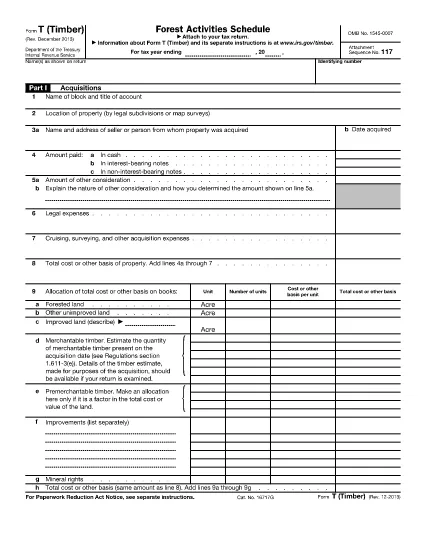
Form T (Timber) is the IRS‑required schedule used to report timber acquisitions, depletion, sales, and reforestation activities. Whether you own a forested property, manage timber contracts, or simply need to document occasional timber sales, this fillable PDF helps you stay compliant.

What Is Form T (Timber)?

The form is part of the federal income‑tax return and captures detailed information about timber assets, including:

  • Acquisitions and exchanges of timber or forest land (Part I)
  • Timber depletion calculations (Part II)
  • Profit or loss from timber sales (Part III)
  • Reforestation and stand‑management expenses (Part IV)
  • Changes in land ownership (Part V)

Key Sections of Form T

Each part must be completed accurately to avoid IRS penalties. The most common areas where taxpayers err are:

  • Not separating reforestation projects in Part IV.
  • Incorrectly calculating depletion using the wrong unit of measure.
  • Failing to maintain a separate schedule for each timber stand.

How to Fill Out Form T Online

Our Formize fillable PDF eliminates the need for a separate editor. Follow the simple steps below to complete the form directly in your browser.

Common Mistakes to Avoid

  • Leaving Part IV blank when you incurred any reforestation expense.
  • Using outdated basis figures for timber that has been fully amortized.
  • Submitting the form without attaching supporting documentation for large timber sales.

Download the Official PDF

Click the button below to load the official IRS Form T (Timber) PDF into Formize’s secure filler. The document is the same version published by the IRS in 2013.

Instrukcijos

DUK
  • Do I need to file Form T if I only sell timber occasionally?

    No. The IRS does not require filing Form T for occasional sales (e.g., one or two sales every 3‑4 years), but you must keep adequate records of those transactions.

  • What is the purpose of Part IV on Form T?

    Part IV reports reforestation and timber‑stand activities. It is required whenever you incur expenses for planting, thinning, burning, or other silvicultural practices.

  • Can I fill out Form T on a mobile device?

    Yes. The Formize PDF filler works on modern smartphones and tablets, allowing you to complete the form anywhere with an internet connection.

  • How do I calculate timber depletion for the year?

    Use the depletion method prescribed in the IRS instructions (cost‑or‑value method). Enter the quantity of timber cut and the depletion rate in Part II.

  • What supporting documents should I keep with Form T?

    Maintain purchase agreements, harvest receipts, reforestation invoices, and any appraisal reports. These documents substantiate the amounts reported on the form.

  • Is the PDF provided by Formize the official IRS version?

    Yes. The download link points to the official IRS Form T (Timber) PDF published in 2013, ensuring you are using the correct form.

KAIP

Kaip nemokamai užpildyti Form T timber internete, atlikdami 3 paprastus veiksmus:

  1. 1
    Click the Fill‑out Button
    Press the “Fill out this form” button on the page. The PDF will open instantly in Formize’s online filler.
  2. 2
    Wait for the Filler to Load
    The Formize PDF Filler app loads the form in a secure window. No download or installation is required.
  3. 3
    Complete and Save
    Enter your information in each field, then click “Save” to download the completed PDF or email it directly to your accountant.
Formuokite PDF užpildymo programą
APIE

Mokesčių formos

Form T timber yra viena iš mokesčių formų, kurios yra dokumentai, naudojami su mokesčiais susijusiai informacijai pranešti atitinkamai mokesčių institucijai. Yra įvairių tipų mokesčių formų, įskaitant federalines, valstijos ir vietines mokesčių formas, kurios gali skirtis priklausomai nuo mokesčių mokėtojo aplinkybių ir vietos.

FUNKCIJOS

PDF užpildas

Lengviausias būdas užpildyti Form T timber internete

  • Greitai užpildykite Form T timber
    Ieškote būdo greitai užpildyti Form T timber internete? Naudodami internetinį nemokamą PDF formų užpildą sužinosite, kaip redaguoti ir užpildyti šį pdf dokumentą greičiau nei per minutę.
  • Lengva naudoti internetinį PDF redaktorių
    Atsibodo spausdinti PDF failus, kad galėtumėte juos redaguoti prieš nuskaitydami iš naujo ir siųsdami atgal? Redaguoti PDF dokumentus internete nemokamai. Norėdami sutaupyti laiko ir popieriaus, naudokite mūsų internetinį pdf redaktorių.
  • Puikūs įrankiai, visos platformos
    Svarstote, kaip užpildyti Form T timber „Mac“ kompiuteryje, o gal kaip nemokamai naudoti PDF užpildą? Mūsų internetiniai PDF įrankiai veikia visose platformose.
  • Saugi failų saugykla
    Užbaigti „Form T timber“ failai saugomi saugioje duomenų bazėje, kurią valdo „Amazon Cloud“ priegloba. Galite bet kada ištrinti failus iš mūsų sistemos. Bet kokiu atveju šie failai automatiškai ištrinami po 24 valandų.
  • Kalbėkitės su Form T timber
    Kalbėkite su „Form T timber“ naudodami Chatize, kuri yra nemokama PDF skaitymo priemonė. Užduokite klausimų ir gaukite atsakymus iš „Form T timber“. Tiesiog spustelėkite aukščiau esantį mygtuką Kalbėtis su dokumentu.

Ištrinti užpildymo seansą

Ištrinti pasirinktą pildymo seansą? Tokiu atveju jūsų pažanga pildant formą bus prarasta.

Ištrinti redagavimo sesiją

Ištrinti pasirinktą redagavimo sesiją? Tokiu atveju jūsų pažanga kuriant ir redaguojant formą bus prarasta.