
Pasirinkite kalbą

Fillable Form W-4P – Federal Income Tax Withholding for Pensions & Annuities

  1. Šalis JAV
  2. Kalba Anglų
  3. Veikla Mokesčiai
  4. skyrius Vidaus pajamų tarnyba
Fillable Form W-4P – Federal Income Tax Withholding for Pensions & Annuities

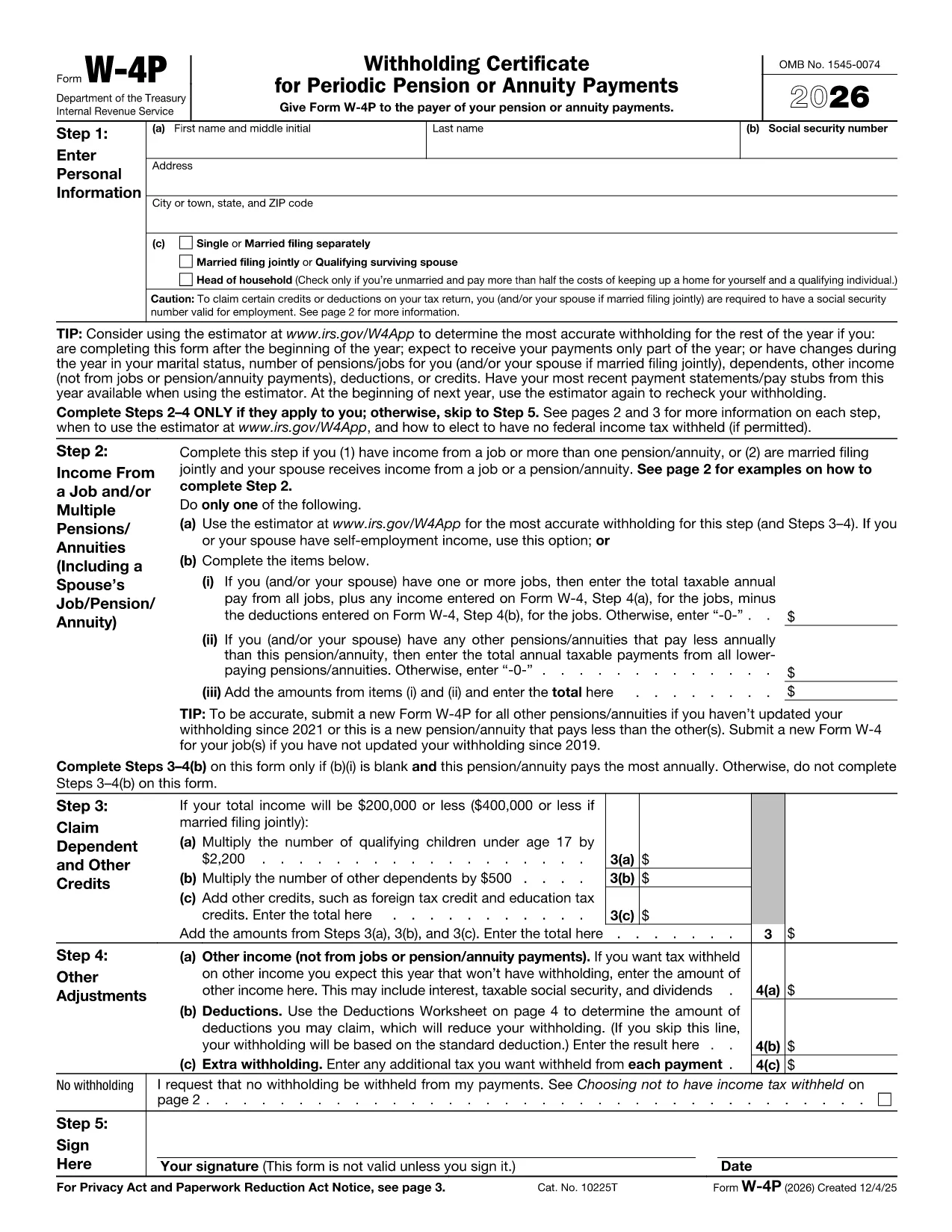
Form W-4P is the IRS document used to tell a payer how much federal income tax to withhold from periodic pension, annuity, profit‑sharing, stock‑bonus plan, or IRA payments. The form captures personal information, filing status, credits, deductions, and any extra withholding you want.

What Is Form W-4P?

The IRS Form W-4P ("Withholding Certificate for Pension or Annuity Payments") replaces the older paper‑only version with a modern, fillable PDF that can be completed electronically. It applies only to the taxable portion of your periodic payments.

When Do You Need Form W-4P?

  • When you start receiving a pension or annuity and want the correct tax withheld.
  • If you have multiple sources of retirement income and need to adjust withholding.
  • When you experience a change in filing status, dependents, or tax credits.

How to Fill Out the Fillable W-4P Online

Instead of downloading the PDF and opening a separate editor, simply click the "Fill out this form" button on this page. The Formize PDF Filler app will load instantly, allowing you to complete the form directly in your browser.

Common Mistakes to Avoid

  • Leaving the "Exempt" box unchecked when you qualify for exemption.
  • Entering an incorrect Social Security Number – double‑check each digit.
  • Forgetting to sign and date the form; an unsigned form is rejected.
  • Misreporting credits or deductions, which can lead to over‑ or under‑withholding.

Where to Submit Your Completed Form

Send the finished Form W-4P to the payer of your pension or annuity (financial institution, plan administrator, or IRA custodian). Keep a copy for your records. The payer will use the information to calculate the correct federal tax to withhold each payment cycle.

Need a printable copy? Use the official IRS PDF linked below.

DUK
  • Do I need to file Form W-4P every year?

    You only need to file a new W-4P when your situation changes (e.g., filing status, dependents, or extra withholding). Otherwise, the original form remains valid.

  • Can I claim exemption from withholding on Form W-4P?

    Yes, if you had no tax liability last year and expect none this year, you can check the exemption box. Be sure you truly qualify; an incorrect claim can result in penalties.

  • What happens if I make a mistake on the form?

    Contact the payer immediately to submit a corrected W-4P. Incorrect information can cause under‑withholding, leading to a large tax bill at year‑end.

  • Is the fillable PDF accepted by all payers?

    The IRS‑approved fillable PDF meets all requirements. Most financial institutions and plan administrators accept it, but you can always request a paper copy if needed.

  • How do I know how much tax should be withheld?

    Use the IRS Tax Withholding Estimator or consult a tax professional. The form also lets you add extra withholding amounts if you anticipate a higher tax liability.

  • Can I submit the form electronically?

    Yes. After completing the fillable PDF, you can email the PDF directly to your payer or upload it through their secure portal if they offer one.

  • Where can I find the official PDF version of Form W-4P?

    The official, up‑to‑date PDF is available from the IRS at https://www.irs.gov/pub/irs-pdf/fw4p.pdf.

KAIP

Kaip nemokamai užpildyti Form W-4P internete, atlikdami 5 paprastus veiksmus:

  1. 1
    Click the Fill Out Button
    Press the “Fill out this form” button on the page to launch the Formize PDF Filler.
  2. 2
    Wait for the Filler to Load
    The online filler loads in seconds. No download or installation is required.
  3. 3
    Enter Your Information
    Complete each required field – personal details, filing status, credits, and any extra withholding.
  4. 4
    Review and Sign
    Double‑check all entries, then add your electronic signature and the date.
  5. 5
    Save or Email Your Form
    Download the completed PDF or email it directly to your payer from the Formize interface.
Formuokite PDF užpildymo programą
APIE

Vidaus pajamų tarnybos (IRS) formos

Form W-4P yra viena iš oficialių mokesčių formų, naudojamų Jungtinėse Valstijose norint pranešti apie pajamas, reikalauti atskaitymų ir kreditų, apskaičiuoti mokestinę prievolę ir vykdyti kitus su mokesčiais susijusius įsipareigojimus. IRS yra federalinė agentūra, atsakinga už vidaus pajamų įstatymų administravimą ir vykdymą JAV.

Štai keletas Vidaus pajamų tarnybos formų pavyzdžių:

1040 forma: tai pagrindinė gyventojų pajamų mokesčio deklaracijos forma, kurią naudoja dauguma mokesčių mokėtojų. Jis naudojamas pranešti apie įvairias pajamas, reikalauti atskaitymų ir kreditų, apskaičiuoti mokestinę prievolę ir nustatyti, ar mokesčių mokėtojas yra skolingas papildomai, ar turi teisę susigrąžinti mokesčius.

1099 forma: yra įvairių 1099 formos variantų, pvz., 1099-MISC, 1099-INT, 1099-DIV ir tt Šios formos naudojamos pajamoms, kurias asmenys ar įmonės gauna iš įvairių šaltinių, išskyrus užimtumą, pvz., savarankiško darbo, pateikti. pajamos, palūkanų pajamos, dividendų pajamos ir nuomos pajamos.

Forma W-2: šią formą naudoja darbdaviai norėdami pranešti apie darbuotojams mokamą atlyginimą ir mokesčius išskaičiuoti iš jų darbo užmokesčio. Darbuotojai naudoja W-2 formoje pateiktą informaciją, kad užpildytų savo individualias mokesčių deklaracijas.

941 forma: darbdaviai naudoja šią formą norėdami pranešti apie savo darbuotojų darbo mokesčius, įskaitant išskaičiuotą federalinį pajamų mokestį, socialinio draudimo mokestį ir medicininės priežiūros mokestį.

1065 forma: šią formą bendrijos naudoja pajamoms, atskaitymams ir mokesčių prievolėms pranešti. Pačios bendrijos pajamų mokesčio nemoka; vietoj to partneriai savo individualiose mokesčių deklaracijose nurodo savo bendrijos pajamų dalį.

1120 forma: tai pelno mokesčio deklaracijos forma, kurią C korporacijos naudoja savo pajamoms pranešti. atskaitymus ir mokestinę prievolę.

990 forma: šią formą naudoja neapmokestinamos organizacijos, pvz., ne pelno ir labdaros organizacijos, pranešti apie savo finansinę informaciją, veiklą ir mokesčių įstatymų laikymąsi.

8862 forma: šią formą naudoja mokesčių mokėtojai, kurie anksčiau pareikalavo uždirbtų pajamų mokesčio kredito (EITC) bet buvo uždrausta, o dabar noriu vėl pareikšti ieškinį.

Tai tik keli pavyzdžiai iš daugybės IRS formų, skirtų įvairioms su mokesčiais susijusioms prievolėms įvykdyti. Asmeniui ar verslui reikalingos konkrečios formos priklauso nuo jų unikalių aplinkybių, pajamų šaltinių ir atskaitymų. Patartina apsilankyti oficialioje Vidaus pajamų tarnybos svetainėje (www.irs.gov) arba kreiptis į profesionalų mokesčių patarimą, kad gautumėte tikslią ir naujausią informaciją apie konkrečią IRS. formas, atitinkančias jūsų mokesčių situaciją.

FUNKCIJOS

PDF užpildas

Lengviausias būdas užpildyti Form W-4P internete

  • Greitai užpildykite Form W-4P
    Ieškote būdo greitai užpildyti Form W-4P internete? Naudodami internetinį nemokamą PDF formų užpildą sužinosite, kaip redaguoti ir užpildyti šį pdf dokumentą greičiau nei per minutę.
  • Lengva naudoti internetinį PDF redaktorių
    Atsibodo spausdinti PDF failus, kad galėtumėte juos redaguoti prieš nuskaitydami iš naujo ir siųsdami atgal? Redaguoti PDF dokumentus internete nemokamai. Norėdami sutaupyti laiko ir popieriaus, naudokite mūsų internetinį pdf redaktorių.
  • Puikūs įrankiai, visos platformos
    Svarstote, kaip užpildyti Form W-4P „Mac“ kompiuteryje, o gal kaip nemokamai naudoti PDF užpildą? Mūsų internetiniai PDF įrankiai veikia visose platformose.
  • Saugi failų saugykla
    Užbaigti „Form W-4P“ failai saugomi saugioje duomenų bazėje, kurią valdo „Amazon Cloud“ priegloba. Galite bet kada ištrinti failus iš mūsų sistemos. Bet kokiu atveju šie failai automatiškai ištrinami po 24 valandų.
  • Kalbėkitės su Form W-4P
    Kalbėkite su „Form W-4P“ naudodami Chatize, kuri yra nemokama PDF skaitymo priemonė. Užduokite klausimų ir gaukite atsakymus iš „Form W-4P“. Tiesiog spustelėkite aukščiau esantį mygtuką Kalbėtis su dokumentu.

Ištrinti užpildymo seansą

Ištrinti pasirinktą pildymo seansą? Tokiu atveju jūsų pažanga pildant formą bus prarasta.

Ištrinti redagavimo sesiją

Ištrinti pasirinktą redagavimo sesiją? Tokiu atveju jūsų pažanga kuriant ir redaguojant formą bus prarasta.