
Pasirinkite kalbą

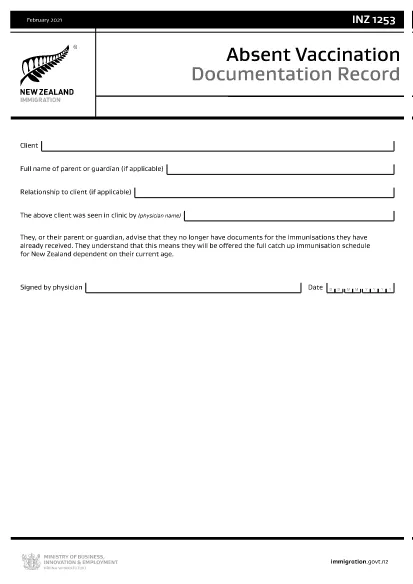
INZ1253 – Absent Vaccination Documentation Record (Fillable PDF)

  1. Kalba Anglų
  2. Šalis Naujoji Zelandija
  3. Veikla Sveikata
INZ1253 – Absent Vaccination Documentation Record (Fillable PDF)

The INZ1253 is the official Absent Vaccination Documentation Record used by Immigration New Zealand when an applicant cannot produce proof of previously received immunisations. This form allows the applicant (or a parent/guardian) to declare the missing records and request the appropriate catch‑up vaccination schedule.

What is the INZ1253 Form?

The form is required for anyone applying for a New Zealand visa or residency who does not have the original vaccination certificates. By completing INZ1253 you acknowledge that you will follow the full catch‑up immunisation schedule based on your age.

How to Complete the INZ1253 Online

Instead of downloading, printing, and scanning, you can fill out the form directly on our site:

  • Click the “Fill out this form” button below.
  • Wait a few seconds while the Formize PDF Filler app loads.
  • Enter the required information in the fillable fields (personal details, reason for missing records, etc.).
  • Save the completed PDF to your device or submit it directly to Immigration New Zealand.

Common Mistakes to Avoid

  • Leaving mandatory fields blank – the system will highlight any missing information before you can save.
  • Using an outdated version – always use the latest INZ1253 PDF provided below.
  • Incorrect date formats – follow the DD/MM/YYYY format as shown in the example.
  • Not signing the form – the electronic signature field must be completed before submission.

Where to Submit the Completed Form

After you have saved the filled PDF, attach it to your visa or residency application through the Immigration New Zealand online portal. If you are applying by paper, include the printed form with your supporting documents.

Need help? Review the FAQs below or contact Immigration New Zealand directly.

DUK
  • Do I need to print the INZ1253 form after filling it online?

    No. The Formize filler creates a fully signed PDF that can be uploaded directly to the Immigration New Zealand portal.

  • Can I edit the form after I have saved it?

    Yes. Open the saved PDF again with the Formize filler to make any changes, then re‑save.

  • What if I don’t have any vaccination records at all?

    Select “No records available” in the form and provide a brief explanation. You will be scheduled for the full catch‑up immunisation program.

  • Is the electronic signature legally accepted?

    Immigration New Zealand accepts electronic signatures on the INZ1253 when the form is completed using a certified PDF filler like Formize.

  • How long does it take for Immigration New Zealand to process the form?

    Processing times vary, but most applicants receive a response within 5‑10 business days after submission.

KAIP

Kaip nemokamai užpildyti INZ1253 internete, atlikdami 4 paprastus veiksmus:

  1. 1
    Open the Fillable Form
    Click the “Fill out this form” button on the page. The Formize PDF Filler will launch in your browser.
  2. 2
    Enter Your Details
    Complete each highlighted field – personal information, reason for missing vaccination records, and any additional notes.
  3. 3
    Save or Submit
    When all required fields are filled, click “Save PDF” to download the completed form or use the built‑in “Submit” button to send it directly to Immigration New Zealand.
  4. 4
    Confirm Receipt
    Check your email or the immigration portal for a confirmation that the form has been received.
Formuokite PDF užpildymo programą
APIE

Medicare paraiškos formos

INZ1253 yra viena iš Medicare formų, kurios yra dokumentai, naudojami įvairiuose procesuose, susijusiuose su Medicare programa, kuri yra federališkai administruojama sveikatos draudimo programa Jungtinėse Valstijose. „Medicare“ teikia aprėptį reikalavimus atitinkantiems asmenims, sulaukusiems 65 metų ir vyresniems, taip pat tam tikriems asmenims, turintiems negalią arba tam tikrų sveikatos sutrikimų.

Kai kurios įprastos Medicare formos yra:

Medicare registracijos paraiška: ši forma naudojama norint kreiptis dėl Medicare išmokų. Tai apima informaciją apie pareiškėjo asmeninius duomenis, pvz., vardą, pavardę, adresą, socialinio draudimo numerį ir informaciją apie dabartinį sveikatos draudimą.

Medicare ieškinio formos: šios formos naudojamos norint prašyti kompensacijos už medicinos paslaugas arba prekes, kurias apima Medicare. Įvairių tipų paslaugoms, pvz., buvimui ligoninėje (UB-04 forma), gydytojų paslaugoms (CMS-1500 forma) arba ilgalaikei medicinos įrangai (DMERC forma), naudojamos skirtingos ieškinio formos.

Medicare receptinių vaistų plano formos: šios formos naudojamos norint užsiregistruoti Medicare D dalyje, kurioje pateikiama receptinių vaistų aprėptis. Paprastai jiems reikalinga informacija apie šiuo metu vartojamus vaistus ir gali būti įtrauktas konkretaus plano apimamų vaistų sąrašas.

Medicare apeliacijų formos: jei Medicare ieškinys atmetamas arba nesutinkama su sprendimu dėl aprėpties, asmenys gali pateikti apeliaciją. Apeliaciniam procesui naudojamos formos skiriasi priklausomai nuo konkrečios situacijos ir susijusios Medicare draudimo rūšies.

Medicare leidimo formos: šios formos naudojamos suteikiant teisę skelbti saugomą informaciją apie sveikatą asmenims ar organizacijoms, kuriems reikalinga prieiga prie medicininių įrašų tokiais tikslais kaip prašymų tvarkymas ar priežiūros koordinavimas.

Medicare pakeitimo formos: šios formos naudojamos norint pakeisti esamą Medicare aprėptį, pvz., atnaujinti asmeninę informaciją, pakeisti pirminės sveikatos priežiūros gydytoją arba pereiti prie kito Medicare Advantage ar D dalies receptinių vaistų plano.

Svarbu pažymėti, kad „Medicare“ formos ir procesai gali būti sudėtingi, todėl asmenys raginami kreiptis pagalbos į „Medicare“ programą arba patikimą sveikatos priežiūros specialistą, kad užtikrintų, jog tinkamai ir laiku užpildytų atitinkamas formas.

FUNKCIJOS

PDF užpildas

Lengviausias būdas užpildyti INZ1253 internete

  • Greitai užpildykite INZ1253
    Ieškote būdo greitai užpildyti INZ1253 internete? Naudodami internetinį nemokamą PDF formų užpildą sužinosite, kaip redaguoti ir užpildyti šį pdf dokumentą greičiau nei per minutę.
  • Lengva naudoti internetinį PDF redaktorių
    Atsibodo spausdinti PDF failus, kad galėtumėte juos redaguoti prieš nuskaitydami iš naujo ir siųsdami atgal? Redaguoti PDF dokumentus internete nemokamai. Norėdami sutaupyti laiko ir popieriaus, naudokite mūsų internetinį pdf redaktorių.
  • Puikūs įrankiai, visos platformos
    Svarstote, kaip užpildyti INZ1253 „Mac“ kompiuteryje, o gal kaip nemokamai naudoti PDF užpildą? Mūsų internetiniai PDF įrankiai veikia visose platformose.
  • Saugi failų saugykla
    Užbaigti „INZ1253“ failai saugomi saugioje duomenų bazėje, kurią valdo „Amazon Cloud“ priegloba. Galite bet kada ištrinti failus iš mūsų sistemos. Bet kokiu atveju šie failai automatiškai ištrinami po 24 valandų.
  • Kalbėkitės su INZ1253
    Kalbėkite su „INZ1253“ naudodami Chatize, kuri yra nemokama PDF skaitymo priemonė. Užduokite klausimų ir gaukite atsakymus iš „INZ1253“. Tiesiog spustelėkite aukščiau esantį mygtuką Kalbėtis su dokumentu.

Ištrinti užpildymo seansą

Ištrinti pasirinktą pildymo seansą? Tokiu atveju jūsų pažanga pildant formą bus prarasta.

Ištrinti redagavimo sesiją

Ištrinti pasirinktą redagavimo sesiją? Tokiu atveju jūsų pažanga kuriant ir redaguojant formą bus prarasta.