
Pasirinkite kalbą

INZ 1220 Supplementary Form – Fillable PDF

  1. Šalis Naujoji Zelandija
  2. Kalba Anglų
  3. Veikla Apsilankymas ir turizmas Darbas Imigracija Studijuoti
INZ 1220 Supplementary Form – Fillable PDF

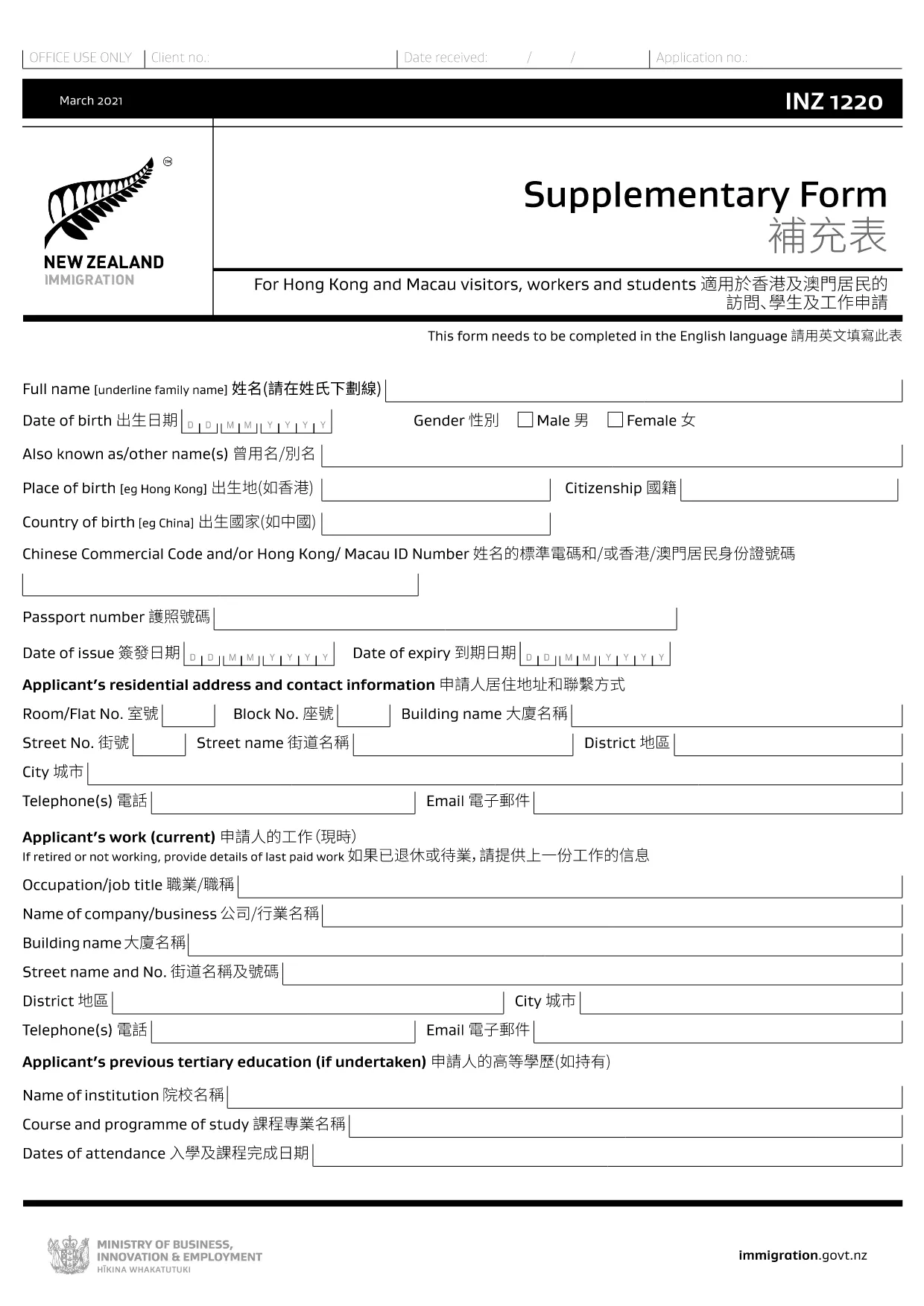
The INZ 1220 Supplementary Form is required by Immigration New Zealand for visitors, workers and students from Hong Kong and Macau who need to provide additional contact details. This fillable PDF lets you complete the form quickly, securely, and without printing.

Our page integrates the Formize PDF Filler app, so you can edit the document directly in your browser. No extra software, no downloads – just click, fill, and submit.

What Is the INZ 1220 Form?

INZ 1220 is a supplementary information sheet that collects the name, address, telephone, and email of a New Zealand contact (friend, family member, or sponsor). It is often requested alongside visa applications to verify local support.

How to Complete the INZ 1220 Online

Follow the simple steps below to fill out the form using Formize:

  • Click the **Fill out this form** button on this page.
  • Wait a few seconds while the Formize PDF Filler loads.
  • Enter the required details in each field – the interface highlights mandatory sections.
  • Review the information for accuracy.
  • Save the completed PDF to your device or download a copy for your records.

Common Mistakes to Avoid

  • Leaving the contact’s phone number incomplete – include country code.
  • Using an outdated email address – Immigration may send important updates.
  • Submitting the form with blank mandatory fields – the filler will flag these before you can save.

Where to Submit the Completed Form

After saving the PDF, attach it to your visa application through the Immigration New Zealand online portal, or email it to the address specified in your application instructions.

FAQs About INZ 1220

Find quick answers to the most common questions below (full FAQ list further down).

DUK
  • Do I need to print the INZ 1220 form?

    No. Using the Formize PDF Filler you can complete the form entirely online and download the finished PDF.

  • What language is the INZ 1220 form in?

    The official form is in English. If you need a translation, you must provide a certified translation alongside the original.

  • Can I save my progress and finish later?

    Yes. While the Formize app is open, you can click **Save** to download a partially‑filled PDF, then reload it later to continue.

  • Is the contact’s New Zealand address mandatory?

    Yes. Immigration requires a full local address (street, city, postal code) to verify your support network.

  • What if I make a mistake after saving?

    Simply reopen the saved PDF in the Formize filler, correct the error, and save a new version.

  • How many pages is the INZ 1220 form?

    The supplementary form is a single‑page PDF, making it quick to fill and attach.

  • Do I need a digital signature?

    A handwritten signature is required. Print the completed PDF, sign it, then scan or take a clear photo to upload.

  • Where can I find help if I’m stuck?

    The Formize filler includes tooltip help for each field. For further assistance, consult the Immigration New Zealand website.

KAIP

Kaip nemokamai užpildyti INZ 1220 internete, atlikdami 5 paprastus veiksmus:

  1. 1
    Open the Fillable Form
    Click the **Fill out this form** button on the page. The Formize PDF Filler app will open in a new tab.
  2. 2
    Load the Form
    Wait a few seconds while the INZ 1220 PDF loads. All fields become editable directly in the browser.
  3. 3
    Enter Your Information
    Type the required details (contact name, address, phone, email). Required fields are marked with an asterisk.
  4. 4
    Review and Save
    Check the entered data for errors, then click **Save** to download the completed PDF to your device.
  5. 5
    Submit with Your Visa Application
    Attach the saved INZ 1220 PDF to your Immigration New Zealand online application or email it as instructed.
Formuokite PDF užpildymo programą
APIE

Turizmo formos

INZ 1220 yra viena iš turizmo formų, kurią naudoja asmenys ar grupės, kurie planuoja keliauti turizmo tikslais. Šios formos gali skirtis priklausomai nuo paskirties šalies arba kelionių paslaugų teikėjo, tačiau paprastai jose pateikiama informacija apie keliautoją, jo maršrutą ir bet kokia kita svarbi informacija.

Kai kurios įprastos turizmo formos yra:

Kelionės maršrutas: šioje formoje nurodoma keliautojo planuojama veikla, įskaitant datas, laiką ir skrydžių, apgyvendinimo, kelionių ir kitos veiklos vietas.

Prašymas išduoti vizą: daugelis šalių reikalauja, kad turistai prieš atvykdami gautų vizą. Prašymo išduoti vizą formoje paprastai prašoma asmeninės informacijos, kelionės informacijos ir patvirtinančių dokumentų, tokių kaip pasas, nuotrauka ar finansinės ataskaitos.

Sveikatos deklaracijos forma: ši forma naudojama deklaruoti bet kokias sveikatos būklę arba galimą užkrečiamųjų ligų, pvz., COVID-19, poveikį. Kai kurios šalys reikalauja, kad keliautojai prieš atvykdami pateiktų neigiamą COVID-19 testą.

Kelionių draudimo forma: šioje formoje pateikiama informacija apie keliautojo kelionių draudimo apsaugą, įskaitant poliso tipą, draudimo limitus ir kontaktinę informaciją kritinės situacijos atveju.

Muitinės deklaracijos forma: ši forma reikalinga kai kuriose šalyse deklaruojant bet kokias į šalį įvežamas prekes, pvz., dovanas, suvenyrus ar elektroniką.

Apgyvendinimo užsakymo forma: šioje formoje pateikiama informacija apie keliautojo apgyvendinimą, įskaitant viešnagės datas, kambario tipą ir visus specialius pageidavimus.

Turizmo formas gali reikalauti oro linijos, kelionių agentūros, viešbučiai ar kiti kelionių paslaugų teikėjai, jos gali būti pateikiamos elektroniniu arba popieriniu formatu. Svarbu atidžiai peržiūrėti ir užpildyti visas reikalingas formas, kad kelionės būtų sklandžiai ir be rūpesčių.

FUNKCIJOS

PDF užpildas

Lengviausias būdas užpildyti INZ 1220 internete

  • Greitai užpildykite INZ 1220
    Ieškote būdo greitai užpildyti INZ 1220 internete? Naudodami internetinį nemokamą PDF formų užpildą sužinosite, kaip redaguoti ir užpildyti šį pdf dokumentą greičiau nei per minutę.
  • Lengva naudoti internetinį PDF redaktorių
    Atsibodo spausdinti PDF failus, kad galėtumėte juos redaguoti prieš nuskaitydami iš naujo ir siųsdami atgal? Redaguoti PDF dokumentus internete nemokamai. Norėdami sutaupyti laiko ir popieriaus, naudokite mūsų internetinį pdf redaktorių.
  • Puikūs įrankiai, visos platformos
    Svarstote, kaip užpildyti INZ 1220 „Mac“ kompiuteryje, o gal kaip nemokamai naudoti PDF užpildą? Mūsų internetiniai PDF įrankiai veikia visose platformose.
  • Saugi failų saugykla
    Užbaigti „INZ 1220“ failai saugomi saugioje duomenų bazėje, kurią valdo „Amazon Cloud“ priegloba. Galite bet kada ištrinti failus iš mūsų sistemos. Bet kokiu atveju šie failai automatiškai ištrinami po 24 valandų.
  • Kalbėkitės su INZ 1220
    Kalbėkite su „INZ 1220“ naudodami Chatize, kuri yra nemokama PDF skaitymo priemonė. Užduokite klausimų ir gaukite atsakymus iš „INZ 1220“. Tiesiog spustelėkite aukščiau esantį mygtuką Kalbėtis su dokumentu.

Ištrinti užpildymo seansą

Ištrinti pasirinktą pildymo seansą? Tokiu atveju jūsų pažanga pildant formą bus prarasta.

Ištrinti redagavimo sesiją

Ištrinti pasirinktą redagavimo sesiją? Tokiu atveju jūsų pažanga kuriant ir redaguojant formą bus prarasta.