Pasirinkite kalbą

Fillable PRC Size Application Form (8.5×13) – Online

  1. Kalba Anglų
  2. Šalis Philippines
  3. Veikla Licensing
  4. skyrius Professional Regulation Commission
Fillable PRC Size Application Form (8.5×13) – Online

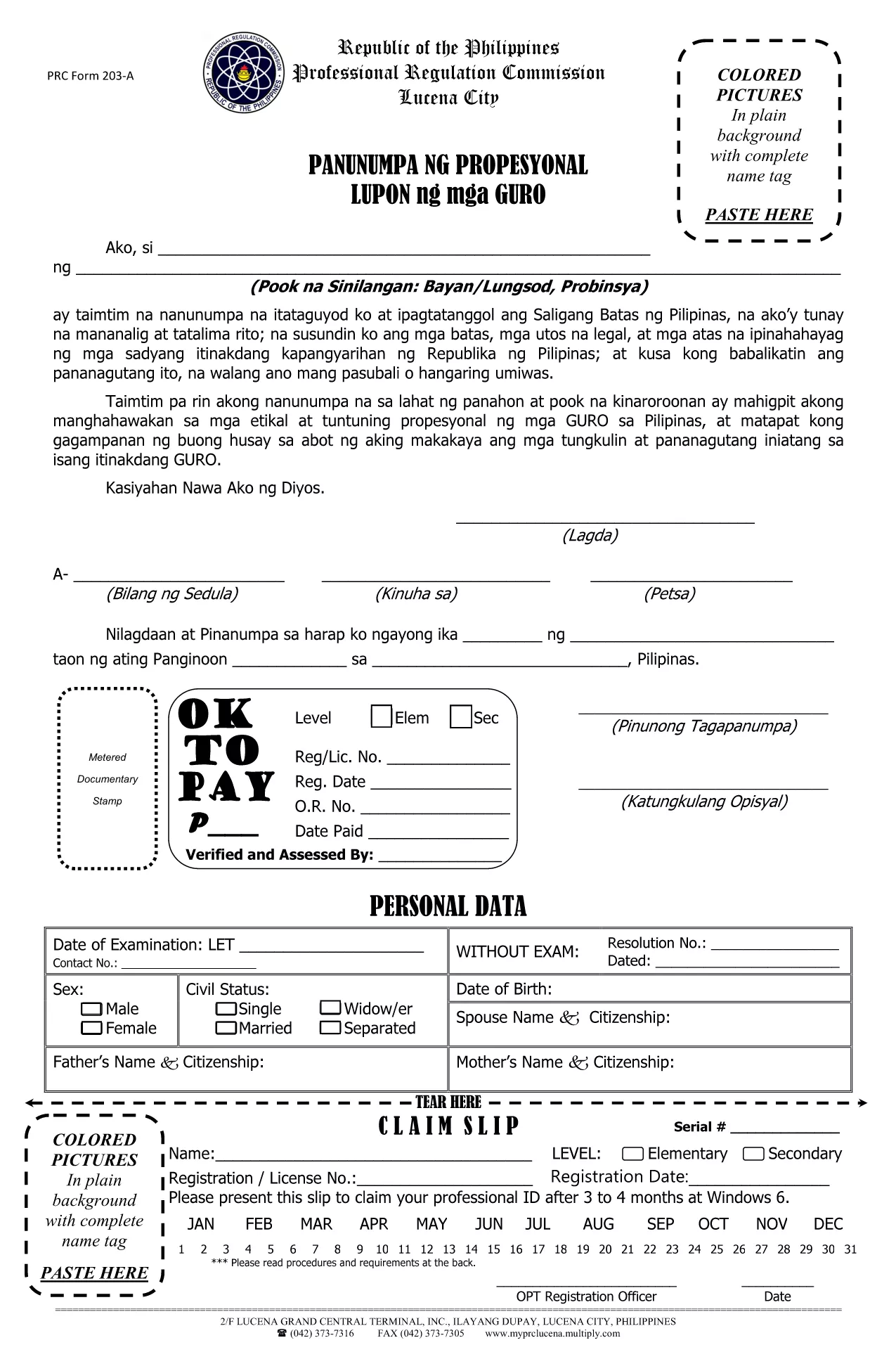
Looking for a printable PRC size application form that fits the standard 8½ × 13 inches paper? You’re in the right place. This page offers a fillable PDF that you can complete directly in your browser using the Formize PDF Filler app – no extra software required.

Why Use the PRC Size Form?

The Professional Regulation Commission (PRC) in the Philippines often requires documents on its custom paper size (8.5 × 13 in). Using the correct size prevents re‑printing, saves time, and ensures your application looks professional.

How to Fill the Form Online

Follow the simple steps below to complete the form instantly:

  • Click the "Fill out this form" button on this page.
  • Wait a few seconds while the Formize PDF Filler app loads.
  • Enter your information in each field – the interface works just like a regular web form.
  • When you’re done, click Save to download the completed PDF or Print directly on PRC‑size paper.

Common Mistakes to Avoid

  • Using the wrong paper size: Make sure your printer is set to 8.5 × 13 in before printing.
  • Leaving required fields blank: The filler will highlight empty mandatory fields before you can submit.
  • Saving in the wrong format: Always save the final document as a PDF to preserve the layout.

Download & Print Options

If you prefer to work offline, you can also download the PDF and open it in any PDF editor that supports fillable fields. Remember to set your printer to the custom PRC size (8.5 × 13 in) before printing.

Need more PRC forms? Explore other downloadable resources on the official PRC website or contact your local PRC office for assistance.

DUK
  • What does PRC size mean?

    PRC size refers to the custom paper dimensions used by the Philippine Professional Regulation Commission – 8½ × 13 inches.

  • Do I need special software to fill this PDF?

    No. The Formize PDF Filler works in any modern browser, so you can complete the form online without installing anything.

  • Can I edit the form after I download it?

    Yes. Once you save the filled PDF, you can reopen it in any PDF viewer that supports editable fields.

  • Is the form accepted for all PRC applications?

    This specific PDF is a teachers’ oath form, often required for teaching licensure. Verify with the PRC if a different application form is needed for your profession.

  • What if I print on standard Letter size paper?

    Printing on Letter (8.5 × 11 in) may truncate the bottom of the form. Always select the custom 8.5 × 13 in setting in your printer preferences.

  • How do I ensure my data is saved securely?

    The Formize app processes your data locally in the browser and does not store it on external servers unless you choose to upload it.

KAIP

Kaip nemokamai užpildyti PRC size application form internete, atlikdami 4 paprastus veiksmus:

  1. 1
    Click the Fill Button
    Press the "Fill out this form" button on the page to launch the Formize PDF Filler.
  2. 2
    Wait for the Filler to Load
    The app loads in a few seconds – you’ll see editable fields appear on the PDF.
  3. 3
    Enter Your Information
    Type directly into each field, using tabs or mouse clicks to move between sections.
  4. 4
    Save or Print
    When finished, click "Save" to download the completed PDF or "Print" to produce a hard copy on 8.5 × 13 in paper.
Formuokite PDF užpildymo programą
APIE

PRC size application form šabloną

Naudodami tradicinį PDF dokumento peržiūros ir pildymo funkcijų rinkinį, žiniatinklio programos pranašumus ir interaktyvų išdėstymą, galite užbaigti PRC size application form per kelias minutes.

FUNKCIJOS

PDF užpildas

Lengviausias būdas užpildyti PRC size application form internete

  • Greitai užpildykite PRC size application form
    Ieškote būdo greitai užpildyti PRC size application form internete? Naudodami internetinį nemokamą PDF formų užpildą sužinosite, kaip redaguoti ir užpildyti šį pdf dokumentą greičiau nei per minutę.
  • Lengva naudoti internetinį PDF redaktorių
    Atsibodo spausdinti PDF failus, kad galėtumėte juos redaguoti prieš nuskaitydami iš naujo ir siųsdami atgal? Redaguoti PDF dokumentus internete nemokamai. Norėdami sutaupyti laiko ir popieriaus, naudokite mūsų internetinį pdf redaktorių.
  • Puikūs įrankiai, visos platformos
    Svarstote, kaip užpildyti PRC size application form „Mac“ kompiuteryje, o gal kaip nemokamai naudoti PDF užpildą? Mūsų internetiniai PDF įrankiai veikia visose platformose.
  • Saugi failų saugykla
    Užbaigti „PRC size application form“ failai saugomi saugioje duomenų bazėje, kurią valdo „Amazon Cloud“ priegloba. Galite bet kada ištrinti failus iš mūsų sistemos. Bet kokiu atveju šie failai automatiškai ištrinami po 24 valandų.
  • Kalbėkitės su PRC size application form
    Kalbėkite su „PRC size application form“ naudodami Chatize, kuri yra nemokama PDF skaitymo priemonė. Užduokite klausimų ir gaukite atsakymus iš „PRC size application form“. Tiesiog spustelėkite aukščiau esantį mygtuką Kalbėtis su dokumentu.

Ištrinti užpildymo seansą

Ištrinti pasirinktą pildymo seansą? Tokiu atveju jūsų pažanga pildant formą bus prarasta.

Ištrinti redagavimo sesiją

Ištrinti pasirinktą redagavimo sesiją? Tokiu atveju jūsų pažanga kuriant ir redaguojant formą bus prarasta.