
Pasirinkite kalbą

South Africa DHA‑529 Application Form – Fillable PDF Online

  1. Šalis South Africa
  2. Kalba Anglų
  3. skyrius Home Affairs
  4. Veikla Pilietybė
South Africa DHA‑529 Application Form – Fillable PDF Online

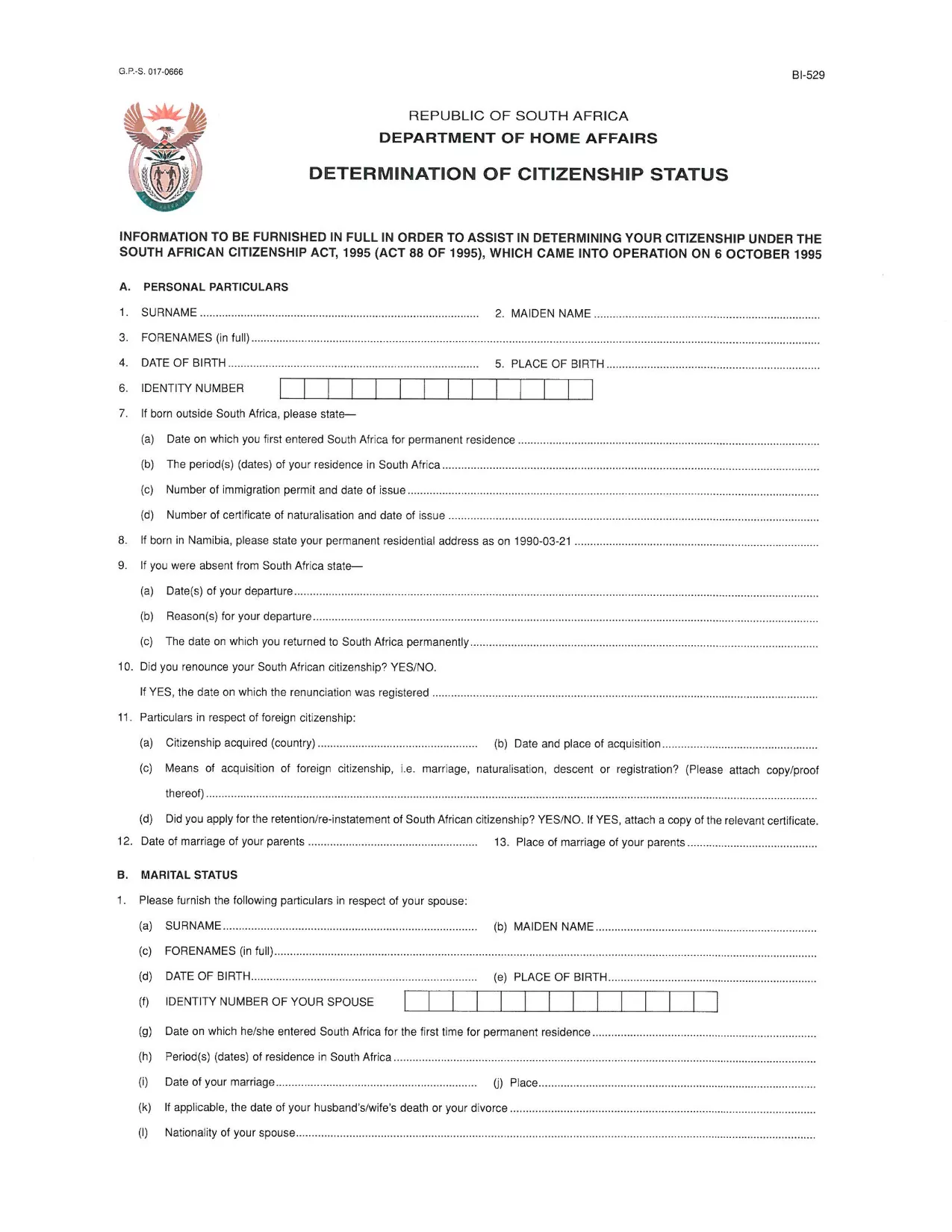
The DHA‑529 is the official South African Home Affairs form used to determine citizenship status, request a birth certificate, or submit parental consent affidavits. Whether you need it for a passport, naturalisation, or other civil services, you can now fill it out directly on our site – no Adobe Acrobat required.

What Is the DHA‑529 Application Form?

This form is issued by the Department of Home Affairs (DHA) and is commonly referred to as the “Application for a Certificate of Naturalisation” or “Citizenship Determination” form. It is required for South African citizens and residents who need to prove or change their citizenship status.

How to Complete the Form Online

Follow these simple steps to fill the form instantly:

  1. Click the "Fill out this form" button below.
  2. Wait a few seconds while the Formize PDF Filler app loads securely in your browser.
  3. Enter your information in each fillable field – the interface highlights required sections.
  4. Review the completed form, then click "Save & Download" to get a PDF copy.
  5. Print or submit the PDF electronically as instructed by Home Affairs.

Common Mistakes to Avoid

  • Leaving required fields blank – the filler will flag missing data before you can save.
  • Using an outdated version – always use the latest PDF linked on this page.
  • Incorrect dates or ID numbers – double‑check against your official documents.
  • Signing with a stylus or handwritten signature on the PDF – use the digital signature field provided.

Where to Submit the Completed Form

After downloading the filled PDF, you can:

  • Visit your nearest Department of Home Affairs office.
  • Mail the form to the address indicated on the document.
  • Upload it via the e‑services portal if you have a registered account.

Need help? The Department’s website provides contact details for each regional office.

DUK
  • Do I need Adobe Acrobat to fill the DHA‑529 form?

    No. Our online Formize PDF Filler lets you complete the form directly in your browser without any additional software.

  • Is the PDF version on this page the latest one?

    Yes. We regularly update the link to ensure you always download the current DHA‑529 form.

  • Can I save my progress and finish later?

    The filler allows you to download a partially completed PDF, which you can reopen later in any PDF reader to finish.

  • What if I make a mistake after downloading?

    You can re‑open the saved PDF in the Formize filler, correct the error, and download a new version.

  • How do I submit the completed form electronically?

    If you have a Home Affairs e‑services account, you can upload the filled PDF through the portal. Otherwise, print and deliver it in person.

  • Is my personal data safe while using the online filler?

    Yes. The Formize PDF Filler runs locally in your browser; no data is stored on our servers.

KAIP

Kaip nemokamai užpildyti application form co za internete, atlikdami 5 paprastus veiksmus:

  1. 1
    Click the Fill Button
    Press the "Fill out this form" button on the page to launch the Formize PDF Filler.
  2. 2
    Wait for the Filler to Load
    The secure filler loads in seconds. No download or installation is required.
  3. 3
    Enter Your Information
    Complete each highlighted field. Required fields are marked with an asterisk.
  4. 4
    Review and Save
    Check all entries, then click "Save & Download" to get a completed PDF.
  5. 5
    Submit to Home Affairs
    Print or upload the saved PDF according to the instructions on the form.
Formuokite PDF užpildymo programą
APIE

Pilietybės formos

application form co za yra viena iš pilietybės formų, kurios yra dokumentai, naudojami kreipiantis dėl pilietybės šalyje. Tikslios pilietybės formos ir reikalavimai skiriasi įvairiose šalyse, tačiau paprastai šis procesas apima asmens informacijos ir tinkamumo pilietybei įrodymų pateikimą.

Jungtinėse Valstijose labiausiai paplitusi pilietybės forma yra N-400 prašymas gauti natūralizaciją. Šią formą naudoja legalūs nuolatiniai gyventojai (žaliosios kortelės turėtojai), norėdami kreiptis dėl JAV pilietybės. Formoje prašoma pateikti asmeninės informacijos, tokios kaip vardas, gimimo data ir kontaktinė informacija, taip pat informacija apie pareiškėjo imigracijos statusą, teistumą ir kitus tinkamumo reikalavimus.

Kitose šalyse gali būti taikomos skirtingos formos ir reikalavimai pilietybei, tačiau pagrindinis procesas paprastai apima informacijos apie pareiškėjo kilmę ir tam tikrų tinkamumo kriterijų įvykdymą. Tai gali apimti pilietybės testo išlaikymą, šalies istorijos ir valdžios žinių pademonstravimą bei šalies kalbos mokėjimo pademonstravimą.

Svarbu pažymėti, kad pilietybės gavimo procesas gali būti sudėtingas ir atimti daug laiko. Pilietybės siekiantiems asmenims rekomenduojama pasikonsultuoti su imigracijos advokatu ar kitu kvalifikuotu specialistu, kuris padėtų orientuotis procese ir užtikrintų visų būtinų formų ir reikalavimų laikymąsi.

FUNKCIJOS

PDF užpildas

Lengviausias būdas užpildyti application form co za internete

  • Greitai užpildykite application form co za
    Ieškote būdo greitai užpildyti application form co za internete? Naudodami internetinį nemokamą PDF formų užpildą sužinosite, kaip redaguoti ir užpildyti šį pdf dokumentą greičiau nei per minutę.
  • Lengva naudoti internetinį PDF redaktorių
    Atsibodo spausdinti PDF failus, kad galėtumėte juos redaguoti prieš nuskaitydami iš naujo ir siųsdami atgal? Redaguoti PDF dokumentus internete nemokamai. Norėdami sutaupyti laiko ir popieriaus, naudokite mūsų internetinį pdf redaktorių.
  • Puikūs įrankiai, visos platformos
    Svarstote, kaip užpildyti application form co za „Mac“ kompiuteryje, o gal kaip nemokamai naudoti PDF užpildą? Mūsų internetiniai PDF įrankiai veikia visose platformose.
  • Saugi failų saugykla
    Užbaigti „application form co za“ failai saugomi saugioje duomenų bazėje, kurią valdo „Amazon Cloud“ priegloba. Galite bet kada ištrinti failus iš mūsų sistemos. Bet kokiu atveju šie failai automatiškai ištrinami po 24 valandų.
  • Kalbėkitės su application form co za
    Kalbėkite su „application form co za“ naudodami Chatize, kuri yra nemokama PDF skaitymo priemonė. Užduokite klausimų ir gaukite atsakymus iš „application form co za“. Tiesiog spustelėkite aukščiau esantį mygtuką Kalbėtis su dokumentu.

Ištrinti užpildymo seansą

Ištrinti pasirinktą pildymo seansą? Tokiu atveju jūsų pažanga pildant formą bus prarasta.

Ištrinti redagavimo sesiją

Ištrinti pasirinktą redagavimo sesiją? Tokiu atveju jūsų pažanga kuriant ir redaguojant formą bus prarasta.