
Pasirinkite kalbą

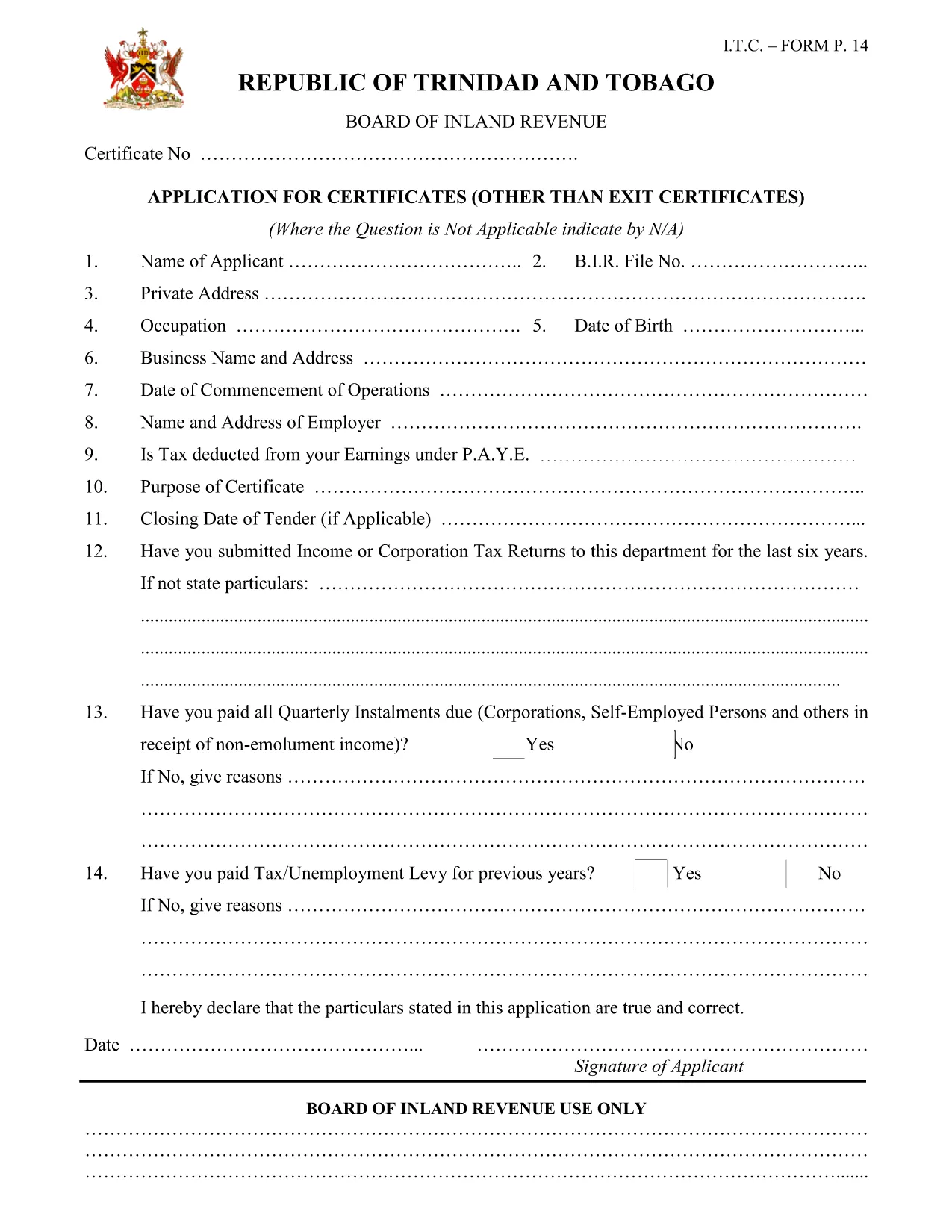
Apply for an Income Tax Clearance Certificate – Migration Allowances

  1. Kalba Anglų
  2. Šalis Trinidad and Tobago
  3. skyrius Inland Revenue Division
  4. Veikla Mokesčiai
Apply for an Income Tax Clearance Certificate – Migration Allowances

Migration allowances often require proof that you are up‑to‑date with your income tax obligations in Trinidad and Tobago. The Income Tax Clearance Certificate confirms your compliance and is essential when applying for residency, work permits, or citizenship abroad.

The official form is provided by the Inland Revenue Division (IRD) of the Ministry of Finance. With Formize you can fill it out online, save a copy, and print or submit it directly to the IRD office.

Key benefits of using the fillable PDF:

  • All fields are interactive – no need to print and write by hand.
  • Automatic validation helps prevent missing or incorrect information.
  • Save progress and return later before final submission.
  • Export a completed PDF for electronic filing or printing.

Below you’ll find everything you need to complete the application quickly and accurately.

DUK
  • Who must obtain a Tax Clearance Certificate for migration allowances?

    Anyone applying for residency, work permits, citizenship, or migration-related benefits outside Trinidad and Tobago must present a current Income Tax Clearance Certificate.

  • Is there a fee for the certificate?

    Yes, the IRD charges a fee of TT$100.00. Payment can be made at any IRD cashiers’ unit or designated bank.

  • Can I submit the form electronically?

    The completed PDF can be emailed to the IRD office, but most offices still require a printed copy for final verification.

  • What documents do I need to attach?

    You need a copy of your ID (passport, national ID, or driver’s licence) and, if applicable, proof that any outstanding tax liabilities have been settled.

  • How long does the clearance process take?

    Processing typically takes 5‑7 business days after the IRD receives a complete and correct application.

  • What common mistakes should I avoid?

    Do not leave any mandatory fields blank, ensure the BIR file number is correct, and double‑check that all signatures are entered before saving.

KAIP

Kaip nemokamai užpildyti income tax clearance certificate internete, atlikdami 5 paprastus veiksmus:

  1. 1
    Open the Fillable Form
    Click the "Fill out this form" button on the page. The Formize PDF Filler app will load the interactive version of the Tax Clearance Certificate application.
  2. 2
    Enter Your Personal Details
    Provide your full name, address, and contact information exactly as they appear on your identification documents.
  3. 3
    Provide BIR File Number & ID
    Enter your Board of Inland Revenue (BIR) file number and attach a scanned copy of a valid ID (passport, national ID, or driver’s licence).
  4. 4
    Declare Tax Compliance
    Answer the compliance questions, confirm that all tax liabilities are settled, and sign the declaration electronically.
  5. 5
    Save, Review & Submit
    Use the "Save" button to store a copy, review every field for accuracy, then click "Submit" to download the completed PDF. Print and deliver it to your nearest IRD office.
Formuokite PDF užpildymo programą
APIE

Mokesčių formos

income tax clearance certificate yra viena iš mokesčių formų, kurios yra dokumentai, naudojami su mokesčiais susijusiai informacijai pranešti atitinkamai mokesčių institucijai. Yra įvairių tipų mokesčių formų, įskaitant federalines, valstijos ir vietines mokesčių formas, kurios gali skirtis priklausomai nuo mokesčių mokėtojo aplinkybių ir vietos.

FUNKCIJOS

PDF užpildas

Lengviausias būdas užpildyti income tax clearance certificate internete

  • Greitai užpildykite income tax clearance certificate
    Ieškote būdo greitai užpildyti income tax clearance certificate internete? Naudodami internetinį nemokamą PDF formų užpildą sužinosite, kaip redaguoti ir užpildyti šį pdf dokumentą greičiau nei per minutę.
  • Lengva naudoti internetinį PDF redaktorių
    Atsibodo spausdinti PDF failus, kad galėtumėte juos redaguoti prieš nuskaitydami iš naujo ir siųsdami atgal? Redaguoti PDF dokumentus internete nemokamai. Norėdami sutaupyti laiko ir popieriaus, naudokite mūsų internetinį pdf redaktorių.
  • Puikūs įrankiai, visos platformos
    Svarstote, kaip užpildyti income tax clearance certificate „Mac“ kompiuteryje, o gal kaip nemokamai naudoti PDF užpildą? Mūsų internetiniai PDF įrankiai veikia visose platformose.
  • Saugi failų saugykla
    Užbaigti „income tax clearance certificate“ failai saugomi saugioje duomenų bazėje, kurią valdo „Amazon Cloud“ priegloba. Galite bet kada ištrinti failus iš mūsų sistemos. Bet kokiu atveju šie failai automatiškai ištrinami po 24 valandų.
  • Kalbėkitės su income tax clearance certificate
    Kalbėkite su „income tax clearance certificate“ naudodami Chatize, kuri yra nemokama PDF skaitymo priemonė. Užduokite klausimų ir gaukite atsakymus iš „income tax clearance certificate“. Tiesiog spustelėkite aukščiau esantį mygtuką Kalbėtis su dokumentu.

Ištrinti užpildymo seansą

Ištrinti pasirinktą pildymo seansą? Tokiu atveju jūsų pažanga pildant formą bus prarasta.

Ištrinti redagavimo sesiją

Ištrinti pasirinktą redagavimo sesiją? Tokiu atveju jūsų pažanga kuriant ir redaguojant formą bus prarasta.