Pasirinkite kalbą

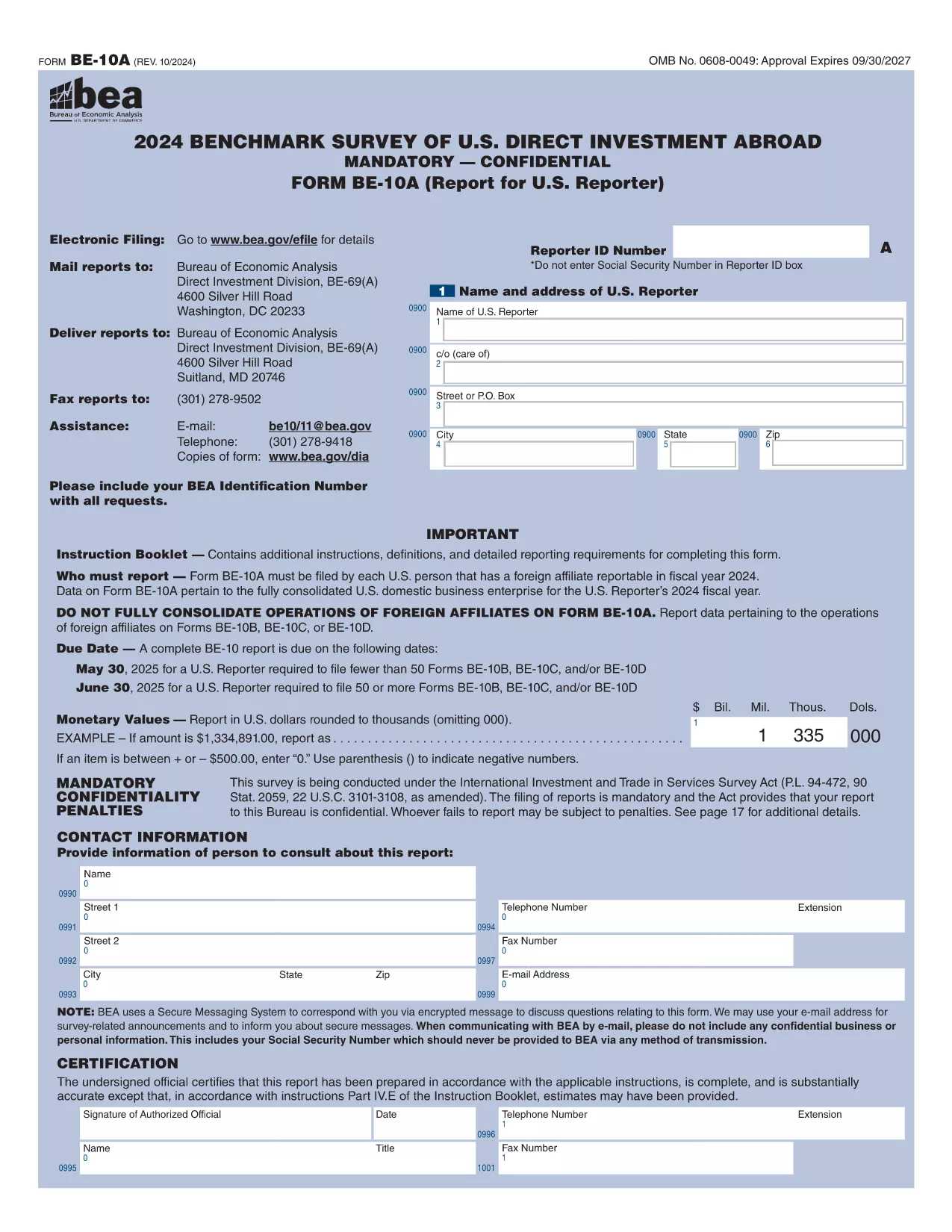
Form 10BBE – Fillable BE‑10 Survey PDF

  1. Šalis JAV
  2. Kalba Anglų
  3. skyrius Bureau of Economic Analysis
  4. Veikla International Investment Surveys
Form 10BBE – Fillable BE‑10 Survey PDF

The Form 10BBE is part of the BE‑10 benchmark survey administered by the U.S. Bureau of Economic Analysis (BEA). It collects detailed financial and operating data for majority‑owned foreign affiliates that meet specific asset, sales, or net‑income thresholds.

Using Formize’s online PDF filler, you can complete the form directly in your browser—no Adobe Acrobat Pro or other PDF editor required. Simply click the “Fill out this form” button, wait for the Formize PDF Filler to load, and start entering your information.

Below you’ll find everything you need to know about the form, step‑by‑step instructions, and answers to the most common questions.

What is Form 10BBE?

Form 10BBE (often referenced as BE‑10B) gathers data on foreign affiliates whose assets, sales, or net income exceed $80 million. The information helps the BEA compile the U.S. Direct Investment Abroad statistics used by policymakers, researchers, and businesses.

How to Complete the Fillable Form 10BBE

Follow the simple process below to fill out the form quickly and accurately using Formize.

Common Mistakes to Avoid

  • Leaving required fields blank – the filler will highlight missing entries.
  • Entering figures in the wrong units (e.g., thousands vs. millions).
  • Using outdated fiscal year dates – verify the reporting year before you start.

Download & Fill the Form Instantly

Click the button below to open the fillable PDF in Formize’s secure online editor. All changes are saved automatically, and you can export the completed form as a PDF ready for e‑filing.

FAQ About Form 10BBE

Find quick answers to the most frequently asked questions further down the page.

DUK
  • Who must file Form 10BBE?

    All U.S. multinational enterprises with majority‑owned foreign affiliates whose assets, sales, or net income exceed $80 million must file Form 10BBE as part of the BE‑10 benchmark survey.

  • Can I file Form 10BBE electronically?

    Yes. After completing the fillable PDF with Formize, you can upload the saved file to the BEA e‑file system for electronic submission.

  • What fiscal year does Form 10BBE cover?

    The form reports data for the most recent fiscal year ending in the calendar year specified in the survey notice (typically the year before the filing deadline).

  • Is the information I provide confidential?

    Federal law protects the confidentiality of all data submitted to the BEA. Your information is used only for statistical purposes and is not disclosed publicly.

  • What if I make a mistake after submitting?

    You can file an amendment using the BEA’s “Form 10BBE Amendment” process. Contact the BEA survey office for the correct procedure.

  • Do I need Adobe Acrobat Pro to edit the form?

    No. Formize’s online PDF filler works in any modern browser, and you only need the free Adobe Acrobat Reader to view the final PDF.

  • What is the deadline for filing Form 10BBE?

    For reporters filing 50 or more BE‑10 forms, the deadline is June 30 2025. For fewer than 50, the deadline is May 30 2025.

  • Where can I find the instructions for Form 10BBE?

    The detailed instruction booklet is available on the BEA website alongside the fillable PDF. It explains each line item and provides examples.

KAIP

Kaip nemokamai užpildyti Form 10BBE internete, atlikdami 5 paprastus veiksmus:

  1. 1
    Click the Fill‑out Button
    Press the “Fill out this form” button on the page. The Formize PDF Filler will open in a new tab.
  2. 2
    Wait for the Formizer to Load
    A short loading screen appears while the fillable PDF is prepared. This ensures all fields are interactive.
  3. 3
    Enter Your Data
    Complete each required field. The filler validates entries in real time and highlights any missing information.
  4. 4
    Review and Save
    Use the built‑in preview to double‑check your answers, then click “Save” to store the completed form on your device.
  5. 5
    Submit or Download
    When you’re satisfied, download the final PDF for e‑filing or submit it directly through the BEA e‑file portal.
Formuokite PDF užpildymo programą
APIE

Form 10BBE šabloną

Naudodami tradicinį PDF dokumento peržiūros ir pildymo funkcijų rinkinį, žiniatinklio programos pranašumus ir interaktyvų išdėstymą, galite užbaigti Form 10BBE per kelias minutes.

FUNKCIJOS

PDF užpildas

Lengviausias būdas užpildyti Form 10BBE internete

  • Greitai užpildykite Form 10BBE
    Ieškote būdo greitai užpildyti Form 10BBE internete? Naudodami internetinį nemokamą PDF formų užpildą sužinosite, kaip redaguoti ir užpildyti šį pdf dokumentą greičiau nei per minutę.
  • Lengva naudoti internetinį PDF redaktorių
    Atsibodo spausdinti PDF failus, kad galėtumėte juos redaguoti prieš nuskaitydami iš naujo ir siųsdami atgal? Redaguoti PDF dokumentus internete nemokamai. Norėdami sutaupyti laiko ir popieriaus, naudokite mūsų internetinį pdf redaktorių.
  • Puikūs įrankiai, visos platformos
    Svarstote, kaip užpildyti Form 10BBE „Mac“ kompiuteryje, o gal kaip nemokamai naudoti PDF užpildą? Mūsų internetiniai PDF įrankiai veikia visose platformose.
  • Saugi failų saugykla
    Užbaigti „Form 10BBE“ failai saugomi saugioje duomenų bazėje, kurią valdo „Amazon Cloud“ priegloba. Galite bet kada ištrinti failus iš mūsų sistemos. Bet kokiu atveju šie failai automatiškai ištrinami po 24 valandų.
  • Kalbėkitės su Form 10BBE
    Kalbėkite su „Form 10BBE“ naudodami Chatize, kuri yra nemokama PDF skaitymo priemonė. Užduokite klausimų ir gaukite atsakymus iš „Form 10BBE“. Tiesiog spustelėkite aukščiau esantį mygtuką Kalbėtis su dokumentu.

Ištrinti užpildymo seansą

Ištrinti pasirinktą pildymo seansą? Tokiu atveju jūsų pažanga pildant formą bus prarasta.

Ištrinti redagavimo sesiją

Ištrinti pasirinktą redagavimo sesiją? Tokiu atveju jūsų pažanga kuriant ir redaguojant formą bus prarasta.