
Pasirinkite kalbą

DL 520 – Employer Testing Program Application (California DMV)

  1. Kalba Anglų
  2. Šalis JAV
  3. Veikla Transporto priemonės registracija
  4. skyrius California DMV
DL 520 – Employer Testing Program Application (California DMV)

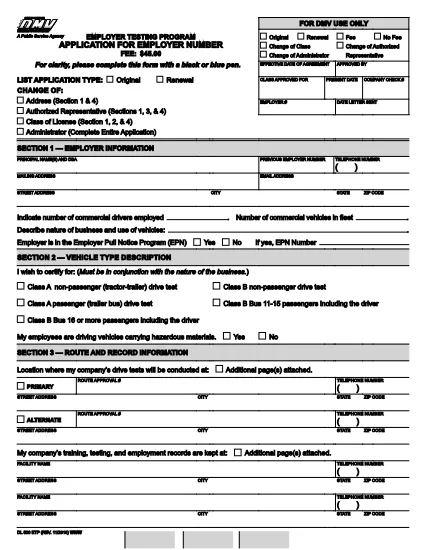
The DL 520 is the California Department of Motor Vehicles (DMV) application used by employers to obtain an employer number for the Employer Testing Program (ETP). This program allows qualified organizations to issue Certificates of Driving Skill (DL 170 ETP) to employees who operate motor vehicles in safety‑sensitive positions.

What is the DL 520 Form?

The DL 520 form collects essential information about your business, the types of testing you will conduct, and your compliance with California Vehicle Code sections related to employer‑run testing programs. Once approved, you receive an employer number that authorizes you to manage driver‑skill testing under the ETP.

Who Must Complete the DL 520?

  • Employers in California who need to test employees for driving‑skill certification (e.g., transportation, construction, utilities).
  • Companies that wish to issue DL 170 ETP certificates to qualified drivers.
  • Any organization that conducts mandatory drug, alcohol, or skills testing required by state law.

How to Fill Out the DL 520 Online with Formize

Instead of downloading, printing, and scanning, you can complete the form directly on our site:

  1. Click the “Fill out this form” button on the page.
  2. Wait a few seconds while the Formize PDF Filler app loads the fillable DL 520 PDF.
  3. Enter your employer information, testing procedures, and contact details in the highlighted fields.
  4. Review each section for accuracy; required fields are marked with an asterisk (*).
  5. When finished, click Save & Download to get a completed PDF you can email or print for submission.

The fillable PDF retains the official DMV layout, so the California DMV will accept it without any modifications.

Common Mistakes to Avoid

  • Leaving required fields blank – the DMV will reject the application.
  • Using an outdated version of the form – always use the latest PDF (linked above).
  • Incorrect employer number format – double‑check the 8‑digit number if you already have one.
  • Missing signatures – both the employer representative and the DMV inspector must sign.
  • Submitting a scanned image of a handwritten form – the fillable PDF ensures legibility.

Where to Submit the Completed Form

After saving your completed DL 520 PDF, mail or fax it to the address listed on the form’s last page. You may also deliver a printed copy to your local DMV office. Keep a copy for your records.

Need help? Review the FAQs below or contact your nearest California DMV office.

DUK
  • Do I need to print the DL 520 after filling it online?

    The California DMV accepts a printable PDF. You can either submit the electronic file by fax or print a hard copy for mailing.

  • How long does it take to get an employer number after submitting DL 520?

    Processing typically takes 7‑10 business days once the DMV receives a complete and correctly signed application.

  • Can I use the DL 520 for multiple locations?

    Yes. The employer number applies to all locations under the same legal entity, but each site must follow the same testing procedures.

  • What if I make a mistake after downloading the completed PDF?

    You must correct the error on a new copy of the form. The DMV does not accept handwritten alterations on a submitted PDF.

  • Is there a filing fee for the DL 520 application?

    There is no fee to submit the DL 520 itself, but the DMV may charge fees for issuing the employer number and subsequent certificates.

  • Do I need a separate DL 520 for each type of test (drug, alcohol, skill)?

    A single DL 520 authorizes all testing types covered under the Employer Testing Program, provided they are described in the application.

KAIP

Kaip nemokamai užpildyti DL 520 internete, atlikdami 4 paprastus veiksmus:

  1. 1
    Open the Fillable Form
    Click the “Fill out this form” button on the page. The Formize PDF Filler will load the DL 520 PDF automatically.
  2. 2
    Enter Your Information
    Type your employer name, address, testing procedures, and other required details into the highlighted fields.
  3. 3
    Review and Save
    Check every section for completeness, then click “Save & Download” to obtain a completed PDF ready for submission.
  4. 4
    Submit to the DMV
    Print the saved PDF (if required) and mail, fax, or deliver it to your local California DMV office as instructed on the form.
Formuokite PDF užpildymo programą
APIE

Transporto priemonių registracijos formos

DL 520 yra viena iš transporto priemonių registracijos formų, kurios yra dokumentai, naudojami motorinei transporto priemonei įregistruoti atitinkamoje vyriausybinėje institucijoje, paprastai Motorinių transporto priemonių departamente (DMV) arba lygiavertėje agentūroje. Šios formos reikalingos, kai asmuo perka naują ar naudotą transporto priemonę, perduoda transporto priemonės nuosavybės teisę arba su transporto priemone persikelia į naują jurisdikciją.

Konkrečios transporto priemonės registracijos formos gali skirtis priklausomai nuo jurisdikcijos, tačiau paprastai joms reikia šios informacijos:

Informacija apie transporto priemonę: tai apima išsamią informaciją apie transporto priemonę, pvz., markę, modelį, metus, transporto priemonės identifikavimo numerį (VIN) ir odometro rodmenis.

Savininko informacija: formoje reikės informacijos apie transporto priemonės savininką, įskaitant jo vardą, pavardę, adresą, kontaktinę informaciją ir vairuotojo pažymėjimo numerį.

Nuosavybės teisę patvirtinantis dokumentas: atsižvelgiant į aplinkybes, gali prireikti nuosavybės teisę patvirtinančio dokumento, pvz., nuosavybės pažymėjimo, pardavimo sąskaitos arba gamintojo kilmės sertifikato (naujoms transporto priemonėms).

Draudimo informacija: paprastai reikalingas galiojančio transporto priemonės draudimo įrodymas. Tai gali apimti draudimo poliso numerio, draudimo datų ir draudimo bendrovės duomenų pateikimą.

Mokesčių mokėjimas: transporto priemonės registracija apima įvairių mokesčių, tokių kaip registracijos mokesčiai, mokesčiai ir galbūt kiti tai jurisdikcijai būdingi mokesčiai, mokėjimą.

Be šių pagrindinių reikalavimų, kai kurios jurisdikcijos gali turėti papildomų formų arba dokumentų reikalavimų. Pavyzdžiui, kai kuriose srityse gali prireikti išmetamųjų teršalų bandymų rezultatų, saugos patikrinimų arba gyvenamosios vietos įrodymo.

Užpildžius ir pateikus transporto priemonės registracijos formas, valdžios institucija išduos registracijos liudijimą, valstybinius numerius ir registracijos lipdukus. Šiuose dokumentuose nurodyta, kad transporto priemonė yra teisėtai registruota ir leidžiama važiuoti viešaisiais keliais.

Svarbu pažymėti, kad transporto priemonių registracijos reikalavimai gali labai skirtis priklausomai nuo jurisdikcijos. Todėl dėl konkrečių formų ir procedūrų, taikomų jūsų vietovėje, rekomenduojama pasikonsultuoti su vietine DMV arba lygiaverte agentūra.

FUNKCIJOS

PDF užpildas

Lengviausias būdas užpildyti DL 520 internete

  • Greitai užpildykite DL 520
    Ieškote būdo greitai užpildyti DL 520 internete? Naudodami internetinį nemokamą PDF formų užpildą sužinosite, kaip redaguoti ir užpildyti šį pdf dokumentą greičiau nei per minutę.
  • Lengva naudoti internetinį PDF redaktorių
    Atsibodo spausdinti PDF failus, kad galėtumėte juos redaguoti prieš nuskaitydami iš naujo ir siųsdami atgal? Redaguoti PDF dokumentus internete nemokamai. Norėdami sutaupyti laiko ir popieriaus, naudokite mūsų internetinį pdf redaktorių.
  • Puikūs įrankiai, visos platformos
    Svarstote, kaip užpildyti DL 520 „Mac“ kompiuteryje, o gal kaip nemokamai naudoti PDF užpildą? Mūsų internetiniai PDF įrankiai veikia visose platformose.
  • Saugi failų saugykla
    Užbaigti „DL 520“ failai saugomi saugioje duomenų bazėje, kurią valdo „Amazon Cloud“ priegloba. Galite bet kada ištrinti failus iš mūsų sistemos. Bet kokiu atveju šie failai automatiškai ištrinami po 24 valandų.
  • Kalbėkitės su DL 520
    Kalbėkite su „DL 520“ naudodami Chatize, kuri yra nemokama PDF skaitymo priemonė. Užduokite klausimų ir gaukite atsakymus iš „DL 520“. Tiesiog spustelėkite aukščiau esantį mygtuką Kalbėtis su dokumentu.

Ištrinti užpildymo seansą

Ištrinti pasirinktą pildymo seansą? Tokiu atveju jūsų pažanga pildant formą bus prarasta.

Ištrinti redagavimo sesiją

Ištrinti pasirinktą redagavimo sesiją? Tokiu atveju jūsų pažanga kuriant ir redaguojant formą bus prarasta.