
Pasirinkite kalbą

Form 750-F Fillable PDF – Download & Complete Online

  1. Kalba Anglų
  2. Šalis JAV
  3. Veikla Legal Forms
  4. skyrius Teisingumo departamentas
Form 750-F Fillable PDF – Download & Complete Online

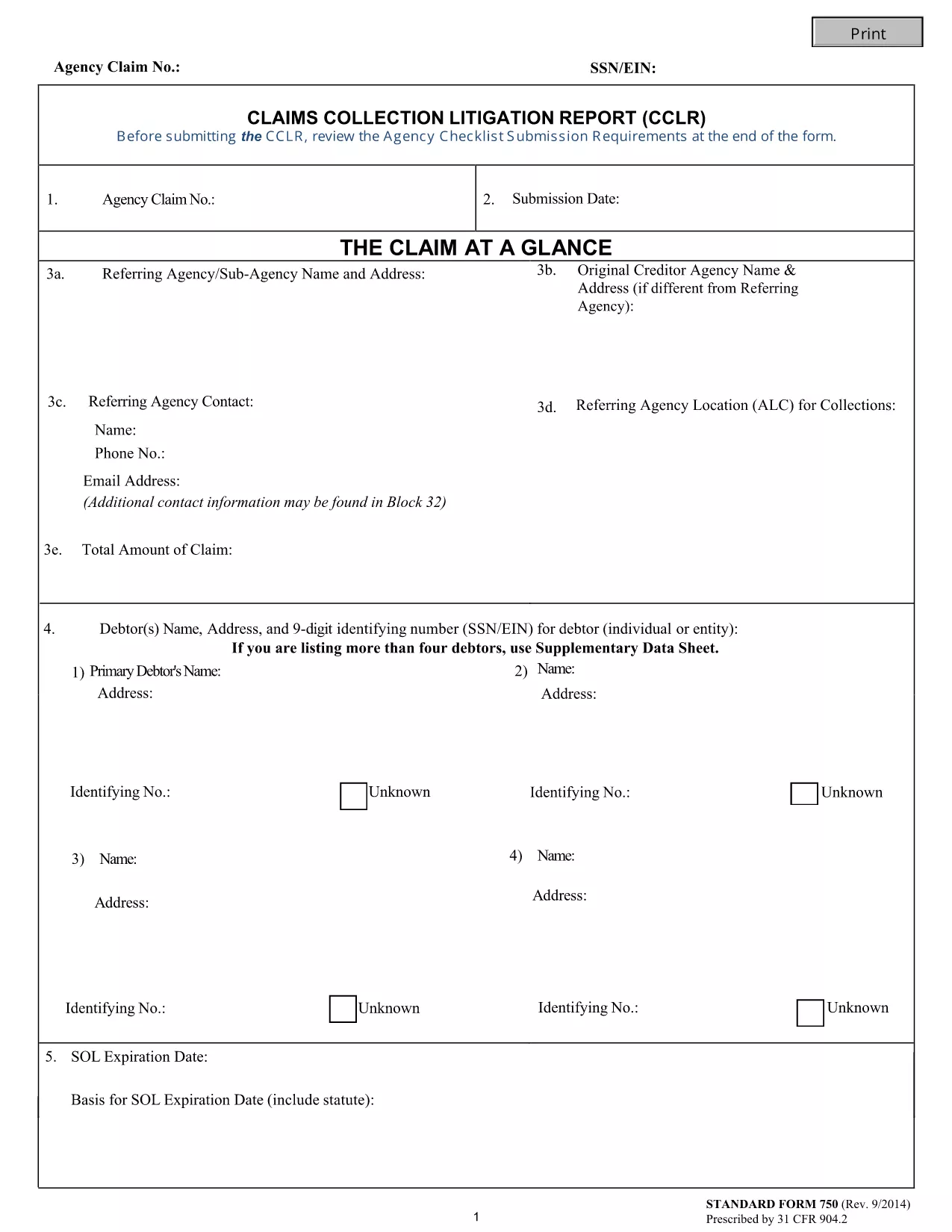
The Form 750-F (Standard Form 750) is the Department of Justice’s official debt‑substantiation report required under 31 CFR 904.2. It is used by government agencies and contractors to document and justify the collection of debts owed to the United States.

Our fillable PDF version lets you complete the form directly in your browser—no Adobe Acrobat or other editor needed. Simply click the button below, let the Formize PDF Filler load, and start typing.

What Is Form 750-F?

Form 750-F collects detailed information about the debtor, the nature of the debt, and the actions taken to recover the amount. It is commonly called the “Debt Substantiation List” and is required for:

  • Federal contract compliance audits
  • Department of Justice investigations
  • Any agency that must prove the validity of a debt before collection

How to Fill Out Form 750-F Online

Follow the step‑by‑step guide below to complete the form quickly and accurately.

Common Mistakes to Avoid

Even small errors can delay processing. Keep these tips in mind:

  • Do not leave required fields blank.
  • Use the exact format for dates (MM/DD/YYYY).
  • Enter the full legal name of the debtor as it appears on official records.
  • Double‑check dollar amounts for commas and decimal points.

Where to Submit the Completed Form

After you have saved the completed PDF, submit it according to the instructions on the covering letter of your agency or the specific contract notice. Most agencies accept electronic uploads through their secure portals.

FAQs About Form 750-F

Find quick answers to the most common questions below. If you need more help, consult your agency’s legal department.

DUK
  • Is Form 750-F required for all federal contracts?

    Only contracts that involve debt recovery or collection actions require Form 750-F. Check your contract clause or contact your contracting officer for confirmation.

  • Can I edit the PDF after I download it?

    Yes, but using the Formize online filler is recommended because it preserves the original formatting and prevents accidental corruption of the file.

  • What should I do if I make a mistake while filling the form?

    You can clear the field and re‑enter the correct information. If you have already saved the PDF, simply open it again in the Formize filler and edit the needed sections.

  • Do I need a digital signature on Form 750-F?

    Most agencies accept an electronic signature generated by the PDF filler. Confirm with your agency whether a handwritten signature is required.

  • How long should I keep a copy of the completed Form 750-F?

    Retain a copy for at least three years, or longer if your agency’s record‑keeping policy specifies a different period.

  • Is there a cost to use the Formize PDF Filler?

    No. The Formize PDF Filler is free for all users accessing fillable forms on Formize.com.

  • Can I submit the form directly from the filler?

    The filler allows you to download the completed PDF. Submission must be done through your agency’s designated portal or mailing address.

KAIP

Kaip nemokamai užpildyti Form 750-F internete, atlikdami 5 paprastus veiksmus:

  1. 1
    Click the Fill‑out Button
    Press the “Fill out this form” button on the page. The Formize PDF Filler app will open in a new tab.
  2. 2
    Wait for the Filler to Load
    The app loads the fillable PDF automatically. This usually takes a few seconds.
  3. 3
    Complete All Required Fields
    Enter the requested information exactly as it appears on your source documents. Required fields are marked with an asterisk.
  4. 4
    Review and Save
    Use the built‑in preview to double‑check your entries, then click “Save” to download the completed PDF to your device.
  5. 5
    Submit or Print
    Follow your agency’s instructions to upload the PDF electronically or print and mail a hard copy.
Formuokite PDF užpildymo programą
APIE

Teisingumo departamento (DOJ) formos

Form 750-F yra viena iš oficialių formų, kurią naudoja Jungtinių Valstijų teisingumo departamentas ir įvairūs jo skyriai, agentūros ir komponentai. DOJ yra federalinis vykdomasis departamentas, atsakingas už federalinių įstatymų vykdymą, Jungtinių Valstijų interesų gynimą teisiniais klausimais ir teisingumo vykdymą.

Štai keletas Teisingumo departamento formų pavyzdžių:

Federalinės pagalbos prašymas (SF-424): šią formą naudoja organizacijos, prašančios federalinės dotacijos arba finansinės paramos, kurią administruoja DOJ arba jo komponentai. Ji renka informaciją apie organizaciją, siūlomą projektą ir biudžetą.

Skundo dėl pilietinių teisių forma: ši forma naudojama norint pateikti skundą DOJ Civilinių teisių skyriui dėl tariamų pilietinių teisių įstatymų pažeidimų, pvz., diskriminacijos dėl rasės, lyties, negalios ar tautinės kilmės.

Prašymo pranešti apie auką forma: šią formą naudoja nusikaltimų aukos, norėdami prašyti pranešimo apie federalinės baudžiamosios bylos būseną ir procesą, nes tai yra dalis DOJ pastangų teikti informaciją ir paramą nusikaltimų aukoms.

Imigracijos formos: DOJ vykdomoji imigracijos peržiūros tarnyba (EOIR) administruoja imigracijos teismus ir su imigracija susijusias bylas. Imigracijos teismo procesuose naudojamos įvairios formos, pvz., EOIR-42B forma prašymui atleisti nuo pašalinimo arba EOIR-28 forma apeliaciniams skundams.

ATF formos: Alkoholio, tabako, šaunamųjų ginklų ir sprogmenų biuras (ATF), DOJ sudedamoji dalis, turi savo formų rinkinį įvairiems tikslams, kaip minėta ankstesniame atsakyme.

Narkotikų kontrolės administracijos (DEA) formos: DEA, kitas DOJ komponentas, naudoja savo formas su kontroliuojamomis medžiagomis susijusiems klausimams, įskaitant registracijos, ataskaitų teikimo ir įrašų saugojimo reikalavimus.

Šiuose pavyzdžiuose išryškinamos kelios DOJ formų kategorijos, tačiau Teisingumo departamento naudojamos konkrečios formos gali skirtis priklausomai nuo padalinio, agentūros ar komponento ir paslaugų ar procedūrų pobūdžio. Patartina apsilankyti oficialioje konkretaus DOJ padalinio ar agentūros svetainėje arba kreiptis į teisinę konsultaciją, kad gautumėte tikslios ir naujausios informacijos apie konkrečias DOJ formas, susijusias su jūsų situacija.

FUNKCIJOS

PDF užpildas

Lengviausias būdas užpildyti Form 750-F internete

  • Greitai užpildykite Form 750-F
    Ieškote būdo greitai užpildyti Form 750-F internete? Naudodami internetinį nemokamą PDF formų užpildą sužinosite, kaip redaguoti ir užpildyti šį pdf dokumentą greičiau nei per minutę.
  • Lengva naudoti internetinį PDF redaktorių
    Atsibodo spausdinti PDF failus, kad galėtumėte juos redaguoti prieš nuskaitydami iš naujo ir siųsdami atgal? Redaguoti PDF dokumentus internete nemokamai. Norėdami sutaupyti laiko ir popieriaus, naudokite mūsų internetinį pdf redaktorių.
  • Puikūs įrankiai, visos platformos
    Svarstote, kaip užpildyti Form 750-F „Mac“ kompiuteryje, o gal kaip nemokamai naudoti PDF užpildą? Mūsų internetiniai PDF įrankiai veikia visose platformose.
  • Saugi failų saugykla
    Užbaigti „Form 750-F“ failai saugomi saugioje duomenų bazėje, kurią valdo „Amazon Cloud“ priegloba. Galite bet kada ištrinti failus iš mūsų sistemos. Bet kokiu atveju šie failai automatiškai ištrinami po 24 valandų.
  • Kalbėkitės su Form 750-F
    Kalbėkite su „Form 750-F“ naudodami Chatize, kuri yra nemokama PDF skaitymo priemonė. Užduokite klausimų ir gaukite atsakymus iš „Form 750-F“. Tiesiog spustelėkite aukščiau esantį mygtuką Kalbėtis su dokumentu.

Ištrinti užpildymo seansą

Ištrinti pasirinktą pildymo seansą? Tokiu atveju jūsų pažanga pildant formą bus prarasta.

Ištrinti redagavimo sesiją

Ištrinti pasirinktą redagavimo sesiją? Tokiu atveju jūsų pažanga kuriant ir redaguojant formą bus prarasta.