Pasirinkite kalbą

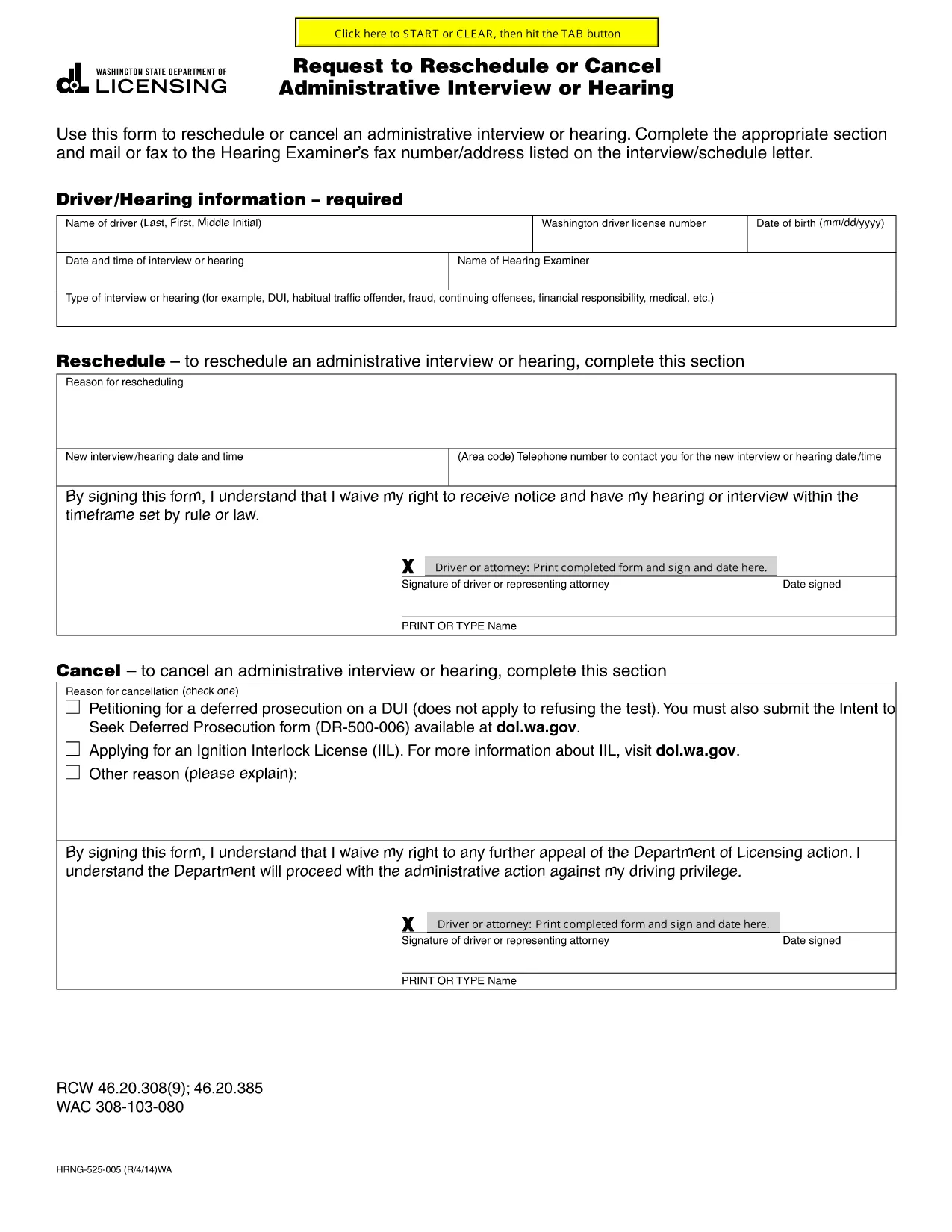
Request to Reschedule or Cancel an Administrative Interview or Hearing

  1. Kalba Anglų
  2. Šalis JAV
  3. Veikla Legal Procedures
  4. skyrius Department of Licensing
Request to Reschedule or Cancel an Administrative Interview or Hearing

If you have received an interview or hearing notice and need to change the date—or cancel altogether—this official fillable PDF is the right tool. The form complies with state licensing requirements and can be completed directly in your browser using Formize's PDF Filler, so you never have to download, print, or scan.

Key benefits:

  • Fully fillable fields that match the original government document.
  • Automatic validation to reduce errors.
  • Instant download of a completed PDF you can email, fax, or mail to the hearing examiner.

Use this form whenever you need to request a new interview date, ask for a cancellation, or provide a valid reason for the change (medical emergency, travel conflict, etc.). The completed request should be sent to the address or fax number listed on your original interview notice.

Below you’ll find step‑by‑step instructions, common pitfalls to watch out for, and answers to the most common questions.

DUK
  • Do I need a lawyer to fill out this form?

    No. The fillable PDF is designed for individuals to complete on their own. If you have legal questions, you may consult an attorney separately.

  • Can I submit the request by email?

    Yes. After completing the form, download the PDF and email it to the address provided on your interview notice. Keep a copy for your records.

  • What if I miss the deadline to request a change?

    Contact the hearing examiner immediately. Some jurisdictions may accept late requests if you provide a compelling reason and supporting documentation.

  • Is there a fee to use the Formize PDF Filler?

    No. Formize provides free online filling for this government form.

  • What supporting documents should I attach?

    Common attachments include a medical certificate, travel itinerary, or a letter from your employer explaining why you cannot attend on the scheduled date.

  • Can I request both a reschedule and a cancellation on the same form?

    Yes. The form includes separate sections for "Reschedule Request" and "Cancellation Request." Fill out only the section that applies to you.

  • How long does it take for the hearing examiner to respond?

    Response times vary by agency, but you should receive a confirmation within 5‑10 business days.

KAIP

Kaip nemokamai užpildyti reschedule interview form internete, atlikdami 5 paprastus veiksmus:

  1. 1
    Open the Fillable Form
    Click the "Fill out this form" button on the page. The Formize PDF Filler app will open in a new tab.
  2. 2
    Wait for the Filler to Load
    The app loads the PDF instantly. No download or installation is required.
  3. 3
    Complete All Required Fields
    Enter your name, case number, current interview date, and the new date you are requesting. Provide a brief reason and attach any supporting documents.
  4. 4
    Review and Sign
    Use the built‑in signature field to sign electronically, then review the entire form for accuracy.
  5. 5
    Submit or Save
    Click "Download" to save the completed PDF. Email, fax, or mail the file to the hearing examiner as instructed on your interview notice.
Formuokite PDF užpildymo programą
APIE

reschedule interview form šabloną

Naudodami tradicinį PDF dokumento peržiūros ir pildymo funkcijų rinkinį, žiniatinklio programos pranašumus ir interaktyvų išdėstymą, galite užbaigti reschedule interview form per kelias minutes.

FUNKCIJOS

PDF užpildas

Lengviausias būdas užpildyti reschedule interview form internete

  • Greitai užpildykite reschedule interview form
    Ieškote būdo greitai užpildyti reschedule interview form internete? Naudodami internetinį nemokamą PDF formų užpildą sužinosite, kaip redaguoti ir užpildyti šį pdf dokumentą greičiau nei per minutę.
  • Lengva naudoti internetinį PDF redaktorių
    Atsibodo spausdinti PDF failus, kad galėtumėte juos redaguoti prieš nuskaitydami iš naujo ir siųsdami atgal? Redaguoti PDF dokumentus internete nemokamai. Norėdami sutaupyti laiko ir popieriaus, naudokite mūsų internetinį pdf redaktorių.
  • Puikūs įrankiai, visos platformos
    Svarstote, kaip užpildyti reschedule interview form „Mac“ kompiuteryje, o gal kaip nemokamai naudoti PDF užpildą? Mūsų internetiniai PDF įrankiai veikia visose platformose.
  • Saugi failų saugykla
    Užbaigti „reschedule interview form“ failai saugomi saugioje duomenų bazėje, kurią valdo „Amazon Cloud“ priegloba. Galite bet kada ištrinti failus iš mūsų sistemos. Bet kokiu atveju šie failai automatiškai ištrinami po 24 valandų.
  • Kalbėkitės su reschedule interview form
    Kalbėkite su „reschedule interview form“ naudodami Chatize, kuri yra nemokama PDF skaitymo priemonė. Užduokite klausimų ir gaukite atsakymus iš „reschedule interview form“. Tiesiog spustelėkite aukščiau esantį mygtuką Kalbėtis su dokumentu.

Ištrinti užpildymo seansą

Ištrinti pasirinktą pildymo seansą? Tokiu atveju jūsų pažanga pildant formą bus prarasta.

Ištrinti redagavimo sesiją

Ištrinti pasirinktą redagavimo sesiją? Tokiu atveju jūsų pažanga kuriant ir redaguojant formą bus prarasta.