
Pasirinkite kalbą

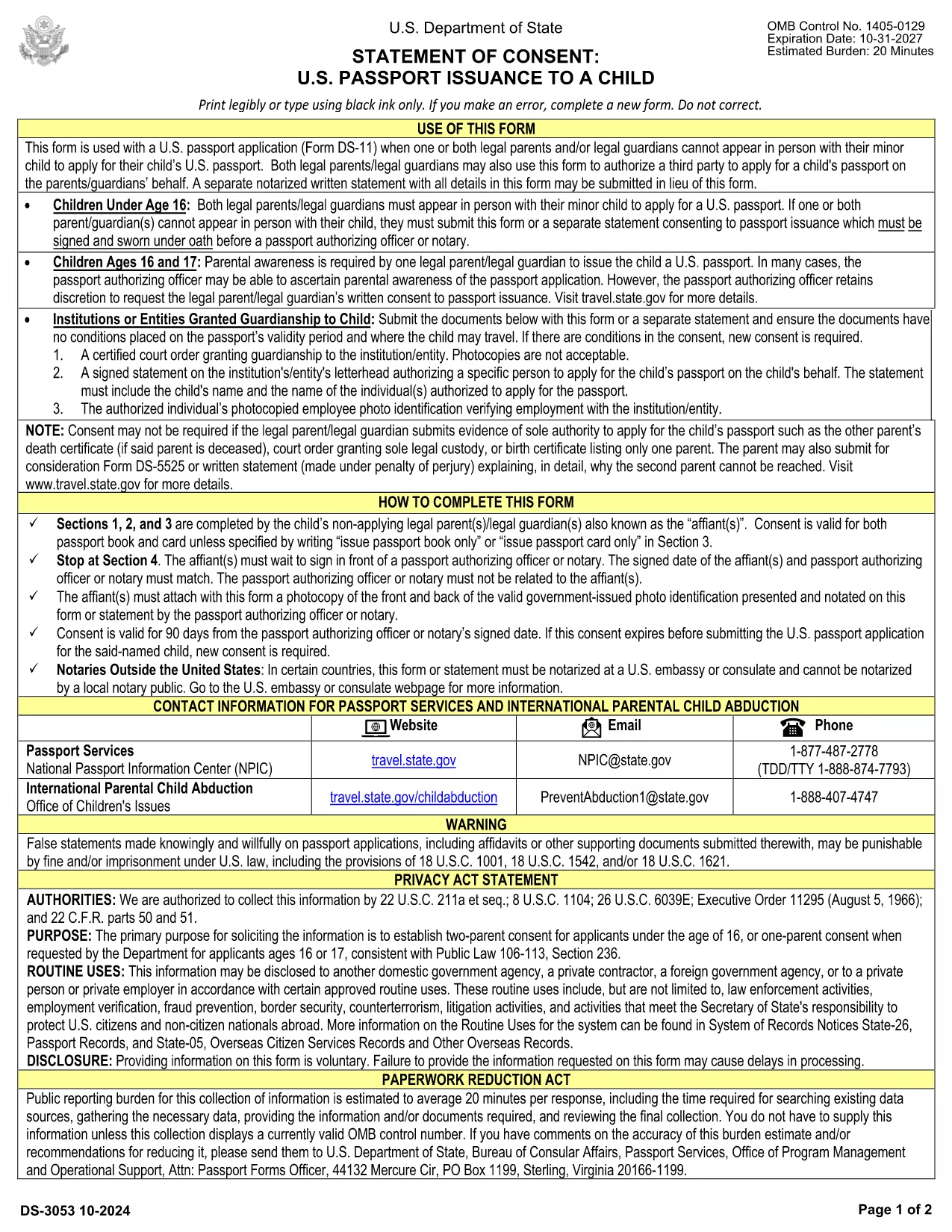
Consent Form for Visa Application (Minor) – Fillable PDF

  1. Kalba Anglų
  2. Šalis JAV
  3. skyrius Valstybės departamentas
  4. Veikla Vizos
Consent Form for Visa Application (Minor) – Fillable PDF

Consent Form for Visa Application (Minor) – Fillable PDF

When a minor applies for a U.S. visa, the Department of State requires a signed consent form from both parents or legal guardians. This visa application consent form confirms that the child has permission to travel and that the parents approve the visa request.

Why You Need This Consent Form

The consent form is a mandatory attachment to the DS-160/DS-260 visa package for minors. Without it, the application will be delayed or rejected at the U.S. embassy or consulate. It also protects families from allegations of child abduction.

How to Fill the Form Online with Formize

Formize lets you complete the PDF directly in your browser—no extra software needed. Simply click the Fill out this form button below, wait for the Formize PDF Filler to load, and start entering the required information.

Common Mistakes to Avoid

  • Leaving any required field blank (e.g., passport numbers, dates of birth).
  • Using an illegible handwritten signature when you can sign electronically.
  • Forgetting to notarize the form when the destination country requires it.
  • Mismatching names with the child’s birth certificate.

Download & Print the Completed Form

After you finish, you can download the completed PDF, email it to the embassy, or print a hard copy for notarization. The file is fully compatible with all U.S. visa processing systems.

Legal Requirements & Notarization

Most U.S. embassies accept a signed PDF, but many countries and airlines require a notarized original. Check the specific requirements of the consulate you are applying to. Notarization adds an extra layer of authenticity and can prevent travel delays.

Ready to start? Click the button below and let Formize handle the heavy lifting.

DUK
  • What is the purpose of the visa consent form?

    It provides written proof that both parents or legal guardians authorize the minor to apply for and travel on a U.S. visa.

  • Can I fill the consent form on a mobile device?

    Yes. Formize’s PDF Filler works on smartphones, tablets, and desktop computers.

  • Do I need to notarize the form?

    Notarization is not required by the U.S. Department of State, but some embassies or airlines may ask for a notarized copy. Check the specific requirements of your destination.

  • How long does it take to complete the form?

    Most users finish in under 10 minutes once they have all required information at hand.

  • Is the filled PDF accepted for visa submission?

    Yes. The completed PDF meets the formatting standards of U.S. consular offices and can be uploaded with the DS‑160/DS‑260.

  • What if I make a mistake after downloading?

    You can reopen the form in Formize, edit the fields, and re‑download the corrected version.

  • Is my personal data safe?

    Formize processes the PDF locally in your browser; no personal data is stored on our servers.

KAIP

Kaip nemokamai užpildyti visa consent form internete, atlikdami 6 paprastus veiksmus:

  1. 1
    Click the Fill Out This Form button
    Locate the "Fill out this form" button on this page and click it to launch the Formize PDF Filler.
  2. 2
    Wait for the Formize PDF Filler to load
    A secure loading screen appears while the fillable PDF is prepared. This only takes a few seconds.
  3. 3
    Enter all required information
    Complete each field—parent names, passport numbers, child’s details, and travel information—directly in the browser.
  4. 4
    Sign electronically
    Use the electronic signature tool to add your signature. You can also upload a scanned signature if preferred.
  5. 5
    Download or email the finished form
    When you’re satisfied, click "Download" to save the PDF or use the "Email" option to send it straight to the embassy.
  6. 6
    Print and notarize if required
    If the consulate mandates a notarized copy, print the completed PDF and bring it to a notary public.
Formuokite PDF užpildymo programą
APIE

Vizos formos

visa consent form yra viena iš vizų formų, kurios yra dokumentai, naudojami kreipiantis dėl vizos įvažiuoti į užsienio šalį. Viza – tai dokumentas, leidžiantis užsieniečiui atvykti, būti, o kartais ir dirbti užsienio šalyje tam tikrą laiką. Tikslios vizos formos ir reikalavimai skiriasi priklausomai nuo šalies ir vizos tipo.

Vizos formose paprastai reikalaujama asmeninės informacijos, tokios kaip vardas, pavardė, gimimo data ir paso informacija, taip pat informacija apie kelionės tikslą ir trukmę, numatomą kelionės tikslą ir tai, ar pareiškėjui anksčiau buvo atsisakyta išduoti vizą ar jis buvo deportuotas iš šalies. Formose taip pat gali reikėti patvirtinančių dokumentų, tokių kaip pasas, nuotraukos ir finansinės paramos įrodymas.

Jungtinėse Valstijose labiausiai paplitusios vizos formos yra DS-160 ir DS-260 formos. DS-160 forma naudojama kreipiantis dėl neimigracinės vizos, o forma DS-260 naudojama kreipiantis dėl imigracijos vizos. Šiose formose reikia išsamios informacijos apie pareiškėjo asmeninę ir kelionių istoriją, taip pat patvirtinamuosius dokumentus, tokius kaip pasas, kelionės maršrutas ir finansiniai įrašai.

Kitose šalyse gali būti taikomos skirtingos vizos formos ir reikalavimai, tačiau pagrindinis procesas paprastai apima prašymo išduoti vizą užpildymą, patvirtinančių dokumentų pateikimą ir dalyvavimą pokalbyje su konsuliniu pareigūnu JAV ambasadoje ar konsulate. Svarbu pažymėti, kad prašymo išduoti vizą procesas gali būti sudėtingas ir daug laiko reikalaujantis, todėl asmenims, norintiems gauti vizą, rekomenduojama pasikonsultuoti su imigracijos advokatu ar kitu kvalifikuotu specialistu, kad įsitikintų, jog yra laikomasi visų reikiamų formų ir reikalavimų.

FUNKCIJOS

PDF užpildas

Lengviausias būdas užpildyti visa consent form internete

  • Greitai užpildykite visa consent form
    Ieškote būdo greitai užpildyti visa consent form internete? Naudodami internetinį nemokamą PDF formų užpildą sužinosite, kaip redaguoti ir užpildyti šį pdf dokumentą greičiau nei per minutę.
  • Lengva naudoti internetinį PDF redaktorių
    Atsibodo spausdinti PDF failus, kad galėtumėte juos redaguoti prieš nuskaitydami iš naujo ir siųsdami atgal? Redaguoti PDF dokumentus internete nemokamai. Norėdami sutaupyti laiko ir popieriaus, naudokite mūsų internetinį pdf redaktorių.
  • Puikūs įrankiai, visos platformos
    Svarstote, kaip užpildyti visa consent form „Mac“ kompiuteryje, o gal kaip nemokamai naudoti PDF užpildą? Mūsų internetiniai PDF įrankiai veikia visose platformose.
  • Saugi failų saugykla
    Užbaigti „visa consent form“ failai saugomi saugioje duomenų bazėje, kurią valdo „Amazon Cloud“ priegloba. Galite bet kada ištrinti failus iš mūsų sistemos. Bet kokiu atveju šie failai automatiškai ištrinami po 24 valandų.
  • Kalbėkitės su visa consent form
    Kalbėkite su „visa consent form“ naudodami Chatize, kuri yra nemokama PDF skaitymo priemonė. Užduokite klausimų ir gaukite atsakymus iš „visa consent form“. Tiesiog spustelėkite aukščiau esantį mygtuką Kalbėtis su dokumentu.

Ištrinti užpildymo seansą

Ištrinti pasirinktą pildymo seansą? Tokiu atveju jūsų pažanga pildant formą bus prarasta.

Ištrinti redagavimo sesiją

Ištrinti pasirinktą redagavimo sesiją? Tokiu atveju jūsų pažanga kuriant ir redaguojant formą bus prarasta.