Pasirinkite kalbą

SP-120 Fillable PDF Form – Quick Online Completion

  1. Šalis JAV
  2. Kalba Anglų
  3. Veikla Mokesčiai
  4. skyrius Department of Taxation
SP-120 Fillable PDF Form – Quick Online Completion

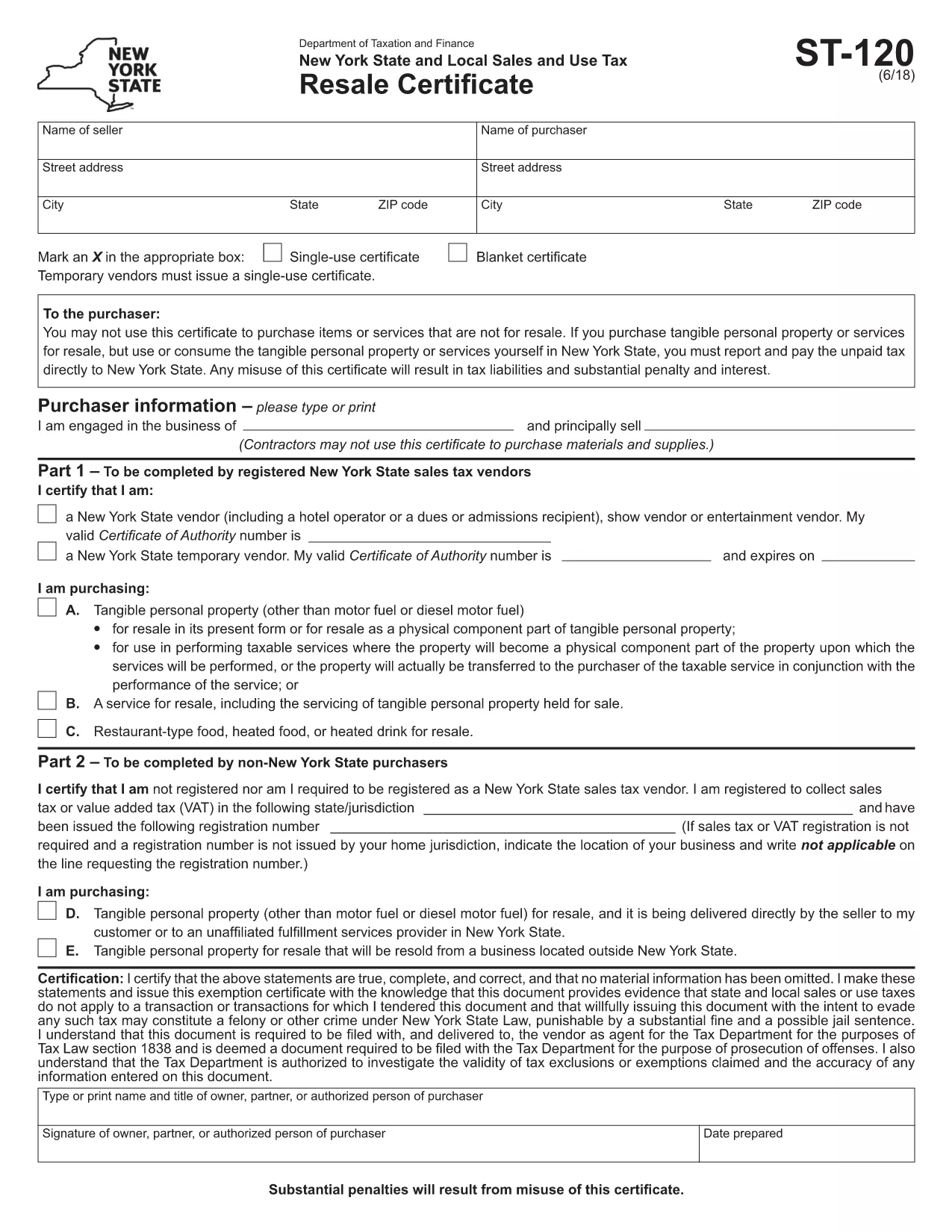
The SP-120 form is the standard sales‑tax exemption certificate used by many U.S. businesses to document tax‑exempt purchases. Whether you’re a reseller, a nonprofit, or a government agency, completing the SP-120 correctly saves time and prevents costly audits.

What Is the SP-120 Form?

The SP-120 is a state‑level certificate that grants exemption from sales tax on qualifying purchases. It typically requires basic business information, a description of the exemption type, and a signature from an authorized officer.

How to Fill Out the SP-120 Online

Instead of printing, printing, and scanning, simply click the "Fill out this form" button on this page. The Formize PDF Filler app will load the official fillable PDF, allowing you to:

  • Enter data directly into fields
  • Save progress and return later
  • Download a completed, signed PDF instantly

Common Mistakes to Avoid

  • Leaving required fields blank – every asterisk (*) field must be completed.
  • Using the wrong exemption code – verify your business classification before entering the code.
  • Illegible signatures – use a clear electronic signature or print to sign.

Where to Submit the Completed Form

Once you have saved the filled PDF, submit it to the appropriate state tax authority or provide it to the vendor requesting the exemption. Most agencies accept electronic submissions via email or secure upload portals.

Download the Official SP-120 PDF

For reference, you can also download the original, unfilled SP-120 PDF from the link below. However, we recommend using the online filler for a faster, error‑free experience.

DUK
  • Is the SP-120 form available for free?

    Yes. The official SP-120 PDF is provided by the state tax agency at no cost. Formize lets you fill it online for free.

  • Can I use the SP-120 for out‑of‑state purchases?

    Only if the vendor accepts the issuing state’s exemption certificate. Check the vendor’s policy before using the SP-120 for out‑of‑state transactions.

  • Do I need a digital signature?

    A digital signature is accepted by most agencies. If you prefer a handwritten signature, print the completed form, sign, and scan it back.

  • How long is the SP-120 valid?

    Validity periods vary by state. Typically, the certificate remains valid for one year unless revoked or the business information changes.

  • What if I make a mistake after submitting?

    Contact the tax authority immediately. You may need to submit a corrected SP-120 or an amendment form.

  • Is the Formize filler secure?

    Yes. Formize uses SSL encryption, and your data is processed locally in your browser; nothing is stored on our servers.

KAIP

Kaip nemokamai užpildyti SP-120 form internete, atlikdami 4 paprastus veiksmus:

  1. 1
    Click the Fill‑out Button
    Press the "Fill out this form" button on the page. The Formize PDF Filler app will open the SP-120 PDF directly in your browser.
  2. 2
    Enter Your Information
    Complete each highlighted field—business name, address, exemption code, and authorized signature—using your keyboard.
  3. 3
    Save and Download
    When all required fields are filled, click "Save". Download the completed PDF and keep a copy for your records.
  4. 4
    Submit to the Authority
    Email or upload the saved PDF to the state tax agency or provide it to the vendor that requested the exemption.
Formuokite PDF užpildymo programą
APIE

Mokesčių formos

SP-120 form yra viena iš mokesčių formų, kurios yra dokumentai, naudojami su mokesčiais susijusiai informacijai pranešti atitinkamai mokesčių institucijai. Yra įvairių tipų mokesčių formų, įskaitant federalines, valstijos ir vietines mokesčių formas, kurios gali skirtis priklausomai nuo mokesčių mokėtojo aplinkybių ir vietos.

FUNKCIJOS

PDF užpildas

Lengviausias būdas užpildyti SP-120 form internete

  • Greitai užpildykite SP-120 form
    Ieškote būdo greitai užpildyti SP-120 form internete? Naudodami internetinį nemokamą PDF formų užpildą sužinosite, kaip redaguoti ir užpildyti šį pdf dokumentą greičiau nei per minutę.
  • Lengva naudoti internetinį PDF redaktorių
    Atsibodo spausdinti PDF failus, kad galėtumėte juos redaguoti prieš nuskaitydami iš naujo ir siųsdami atgal? Redaguoti PDF dokumentus internete nemokamai. Norėdami sutaupyti laiko ir popieriaus, naudokite mūsų internetinį pdf redaktorių.
  • Puikūs įrankiai, visos platformos
    Svarstote, kaip užpildyti SP-120 form „Mac“ kompiuteryje, o gal kaip nemokamai naudoti PDF užpildą? Mūsų internetiniai PDF įrankiai veikia visose platformose.
  • Saugi failų saugykla
    Užbaigti „SP-120 form“ failai saugomi saugioje duomenų bazėje, kurią valdo „Amazon Cloud“ priegloba. Galite bet kada ištrinti failus iš mūsų sistemos. Bet kokiu atveju šie failai automatiškai ištrinami po 24 valandų.
  • Kalbėkitės su SP-120 form
    Kalbėkite su „SP-120 form“ naudodami Chatize, kuri yra nemokama PDF skaitymo priemonė. Užduokite klausimų ir gaukite atsakymus iš „SP-120 form“. Tiesiog spustelėkite aukščiau esantį mygtuką Kalbėtis su dokumentu.

Ištrinti užpildymo seansą

Ištrinti pasirinktą pildymo seansą? Tokiu atveju jūsų pažanga pildant formą bus prarasta.

Ištrinti redagavimo sesiją

Ištrinti pasirinktą redagavimo sesiją? Tokiu atveju jūsų pažanga kuriant ir redaguojant formą bus prarasta.