Pasirinkite kalbą

Medical Evaluation Request for Driver Re‑Examination (Fillable PDF)

  1. Kalba Anglų
  2. Šalis JAV
  3. Veikla Driver Licensing
  4. skyrius Transporto departamentas
Medical Evaluation Request for Driver Re‑Examination (Fillable PDF)

Why a Medical Evaluation Is Required

State DMVs must ensure every licensed driver meets physical, mental, and visual standards. When a medical condition could affect safe driving, a medical evaluation request triggers a re‑examination to protect public safety.

Key Sections of the Form Explained

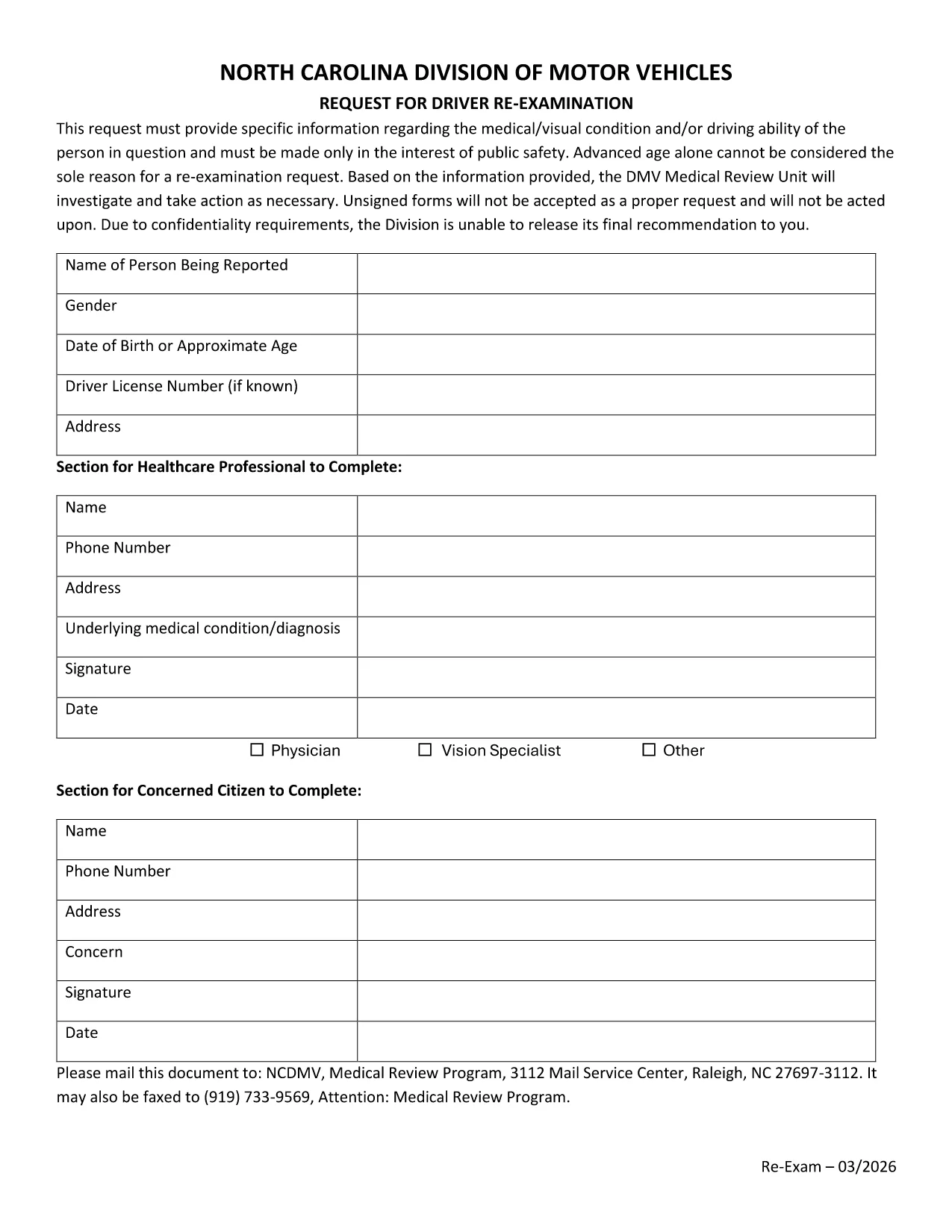
The form is divided into clear parts: driver information, requesting party details, medical condition description, and supporting documentation checklist. Each section asks for specific data such as license number, physician’s name, and a narrative explaining why the re‑examination is needed.

How to Complete the Fillable PDF Online

Formize makes the process painless. Click the "Fill out this form" button, wait a moment while the Formize PDF Filler loads, then enter the required information directly in your browser. No download‑edit‑upload steps are needed.

Common Mistakes to Avoid

1. Leaving the driver’s license number blank.
2. Omitting the physician’s signature or contact details.
3. Forgetting to attach the required medical reports.
4. Using vague language in the narrative – be specific about symptoms and functional limitations.

Following these tips ensures a faster review by the DMV Medical Review Unit.

DUK
  • Who can submit a medical evaluation request?

    The request may be submitted by the driver, a physician, law‑enforcement officer, or a concerned family member on behalf of the driver.

  • Do I need a signature on the PDF?

    Yes. Both the driver and the requesting medical professional must sign the form. The Formize filler allows you to add a digital signature.

  • Can I submit the form electronically?

    After completing the fillable PDF, you can download it and upload it through your state DMV’s online portal, if available.

  • What supporting documents are required?

    Include a recent physician’s statement, any relevant test results (e.g., vision or neurological exams), and a medication list if applicable.

  • How long does the DMV take to review the request?

    Processing times vary by state but typically range from 10‑15 business days after the form and supporting documents are received.

  • Is there a fee to file the medical evaluation request?

    Most states do not charge a fee for the request itself, though a re‑examination appointment may have associated costs.

  • What happens if my request is denied?

    You will receive a written notice explaining the reason. You may request a hearing or provide additional medical evidence.

KAIP

Kaip nemokamai užpildyti medical evaluation request internete, atlikdami 5 paprastus veiksmus:

  1. 1
    Open the Fillable Form
    Click the "Fill out this form" button on the page. The Formize PDF Filler app will open in a new tab.
  2. 2
    Wait for the Loader
    Allow a few seconds for the secure filler to load. No software download is required.
  3. 3
    Enter All Required Information
    Complete each field—driver details, medical description, and contact information—using your keyboard.
  4. 4
    Attach Supporting Documents
    Use the "Add File" button to upload physician statements or test results directly within the form.
  5. 5
    Review, Save, and Submit
    Double‑check for completeness, then click "Save & Submit". You can download a copy for your records.
Formuokite PDF užpildymo programą
APIE

medical evaluation request šabloną

Naudodami tradicinį PDF dokumento peržiūros ir pildymo funkcijų rinkinį, žiniatinklio programos pranašumus ir interaktyvų išdėstymą, galite užbaigti medical evaluation request per kelias minutes.

FUNKCIJOS

PDF užpildas

Lengviausias būdas užpildyti medical evaluation request internete

  • Greitai užpildykite medical evaluation request
    Ieškote būdo greitai užpildyti medical evaluation request internete? Naudodami internetinį nemokamą PDF formų užpildą sužinosite, kaip redaguoti ir užpildyti šį pdf dokumentą greičiau nei per minutę.
  • Lengva naudoti internetinį PDF redaktorių
    Atsibodo spausdinti PDF failus, kad galėtumėte juos redaguoti prieš nuskaitydami iš naujo ir siųsdami atgal? Redaguoti PDF dokumentus internete nemokamai. Norėdami sutaupyti laiko ir popieriaus, naudokite mūsų internetinį pdf redaktorių.
  • Puikūs įrankiai, visos platformos
    Svarstote, kaip užpildyti medical evaluation request „Mac“ kompiuteryje, o gal kaip nemokamai naudoti PDF užpildą? Mūsų internetiniai PDF įrankiai veikia visose platformose.
  • Saugi failų saugykla
    Užbaigti „medical evaluation request“ failai saugomi saugioje duomenų bazėje, kurią valdo „Amazon Cloud“ priegloba. Galite bet kada ištrinti failus iš mūsų sistemos. Bet kokiu atveju šie failai automatiškai ištrinami po 24 valandų.
  • Kalbėkitės su medical evaluation request
    Kalbėkite su „medical evaluation request“ naudodami Chatize, kuri yra nemokama PDF skaitymo priemonė. Užduokite klausimų ir gaukite atsakymus iš „medical evaluation request“. Tiesiog spustelėkite aukščiau esantį mygtuką Kalbėtis su dokumentu.

Ištrinti užpildymo seansą

Ištrinti pasirinktą pildymo seansą? Tokiu atveju jūsų pažanga pildant formą bus prarasta.

Ištrinti redagavimo sesiją

Ištrinti pasirinktą redagavimo sesiją? Tokiu atveju jūsų pažanga kuriant ir redaguojant formą bus prarasta.