
Pasirinkite kalbą

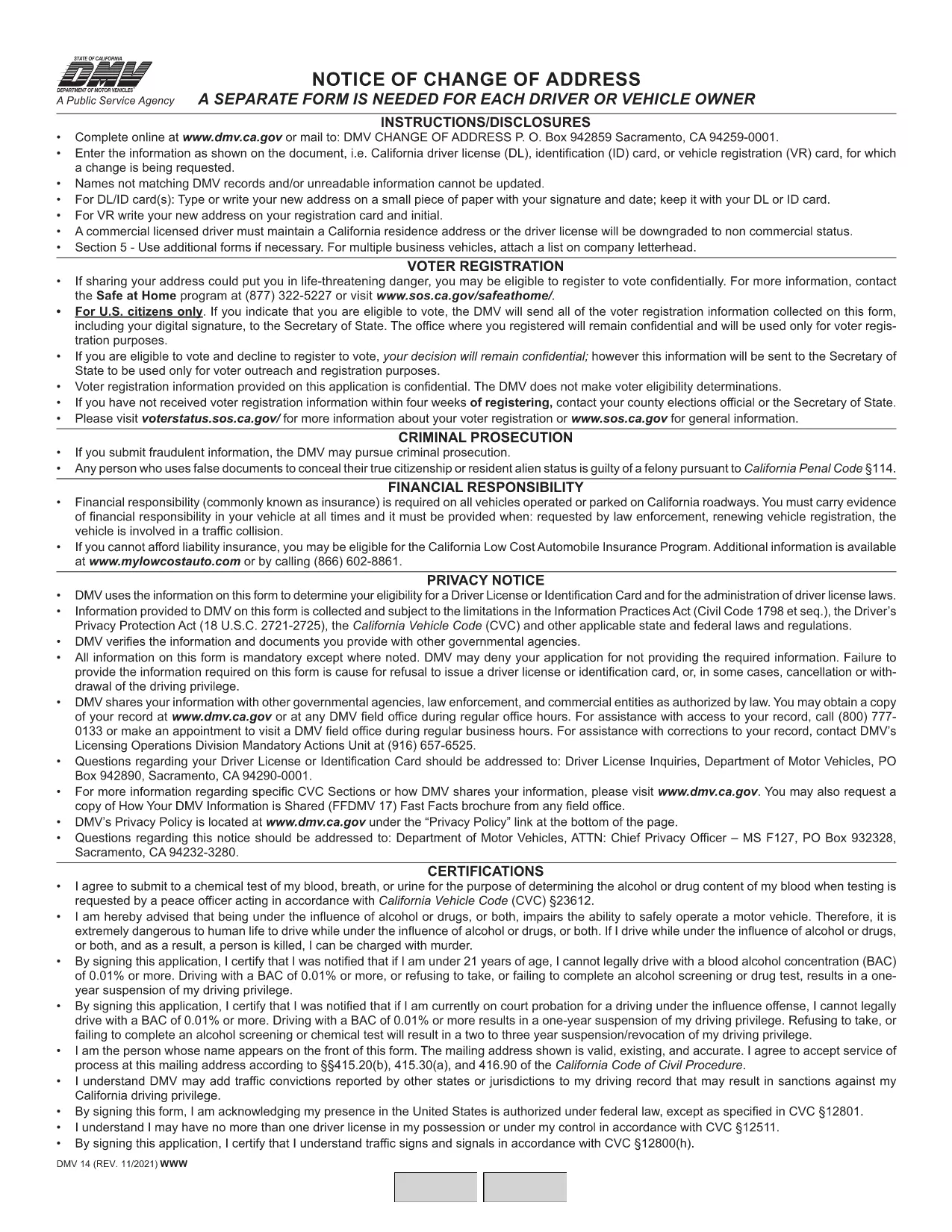
California DMV Form 14 – Notice of Change of Address

  1. Kalba Anglų
  2. Šalis JAV
  3. Veikla Vairuotojo pažymėjimas
  4. valstybė Kalifornija
California DMV Form 14 – Notice of Change of Address

When you move in California, the Department of Motor Vehicles (DMV) requires you to update your address on your driver license or identification card. Form DMV‑14, also called the “Notice of Change of Address,” is the official document used for this purpose.

What Is DMV Form 14?

Form DMV‑14 is a short, printable notice that captures your new residential address, mailing address (if different), and vehicle information. The form is required for:

  • Driver licenses
  • Identification cards
  • Vehicle registrations

Submitting the form promptly helps the DMV keep your records current and ensures you receive important notices, renewal reminders, and traffic citations.

How to Fill Out the Form Online with Formize

Instead of downloading the PDF, printing it, and manually filling it in, you can complete the form instantly on our site:

  1. Click the "Fill out this form" button below the description.
  2. Our Formize PDF Filler app will load the fillable version of DMV‑14.
  3. Enter your information in the highlighted fields (address, phone, vehicle details, etc.).
  4. Review the completed form and click Submit to download a completed PDF or share it directly with the DMV.

All data stays in your browser; we never store personal details.

Common Mistakes to Avoid

  • Using the wrong ink color: If you print the form, use black or dark blue ink only.
  • Leaving fields blank: Every field marked with an asterisk (*) is mandatory.
  • Incorrect ZIP code: Double‑check the ZIP code for both old and new addresses.
  • Signing the wrong section: The signature must appear on the "Driver/Owner Signature" line.

Where to Submit Your Completed Form

After you’ve filled out and saved the PDF, you have three submission options:

  1. Mail: Send the form to DMV, P.O. Box 942859, Sacramento, CA 94259‑0001.
  2. In‑person: Bring the printed form to any California DMV office.
  3. Online (recommended): Upload the completed PDF through the California DMV website under "Change of Address".

Updating your address online is the fastest way to have the change processed, usually within 5‑7 business days.

DUK
  • Do I need to submit Form DMV‑14 for every vehicle I own?

    No. You only need to submit the form once for the primary address change. The DMV will automatically update the address on all vehicles linked to your driver license.

  • Can I file Form DMV‑14 online without printing?

    Yes. Use the Formize PDF Filler on this page to complete the form digitally, then download the finished PDF or upload it directly to the DMV website.

  • How long does it take for the address change to be processed?

    When submitted online, the DMV typically updates your records within 5‑7 business days. Mail submissions may take longer.

  • Is there a fee to change my address with Form DMV‑14?

    Changing your address on a driver license or ID card is free. However, if you need a new card with the updated address, a replacement fee applies.

  • What should I do if I make a mistake on the form?

    If you catch an error before submitting, simply correct it in the fillable PDF and re‑save. If you have already mailed the form, fill out a new Form DMV‑14 with the correct information.

KAIP

Kaip nemokamai užpildyti DMV Form 14 internete, atlikdami 4 paprastus veiksmus:

  1. 1
    Open the Fillable Form
    Click the "Fill out this form" button on the page. The Formize PDF Filler will open the DMV‑14 document in your browser.
  2. 2
    Enter Your New Address
    Type your new residential address, mailing address (if different), and any vehicle information into the highlighted fields.
  3. 3
    Review and Sign
    Double‑check all entries for accuracy, then add your electronic signature using the signature field.
  4. 4
    Download or Submit
    Click "Download PDF" to save a copy, or use the "Submit to DMV" option to upload the completed form directly to the California DMV portal.
Formuokite PDF užpildymo programą
APIE

Prašymo išduoti vairuotojo pažymėjimą formos

DMV Form 14 yra viena iš vairuotojo pažymėjimo formų, kurios yra dokumentai, naudojami norint gauti vairuotojo pažymėjimą arba užklausti įvairių paslaugų, susijusių su vairuotojo pažymėjimais. Šias formas paprastai teikia departamentas arba agentūra, atsakinga už vairuotojo pažymėjimų išdavimą konkrečioje jurisdikcijoje, pvz., Jungtinių Valstijų Motorinių transporto priemonių departamentas (DMV).

Įprastos vairuotojo pažymėjimo formos apima:

Vairuotojo pažymėjimo paraiška: ši forma naudojama norint gauti naują vairuotojo pažymėjimą arba atnaujinti esamą. Paprastai tam reikia asmeninės informacijos, tokios kaip vardas, adresas, gimimo data ir socialinio draudimo numeris.

Asmens tapatybę patvirtinantys dokumentai: kai kuriose jurisdikcijose reikalingi specialūs asmens tapatybės dokumentai, patvirtinantys pareiškėjo tapatybę ir gyvenamąją vietą. Tai gali būti tokios formos kaip gimimo liudijimas, pasas arba socialinio draudimo kortelė.

Regėjimo patikrinimas: daugeliui prašymų išduoti vairuotojo pažymėjimą reikalinga regėjimo patikrinimo forma, kurioje įgaliotas medicinos specialistas arba akių priežiūros specialistas patvirtina, kad kandidatas atitinka minimalius vairavimo regėjimo reikalavimus.

Vairuotojo mokymo formos: kai kuriais atvejais asmenims gali tekti pateikti vairuotojo mokymo kurso baigimo įrodymą, pvz., vairuotojo išsilavinimo baigimo pažymėjimą arba instruktoriaus pasirašytą formą.

Medicininis įvertinimas: dėl tam tikrų sveikatos būklių sveikatos priežiūros specialistas gali užpildyti papildomas formas. Šios formos patvirtina pareiškėjo fizinį ir protinį tinkamumą vairuoti.

Adreso keitimo forma: jei vairuotojo pažymėjimo savininkas persikelia gyventi kitu adresu, gali tekti užpildyti adreso pakeitimo formą, kad būtų atnaujinta vairuotojo pažymėjimo informacija.

Vairuotojo pažymėjimo formas galite gauti vietiniame DMV biure arba atsisiųsti iš jų svetainės. Svarbu kruopščiai užpildyti ir pateikti reikiamas formas kartu su visais patvirtinamaisiais dokumentais, kad būtų užtikrintas sklandus paraiškų teikimo ar paslaugų teikimo procesas.

FUNKCIJOS

PDF užpildas

Lengviausias būdas užpildyti DMV Form 14 internete

  • Greitai užpildykite DMV Form 14
    Ieškote būdo greitai užpildyti DMV Form 14 internete? Naudodami internetinį nemokamą PDF formų užpildą sužinosite, kaip redaguoti ir užpildyti šį pdf dokumentą greičiau nei per minutę.
  • Lengva naudoti internetinį PDF redaktorių
    Atsibodo spausdinti PDF failus, kad galėtumėte juos redaguoti prieš nuskaitydami iš naujo ir siųsdami atgal? Redaguoti PDF dokumentus internete nemokamai. Norėdami sutaupyti laiko ir popieriaus, naudokite mūsų internetinį pdf redaktorių.
  • Puikūs įrankiai, visos platformos
    Svarstote, kaip užpildyti DMV Form 14 „Mac“ kompiuteryje, o gal kaip nemokamai naudoti PDF užpildą? Mūsų internetiniai PDF įrankiai veikia visose platformose.
  • Saugi failų saugykla
    Užbaigti „DMV Form 14“ failai saugomi saugioje duomenų bazėje, kurią valdo „Amazon Cloud“ priegloba. Galite bet kada ištrinti failus iš mūsų sistemos. Bet kokiu atveju šie failai automatiškai ištrinami po 24 valandų.
  • Kalbėkitės su DMV Form 14
    Kalbėkite su „DMV Form 14“ naudodami Chatize, kuri yra nemokama PDF skaitymo priemonė. Užduokite klausimų ir gaukite atsakymus iš „DMV Form 14“. Tiesiog spustelėkite aukščiau esantį mygtuką Kalbėtis su dokumentu.

Ištrinti užpildymo seansą

Ištrinti pasirinktą pildymo seansą? Tokiu atveju jūsų pažanga pildant formą bus prarasta.

Ištrinti redagavimo sesiją

Ištrinti pasirinktą redagavimo sesiją? Tokiu atveju jūsų pažanga kuriant ir redaguojant formą bus prarasta.