
Pasirinkite kalbą

Form 5454 – Request for Interactive Driver Records (Fillable PDF)

  1. Kalba Anglų
  2. Šalis JAV
  3. Veikla Vairuotojo pažymėjimas
  4. valstybė Misūris
Form 5454 – Request for Interactive Driver Records (Fillable PDF)

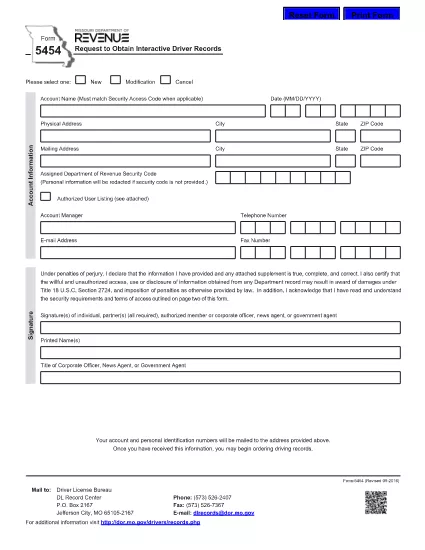
Form 5454 is the official Missouri Department of Revenue document used to request interactive driver records. Whether you’re an employer, a background‑check provider, or an individual needing a personal driving history, this fillable PDF makes the process fast and error‑free.

Our online Formize PDF Filler loads the exact same form you would receive by mail, but with the convenience of digital entry, automatic validation, and instant download of the completed document.

Below you’ll find everything you need to know about the purpose of Form 5454, step‑by‑step instructions for filling it out, common pitfalls to watch for, and where to send the finished form.

DUK
  • Who is required to use Form 5454?

    Any individual, employer, or agency that needs an official, interactive driver record from the Missouri Department of Revenue must submit Form 5454.

  • Is the PDF truly fillable online?

    Yes. After clicking the “Fill out this form” button, the Formize PDF Filler turns the static PDF into an interactive document you can complete directly in your browser.

  • Can I submit the form electronically?

    The Missouri Department of Revenue still requires a printed copy with a signature, but you can download the completed PDF, print it, sign it, and mail it in.

  • What fees are associated with requesting driver records?

    Fees vary based on the type of record requested. Refer to the fee schedule on the Missouri Department of Revenue website for the most current rates.

  • How long does it take to receive the records?

    Processing typically takes 5‑10 business days after the signed form is received, though expedited services may be available for an additional charge.

  • What common mistakes should I avoid?

    Do not leave required fields blank, ensure the driver’s license number is typed exactly as it appears, and double‑check the mailing address for accuracy.

KAIP

Kaip nemokamai užpildyti Form 5454 internete, atlikdami 5 paprastus veiksmus:

  1. 1
    Click the Fill‑out Button
    On this page, click the bright “Fill out this form” button. The Formize PDF Filler app will open in a new tab.
  2. 2
    Wait for the Filler to Load
    The app automatically loads the exact Form 5454 PDF. A loading spinner appears for a few seconds – this ensures all fields are interactive.
  3. 3
    Enter Your Information
    Type directly into each field (name, address, driver’s license number, etc.). Required fields are highlighted in red if left blank.
  4. 4
    Review and Validate
    Use the built‑in validation to check for formatting errors (e.g., ZIP code, date of birth). Correct any warnings before proceeding.
  5. 5
    Save, Download, or Submit
    When the form is complete, click “Save PDF” to download a copy for your records, or use the “Email” button to send it directly to the Missouri Department of Revenue.
Formuokite PDF užpildymo programą
APIE

Prašymo išduoti vairuotojo pažymėjimą formos

Daugumoje šalių prieš išvažiuojant į kelią privaloma turėti vairuotojo pažymėjimą. Vairuotojo pažymėjimo gavimas yra svarbus etapas kiekvienam, norinčiam vairuoti automobilį.

Form 5454 yra viena iš prašymo išduoti vairuotojo pažymėjimą formų, kuri yra dokumentai, naudojami informacijai iš žmonių, norinčių gauti vairuotojo pažymėjimą, rinkti. Paprastai jame yra laukeliai, kuriuose nurodomas pareiškėjo vardas, pavardė, gimimo data, ID numeris, kontaktinė informacija, taip pat vairuotojo pažymėjimo istorija ir patirtis.

FUNKCIJOS

PDF užpildas

Lengviausias būdas užpildyti Form 5454 internete

  • Greitai užpildykite Form 5454
    Ieškote būdo greitai užpildyti Form 5454 internete? Naudodami internetinį nemokamą PDF formų užpildą sužinosite, kaip redaguoti ir užpildyti šį pdf dokumentą greičiau nei per minutę.
  • Lengva naudoti internetinį PDF redaktorių
    Atsibodo spausdinti PDF failus, kad galėtumėte juos redaguoti prieš nuskaitydami iš naujo ir siųsdami atgal? Redaguoti PDF dokumentus internete nemokamai. Norėdami sutaupyti laiko ir popieriaus, naudokite mūsų internetinį pdf redaktorių.
  • Puikūs įrankiai, visos platformos
    Svarstote, kaip užpildyti Form 5454 „Mac“ kompiuteryje, o gal kaip nemokamai naudoti PDF užpildą? Mūsų internetiniai PDF įrankiai veikia visose platformose.
  • Saugi failų saugykla
    Užbaigti „Form 5454“ failai saugomi saugioje duomenų bazėje, kurią valdo „Amazon Cloud“ priegloba. Galite bet kada ištrinti failus iš mūsų sistemos. Bet kokiu atveju šie failai automatiškai ištrinami po 24 valandų.
  • Kalbėkitės su Form 5454
    Kalbėkite su „Form 5454“ naudodami Chatize, kuri yra nemokama PDF skaitymo priemonė. Užduokite klausimų ir gaukite atsakymus iš „Form 5454“. Tiesiog spustelėkite aukščiau esantį mygtuką Kalbėtis su dokumentu.

Ištrinti užpildymo seansą

Ištrinti pasirinktą pildymo seansą? Tokiu atveju jūsų pažanga pildant formą bus prarasta.

Ištrinti redagavimo sesiją

Ištrinti pasirinktą redagavimo sesiją? Tokiu atveju jūsų pažanga kuriant ir redaguojant formą bus prarasta.