
Pasirinkite kalbą

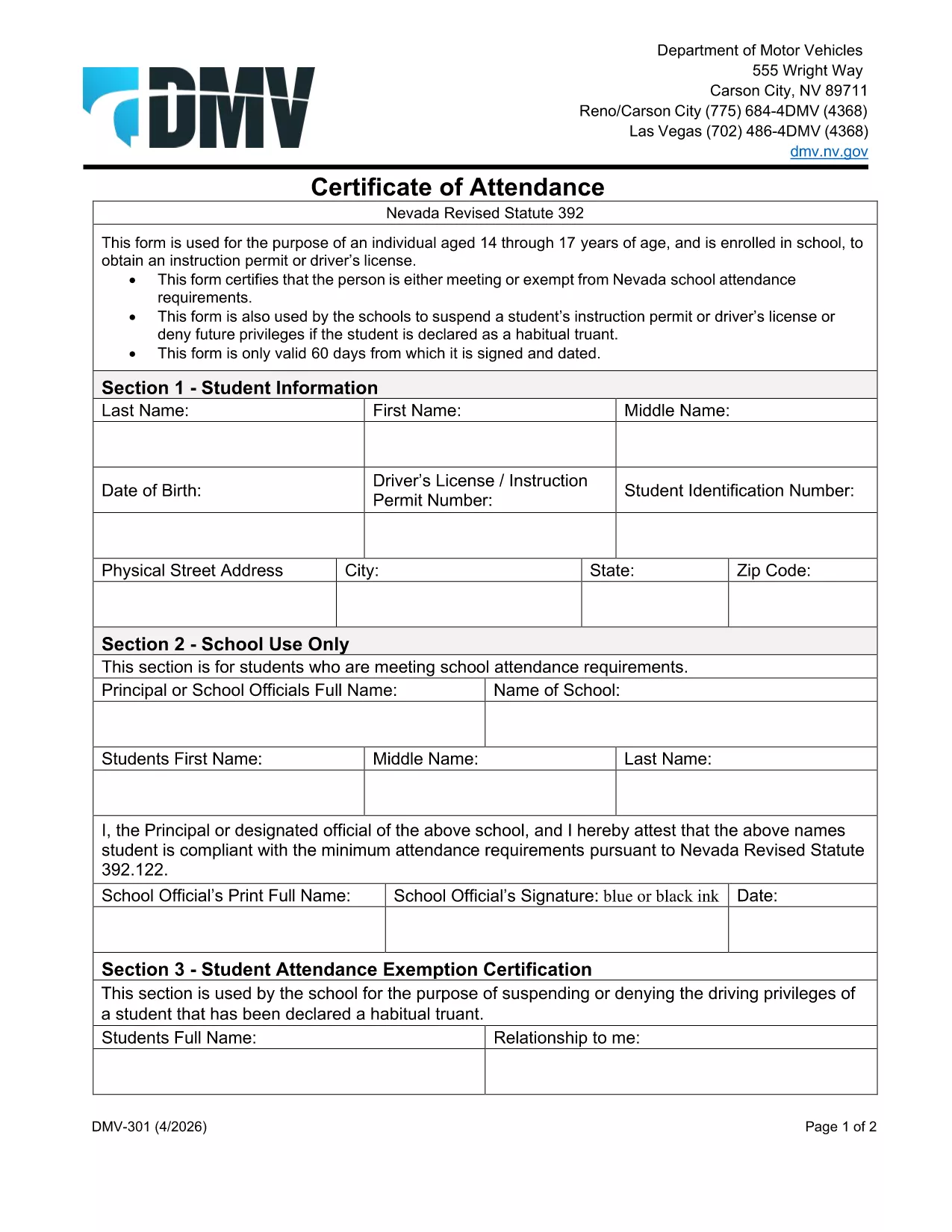
Nevada DMV Form 301 – Certification of Attendance (Fillable PDF)

  1. Kalba Anglų
  2. Šalis JAV
  3. Veikla Vairuotojo pažymėjimas
  4. valstybė Nevada
Nevada DMV Form 301 – Certification of Attendance (Fillable PDF)

The Nevada Department of Motor Vehicles (DMV) requires Form 301 – Certification of Attendance for teens ages 14‑18 who are enrolled in school and are applying for an instruction permit or driver’s license. This form verifies that the student meets the state’s school attendance requirements or is exempt.

What Is DMV Form 301?

Form 301 is a short, one‑page certificate completed by the student, a parent/guardian, and the school. It is used to:

  • Confirm regular school attendance
  • Document any legal exemption
  • Allow the DMV to issue an instruction permit or driver’s license

How to Complete the Certification of Attendance

Follow the simple steps below. The form is fully fillable online, so you don’t need any PDF editor.

  1. Click the "Fill out this form" button on this page.
  2. Wait a few seconds while the Formize PDF Filler app loads the fillable DMV 301 PDF.
  3. Enter the student’s printed name, date of birth, and school information in the designated fields.
  4. Have the parent/guardian sign the required section electronically.
  5. If you are a school administrator, complete the "School Use Only" part and add the school seal.
  6. When all fields are completed, click Save to download a completed copy, or click Print to bring a hard copy to the DMV.

Common Mistakes to Avoid

To ensure your form is accepted, avoid these frequent errors:

  • Leaving any required field blank – the filler will highlight missing data.
  • Using an illegible signature – the electronic signature must be clear.
  • Submitting an outdated school name or address – verify the information with your school office.
  • Forgetting to date the form – the DMV requires a current date.

Where to Submit the Form

After you’ve filled and signed Form 301, bring the printed copy (or a secured digital version on a tablet) to any Nevada DMV office together with the required identification documents. The form is accepted at all DMV locations across Nevada.

Download the Fillable PDF Instantly

Ready to start? Click the button above, let Formize load the fillable PDF, and complete the Certification of Attendance in minutes.

DUK
  • Who needs to complete DMV Form 301?

    Any Nevada resident between 14 and 18 years old who is enrolled in school and is applying for an instruction permit or driver’s license must submit a completed Form 301.

  • Can I fill out Form 301 on a mobile device?

    Yes. The Formize PDF Filler works on smartphones, tablets, and computers, allowing you to complete the form on any device.

  • Do I need a physical signature?

    The DMV accepts an electronic signature entered through the fillable PDF. Print the form with the signature if you prefer a hard copy.

  • What if my school does not have a seal?

    If the school lacks an official seal, have the school administrator write the school name and date in the "School Use Only" section and sign it.

  • How long is the Certification of Attendance valid?

    The form is valid for the specific permit or license application it accompanies. If the application is delayed, a new form may be required.

  • Where can I submit the completed Form 301?

    Bring the completed form to any Nevada DMV office, or submit it as part of your online permit application if the DMV offers that option.

  • Is there a fee to download the PDF?

    No. The PDF is provided free of charge; you only pay the standard DMV fees for the permit or license.

KAIP

Kaip nemokamai užpildyti DMV 301 internete, atlikdami 4 paprastus veiksmus:

  1. 1
    Open the Fillable Form
    Click the "Fill out this form" button on the page. The Formize PDF Filler app will load the DMV 301 PDF automatically.
  2. 2
    Enter Required Information
    Type the student's name, date of birth, school details, and any exemption notes directly into the highlighted fields.
  3. 3
    Add Signatures
    Use your mouse or touchscreen to sign the parent/guardian section. School officials can add their signature and seal if needed.
  4. 4
    Save or Print
    When all fields are completed, click "Save" to download the completed PDF or "Print" to obtain a hard‑copy for the DMV.
Formuokite PDF užpildymo programą
APIE

Prašymo išduoti vairuotojo pažymėjimą formos

DMV 301 yra viena iš vairuotojo pažymėjimo formų, kurios yra dokumentai, naudojami norint gauti vairuotojo pažymėjimą arba užklausti įvairių paslaugų, susijusių su vairuotojo pažymėjimais. Šias formas paprastai teikia departamentas arba agentūra, atsakinga už vairuotojo pažymėjimų išdavimą konkrečioje jurisdikcijoje, pvz., Jungtinių Valstijų Motorinių transporto priemonių departamentas (DMV).

Įprastos vairuotojo pažymėjimo formos apima:

Vairuotojo pažymėjimo paraiška: ši forma naudojama norint gauti naują vairuotojo pažymėjimą arba atnaujinti esamą. Paprastai tam reikia asmeninės informacijos, tokios kaip vardas, adresas, gimimo data ir socialinio draudimo numeris.

Asmens tapatybę patvirtinantys dokumentai: kai kuriose jurisdikcijose reikalingi specialūs asmens tapatybės dokumentai, patvirtinantys pareiškėjo tapatybę ir gyvenamąją vietą. Tai gali būti tokios formos kaip gimimo liudijimas, pasas arba socialinio draudimo kortelė.

Regėjimo patikrinimas: daugeliui prašymų išduoti vairuotojo pažymėjimą reikalinga regėjimo patikrinimo forma, kurioje įgaliotas medicinos specialistas arba akių priežiūros specialistas patvirtina, kad kandidatas atitinka minimalius vairavimo regėjimo reikalavimus.

Vairuotojo mokymo formos: kai kuriais atvejais asmenims gali tekti pateikti vairuotojo mokymo kurso baigimo įrodymą, pvz., vairuotojo išsilavinimo baigimo pažymėjimą arba instruktoriaus pasirašytą formą.

Medicininis įvertinimas: dėl tam tikrų sveikatos būklių sveikatos priežiūros specialistas gali užpildyti papildomas formas. Šios formos patvirtina pareiškėjo fizinį ir protinį tinkamumą vairuoti.

Adreso keitimo forma: jei vairuotojo pažymėjimo savininkas persikelia gyventi kitu adresu, gali tekti užpildyti adreso pakeitimo formą, kad būtų atnaujinta vairuotojo pažymėjimo informacija.

Vairuotojo pažymėjimo formas galite gauti vietiniame DMV biure arba atsisiųsti iš jų svetainės. Svarbu kruopščiai užpildyti ir pateikti reikiamas formas kartu su visais patvirtinamaisiais dokumentais, kad būtų užtikrintas sklandus paraiškų teikimo ar paslaugų teikimo procesas.

FUNKCIJOS

PDF užpildas

Lengviausias būdas užpildyti DMV 301 internete

  • Greitai užpildykite DMV 301
    Ieškote būdo greitai užpildyti DMV 301 internete? Naudodami internetinį nemokamą PDF formų užpildą sužinosite, kaip redaguoti ir užpildyti šį pdf dokumentą greičiau nei per minutę.
  • Lengva naudoti internetinį PDF redaktorių
    Atsibodo spausdinti PDF failus, kad galėtumėte juos redaguoti prieš nuskaitydami iš naujo ir siųsdami atgal? Redaguoti PDF dokumentus internete nemokamai. Norėdami sutaupyti laiko ir popieriaus, naudokite mūsų internetinį pdf redaktorių.
  • Puikūs įrankiai, visos platformos
    Svarstote, kaip užpildyti DMV 301 „Mac“ kompiuteryje, o gal kaip nemokamai naudoti PDF užpildą? Mūsų internetiniai PDF įrankiai veikia visose platformose.
  • Saugi failų saugykla
    Užbaigti „DMV 301“ failai saugomi saugioje duomenų bazėje, kurią valdo „Amazon Cloud“ priegloba. Galite bet kada ištrinti failus iš mūsų sistemos. Bet kokiu atveju šie failai automatiškai ištrinami po 24 valandų.
  • Kalbėkitės su DMV 301
    Kalbėkite su „DMV 301“ naudodami Chatize, kuri yra nemokama PDF skaitymo priemonė. Užduokite klausimų ir gaukite atsakymus iš „DMV 301“. Tiesiog spustelėkite aukščiau esantį mygtuką Kalbėtis su dokumentu.

Ištrinti užpildymo seansą

Ištrinti pasirinktą pildymo seansą? Tokiu atveju jūsų pažanga pildant formą bus prarasta.

Ištrinti redagavimo sesiją

Ištrinti pasirinktą redagavimo sesiją? Tokiu atveju jūsų pažanga kuriant ir redaguojant formą bus prarasta.