
Pasirinkite kalbą

Virginia DMV DMS-004 Fillable PDF – Payment Authorization Form

  1. Šalis JAV
  2. Kalba Anglų
  3. Veikla Vairuotojo pažymėjimas
  4. valstybė Virdžinija
Virginia DMV DMS-004 Fillable PDF – Payment Authorization Form

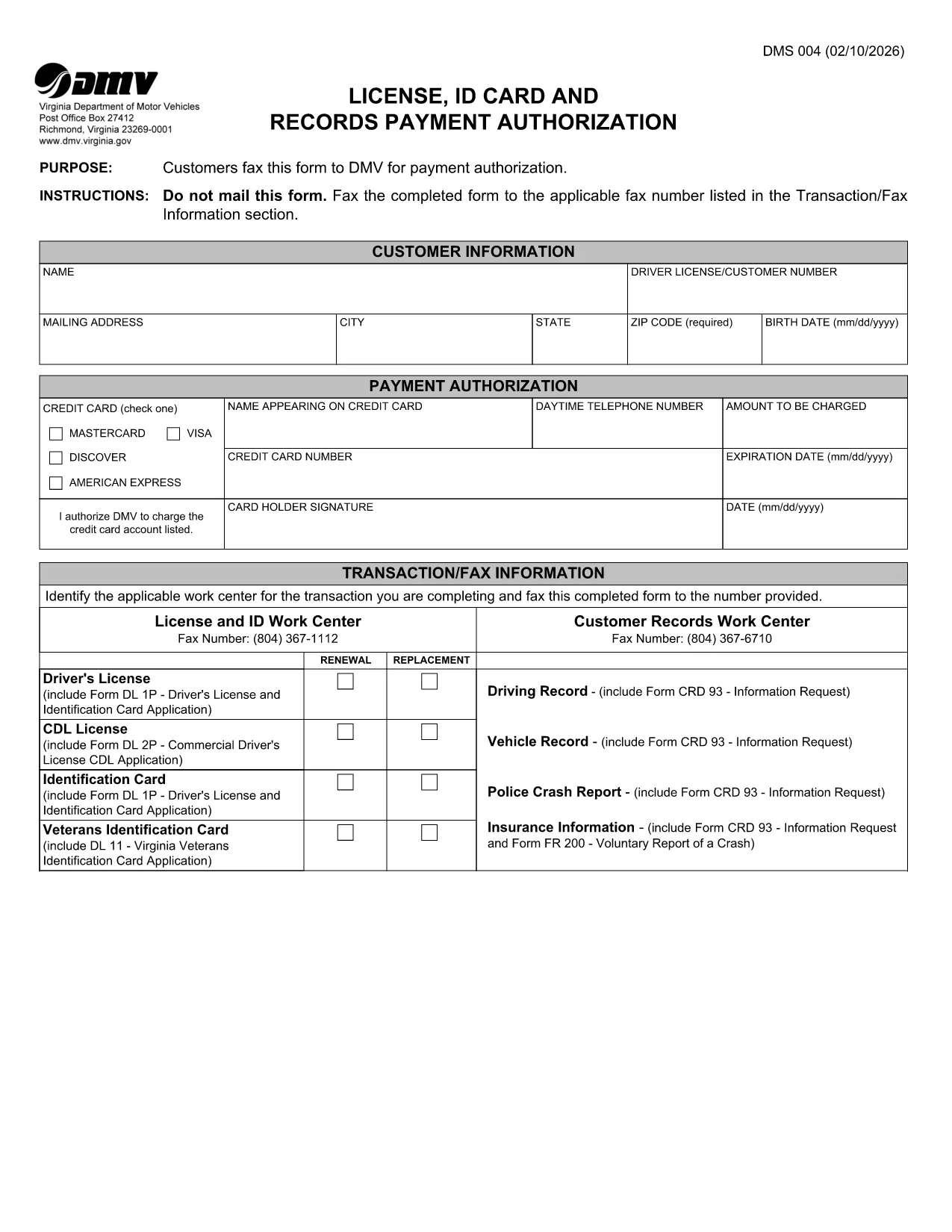
The DMS-004 is the official Virginia Department of Motor Vehicles (DMV) form used to authorize payment for a driver's license, ID card, or records request. This fillable PDF lets you complete the payment authorization quickly, without printing or faxing.

Our online Formize PDF Filler loads the DMS-004 directly in your browser, so you can type, sign, and submit the form in minutes. No additional software is required.

What Is the DMS-004 Form?

The DMS-004, titled "License, ID Card and Records Payment Authorization," captures:

  • Applicant’s personal information (name, address, driver’s license number)
  • Details of the requested service (license renewal, new ID, record copy)
  • Payment method and authorization signature

It is required whenever you need to pay the DMV for a license, ID card, or official record request.

How to Fill Out DMS-004 Online with Formize

Follow the simple steps below to complete the form without ever leaving the page.

Common Mistakes to Avoid

Even a tiny error can delay processing. Keep these tips in mind:

  • Double‑check the driver’s license number – a single digit off will cause a rejection.
  • Use a valid credit or debit card number; the form does not accept expired cards.
  • Sign exactly where the signature box appears; digital signatures are accepted.
  • Do not leave any mandatory fields blank; the Formize validator will highlight them.

Where to Submit the Completed Form

After you finish, you have two options:

  • Fax – The form automatically generates a fax‑ready PDF you can send to the number listed in the “Transaction/Fax Information” section.
  • Upload – Use the Virginia DMV online portal to upload the completed PDF directly.

Both methods are accepted, but the online upload is faster and provides an instant confirmation.

DUK
  • What is the purpose of the DMS-004 form?

    The DMS-004 authorizes the Virginia DMV to process payment for a driver's license, state ID card, or official records request.

  • Can I fill out DMS-004 on a mobile device?

    Yes. The Formize PDF Filler is fully responsive, allowing you to complete the form on smartphones or tablets.

  • Is a digital signature accepted?

    A digital signature created within the Formize app meets the DMV’s requirements and is treated the same as a handwritten signature.

  • Do I need to print the form after filling it out?

    No. You can fax the completed PDF directly from the app or upload the file to the DMV’s online portal.

  • What payment methods are accepted on DMS-004?

    The form accepts credit or debit card numbers. Ensure the card is current and has sufficient funds.

  • How long does it take for the DMV to process the form?

    Processing is typically 2–3 business days after the DMV receives the completed and authorized form.

  • Can I save a draft and finish later?

    Yes. The Formize app allows you to save a draft locally in your browser and return to it anytime before submission.

  • What should I do if I make a mistake?

    Edit the field directly in the Formize app before final submission. If you have already submitted, contact the Virginia DMV to request a correction.

KAIP

Kaip nemokamai užpildyti DMS-004 internete, atlikdami 4 paprastus veiksmus:

  1. 1
    Open the Fillable Form
    Click the "Fill out this form" button on the page. The Formize PDF Filler app loads the DMS-004 directly in your browser.
  2. 2
    Enter Your Information
    Type in all required fields: personal details, service requested, and payment information. The form validates entries in real time.
  3. 3
    Add Your Digital Signature
    Use your mouse, trackpad, or touchscreen to sign in the signature box. Formize captures a secure digital signature.
  4. 4
    Review and Submit
    Click the "Review" button to ensure no fields are missing. Then choose to either fax the PDF automatically or download it for online upload to the Virginia DMV portal.
Formuokite PDF užpildymo programą
APIE

Prašymo išduoti vairuotojo pažymėjimą formos

Daugumoje šalių prieš išvažiuojant į kelią privaloma turėti vairuotojo pažymėjimą. Vairuotojo pažymėjimo gavimas yra svarbus etapas kiekvienam, norinčiam vairuoti automobilį.

DMS-004 yra viena iš prašymo išduoti vairuotojo pažymėjimą formų, kuri yra dokumentai, naudojami informacijai iš žmonių, norinčių gauti vairuotojo pažymėjimą, rinkti. Paprastai jame yra laukeliai, kuriuose nurodomas pareiškėjo vardas, pavardė, gimimo data, ID numeris, kontaktinė informacija, taip pat vairuotojo pažymėjimo istorija ir patirtis.

FUNKCIJOS

PDF užpildas

Lengviausias būdas užpildyti DMS-004 internete

  • Greitai užpildykite DMS-004
    Ieškote būdo greitai užpildyti DMS-004 internete? Naudodami internetinį nemokamą PDF formų užpildą sužinosite, kaip redaguoti ir užpildyti šį pdf dokumentą greičiau nei per minutę.
  • Lengva naudoti internetinį PDF redaktorių
    Atsibodo spausdinti PDF failus, kad galėtumėte juos redaguoti prieš nuskaitydami iš naujo ir siųsdami atgal? Redaguoti PDF dokumentus internete nemokamai. Norėdami sutaupyti laiko ir popieriaus, naudokite mūsų internetinį pdf redaktorių.
  • Puikūs įrankiai, visos platformos
    Svarstote, kaip užpildyti DMS-004 „Mac“ kompiuteryje, o gal kaip nemokamai naudoti PDF užpildą? Mūsų internetiniai PDF įrankiai veikia visose platformose.
  • Saugi failų saugykla
    Užbaigti „DMS-004“ failai saugomi saugioje duomenų bazėje, kurią valdo „Amazon Cloud“ priegloba. Galite bet kada ištrinti failus iš mūsų sistemos. Bet kokiu atveju šie failai automatiškai ištrinami po 24 valandų.
  • Kalbėkitės su DMS-004
    Kalbėkite su „DMS-004“ naudodami Chatize, kuri yra nemokama PDF skaitymo priemonė. Užduokite klausimų ir gaukite atsakymus iš „DMS-004“. Tiesiog spustelėkite aukščiau esantį mygtuką Kalbėtis su dokumentu.

Ištrinti užpildymo seansą

Ištrinti pasirinktą pildymo seansą? Tokiu atveju jūsų pažanga pildant formą bus prarasta.

Ištrinti redagavimo sesiją

Ištrinti pasirinktą redagavimo sesiją? Tokiu atveju jūsų pažanga kuriant ir redaguojant formą bus prarasta.