
Pasirinkite kalbą

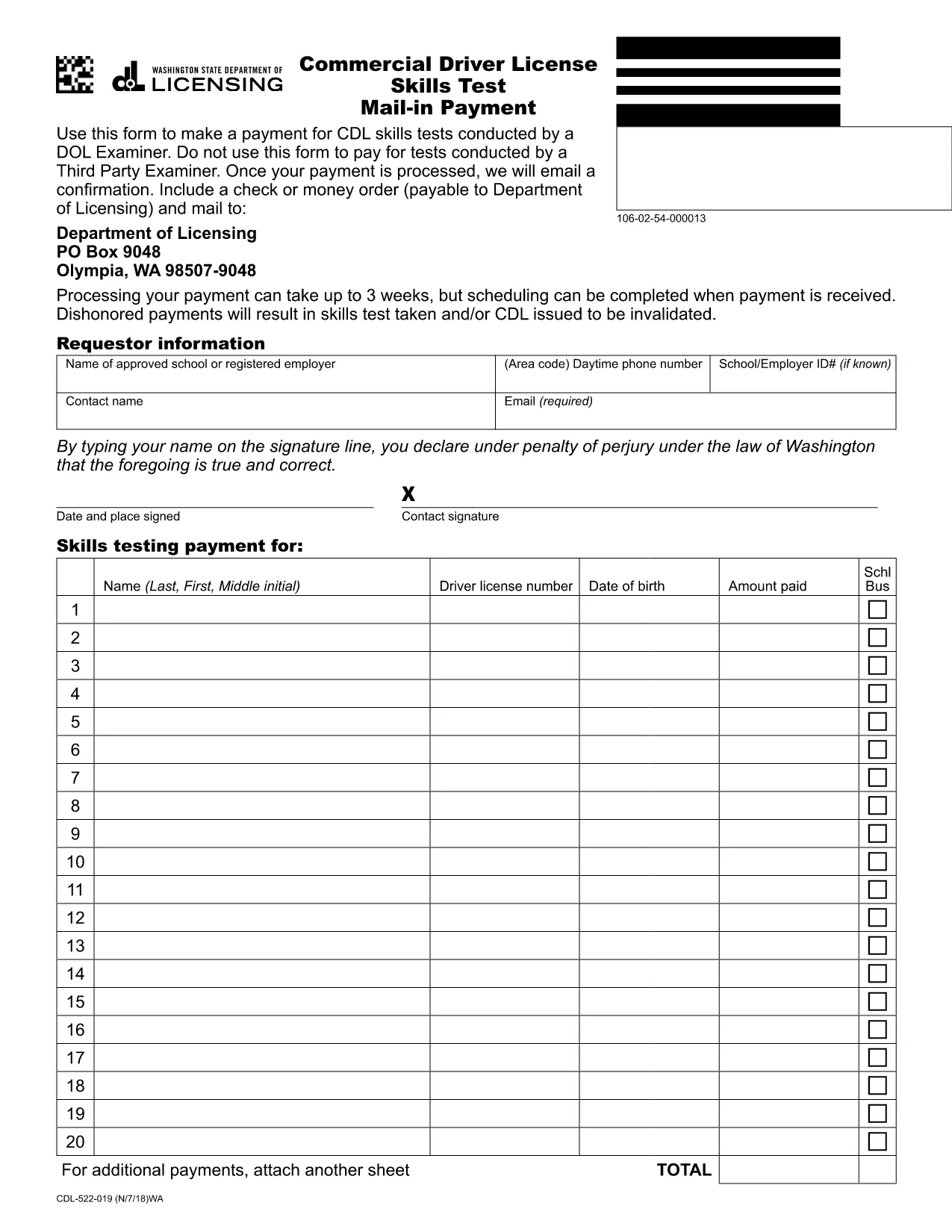
Commercial Driver License Skills Test Mail‑In Payment Form

  1. Kalba Anglų
  2. Šalis JAV
  3. Veikla Vairuotojo pažymėjimas
  4. valstybė Vašingtonas
Commercial Driver License Skills Test Mail‑In Payment Form

Need to pay for your Commercial Driver License (CDL) skills test? Our secure, fillable PDF solution lets you complete the Department of Licensing’s mail‑in payment form without printing or scanning.

Simply click the Fill out this form button below, and the Formize PDF Filler app will load the official Washington State form. All fields are interactive, and you can add your check or money‑order image directly before submitting.

  • Fast processing: Once you submit, you’ll receive an email confirmation within 24‑48 hours.
  • Secure handling: Your payment information stays encrypted throughout the process.
  • Paper‑less convenience: No need to mail a physical form unless you prefer to send a hard‑copy check.

Follow the step‑by‑step guide below to avoid common errors and ensure your payment is accepted.

DUK
  • Can I use a credit card for the CDL skills test payment?

    The mail‑in payment form accepts only a check or money order payable to the Department of Licensing. Credit cards must be processed through the online portal, not this form.

  • Do I need to print the form after filling it online?

    No. The Formize PDF Filler submits the completed PDF electronically. Print only if you prefer to keep a physical copy for your records.

  • How long does processing take after I submit?

    The Department typically processes mail‑in payments within 24‑48 hours and sends a confirmation email.

  • What should I do if my check is lost in the mail?

    Contact the Department of Licensing’s payment office immediately. You can also submit a new payment using this online form.

  • Is the form accepted for tests conducted by third‑party examiners?

    No. This form is only for CDL skills tests administered by a Department of Licensing examiner.

  • Can I save my progress and finish the form later?

    Yes. The Formize app lets you save a draft. Return to the form, load your saved file, and continue where you left off.

  • What information is required on the payment form?

    You must provide your full name, mailing address, CDL number, test date, payment amount, and attach a clear image of your check or money order.

  • Is there a fee for using the Formize PDF Filler?

    Formize provides the filler for free. You only pay the standard CDL skills test fee indicated on the form.

KAIP

Kaip nemokamai užpildyti CDL skills test payment internete, atlikdami 5 paprastus veiksmus:

  1. 1
    Open the Fillable Form
    Click the "Fill out this form" button on the page. The Formize PDF Filler will load the official CDL skills test payment PDF.
  2. 2
    Enter Payment Details
    Fill in the required fields: name, address, CDL number, test date, and payment amount. Attach a scanned image of your check or money order if the form requests it.
  3. 3
    Review for Accuracy
    Double‑check every entry for spelling errors, correct amounts, and a valid signature field.
  4. 4
    Submit the Form
    Click the Submit button within the Formize app. Your completed PDF will be securely transmitted to the Department of Licensing.
  5. 5
    Save Confirmation
    After submission, download the confirmation page or save the email receipt for your records.
Formuokite PDF užpildymo programą
APIE

Prašymo išduoti vairuotojo pažymėjimą formos

Daugumoje šalių prieš išvažiuojant į kelią privaloma turėti vairuotojo pažymėjimą. Vairuotojo pažymėjimo gavimas yra svarbus etapas kiekvienam, norinčiam vairuoti automobilį.

CDL skills test payment yra viena iš prašymo išduoti vairuotojo pažymėjimą formų, kuri yra dokumentai, naudojami informacijai iš žmonių, norinčių gauti vairuotojo pažymėjimą, rinkti. Paprastai jame yra laukeliai, kuriuose nurodomas pareiškėjo vardas, pavardė, gimimo data, ID numeris, kontaktinė informacija, taip pat vairuotojo pažymėjimo istorija ir patirtis.

FUNKCIJOS

PDF užpildas

Lengviausias būdas užpildyti CDL skills test payment internete

  • Greitai užpildykite CDL skills test payment
    Ieškote būdo greitai užpildyti CDL skills test payment internete? Naudodami internetinį nemokamą PDF formų užpildą sužinosite, kaip redaguoti ir užpildyti šį pdf dokumentą greičiau nei per minutę.
  • Lengva naudoti internetinį PDF redaktorių
    Atsibodo spausdinti PDF failus, kad galėtumėte juos redaguoti prieš nuskaitydami iš naujo ir siųsdami atgal? Redaguoti PDF dokumentus internete nemokamai. Norėdami sutaupyti laiko ir popieriaus, naudokite mūsų internetinį pdf redaktorių.
  • Puikūs įrankiai, visos platformos
    Svarstote, kaip užpildyti CDL skills test payment „Mac“ kompiuteryje, o gal kaip nemokamai naudoti PDF užpildą? Mūsų internetiniai PDF įrankiai veikia visose platformose.
  • Saugi failų saugykla
    Užbaigti „CDL skills test payment“ failai saugomi saugioje duomenų bazėje, kurią valdo „Amazon Cloud“ priegloba. Galite bet kada ištrinti failus iš mūsų sistemos. Bet kokiu atveju šie failai automatiškai ištrinami po 24 valandų.
  • Kalbėkitės su CDL skills test payment
    Kalbėkite su „CDL skills test payment“ naudodami Chatize, kuri yra nemokama PDF skaitymo priemonė. Užduokite klausimų ir gaukite atsakymus iš „CDL skills test payment“. Tiesiog spustelėkite aukščiau esantį mygtuką Kalbėtis su dokumentu.

Ištrinti užpildymo seansą

Ištrinti pasirinktą pildymo seansą? Tokiu atveju jūsų pažanga pildant formą bus prarasta.

Ištrinti redagavimo sesiją

Ištrinti pasirinktą redagavimo sesiją? Tokiu atveju jūsų pažanga kuriant ir redaguojant formą bus prarasta.