
Pasirinkite kalbą

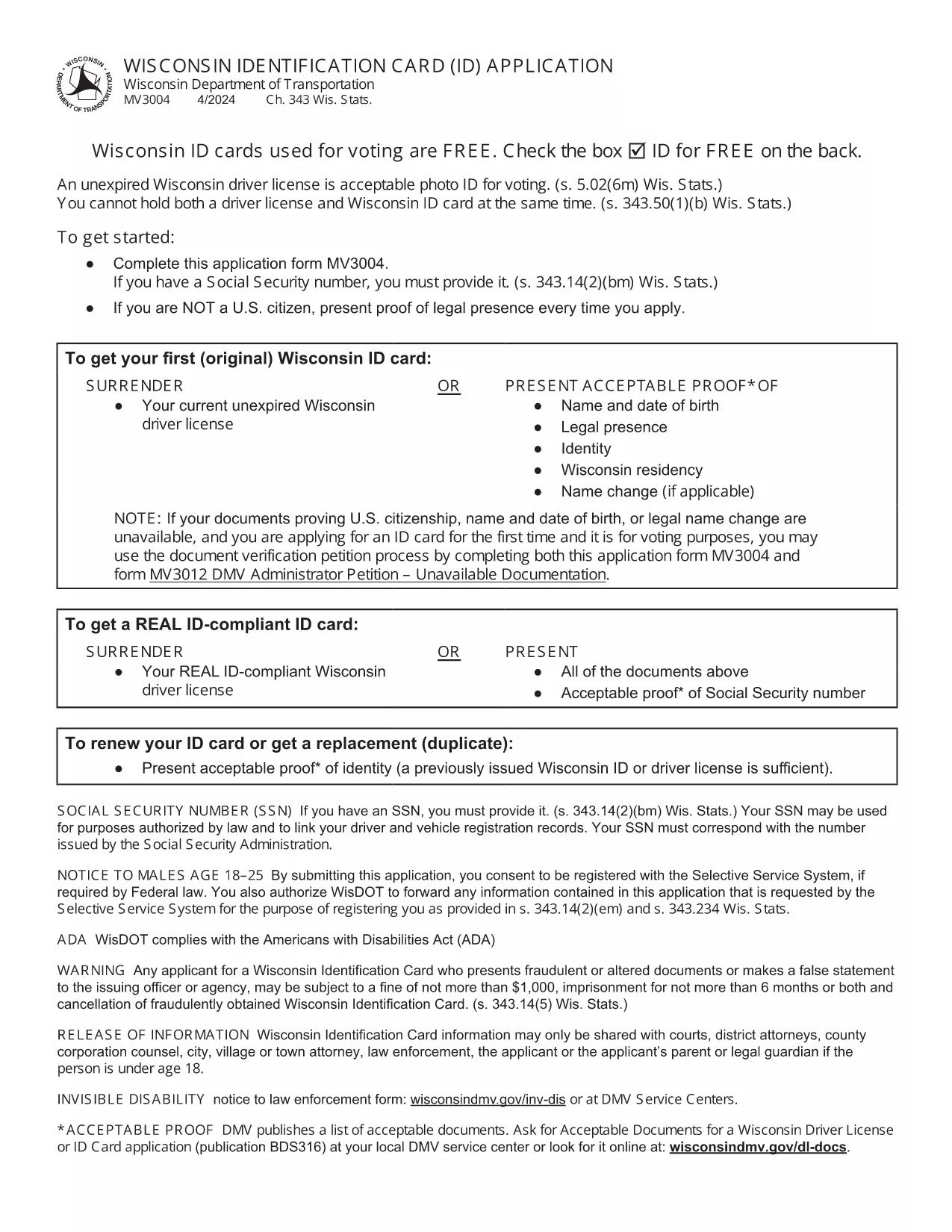
Wisconsin Identification Card Application (Form MV3004) – Fillable PDF

  1. Kalba Anglų
  2. Šalis JAV
  3. Veikla Vairuotojo pažymėjimas
  4. valstybė Viskonsinas
Wisconsin Identification Card Application (Form MV3004) – Fillable PDF

Form MV3004 is the official Wisconsin Identification Card (ID) application issued by the Wisconsin Department of Transportation (DOT). Whether you need an ID for voting, travel, or everyday identification, this fillable PDF lets you complete the entire request from the comfort of your home.

What Is Form MV3004?

The MV3004 form collects personal details, proof‑of‑citizenship documents, and a photo consent statement. It is required for first‑time applicants, name changes, or renewals when a new photo is needed.

How to Complete the MV3004 Online

Instead of downloading and editing the PDF manually, simply click the "Fill out this form" button on this page. The Formize PDF Filler app will load directly in your browser, allowing you to type, select, and sign without any extra software.

  • Step 1: Click the button and wait for the Formize PDF Filler to appear.
  • Step 2: Enter your name, address, date of birth, and other required information.
  • Step 3: Upload scanned copies of your citizenship and name‑change documents.
  • Step 4: Review the completed form for accuracy.
  • Step 5: Submit the form electronically or print it for mailing.

Common Mistakes to Avoid

  • Leaving any required field blank – the online filler will highlight missing data.
  • Uploading blurry or non‑PDF supporting documents – use clear, high‑resolution scans.
  • Signing with a stylus that does not create a vector signature – use the built‑in signature tool.
  • Mismatching the name on your ID with the name on supporting documents – ensure exact spelling.

Where to Submit Your Completed Form

After you finish, you have two options:

  • Electronic submission: Save the completed PDF and email it to your local DMV office (check the Wisconsin DOT contact page for the correct address).
  • Mail submission: Print the form, attach your original documents or certified copies, and mail everything to the address listed on the form.

Processing typically takes 7‑10 business days. Keep a copy of the submitted PDF for your records.

DUK
  • Who needs to fill out Form MV3004?

    Anyone applying for a Wisconsin state identification card for the first time, changing their legal name, or needing a new photo on an existing ID.

  • Can I submit the form online?

    Yes. After completing the fillable PDF, you can email the file to your local DMV office. Check the Wisconsin DOT website for the correct email address.

  • What documents must I attach?

    Proof of U.S. citizenship (e.g., birth certificate or passport), a legal name‑change document if applicable, and a recent head‑shot photo if a new picture is required.

  • How long does processing take?

    Standard processing is 7‑10 business days after the DMV receives a complete application and supporting documents.

  • Is there a fee for the Wisconsin ID card?

    Yes. As of 2026, the fee is $30 for a standard ID card. Check the latest fee schedule on the Wisconsin DOT website.

  • What if I make a mistake on the form?

    If you notice an error after submission, contact your local DMV office immediately. In most cases, you can submit a corrected form without paying an additional fee.

  • Do I need a notarized signature?

    No. The electronic signature created in the Formize PDF Filler is accepted for the MV3004 application.

  • Can I use a mobile device to fill out MV3004?

    Yes. The Formize PDF Filler works on modern smartphones and tablets, but a larger screen makes it easier to review scanned documents.

KAIP

Kaip nemokamai užpildyti MV3004 internete, atlikdami 5 paprastus veiksmus:

  1. 1
    Open the Fillable Form
    Click the "Fill out this form" button on the page. The Formize PDF Filler loads instantly in your browser.
  2. 2
    Enter Your Information
    Type your personal details into each field. Use the dropdown menus for state, gender, and document types.
  3. 3
    Upload Supporting Documents
    Attach clear PDF or JPEG scans of your citizenship proof, name‑change documents, and a recent photo if required.
  4. 4
    Review and Sign
    Double‑check every entry, then use the built‑in signature tool to add your electronic signature.
  5. 5
    Submit or Print
    Save the completed PDF. You can either email it directly to your local DMV office or print it for postal submission.
Formuokite PDF užpildymo programą
APIE

Prašymo išduoti vairuotojo pažymėjimą formos

MV3004 yra viena iš vairuotojo pažymėjimo formų, kurios yra dokumentai, naudojami įgyjant arba atnaujinant vairuotojo pažymėjimą, kuris yra oficialus vyriausybės išduotas dokumentas, leidžiantis asmenims vairuoti motorinę transporto priemonę viešuose keliuose. Šios formos gali skirtis priklausomai nuo jurisdikcijos, tačiau paprastai jos apima:

Prašymo forma: ši forma naudojama teikiant paraišką vairuotojo pažymėjimui gauti, joje paprastai prašoma asmeninės informacijos, tokios kaip vardas, pavardė, adresas, gimimo data ir socialinio draudimo numeris.

Asmens tapatybę patvirtinantys dokumentai: kartu su prašymo forma asmenys paprastai turi pateikti konkrečius asmens tapatybę patvirtinančius dokumentus, įrodančius jų tapatybę, gyvenamąją vietą ir teisėtą buvimą šalyje. Tai gali būti galiojantis pasas, gimimo liudijimas, socialinio draudimo kortelė arba kitas vyriausybės išduotas tapatybės dokumentas.

Gyvenamosios vietos įrodymas: daugelyje jurisdikcijų reikalaujama, kad pareiškėjai pateiktų gyvenamosios vietos įrodymą, pvz., komunalinių paslaugų sąskaitą, nuomos sutartį arba banko išrašą, kad patvirtintų savo adresą.

Medicininės apžiūros forma: kai kuriose jurisdikcijose gali būti reikalaujama atlikti medicininę apžiūrą, kad būtų užtikrinta, jog pareiškėjas atitinka būtinus fizinius ir psichinius saugiam vairavimui keliamus reikalavimus. Paprastai šią formą užpildo medicinos specialistas.

Vairuotojo išsilavinimo baigimo forma: pirmą kartą vairuojantiems gali reikėti baigti vairuotojo mokymo programą. Norint gauti vairuotojo pažymėjimą, dažnai reikalinga forma arba pažymėjimas, nurodantis sėkmingą baigimą.

Regėjimo patikrinimo forma: regėjimo patikrinimas paprastai atliekamas prašymo gauti vairuotojo pažymėjimą metu. Akių priežiūros specialistas arba įgaliotas personalas įvertins pareiškėjo regėjimo aštrumą ir užpildys reikiamą formą.

Šias formas paprastai galima gauti vietiniame Motorinių transporto priemonių departamente (DMV) arba lygiavertėje vyriausybinėje agentūroje, atsakingoje už vairuotojo pažymėjimų išdavimą. Svarbu patikrinti jūsų jurisdikcijai taikomus konkrečius reikalavimus ir formas, nes jie gali skirtis.

FUNKCIJOS

PDF užpildas

Lengviausias būdas užpildyti MV3004 internete

  • Greitai užpildykite MV3004
    Ieškote būdo greitai užpildyti MV3004 internete? Naudodami internetinį nemokamą PDF formų užpildą sužinosite, kaip redaguoti ir užpildyti šį pdf dokumentą greičiau nei per minutę.
  • Lengva naudoti internetinį PDF redaktorių
    Atsibodo spausdinti PDF failus, kad galėtumėte juos redaguoti prieš nuskaitydami iš naujo ir siųsdami atgal? Redaguoti PDF dokumentus internete nemokamai. Norėdami sutaupyti laiko ir popieriaus, naudokite mūsų internetinį pdf redaktorių.
  • Puikūs įrankiai, visos platformos
    Svarstote, kaip užpildyti MV3004 „Mac“ kompiuteryje, o gal kaip nemokamai naudoti PDF užpildą? Mūsų internetiniai PDF įrankiai veikia visose platformose.
  • Saugi failų saugykla
    Užbaigti „MV3004“ failai saugomi saugioje duomenų bazėje, kurią valdo „Amazon Cloud“ priegloba. Galite bet kada ištrinti failus iš mūsų sistemos. Bet kokiu atveju šie failai automatiškai ištrinami po 24 valandų.
  • Kalbėkitės su MV3004
    Kalbėkite su „MV3004“ naudodami Chatize, kuri yra nemokama PDF skaitymo priemonė. Užduokite klausimų ir gaukite atsakymus iš „MV3004“. Tiesiog spustelėkite aukščiau esantį mygtuką Kalbėtis su dokumentu.

Ištrinti užpildymo seansą

Ištrinti pasirinktą pildymo seansą? Tokiu atveju jūsų pažanga pildant formą bus prarasta.

Ištrinti redagavimo sesiją

Ištrinti pasirinktą redagavimo sesiją? Tokiu atveju jūsų pažanga kuriant ir redaguojant formą bus prarasta.