
Pasirinkite kalbą

Wisconsin MV3112 Driver Instructor Application – Fillable PDF

  1. Kalba Anglų
  2. Šalis JAV
  3. Veikla Vairuotojo pažymėjimas
  4. valstybė Viskonsinas
Wisconsin MV3112 Driver Instructor Application – Fillable PDF

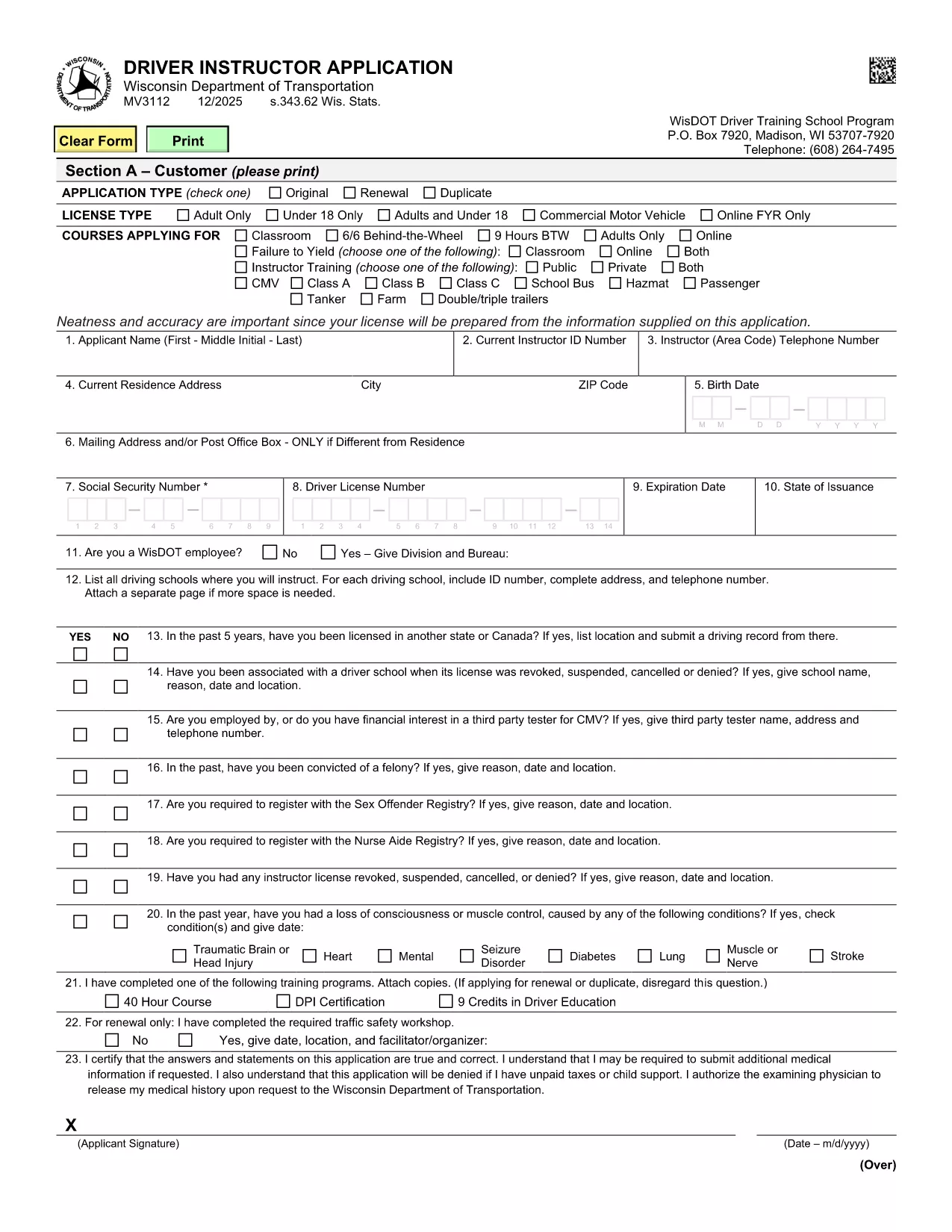
The MV3112 is the official Driver Instructor Application required by the Wisconsin Department of Transportation (WisDOT). Whether you’re starting a new driver‑training school or adding an instructor to an existing program, this form must be completed, signed, and submitted before you can begin teaching.

Formize makes the MV3112 completely fillable online. No more printing, scanning, or hand‑writing. Simply click the “Fill out this form” button, enter your information, and download a completed PDF ready for submission.

What Is the MV3112 Form?

The MV3112 collects personal data, driving history, medical qualifications, and background information about the applicant. It also includes a certification section where you attest that all statements are true and that you meet WisDOT’s eligibility criteria.

How to Complete the MV3112 Online

Follow these quick steps to fill the form using Formize’s PDF Filler:

  • Click the Fill out this form button on this page.
  • Wait for the Formize PDF Filler to load (a few seconds).
  • Enter all required information in the highlighted fields.
  • Upload any supporting documents (e.g., medical clearance, driver record).
  • Save the completed PDF, print it, sign where required, and mail it to WisDOT.

Common Mistakes to Avoid

Even a small error can delay your application. Keep these tips in mind:

  • Missing signatures: Every signature box must be signed in ink after printing.
  • Incomplete medical info: Attach the most recent medical examination if requested.
  • Incorrect fee amount: Verify the current fee on WisDOT’s website before mailing.
  • Out‑of‑date driver record: Use a driver record dated within the last 90 days.

Submission Guidelines & Fees

After you’ve filled and printed the form, mail it to:

Wisconsin Department of Transportation
Division of Driver Services
P.O. Box 7448
Madison, WI 53707‑7448

Include the application fee (check the latest WisDOT fee schedule) and any required medical documentation. Processing typically takes 10‑14 business days.

Need Help? Frequently Asked Questions

Below are answers to the most common questions about the MV3112.

DUK
  • Who is eligible to use the MV3112 form?

    Any individual who wishes to become a licensed driver instructor in Wisconsin, including those starting a new school or joining an existing one.

  • Do I need a medical examination?

    A medical exam is required only if WisDOT requests it. Attach a current medical report (within 60 days) when requested.

  • What is the application fee?

    The fee varies; check WisDOT’s current fee schedule on their website before submitting the form.

  • Can I submit the MV3112 electronically?

    WisDOT currently requires a printed, signed copy. The online filler speeds up data entry, but you must mail the final PDF.

  • How long does processing take?

    Standard processing is 10‑14 business days after WisDOT receives the complete, signed application.

  • What should I do if I make a mistake on the form?

    Correct any errors before printing. If you discover a mistake after mailing, contact WisDOT to request a replacement form.

  • Is there a deadline for submitting the MV3112?

    There is no fixed deadline, but you should submit the application before you begin any instructor activities to avoid penalties.

  • Where can I find additional guidance?

    Visit the WisDOT Driver Services website for detailed instructions, fee information, and contact details for further assistance.

KAIP

Kaip nemokamai užpildyti MV3112 internete, atlikdami 5 paprastus veiksmus:

  1. 1
    Open the Fillable Form
    Click the “Fill out this form” button on this page. The Formize PDF Filler will open in a new tab.
  2. 2
    Enter Your Information
    Type your details into each highlighted field. Use the drop‑down menus where available for easy selection.
  3. 3
    Upload Supporting Documents
    Attach required files such as medical clearance or a recent driver record using the upload icons.
  4. 4
    Save and Print
    When every field is completed, click “Save PDF”. Print the document, sign the required sections in ink, and prepare it for mailing.
  5. 5
    Submit to WisDOT
    Mail the signed PDF along with the application fee to the WisDOT address listed on the form.
Formuokite PDF užpildymo programą
APIE

Prašymo išduoti vairuotojo pažymėjimą formos

Daugumoje šalių prieš išvažiuojant į kelią privaloma turėti vairuotojo pažymėjimą. Vairuotojo pažymėjimo gavimas yra svarbus etapas kiekvienam, norinčiam vairuoti automobilį.

MV3112 yra viena iš prašymo išduoti vairuotojo pažymėjimą formų, kuri yra dokumentai, naudojami informacijai iš žmonių, norinčių gauti vairuotojo pažymėjimą, rinkti. Paprastai jame yra laukeliai, kuriuose nurodomas pareiškėjo vardas, pavardė, gimimo data, ID numeris, kontaktinė informacija, taip pat vairuotojo pažymėjimo istorija ir patirtis.

FUNKCIJOS

PDF užpildas

Lengviausias būdas užpildyti MV3112 internete

  • Greitai užpildykite MV3112
    Ieškote būdo greitai užpildyti MV3112 internete? Naudodami internetinį nemokamą PDF formų užpildą sužinosite, kaip redaguoti ir užpildyti šį pdf dokumentą greičiau nei per minutę.
  • Lengva naudoti internetinį PDF redaktorių
    Atsibodo spausdinti PDF failus, kad galėtumėte juos redaguoti prieš nuskaitydami iš naujo ir siųsdami atgal? Redaguoti PDF dokumentus internete nemokamai. Norėdami sutaupyti laiko ir popieriaus, naudokite mūsų internetinį pdf redaktorių.
  • Puikūs įrankiai, visos platformos
    Svarstote, kaip užpildyti MV3112 „Mac“ kompiuteryje, o gal kaip nemokamai naudoti PDF užpildą? Mūsų internetiniai PDF įrankiai veikia visose platformose.
  • Saugi failų saugykla
    Užbaigti „MV3112“ failai saugomi saugioje duomenų bazėje, kurią valdo „Amazon Cloud“ priegloba. Galite bet kada ištrinti failus iš mūsų sistemos. Bet kokiu atveju šie failai automatiškai ištrinami po 24 valandų.
  • Kalbėkitės su MV3112
    Kalbėkite su „MV3112“ naudodami Chatize, kuri yra nemokama PDF skaitymo priemonė. Užduokite klausimų ir gaukite atsakymus iš „MV3112“. Tiesiog spustelėkite aukščiau esantį mygtuką Kalbėtis su dokumentu.

Ištrinti užpildymo seansą

Ištrinti pasirinktą pildymo seansą? Tokiu atveju jūsų pažanga pildant formą bus prarasta.

Ištrinti redagavimo sesiją

Ištrinti pasirinktą redagavimo sesiją? Tokiu atveju jūsų pažanga kuriant ir redaguojant formą bus prarasta.