Pasirinkite kalbą

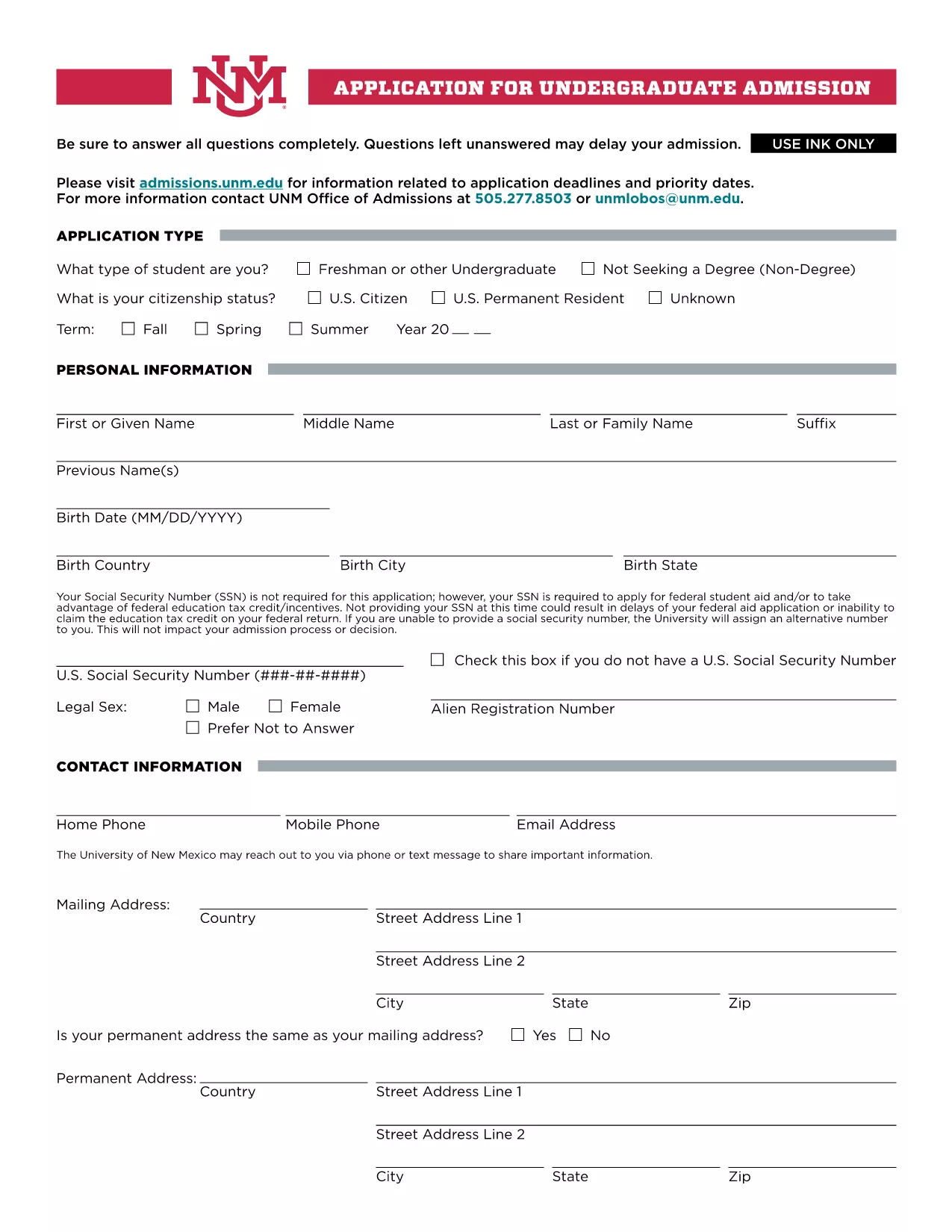
UNM Undergraduate Application Form (Fillable PDF)

  1. Kalba Anglų
  2. Šalis JAV
  3. Veikla College Admissions
  4. skyrius Education
UNM Undergraduate Application Form (Fillable PDF)

Welcome to the official landing page for the UNM Undergraduate Application Form. This fillable PDF lets prospective students apply to the University of New Mexico quickly, securely, and without the need for any additional software.

Our integrated Fill out this form button launches the Formize PDF Filler app directly in your browser, so you can complete every section, save your progress, and submit the application with just a few clicks.

Why Choose the Fillable UNM Application Form?

The fillable version offers several advantages over a static PDF:

  • Instant validation: The form checks required fields and formatting as you type.
  • Save & resume: You can pause, close your browser, and return later without losing data.
  • Environmentally friendly: No printing needed unless you choose to keep a hard copy.
  • Secure transmission: Your information is encrypted during the online submission.

How to Complete the Form Online

Follow these simple steps to fill out the UNM application:

  1. Click the Fill out this form button above.
  2. Wait a few seconds while the Formize PDF Filler loads.
  3. Enter your personal, academic, and residency information in the highlighted fields.
  4. Upload required documents (transcripts, test scores, etc.) using the attachment icons.
  5. Review each section, correct any validation warnings, and click Submit when you’re ready.

Common Mistakes to Avoid

  • Leaving the Social Security Number blank if you plan to apply for federal aid – the form will warn you.
  • Submitting outdated transcripts; always upload the most recent official copy.
  • Skipping the “Signature” field – the digital signature is required for processing.
  • Exceeding the file size limit for uploads; compress large PDFs before attaching.

Submission & Next Steps

After you submit, you will receive an automated confirmation email with a reference number. The UNM admissions office will review your application and contact you if additional information is needed. Keep an eye on your email and the UNM applicant portal for status updates.

Ready to start? Click the button below and let Formize handle the rest.

DUK
  • Do I need to provide my Social Security Number?

    The SSN is not required for the basic application, but it is mandatory if you plan to apply for federal student aid or claim education tax credits.

  • Can I save my progress and finish later?

    Yes. The Formize PDF Filler lets you save a draft in your browser. When you return, simply reload the form and continue where you left off.

  • What file formats are accepted for supporting documents?

    PDF, JPEG, and PNG files are accepted. Each file must be under 5 MB to ensure successful upload.

  • How do I know my application was received?

    After submission, you will receive an automatic confirmation email with a reference number. You can also check the status in the UNM applicant portal.

  • Is there a deadline for the undergraduate application?

    UNM’s regular admission deadline is March 1 for fall enrollment. Check the UNM admissions website for special program deadlines.

  • Can I print a hard copy after completing the form online?

    Absolutely. Once you finish, use the “Print” option in the Formize toolbar to generate a printable PDF version.

  • What should I do if I encounter an error while filling the form?

    Refresh the page and try again. If the problem persists, clear your browser cache or try a different browser.

  • Is there a fee to use the fillable PDF?

    No. The fillable UNM application form and the Formize PDF Filler are completely free to use.

KAIP

Kaip nemokamai užpildyti UNM application form internete, atlikdami 5 paprastus veiksmus:

  1. 1
    Open the Fillable Form
    Click the “Fill out this form” button on the page. The Formize PDF Filler will open in a new browser tab.
  2. 2
    Load the Form
    Wait a few seconds while the PDF loads. All fillable fields will be highlighted for easy entry.
  3. 3
    Enter Your Information
    Complete each section—personal data, academic history, residency, and any required test scores.
  4. 4
    Attach Supporting Documents
    Use the attachment icons to upload transcripts, test scores, and other required files.
  5. 5
    Review & Submit
    Double‑check all entries, resolve any validation warnings, then click the Submit button to send your application securely.
Formuokite PDF užpildymo programą
APIE

UNM application form šabloną

Naudodami tradicinį PDF dokumento peržiūros ir pildymo funkcijų rinkinį, žiniatinklio programos pranašumus ir interaktyvų išdėstymą, galite užbaigti UNM application form per kelias minutes.

FUNKCIJOS

PDF užpildas

Lengviausias būdas užpildyti UNM application form internete

  • Greitai užpildykite UNM application form
    Ieškote būdo greitai užpildyti UNM application form internete? Naudodami internetinį nemokamą PDF formų užpildą sužinosite, kaip redaguoti ir užpildyti šį pdf dokumentą greičiau nei per minutę.
  • Lengva naudoti internetinį PDF redaktorių
    Atsibodo spausdinti PDF failus, kad galėtumėte juos redaguoti prieš nuskaitydami iš naujo ir siųsdami atgal? Redaguoti PDF dokumentus internete nemokamai. Norėdami sutaupyti laiko ir popieriaus, naudokite mūsų internetinį pdf redaktorių.
  • Puikūs įrankiai, visos platformos
    Svarstote, kaip užpildyti UNM application form „Mac“ kompiuteryje, o gal kaip nemokamai naudoti PDF užpildą? Mūsų internetiniai PDF įrankiai veikia visose platformose.
  • Saugi failų saugykla
    Užbaigti „UNM application form“ failai saugomi saugioje duomenų bazėje, kurią valdo „Amazon Cloud“ priegloba. Galite bet kada ištrinti failus iš mūsų sistemos. Bet kokiu atveju šie failai automatiškai ištrinami po 24 valandų.
  • Kalbėkitės su UNM application form
    Kalbėkite su „UNM application form“ naudodami Chatize, kuri yra nemokama PDF skaitymo priemonė. Užduokite klausimų ir gaukite atsakymus iš „UNM application form“. Tiesiog spustelėkite aukščiau esantį mygtuką Kalbėtis su dokumentu.

Ištrinti užpildymo seansą

Ištrinti pasirinktą pildymo seansą? Tokiu atveju jūsų pažanga pildant formą bus prarasta.

Ištrinti redagavimo sesiją

Ištrinti pasirinktą redagavimo sesiją? Tokiu atveju jūsų pažanga kuriant ir redaguojant formą bus prarasta.