
Pasirinkite kalbą

2026 IRS W‑4 Employee Tax Withholding Form (Fillable PDF)

  1. Šalis JAV
  2. Kalba Anglų
  3. Veikla Mokesčiai
  4. skyrius IRS
2026 IRS W‑4 Employee Tax Withholding Form (Fillable PDF)

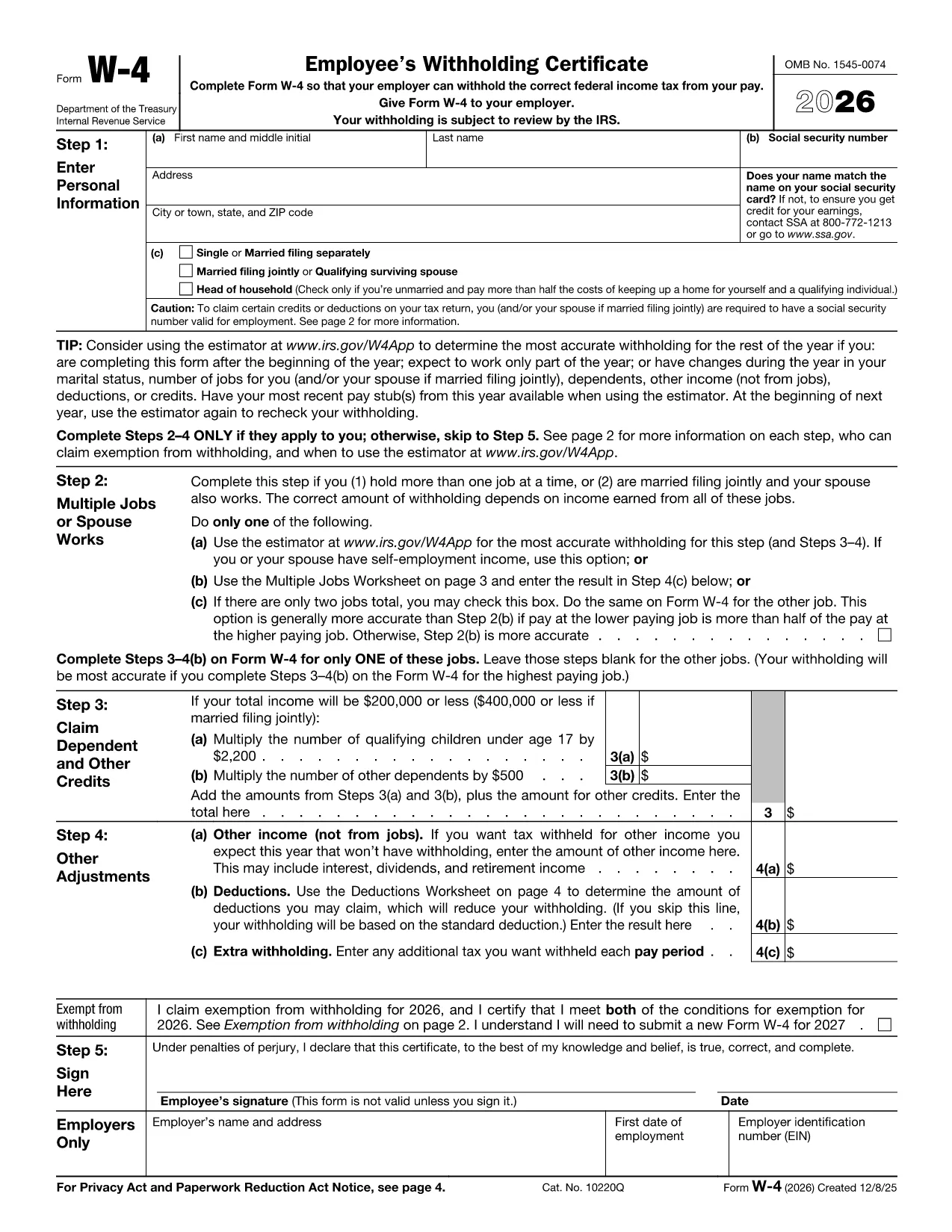
The 2026 IRS W‑4 is the official employee tax‑withholding form you use when starting a new job or when your personal or financial situation changes. Filling it out correctly ensures the right amount of federal income tax is taken from each paycheck.

Why You Need the 2026 W‑4 Form

Employers must have a current W‑4 on file for every employee. An up‑to‑date form helps you avoid over‑withholding (which reduces your take‑home pay) or under‑withholding (which could lead to a tax bill at filing time).

How to Fill Out the 2026 W‑4 Online

Instead of downloading the PDF and editing it with a separate program, simply click the "Fill out this form" button on this page. The Formize PDF Filler app will load directly in your browser, letting you complete the form instantly.

Common Mistakes to Avoid

  • Leaving the “Step 4 (Other Adjustments)” section blank when you have extra income or deductions.
  • Signing and dating the form in the wrong place.
  • Using an old version of the W‑4 (always use the 2026 edition).

Submit and Keep Records

After you finish, click Submit in the Formize app. Your completed PDF can be saved to your device and a copy should be kept for your records. Give the signed form to your employer’s payroll department.

Need more help? Review the FAQs below or consult the IRS Publication 505 for detailed withholding guidance.

DUK
  • When should I submit a new W‑4?

    Submit a new W‑4 whenever your filing status, number of dependents, or other tax‑affecting circumstances change, such as a marriage, birth, or significant raise.

  • Do I need to file the W‑4 with the IRS?

    No. The W‑4 is given only to your employer. The IRS receives the information indirectly through your employer’s payroll reports.

  • Can I edit a submitted W‑4?

    You cannot edit a submitted form, but you can complete a new W‑4 and give it to your employer to replace the old one.

  • Is the 2026 W‑4 available in paper form?

    Yes, you can request a paper copy from your employer or download the PDF and print it, but the online Formize filler offers a faster, error‑checking experience.

  • What if I make a mistake after submitting?

    Complete a new W‑4 with the correct information and submit it to your employer as soon as possible. This will update future withholdings.

  • Where can I find more detailed guidance?

    Refer to IRS Publication 505, "Tax Withholding and Estimated Tax," for comprehensive instructions on how the W‑4 impacts your tax liability.

KAIP

Kaip nemokamai užpildyti 2026 W-4 internete, atlikdami 4 paprastus veiksmus:

  1. 1
    Open the Fillable Form
    Click the "Fill out this form" button on the page. The Formize PDF Filler loads directly in your browser.
  2. 2
    Complete Each Section
    Enter your personal information, filing status, dependents, and any extra withholding adjustments as prompted.
  3. 3
    Review for Accuracy
    Double‑check all entries, especially Social Security Number and signature fields, to avoid processing delays.
  4. 4
    Save and Submit
    Save the completed PDF to your device, then submit a copy to your employer’s payroll department.
Formuokite PDF užpildymo programą
APIE

Mokesčių formos

2026 W-4 yra viena iš mokesčių formų, kurios yra dokumentai, naudojami su mokesčiais susijusiai informacijai pranešti atitinkamai mokesčių institucijai. Yra įvairių tipų mokesčių formų, įskaitant federalines, valstijos ir vietines mokesčių formas, kurios gali skirtis priklausomai nuo mokesčių mokėtojo aplinkybių ir vietos.

FUNKCIJOS

PDF užpildas

Lengviausias būdas užpildyti 2026 W-4 internete

  • Greitai užpildykite 2026 W-4
    Ieškote būdo greitai užpildyti 2026 W-4 internete? Naudodami internetinį nemokamą PDF formų užpildą sužinosite, kaip redaguoti ir užpildyti šį pdf dokumentą greičiau nei per minutę.
  • Lengva naudoti internetinį PDF redaktorių
    Atsibodo spausdinti PDF failus, kad galėtumėte juos redaguoti prieš nuskaitydami iš naujo ir siųsdami atgal? Redaguoti PDF dokumentus internete nemokamai. Norėdami sutaupyti laiko ir popieriaus, naudokite mūsų internetinį pdf redaktorių.
  • Puikūs įrankiai, visos platformos
    Svarstote, kaip užpildyti 2026 W-4 „Mac“ kompiuteryje, o gal kaip nemokamai naudoti PDF užpildą? Mūsų internetiniai PDF įrankiai veikia visose platformose.
  • Saugi failų saugykla
    Užbaigti „2026 W-4“ failai saugomi saugioje duomenų bazėje, kurią valdo „Amazon Cloud“ priegloba. Galite bet kada ištrinti failus iš mūsų sistemos. Bet kokiu atveju šie failai automatiškai ištrinami po 24 valandų.
  • Kalbėkitės su 2026 W-4
    Kalbėkite su „2026 W-4“ naudodami Chatize, kuri yra nemokama PDF skaitymo priemonė. Užduokite klausimų ir gaukite atsakymus iš „2026 W-4“. Tiesiog spustelėkite aukščiau esantį mygtuką Kalbėtis su dokumentu.

Ištrinti užpildymo seansą

Ištrinti pasirinktą pildymo seansą? Tokiu atveju jūsų pažanga pildant formą bus prarasta.

Ištrinti redagavimo sesiją

Ištrinti pasirinktą redagavimo sesiją? Tokiu atveju jūsų pažanga kuriant ir redaguojant formą bus prarasta.