
Pasirinkite kalbą

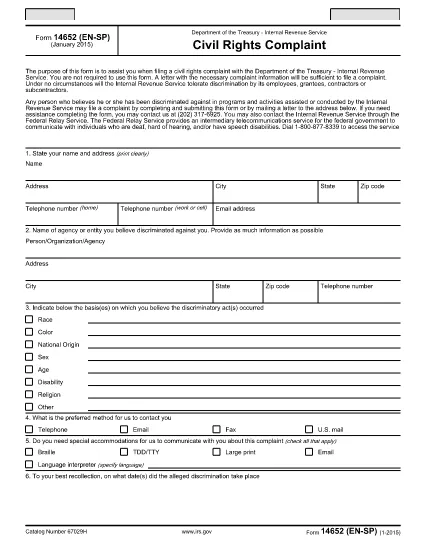
Form 14652 (CN) – Fillable PDF Online

  1. Šalis JAV
  2. Kalba Anglų
  3. Veikla Mokesčiai
  4. skyrius IRS
Form 14652 (CN) – Fillable PDF Online

Form 14652 (CN) is an IRS tax document used for specific reporting requirements. Whether you are a taxpayer, accountant, or business owner, you can now complete this form quickly and securely without printing a paper copy.

Our online fillable PDF works directly in your browser. Just click the "Fill out this form" button, let the Formize PDF Filler load, and start entering your data. All fields are interactive, and the layout matches the official IRS version, ensuring compliance.

Why choose the online filler?

  • Instant access – no software download required.
  • Auto‑save feature prevents data loss.
  • Built‑in validation helps avoid common errors.
  • Export as a completed PDF ready for electronic submission or printing.

Below you’ll find step‑by‑step instructions, helpful tips, and answers to the most frequently asked questions about Form 14652 (CN).

DUK
  • Is Form 14652 (CN) available as a free fillable PDF?

    Yes. The official IRS version is free to download, and Formize provides a secure online filler at no cost.

  • Do I need Adobe Acrobat to complete the form?

    No. The Formize PDF Filler works in any modern browser, so you don’t need additional software.

  • Can I save my progress and return later?

    The online filler auto‑saves your entries while the session is open. For a longer pause, download the partially completed PDF and reopen it later.

  • What common mistakes should I avoid?

    Make sure all required fields are filled, use the correct number formats, and double‑check Social Security numbers. The validator will flag most errors before you finish.

  • How do I submit the completed form to the IRS?

    Follow the submission instructions on the last page of Form 14652 (CN). Typically you can mail the printed PDF or submit it electronically if the IRS permits.

  • Is my data safe while using Formize?

    Yes. All data is processed locally in your browser and never stored on our servers unless you choose to download the file.

KAIP

Kaip nemokamai užpildyti Form 14652 internete, atlikdami 5 paprastus veiksmus:

  1. 1
    Click the Fill‑Out Button
    On the page, click the bright “Fill out this form” button to launch the Formize PDF Filler.
  2. 2
    Wait for the Filler to Load
    The app loads the official Form 14652 (CN) PDF in your browser. This only takes a few seconds.
  3. 3
    Enter Your Information
    Type directly into each field. The filler highlights required fields and provides format hints.
  4. 4
    Review and Validate
    Use the built‑in validation to check for missing or incorrectly formatted data before finalizing.
  5. 5
    Save or Submit
    When you’re done, download the completed PDF or send it electronically to the IRS as instructed on the form.
Formuokite PDF užpildymo programą
APIE

Mokesčių formos

Form 14652 yra viena iš mokesčių formų, kurios yra dokumentai, naudojami su mokesčiais susijusiai informacijai pranešti atitinkamai mokesčių institucijai. Yra įvairių tipų mokesčių formų, įskaitant federalines, valstijos ir vietines mokesčių formas, kurios gali skirtis priklausomai nuo mokesčių mokėtojo aplinkybių ir vietos.

FUNKCIJOS

PDF užpildas

Lengviausias būdas užpildyti Form 14652 internete

  • Greitai užpildykite Form 14652
    Ieškote būdo greitai užpildyti Form 14652 internete? Naudodami internetinį nemokamą PDF formų užpildą sužinosite, kaip redaguoti ir užpildyti šį pdf dokumentą greičiau nei per minutę.
  • Lengva naudoti internetinį PDF redaktorių
    Atsibodo spausdinti PDF failus, kad galėtumėte juos redaguoti prieš nuskaitydami iš naujo ir siųsdami atgal? Redaguoti PDF dokumentus internete nemokamai. Norėdami sutaupyti laiko ir popieriaus, naudokite mūsų internetinį pdf redaktorių.
  • Puikūs įrankiai, visos platformos
    Svarstote, kaip užpildyti Form 14652 „Mac“ kompiuteryje, o gal kaip nemokamai naudoti PDF užpildą? Mūsų internetiniai PDF įrankiai veikia visose platformose.
  • Saugi failų saugykla
    Užbaigti „Form 14652“ failai saugomi saugioje duomenų bazėje, kurią valdo „Amazon Cloud“ priegloba. Galite bet kada ištrinti failus iš mūsų sistemos. Bet kokiu atveju šie failai automatiškai ištrinami po 24 valandų.
  • Kalbėkitės su Form 14652
    Kalbėkite su „Form 14652“ naudodami Chatize, kuri yra nemokama PDF skaitymo priemonė. Užduokite klausimų ir gaukite atsakymus iš „Form 14652“. Tiesiog spustelėkite aukščiau esantį mygtuką Kalbėtis su dokumentu.

Ištrinti užpildymo seansą

Ištrinti pasirinktą pildymo seansą? Tokiu atveju jūsų pažanga pildant formą bus prarasta.

Ištrinti redagavimo sesiją

Ištrinti pasirinktą redagavimo sesiją? Tokiu atveju jūsų pažanga kuriant ir redaguojant formą bus prarasta.