
Pasirinkite kalbą

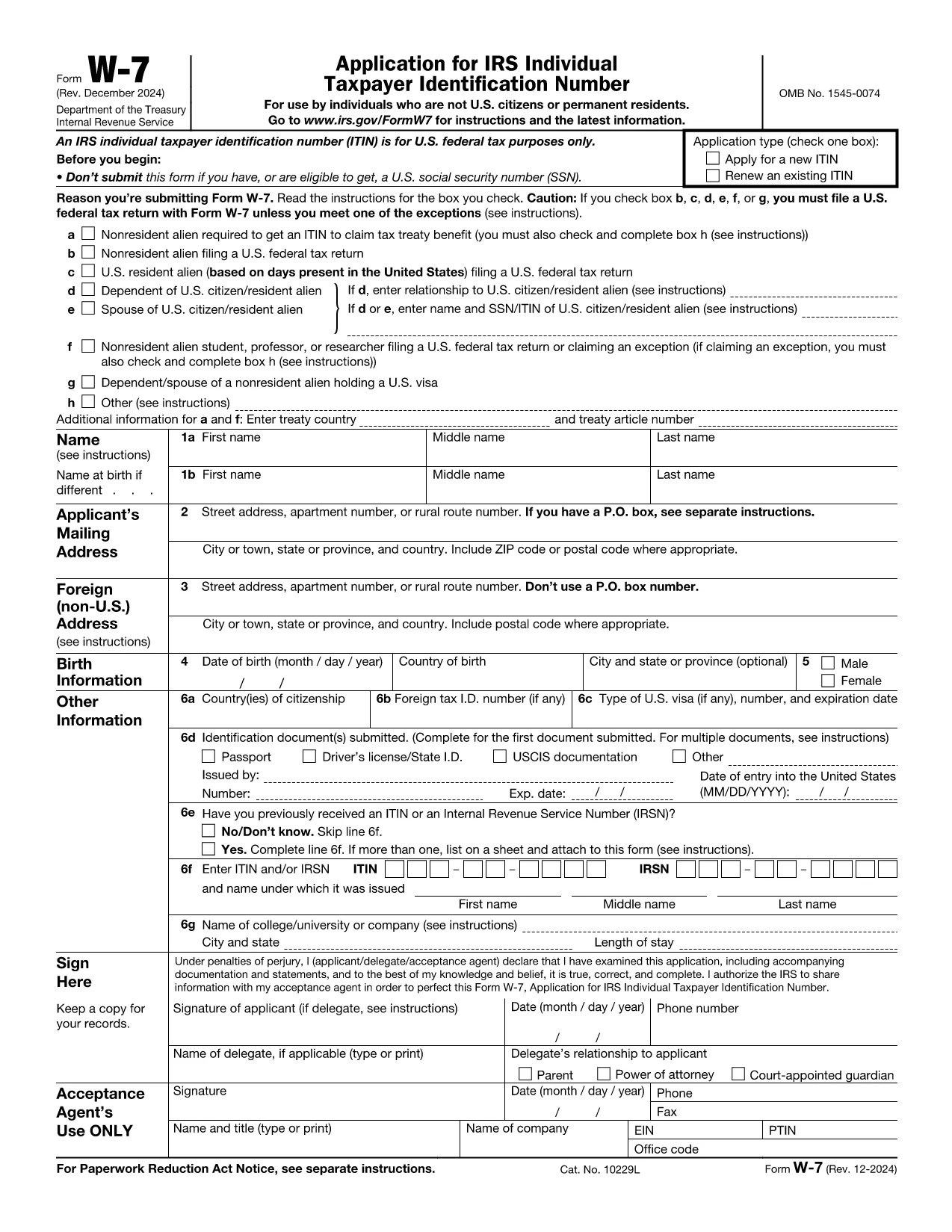
IRS Form W‑7 – Application for an Individual Taxpayer Identification Number (ITIN)

  1. Šalis JAV
  2. Kalba Anglų
  3. Veikla Mokesčiai
  4. skyrius IRS
IRS Form W‑7 – Application for an Individual Taxpayer Identification Number (ITIN)

Form W‑7 is the official Application for an Individual Taxpayer Identification Number (ITIN) issued by the United States Internal Revenue Service (IRS). Taxpayers who are not eligible for a Social Security Number but need a federal tax identification number use this form.

What Is IRS Form W‑7?

The W‑7 form allows foreign individuals, residents, and certain dependents to obtain an ITIN so they can file U.S. tax returns, claim treaty benefits, or be listed on a tax return. The PDF is fully fillable, but editing it locally can be cumbersome.

Why Use Formize’s Fillable PDF?

  • Instant online filling – No need to download, install a PDF editor, or print the form.
  • Secure cloud processing – Your data stays encrypted while the Formize PDF Filler loads.
  • Auto‑save and review – Make changes, preview the completed document, and download a final PDF ready for mailing.

Step‑by‑Step Guide to Complete the Form Online

Follow the simple steps below to fill out Form W‑7 directly on this page.

Common Mistakes & Tips for a Successful Submission

Avoid these pitfalls to prevent delays:

  • Do not leave any required field blank – the online filler will highlight missing items.
  • Ensure the name on the form matches the identification document exactly.
  • Attach a clear, legible copy of the supporting document (passport, national ID, etc.).
  • Sign the form electronically if your PDF viewer allows it; otherwise, print, sign, and scan.

Where to Send Your Completed Form

After you download the finished PDF, mail it with the required documentation to:

Internal Revenue Service
ITIN Operation
P.O. Box 149342
Austin, TX 78714-9342
USA

Or submit through an IRS-authorized Acceptance Agent.

DUK
  • Who needs an ITIN?

    Non‑U.S. residents, foreign nationals, and dependents who are not eligible for a Social Security Number but must file a U.S. tax return or be listed on one.

  • Can I submit Form W‑7 electronically?

    The IRS currently requires a paper submission. You can fill it out online with Formize, then download and mail the completed PDF.

  • What documents must I attach?

    A valid, original passport is the most common. If you don’t have a passport, you can provide a combination of a national ID, birth certificate, and a US visa.

  • How long does the IRS take to process an ITIN?

    Processing usually takes 6‑10 weeks after the IRS receives a complete application.

  • Do I need to renew my ITIN?

    ITINs that have not been used on a tax return for three consecutive years will expire. Renewal is done using the same Form W‑7.

  • Is there a fee to apply for an ITIN?

    There is no fee to the IRS, but if you use an Acceptance Agent, they may charge a service fee.

  • Can I correct a mistake after mailing?

    If you discover an error, you must submit a new, complete Form W‑7 with the correct information.

  • What if I lose my ITIN?

    You can request a copy of your ITIN by calling the IRS at 1‑800‑829‑1040 or by submitting a new Form W‑7.

  • Is Form W‑7 the same as a Social Security Number?

    No. An ITIN is for tax purposes only and does not provide work authorization or Social Security benefits.

  • Will Formize store my personal data?

    Formize processes the PDF in a secure, temporary session and does not retain any personal information after you download the completed form.

KAIP

Kaip nemokamai užpildyti IRS Form W-7 internete, atlikdami 5 paprastus veiksmus:

  1. 1
    Click the "Fill out this form" button
    Locate the bright orange "Fill out this form" button on the page and click it. The Formize PDF Filler app will open in a new tab.
  2. 2
    Wait for the Formize PDF Filler to load
    The online filler loads the IRS Form W‑7 automatically. This usually takes a few seconds.
  3. 3
    Enter your information
    Complete each required field. The filler will highlight any missing or incorrect entries.
  4. 4
    Upload supporting documents
    Use the "Attach File" option to add a scanned copy of your passport or other ID as required by the IRS.
  5. 5
    Review and download
    When you’re satisfied, click "Save & Download" to get a PDF ready for mailing to the IRS.
Formuokite PDF užpildymo programą
APIE

Mokesčių formos

IRS Form W-7 yra viena iš mokesčių formų, kurios yra dokumentai, naudojami su mokesčiais susijusiai informacijai pranešti atitinkamai mokesčių institucijai. Yra įvairių tipų mokesčių formų, įskaitant federalines, valstijos ir vietines mokesčių formas, kurios gali skirtis priklausomai nuo mokesčių mokėtojo aplinkybių ir vietos.

FUNKCIJOS

PDF užpildas

Lengviausias būdas užpildyti IRS Form W-7 internete

  • Greitai užpildykite IRS Form W-7
    Ieškote būdo greitai užpildyti IRS Form W-7 internete? Naudodami internetinį nemokamą PDF formų užpildą sužinosite, kaip redaguoti ir užpildyti šį pdf dokumentą greičiau nei per minutę.
  • Lengva naudoti internetinį PDF redaktorių
    Atsibodo spausdinti PDF failus, kad galėtumėte juos redaguoti prieš nuskaitydami iš naujo ir siųsdami atgal? Redaguoti PDF dokumentus internete nemokamai. Norėdami sutaupyti laiko ir popieriaus, naudokite mūsų internetinį pdf redaktorių.
  • Puikūs įrankiai, visos platformos
    Svarstote, kaip užpildyti IRS Form W-7 „Mac“ kompiuteryje, o gal kaip nemokamai naudoti PDF užpildą? Mūsų internetiniai PDF įrankiai veikia visose platformose.
  • Saugi failų saugykla
    Užbaigti „IRS Form W-7“ failai saugomi saugioje duomenų bazėje, kurią valdo „Amazon Cloud“ priegloba. Galite bet kada ištrinti failus iš mūsų sistemos. Bet kokiu atveju šie failai automatiškai ištrinami po 24 valandų.
  • Kalbėkitės su IRS Form W-7
    Kalbėkite su „IRS Form W-7“ naudodami Chatize, kuri yra nemokama PDF skaitymo priemonė. Užduokite klausimų ir gaukite atsakymus iš „IRS Form W-7“. Tiesiog spustelėkite aukščiau esantį mygtuką Kalbėtis su dokumentu.

Ištrinti užpildymo seansą

Ištrinti pasirinktą pildymo seansą? Tokiu atveju jūsų pažanga pildant formą bus prarasta.

Ištrinti redagavimo sesiją

Ištrinti pasirinktą redagavimo sesiją? Tokiu atveju jūsų pažanga kuriant ir redaguojant formą bus prarasta.