Pasirinkite kalbą

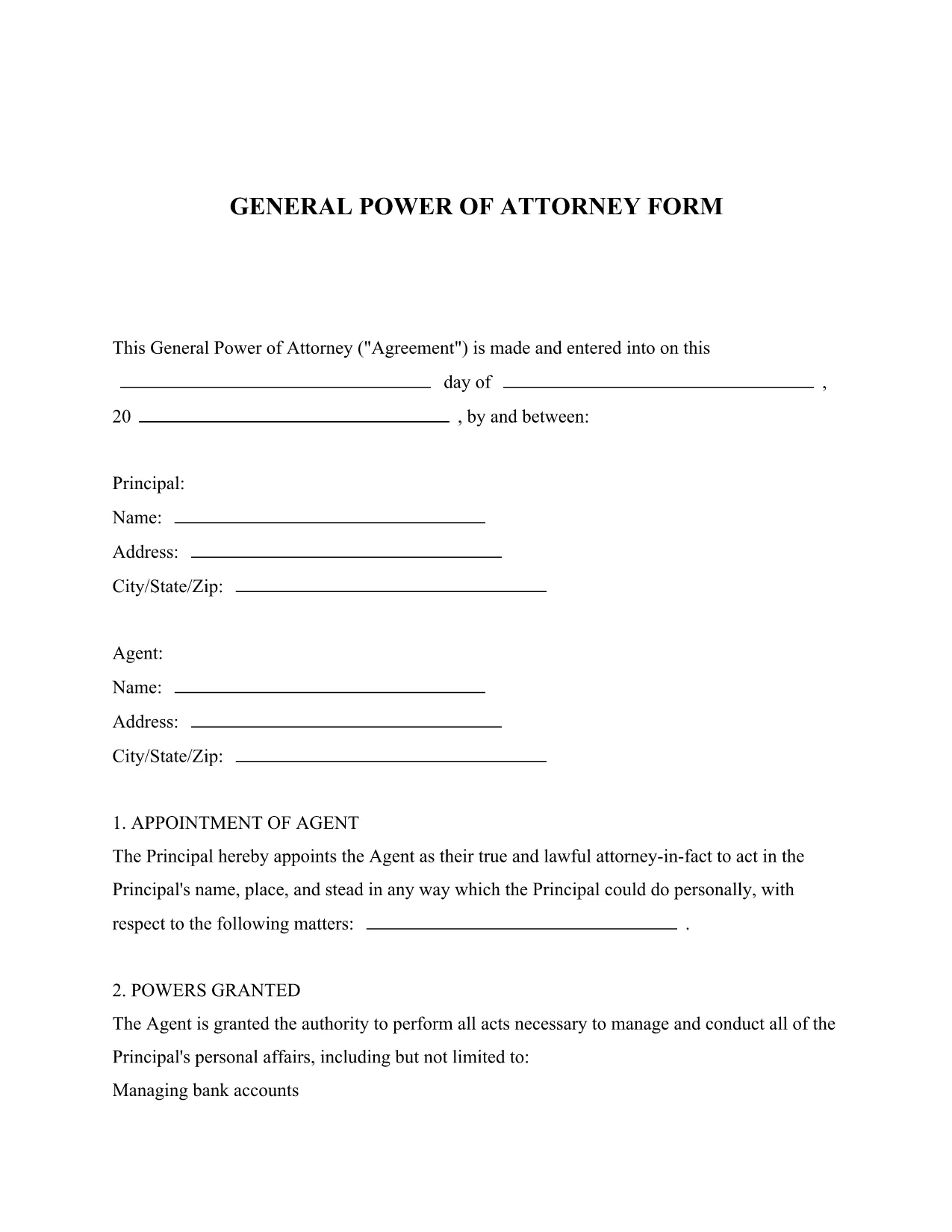
General Power of Attorney Form – Free Fillable PDF Template

  1. Kalba Anglų
  2. Šalis JAV
  3. Veikla Legal Documents Power of Attorney
General Power of Attorney Form – Free Fillable PDF Template

Looking for a reliable legal form template that lets you grant someone authority to act on your behalf? Our General Power of Attorney fillable PDF provides a simple, legally‑compliant way to appoint an attorney‑in‑fact for financial, property, and personal matters.

What Is a General Power of Attorney?

A General Power of Attorney (GPOA) gives a chosen agent broad powers to manage your affairs. It is commonly used when you are unavailable, traveling, or need assistance with day‑to‑day decisions. The form is recognized across all U.S. states when properly executed.

Key Features of Our Fillable PDF Form

  • Fully fillable fields – no printing needed before you start.
  • Clear sections for principal, agent, and notary signatures.
  • Built‑in guidance notes to help you understand each question.
  • Compatible with the Formize PDF Filler for a seamless online experience.

How to Complete the Form in Seconds

Follow the simple steps below to fill, save, and print your Power of Attorney without ever leaving your browser.

Common Mistakes to Avoid

  • Leaving required fields blank – the Formize validator will highlight missing information.
  • Using an unsigned or improperly witnessed form – a notary public is required in most states.
  • Choosing an agent who is not legally capable of acting on your behalf.

Where to Get Help After Submission

If you need legal advice, consult a qualified attorney. Many state bar associations offer free or low‑cost consultations for Power of Attorney questions.

DUK
  • Is a General Power of Attorney valid in every state?

    Yes, a properly executed General Power of Attorney is recognized nationwide, though some states have specific witnessing or notarization requirements.

  • Do I need a lawyer to fill out this form?

    While you can complete the form yourself, consulting an attorney ensures the agent you choose is appropriate and that all legal requirements are met.

  • Can I revoke the Power of Attorney later?

    Absolutely. You can revoke it at any time by creating a written revocation document, signing it, and notifying your agent and any institutions that rely on the POA.

  • What if I make a mistake while filling the PDF?

    The Formize PDF Filler lets you edit any field before saving. If you download the PDF and notice an error, simply reopen it in the filler, correct the mistake, and save again.

  • Is a notarized signature always required?

    Most states require a notary for a General Power of Attorney to be legally binding. Check your state’s specific rules; some may also accept two witnesses instead of a notary.

  • Can I use this form for a minor’s affairs?

    A General Power of Attorney cannot be granted by a minor. For a child’s affairs, a Guardian‑ad Litem or a specific “Minor’s POA” form is needed.

  • How long does the form stay valid?

    Unless you set an expiration date, a General Power of Attorney remains effective until you revoke it, become incapacitated, or pass away.

  • Can I assign more than one agent?

    Yes, you can name multiple agents. The form includes a section for “Successor Agents” if the primary agent cannot serve.

  • Is there a fee to download the PDF?

    No, the General Power of Attorney template is completely free to download and fill using Formize.

  • What should I do after the form is notarized?

    Provide copies to banks, medical providers, and any institutions that will rely on the POA. Keep the original in a safe place.

KAIP

Kaip nemokamai užpildyti general power of attorney internete, atlikdami 5 paprastus veiksmus:

  1. 1
    Click the Fill Out This Form Button
    Locate the bright “Fill out this form” button on the page and click it to launch the Formize PDF Filler.
  2. 2
    Wait for the Formize PDF Filler to Load
    The web‑based filler loads in seconds. All fields become editable directly in your browser.
  3. 3
    Complete Each Section
    Enter the principal’s details, select your agent, and fill in any optional instructions. Required fields are marked with an asterisk.
  4. 4
    Save and Download
    When you’re finished, click “Save” to store a copy in your account, then download the completed PDF for printing and notarization.
  5. 5
    Print, Sign, and Notarize
    Print the saved PDF, sign in the presence of a notary public, and have the notary witness your signature as required by state law.
Formuokite PDF užpildymo programą
APIE

general power of attorney šabloną

Naudodami tradicinį PDF dokumento peržiūros ir pildymo funkcijų rinkinį, žiniatinklio programos pranašumus ir interaktyvų išdėstymą, galite užbaigti general power of attorney per kelias minutes.

FUNKCIJOS

PDF užpildas

Lengviausias būdas užpildyti general power of attorney internete

  • Greitai užpildykite general power of attorney
    Ieškote būdo greitai užpildyti general power of attorney internete? Naudodami internetinį nemokamą PDF formų užpildą sužinosite, kaip redaguoti ir užpildyti šį pdf dokumentą greičiau nei per minutę.
  • Lengva naudoti internetinį PDF redaktorių
    Atsibodo spausdinti PDF failus, kad galėtumėte juos redaguoti prieš nuskaitydami iš naujo ir siųsdami atgal? Redaguoti PDF dokumentus internete nemokamai. Norėdami sutaupyti laiko ir popieriaus, naudokite mūsų internetinį pdf redaktorių.
  • Puikūs įrankiai, visos platformos
    Svarstote, kaip užpildyti general power of attorney „Mac“ kompiuteryje, o gal kaip nemokamai naudoti PDF užpildą? Mūsų internetiniai PDF įrankiai veikia visose platformose.
  • Saugi failų saugykla
    Užbaigti „general power of attorney“ failai saugomi saugioje duomenų bazėje, kurią valdo „Amazon Cloud“ priegloba. Galite bet kada ištrinti failus iš mūsų sistemos. Bet kokiu atveju šie failai automatiškai ištrinami po 24 valandų.
  • Kalbėkitės su general power of attorney
    Kalbėkite su „general power of attorney“ naudodami Chatize, kuri yra nemokama PDF skaitymo priemonė. Užduokite klausimų ir gaukite atsakymus iš „general power of attorney“. Tiesiog spustelėkite aukščiau esantį mygtuką Kalbėtis su dokumentu.

Ištrinti užpildymo seansą

Ištrinti pasirinktą pildymo seansą? Tokiu atveju jūsų pažanga pildant formą bus prarasta.

Ištrinti redagavimo sesiją

Ištrinti pasirinktą redagavimo sesiją? Tokiu atveju jūsų pažanga kuriant ir redaguojant formą bus prarasta.