Pasirinkite kalbą

Parent Authorization Form for Driver License (Fillable PDF)

  1. Kalba Anglų
  2. Šalis JAV
  3. Veikla Driver Licensing
  4. skyrius Motor Vehicle Commission
Parent Authorization Form for Driver License (Fillable PDF)

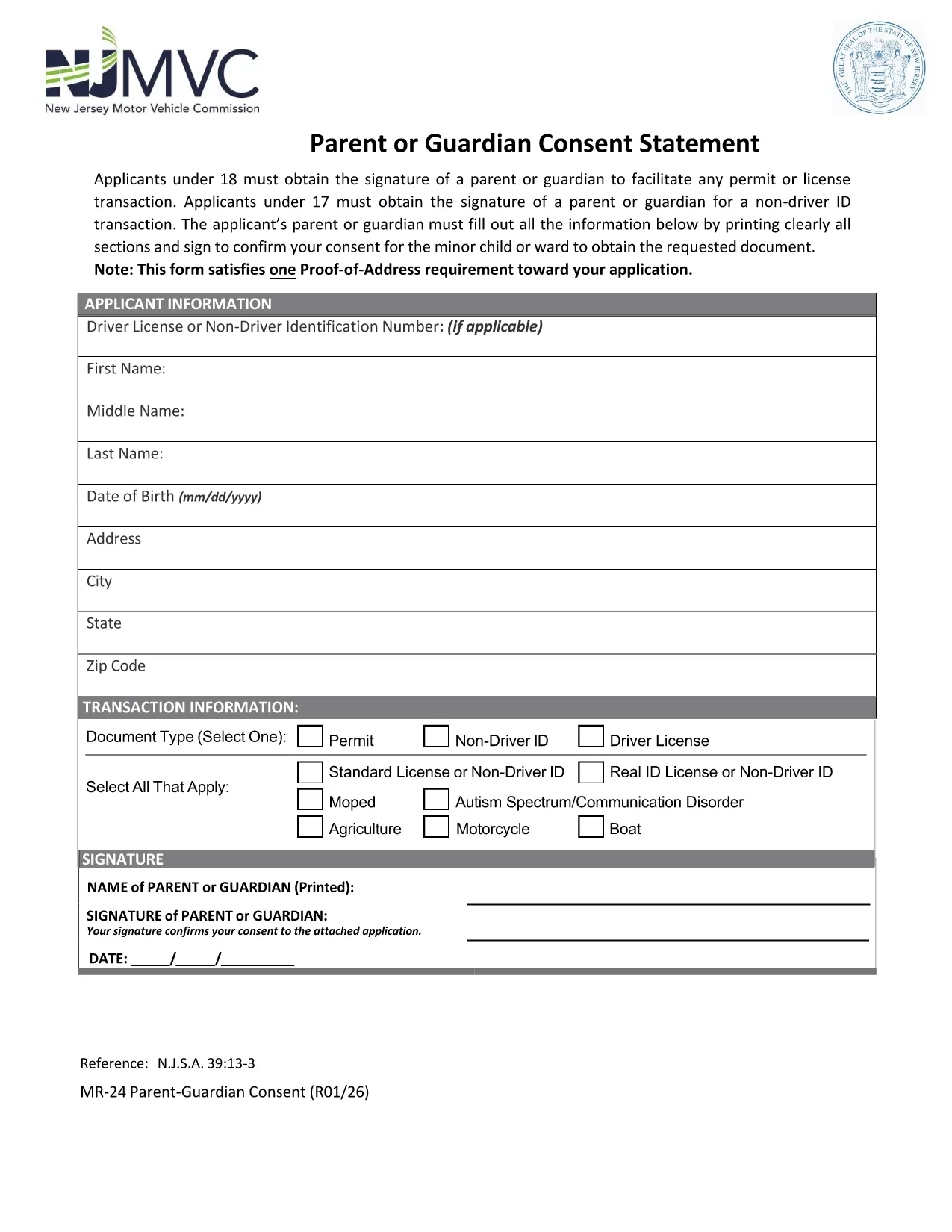
When a teen under 18 applies for a driver’s permit or license, most state motor vehicle agencies require a signed Parent or Guardian Consent Form. This form proves that a parent or legal guardian authorizes the minor to obtain driving privileges and acknowledges responsibility for the teen’s safe operation of the vehicle.

What Is the Parent or Guardian Consent Form?

The consent form is a simple one‑page PDF that captures the minor’s personal information, the parent’s contact details, and the parent’s signature. It is used by the Department of Motor Vehicles (DMV) or Motor Vehicle Commission (MVC) to verify that a responsible adult has given permission.

How to Complete the Form Online with Formize

Instead of printing, scanning, or using a PDF editor, you can fill out the form directly on our site. Follow these steps:

  1. Click the "Fill out this form" button below.
  2. Wait a moment while the Formize PDF Filler app loads securely in your browser.
  3. Enter the required information in each field – the interface highlights mandatory sections.
  4. Use the built‑in signature pad to add the parent’s signature (or type the name and select the "Typed Signature" option).
  5. When you’re done, click Save & Download to get a completed PDF you can print or submit electronically.

Common Mistakes to Avoid

  • Illegible handwriting: Even though you can type, many still hand‑write. Use clear, block letters to prevent processing delays.
  • Missing signatures: Both the parent/guardian and, in some states, the minor must sign. The Formize app will warn you if a signature is missing.
  • Incorrect dates: Use the current date; an expired date may cause the form to be rejected.
  • Wrong address: Verify the address matches the one on file with the DMV.

Where to Submit the Completed Form

After you download the filled PDF, you can:

  • Bring it to your local DMV/MVC office when applying for the permit or license.
  • Mail it to the address listed on the form (if your state allows mail‑in submissions).
  • Upload it through the online driver‑license portal, if your state provides that option.

Download the Official PDF

The form below is the official New Jersey Motor Vehicle Commission (MVC) Parent or Guardian Consent Form. It is fully compatible with the Formize PDF Filler.

Download the PDF

DUK
  • Do I need a notarized signature on the parent consent form?

    No. Most states, including New Jersey, only require a regular signature from the parent or legal guardian. A notarized signature is not necessary.

  • Can I submit the form electronically?

    Yes, if your state’s DMV/MVC offers an online portal. The filled PDF can be uploaded directly after you save it from Formize.

  • What if my teen is 17 and applying for a learner’s permit?

    A parent or guardian must still sign the consent form. Some states also require a separate “Non‑Driver ID” consent; the same PDF covers both purposes.

  • Is the Formize PDF Filler secure?

    Absolutely. All data is processed locally in your browser; nothing is stored on our servers unless you choose to save the file.

  • Can I edit the form after I’ve downloaded it?

    Yes. The saved PDF remains fillable, so you can reopen it in Formize or any standard PDF editor to make corrections before final submission.

  • What if I make a mistake while filling the form?

    Simply click the "Clear" button next to the field, re‑enter the correct information, and continue. The app prevents accidental submission of incomplete or incorrect data.

  • Do I need to provide proof of relationship with the minor?

    The consent form itself serves as proof. However, some DMVs may request additional documentation (birth certificate, custody papers) during the in‑person visit.

  • Is there a fee to use the Formize PDF Filler?

    No. The fillable PDF and online filler are completely free for users.

KAIP

Kaip nemokamai užpildyti parent authorization driver license internete, atlikdami 5 paprastus veiksmus:

  1. 1
    Open the Fillable Form
    Click the "Fill out this form" button on the page. The Formize PDF Filler loads directly in your browser—no download needed.
  2. 2
    Enter All Required Information
    Type the minor’s name, date of birth, address, and the parent’s contact details into the highlighted fields.
  3. 3
    Add the Parent’s Signature
    Use the signature pad to draw a signature or select the "Typed Signature" option. The app validates that the signature field is completed.
  4. 4
    Save and Download
    When every required field is filled, click "Save & Download". A completed PDF will be saved to your device for printing or electronic submission.
  5. 5
    Submit to Your DMV/MVC
    Take the printed copy to your local motor vehicle office, mail it, or upload it through the state’s online portal as instructed.
Formuokite PDF užpildymo programą
APIE

parent authorization driver license šabloną

Naudodami tradicinį PDF dokumento peržiūros ir pildymo funkcijų rinkinį, žiniatinklio programos pranašumus ir interaktyvų išdėstymą, galite užbaigti parent authorization driver license per kelias minutes.

FUNKCIJOS

PDF užpildas

Lengviausias būdas užpildyti parent authorization driver license internete

  • Greitai užpildykite parent authorization driver license
    Ieškote būdo greitai užpildyti parent authorization driver license internete? Naudodami internetinį nemokamą PDF formų užpildą sužinosite, kaip redaguoti ir užpildyti šį pdf dokumentą greičiau nei per minutę.
  • Lengva naudoti internetinį PDF redaktorių
    Atsibodo spausdinti PDF failus, kad galėtumėte juos redaguoti prieš nuskaitydami iš naujo ir siųsdami atgal? Redaguoti PDF dokumentus internete nemokamai. Norėdami sutaupyti laiko ir popieriaus, naudokite mūsų internetinį pdf redaktorių.
  • Puikūs įrankiai, visos platformos
    Svarstote, kaip užpildyti parent authorization driver license „Mac“ kompiuteryje, o gal kaip nemokamai naudoti PDF užpildą? Mūsų internetiniai PDF įrankiai veikia visose platformose.
  • Saugi failų saugykla
    Užbaigti „parent authorization driver license“ failai saugomi saugioje duomenų bazėje, kurią valdo „Amazon Cloud“ priegloba. Galite bet kada ištrinti failus iš mūsų sistemos. Bet kokiu atveju šie failai automatiškai ištrinami po 24 valandų.
  • Kalbėkitės su parent authorization driver license
    Kalbėkite su „parent authorization driver license“ naudodami Chatize, kuri yra nemokama PDF skaitymo priemonė. Užduokite klausimų ir gaukite atsakymus iš „parent authorization driver license“. Tiesiog spustelėkite aukščiau esantį mygtuką Kalbėtis su dokumentu.

Ištrinti užpildymo seansą

Ištrinti pasirinktą pildymo seansą? Tokiu atveju jūsų pažanga pildant formą bus prarasta.

Ištrinti redagavimo sesiją

Ištrinti pasirinktą redagavimo sesiją? Tokiu atveju jūsų pažanga kuriant ir redaguojant formą bus prarasta.