
Pasirinkite kalbą

RI 20-97 – Military Earnings Request Form (Fillable PDF)

  1. Šalis JAV
  2. Kalba Anglų
  3. skyrius Personalo valdymo biuras
  4. Sektorius Išėjimo į pensiją ir draudimo formos
RI 20-97 – Military Earnings Request Form (Fillable PDF)

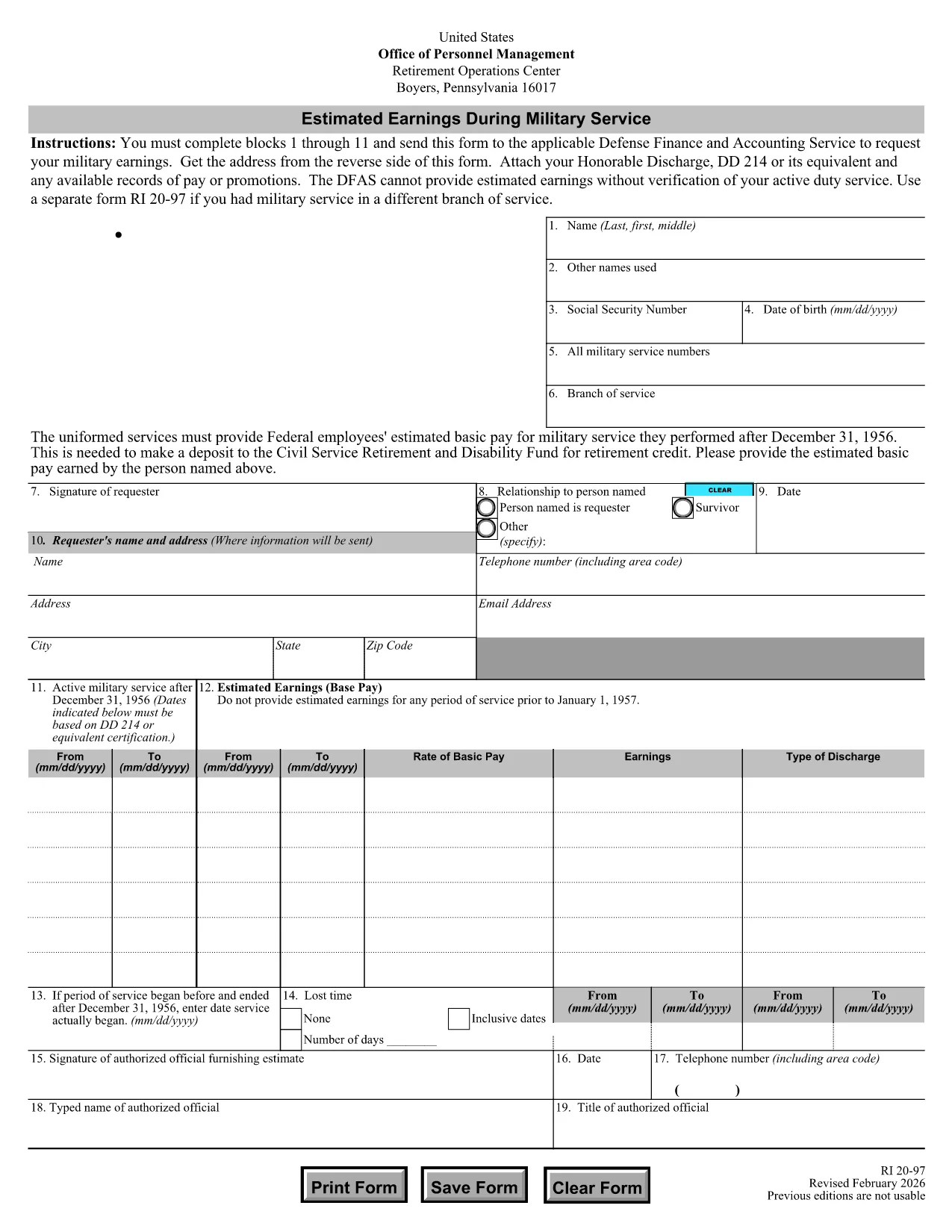
The RI 20-97 is the U.S. Office of Personnel Management (OPM) form used to request an estimate of your military earnings for retirement credit. Federal employees who have served in the armed forces use this form to ensure their service pay is counted toward their civil service pension.

What Is the RI 20-97 Form?

This official PDF, provided by OPM, captures personal details, service dates, pay grade, and any special pay received. Once completed, the form is sent to the Defense Finance and Accounting Service (DFAS) for calculation.

How to Complete the RI 20-97 Online with Formize

Instead of downloading, printing, and scanning, you can fill out the form directly on our site:

  1. Click the "Fill out this form" button below.
  2. The Formize PDF Filler app loads the fillable RI 20-97 template.
  3. Enter your information in each field (blocks 1‑11).
  4. Upload supporting documents such as your DD‑214.
  5. Review, e‑sign, and submit the form securely.

Common Mistakes & Tips for a Successful Submission

  • Missing DD‑214: The form will be rejected if you don’t attach a copy of your discharge papers.
  • Incorrect Service Dates: Double‑check start and end dates; even a one‑day error can delay processing.
  • Skipping Optional Fields: Fill in all optional fields when applicable; they help DFAS calculate a more accurate estimate.
  • Signature Errors: Both electronic and wet signatures are accepted – make sure the signature field is not left blank.

Supporting Documents You’ll Need

Prepare these items before you start:

  • DD‑214 or official military service record
  • Pay statements or promotion orders (if available)
  • Any previous RI 20‑97 submissions for reference

Where to Send Your Completed Form

After you finish the online fill, the Formize app will give you two options:

  • Download a PDF copy to mail to DFAS
  • Securely upload the completed form directly to DFAS through the provided portal link

Following these steps ensures your military earnings are counted toward your federal retirement benefits.

DUK
  • Who needs to fill out the RI 20-97 form?

    Any current or former federal employee who served in the U.S. military and wants their service earnings counted toward their civil service retirement credit.

  • Can I use a wet signature on the RI 20-97?

    Yes. Both electronic and wet signatures are accepted. If you print the form, sign it, and mail it, DFAS will process it without issue.

  • What if I don’t have my DD‑214?

    The DD‑214 is required for verification. If it’s lost, request a replacement from the National Archives before submitting the RI 20‑97.

  • How long does DFAS take to calculate my earnings?

    Processing typically takes 2‑4 weeks after receipt of a complete, correctly signed RI 20‑97 with all supporting documents.

  • Is the Formize filler secure?

    Yes. Formize uses SSL encryption and complies with federal data‑privacy standards, ensuring your personal and military information is protected.

  • Do I need to fill out every field?

    All mandatory fields (blocks 1‑11) must be completed. Optional fields should be filled when applicable to improve accuracy.

  • Can I submit the form directly to DFAS from Formize?

    After completing the form, you can either download a PDF to mail or use the secure upload link provided by Formize to send it directly to DFAS.

  • What is the difference between the RI 20‑97 and the RI‑20‑97‑2023 version?

    The content is the same; the year in the file name reflects the most recent revision. All versions are accepted by DFAS as long as they are the official OPM form.

KAIP

Kaip nemokamai užpildyti RI 20-97 internete, atlikdami 5 paprastus veiksmus:

  1. 1
    Open the Fillable Form
    Click the "Fill out this form" button on the page. The Formize PDF Filler will load the RI 20-97 template instantly.
  2. 2
    Enter Your Information
    Complete fields 1 through 11 with accurate personal and service details. Use dropdowns and date pickers for consistency.
  3. 3
    Attach Supporting Documents
    Upload your DD‑214 and any pay records using the attachment area. The system validates file types before you proceed.
  4. 4
    Review and Sign
    Double‑check every entry, then add an electronic signature or upload a scanned wet signature as required.
  5. 5
    Submit or Download
    Choose to submit directly to DFAS through the secure portal, or download the completed PDF to mail it yourself.
Formuokite PDF užpildymo programą
APIE

Personalo valdymo biuro (OPM) formos

RI 20-97 yra viena iš oficialių formų, naudojamų Jungtinių Valstijų personalo valdymo biure, kuris yra nepriklausoma federalinės vyriausybės agentūra, atsakinga už valstybės tarnybos darbuotojų ir federalinių darbuotojų išmokų valdymą. OPM nustato politiką ir reglamentus, susijusius su federaliniu užimtumu, administruoja įvairias personalo programas ir teikia paslaugas federaliniams darbuotojams, pensininkams ir ieškantiems darbo.

Štai keletas personalo valdymo biuro formų pavyzdžių:

Standartinė 86 forma (SF-86) : ši forma naudojama asmenų, kurie kreipiasi dėl saugumo patikrinimo, fono tyrimo procesui. Ji renka išsamią asmeninę, darbo, išsilavinimo ir finansinę informaciją, taip pat informaciją apie užsienio ryšius ir veiklą.

Standartinė 2809 forma (SF-2809) : ši forma naudojama norint užsiregistruoti federalinėje darbuotojų sveikatos išmokų (FEHB) programoje, kuri suteikia sveikatos draudimo apsaugą federaliniams darbuotojams, pensininkams ir jų reikalavimus atitinkantiems šeimos nariams.

Standartinė 2817 forma (SF-2817): ši forma naudojama norint pratęsti draudimą pagal Federalinę darbuotojų dantų ir regėjimo draudimo programą (FEDVIP) išėjus į pensiją arba atsiskyrus nuo federalinės tarnybos.

Standartinė 3107 forma (SF-3107) : Ši forma naudojama teikiant paraišką dėl išėjimo į pensiją išmokų pagal Valstybės tarnybos pensijų sistemą (CSRS).

Standartinė 2801 forma (SF-2801) : Ši forma naudojama teikiant paraišką dėl išėjimo į pensiją išmokų pagal Federalinę darbuotojų pensijų sistemą (FERS).

Standartinė 15 forma (SF-15) : Ši forma naudojama teikiant paraišką dėl veterano pirmenybės federaliniame darbe. Jį pateikia veteranai arba jų reikalavimus atitinkantys šeimos nariai, ieškantys darbo galimybių federalinėje vyriausybėje.

Šie pavyzdžiai atspindi kai kurias įprastas OPM formas, naudojamas federalinio užimtumo ir išmokų darbuotojams kontekste. Tačiau OPM turi daugybę kitų formų, susijusių su įvairiomis personalo programomis, išėjimu į pensiją, draudimu ir kitais federalinio užimtumo aspektais. Reikalingos konkrečios formos gali skirtis priklausomai nuo operacijos, programos ar siekiamos naudos pobūdžio. Patartina apsilankyti oficialioje JAV personalo valdymo biuro svetainėje (www.opm.gov) arba paprašyti OPM ar atitinkamo žmogiškųjų išteklių personalo patarimo, kad gautumėte tikslią ir naujausią informaciją. naujausia informacija apie konkrečias OPM formas, susijusias su jūsų federaliniais įdarbinimo ar su išmokomis susijusiais poreikiais.

FUNKCIJOS

PDF užpildas

Lengviausias būdas užpildyti RI 20-97 internete

  • Greitai užpildykite RI 20-97
    Ieškote būdo greitai užpildyti RI 20-97 internete? Naudodami internetinį nemokamą PDF formų užpildą sužinosite, kaip redaguoti ir užpildyti šį pdf dokumentą greičiau nei per minutę.
  • Lengva naudoti internetinį PDF redaktorių
    Atsibodo spausdinti PDF failus, kad galėtumėte juos redaguoti prieš nuskaitydami iš naujo ir siųsdami atgal? Redaguoti PDF dokumentus internete nemokamai. Norėdami sutaupyti laiko ir popieriaus, naudokite mūsų internetinį pdf redaktorių.
  • Puikūs įrankiai, visos platformos
    Svarstote, kaip užpildyti RI 20-97 „Mac“ kompiuteryje, o gal kaip nemokamai naudoti PDF užpildą? Mūsų internetiniai PDF įrankiai veikia visose platformose.
  • Saugi failų saugykla
    Užbaigti „RI 20-97“ failai saugomi saugioje duomenų bazėje, kurią valdo „Amazon Cloud“ priegloba. Galite bet kada ištrinti failus iš mūsų sistemos. Bet kokiu atveju šie failai automatiškai ištrinami po 24 valandų.
  • Kalbėkitės su RI 20-97
    Kalbėkite su „RI 20-97“ naudodami Chatize, kuri yra nemokama PDF skaitymo priemonė. Užduokite klausimų ir gaukite atsakymus iš „RI 20-97“. Tiesiog spustelėkite aukščiau esantį mygtuką Kalbėtis su dokumentu.

Ištrinti užpildymo seansą

Ištrinti pasirinktą pildymo seansą? Tokiu atveju jūsų pažanga pildant formą bus prarasta.

Ištrinti redagavimo sesiją

Ištrinti pasirinktą redagavimo sesiją? Tokiu atveju jūsų pažanga kuriant ir redaguojant formą bus prarasta.