
Pasirinkite kalbą

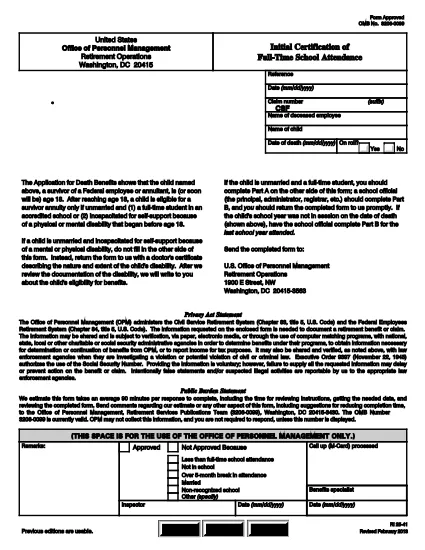
RI 25‑41 Fillable PDF – Initial Certification of Full‑Time School Attendance

  1. Šalis JAV
  2. Kalba Anglų
  3. skyrius Personalo valdymo biuras
  4. Sektorius Išėjimo į pensiją ir draudimo formos
RI 25‑41 Fillable PDF – Initial Certification of Full‑Time School Attendance

The RI 25‑41 is the federal “Initial Certification of Full‑Time School Attendance” used by the Office of Personnel Management (OPM) to verify a student’s eligibility for federal education benefits. This form is required for each school year and must be completed by both the payee (the student’s parent or guardian) and an official of the educational institution.

What Is the RI 25‑41 Form?

RI 25‑41 collects detailed information about the student’s enrollment, the school’s accreditation, and the anticipated dates of attendance. Part A is filled out by the payee, while Part B is completed by a school official. The form must be signed and returned to OPM before benefits are paid.

How to Fill Out RI 25‑41 Online with Formize

Instead of printing, scanning, or editing the PDF in a separate program, you can fill the form directly on our site. Follow the simple steps below:

  1. Click the “Fill out this form” button on the page.
  2. Wait a few seconds while the Formize PDF Filler app loads the fillable RI 25‑41 document.
  3. Enter your information in each field. Use the TAB key to jump between fields.
  4. When all required fields are completed, click Save & Download to get a copy of the completed PDF.
  5. Print the signed copy (if a signature is required) and submit it to OPM as instructed.

Key Sections & Common Mistakes to Avoid

  • Part A – Payee Information: Double‑check the Social Security Number and date of birth; a typo will delay processing.
  • Part B – School Official: Ensure the official’s title and phone number are current; OPM may contact them for verification.
  • Attendance Dates: Use the exact start and end dates of the academic term. Do not leave blanks.
  • Signatures: Electronic signatures are accepted only if the PDF is printed, signed, and scanned back. The online filler does not replace a handwritten signature where required.
  • Attachments: If the school requires additional documentation (e.g., enrollment verification), attach those files before downloading the final PDF.

Where to Submit the Completed Form

After saving the completed RI 25‑41, mail or fax the signed PDF to the address listed on the OPM website. For most federal employees, the preferred method is to upload the PDF to the OPM portal under “Retirement & Insurance Forms.”

Need a printable version? Use the direct download link below.

DUK
  • Can I submit the RI 25‑41 electronically?

    Yes. After completing the form in the Formize filler, you can download the PDF and upload it to the OPM portal. If a signature is required, print, sign, and scan the document before uploading.

  • Who can fill out Part B of the form?

    Part B must be completed by an authorized official of the educational institution, such as the registrar or dean.

  • What happens if I make a mistake on the form?

    Incorrect or missing information can delay benefit payments. Review all entries carefully and correct any errors before submitting.

  • Do I need to attach proof of enrollment?

    OPM may request additional enrollment verification. Attach any required documents before downloading the final PDF.

  • Is the RI 25‑41 form still valid for 2024‑2025 school years?

    Yes. The RI 25‑41 form is the current version for all upcoming school years unless OPM announces a revision.

  • How long does it take for OPM to process the form?

    Processing typically takes 10‑14 business days after receipt of a complete and signed form.

KAIP

Kaip nemokamai užpildyti RI 25-41 internete, atlikdami 4 paprastus veiksmus:

  1. 1
    Open the Fillable Form
    Click the “Fill out this form” button on this page. The Formize PDF Filler will open the RI 25‑41 document automatically.
  2. 2
    Enter Your Information
    Type directly into each field. Use TAB to move to the next field. All required fields are marked with an asterisk.
  3. 3
    Save and Download
    When you’re finished, click “Save & Download” to get a copy of the completed PDF. Print and sign if a handwritten signature is required.
  4. 4
    Submit to OPM
    Mail, fax, or upload the signed PDF to the OPM portal as instructed in the form’s instructions.
Formuokite PDF užpildymo programą
APIE

Personalo valdymo biuro (OPM) formos

RI 25-41 yra viena iš oficialių formų, naudojamų Jungtinių Valstijų personalo valdymo biure, kuris yra nepriklausoma federalinės vyriausybės agentūra, atsakinga už valstybės tarnybos darbuotojų ir federalinių darbuotojų išmokų valdymą. OPM nustato politiką ir reglamentus, susijusius su federaliniu užimtumu, administruoja įvairias personalo programas ir teikia paslaugas federaliniams darbuotojams, pensininkams ir ieškantiems darbo.

Štai keletas personalo valdymo biuro formų pavyzdžių:

Standartinė 86 forma (SF-86) : ši forma naudojama asmenų, kurie kreipiasi dėl saugumo patikrinimo, fono tyrimo procesui. Ji renka išsamią asmeninę, darbo, išsilavinimo ir finansinę informaciją, taip pat informaciją apie užsienio ryšius ir veiklą.

Standartinė 2809 forma (SF-2809) : ši forma naudojama norint užsiregistruoti federalinėje darbuotojų sveikatos išmokų (FEHB) programoje, kuri suteikia sveikatos draudimo apsaugą federaliniams darbuotojams, pensininkams ir jų reikalavimus atitinkantiems šeimos nariams.

Standartinė 2817 forma (SF-2817): ši forma naudojama norint pratęsti draudimą pagal Federalinę darbuotojų dantų ir regėjimo draudimo programą (FEDVIP) išėjus į pensiją arba atsiskyrus nuo federalinės tarnybos.

Standartinė 3107 forma (SF-3107) : Ši forma naudojama teikiant paraišką dėl išėjimo į pensiją išmokų pagal Valstybės tarnybos pensijų sistemą (CSRS).

Standartinė 2801 forma (SF-2801) : Ši forma naudojama teikiant paraišką dėl išėjimo į pensiją išmokų pagal Federalinę darbuotojų pensijų sistemą (FERS).

Standartinė 15 forma (SF-15) : Ši forma naudojama teikiant paraišką dėl veterano pirmenybės federaliniame darbe. Jį pateikia veteranai arba jų reikalavimus atitinkantys šeimos nariai, ieškantys darbo galimybių federalinėje vyriausybėje.

Šie pavyzdžiai atspindi kai kurias įprastas OPM formas, naudojamas federalinio užimtumo ir išmokų darbuotojams kontekste. Tačiau OPM turi daugybę kitų formų, susijusių su įvairiomis personalo programomis, išėjimu į pensiją, draudimu ir kitais federalinio užimtumo aspektais. Reikalingos konkrečios formos gali skirtis priklausomai nuo operacijos, programos ar siekiamos naudos pobūdžio. Patartina apsilankyti oficialioje JAV personalo valdymo biuro svetainėje (www.opm.gov) arba paprašyti OPM ar atitinkamo žmogiškųjų išteklių personalo patarimo, kad gautumėte tikslią ir naujausią informaciją. naujausia informacija apie konkrečias OPM formas, susijusias su jūsų federaliniais įdarbinimo ar su išmokomis susijusiais poreikiais.

FUNKCIJOS

PDF užpildas

Lengviausias būdas užpildyti RI 25-41 internete

  • Greitai užpildykite RI 25-41
    Ieškote būdo greitai užpildyti RI 25-41 internete? Naudodami internetinį nemokamą PDF formų užpildą sužinosite, kaip redaguoti ir užpildyti šį pdf dokumentą greičiau nei per minutę.
  • Lengva naudoti internetinį PDF redaktorių
    Atsibodo spausdinti PDF failus, kad galėtumėte juos redaguoti prieš nuskaitydami iš naujo ir siųsdami atgal? Redaguoti PDF dokumentus internete nemokamai. Norėdami sutaupyti laiko ir popieriaus, naudokite mūsų internetinį pdf redaktorių.
  • Puikūs įrankiai, visos platformos
    Svarstote, kaip užpildyti RI 25-41 „Mac“ kompiuteryje, o gal kaip nemokamai naudoti PDF užpildą? Mūsų internetiniai PDF įrankiai veikia visose platformose.
  • Saugi failų saugykla
    Užbaigti „RI 25-41“ failai saugomi saugioje duomenų bazėje, kurią valdo „Amazon Cloud“ priegloba. Galite bet kada ištrinti failus iš mūsų sistemos. Bet kokiu atveju šie failai automatiškai ištrinami po 24 valandų.
  • Kalbėkitės su RI 25-41
    Kalbėkite su „RI 25-41“ naudodami Chatize, kuri yra nemokama PDF skaitymo priemonė. Užduokite klausimų ir gaukite atsakymus iš „RI 25-41“. Tiesiog spustelėkite aukščiau esantį mygtuką Kalbėtis su dokumentu.

Ištrinti užpildymo seansą

Ištrinti pasirinktą pildymo seansą? Tokiu atveju jūsų pažanga pildant formą bus prarasta.

Ištrinti redagavimo sesiją

Ištrinti pasirinktą redagavimo sesiją? Tokiu atveju jūsų pažanga kuriant ir redaguojant formą bus prarasta.