
Pasirinkite kalbą

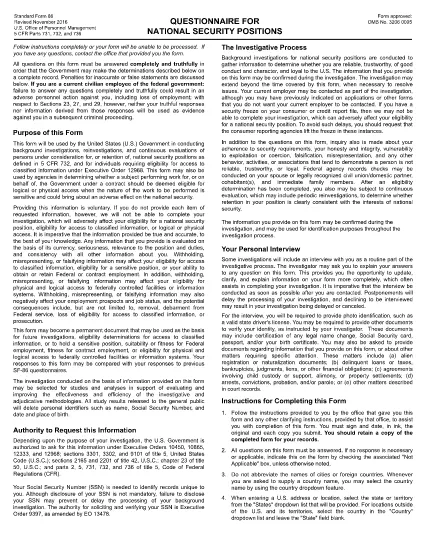
SF-86 Questionnaire – Fillable PDF for Security Clearance

  1. Kalba Anglų
  2. Šalis JAV
  3. skyrius Personalo valdymo biuras
  4. Sektorius Standartinės formos
SF-86 Questionnaire – Fillable PDF for Security Clearance

The SF-86 (Standard Form 86) is the U.S. government’s official questionnaire used for background investigations, reinvestigations, and continuous evaluations of individuals seeking access to classified information or national‑security positions. Completing it accurately is essential for obtaining a security clearance.

This page provides a fillable PDF version of the SF-86 that you can complete directly in your browser using the Formize PDF Filler app. No additional software or printing is required.

What Is the SF-86 Form?

The SF-86 collects detailed personal information, including:

  • Education and employment history (last 10 years)
  • Foreign contacts, travel, and residences
  • Criminal record, financial disclosures, and drug use
  • Military service and security‑related activities

Agencies use this data to assess eligibility for a security clearance.

Key Sections of the SF-86

Understanding the major sections helps you gather the right documents before you start:

  1. Personal Information – name, date of birth, Social Security number.
  2. Residence History – every address for the past 10 years.
  3. Employment & Education – employers, schools, dates, and supervisors.
  4. Foreign Contacts & Travel – individuals, countries, and trips abroad.
  5. Legal & Financial Matters – arrests, convictions, bankruptcies, debts.

How to Complete the SF-86 Online

Follow these simple steps to fill out the form quickly and securely:

  • Click the "Fill out this form" button below.
  • Wait a few seconds while the Formize PDF Filler loads.
  • Enter your information field‑by‑field; the app auto‑saves as you go.
  • When finished, click "Save & Download" to get a completed PDF copy.
  • Submit the saved PDF to your agency or upload it through e‑QIP as instructed.

Common Mistakes & Tips

Tip 1: Answer every question truthfully. Incomplete or false information can delay or deny your clearance.

Tip 2: Use exact dates (MM/DD/YYYY) and full legal names for contacts.

Tip 3: Keep supporting documents (travel itineraries, employment letters) handy for reference.

Tip 4: Review the form twice before saving. The Formize filler highlights required fields you might have missed.

Ready to start? Click below to launch the fillable SF-86 PDF.

DUK
  • What is the SF-86 used for?

    The SF-86 is the standard questionnaire for background investigations and security clearances for U.S. government, military, and contractor positions.

  • Can I fill out the SF-86 on a mobile device?

    Yes. The Formize PDF Filler works on most modern smartphones and tablets, but a desktop browser provides the best experience.

  • Is the fillable PDF version official?

    Yes. The PDF linked below is the official OPM form, now available as a fillable document through Formize.

  • Do I need an e‑QIP account to use this form?

    No. You can complete the PDF offline with Formize and then upload the finished file to e‑QIP if your agency requires it.

  • How long does it take to complete the SF-86?

    Preparation time varies, but most applicants finish the form in 2–4 hours. Gather employment, travel, and foreign‑contact records beforehand.

  • What happens if I make a mistake?

    Incorrect or omitted information can delay your clearance. Use the Formize auto‑save and review features, then double‑check before submitting.

  • Is my data secure while using Formize?

    Formize uses SSL encryption and does not store your personal data on its servers after you download the completed PDF.

KAIP

Kaip nemokamai užpildyti SF-86 internete, atlikdami 5 paprastus veiksmus:

  1. 1
    Click the Fill Out Button
    Press the "Fill out this form" button on this page to open the SF-86 in the Formize PDF Filler.
  2. 2
    Wait for the Filler to Load
    The Formize app loads in a few seconds; a loading bar will appear at the top of the screen.
  3. 3
    Enter Your Information
    Complete each section of the questionnaire. The filler auto‑saves as you type and highlights any required fields you missed.
  4. 4
    Save and Download
    When all fields are filled, click "Save & Download" to get a completed PDF copy on your device.
  5. 5
    Submit to Your Agency
    Follow your agency’s instructions—usually uploading the PDF to e‑QIP or providing a printed copy to your security officer.
Formuokite PDF užpildymo programą
APIE

Personalo valdymo biuro (OPM) formos

SF-86 yra viena iš oficialių formų, naudojamų Jungtinių Valstijų personalo valdymo biure, kuris yra nepriklausoma federalinės vyriausybės agentūra, atsakinga už valstybės tarnybos darbuotojų ir federalinių darbuotojų išmokų valdymą. OPM nustato politiką ir reglamentus, susijusius su federaliniu užimtumu, administruoja įvairias personalo programas ir teikia paslaugas federaliniams darbuotojams, pensininkams ir ieškantiems darbo.

Štai keletas personalo valdymo biuro formų pavyzdžių:

Standartinė 86 forma (SF-86) : ši forma naudojama asmenų, kurie kreipiasi dėl saugumo patikrinimo, fono tyrimo procesui. Ji renka išsamią asmeninę, darbo, išsilavinimo ir finansinę informaciją, taip pat informaciją apie užsienio ryšius ir veiklą.

Standartinė 2809 forma (SF-2809) : ši forma naudojama norint užsiregistruoti federalinėje darbuotojų sveikatos išmokų (FEHB) programoje, kuri suteikia sveikatos draudimo apsaugą federaliniams darbuotojams, pensininkams ir jų reikalavimus atitinkantiems šeimos nariams.

Standartinė 2817 forma (SF-2817): ši forma naudojama norint pratęsti draudimą pagal Federalinę darbuotojų dantų ir regėjimo draudimo programą (FEDVIP) išėjus į pensiją arba atsiskyrus nuo federalinės tarnybos.

Standartinė 3107 forma (SF-3107) : Ši forma naudojama teikiant paraišką dėl išėjimo į pensiją išmokų pagal Valstybės tarnybos pensijų sistemą (CSRS).

Standartinė 2801 forma (SF-2801) : Ši forma naudojama teikiant paraišką dėl išėjimo į pensiją išmokų pagal Federalinę darbuotojų pensijų sistemą (FERS).

Standartinė 15 forma (SF-15) : Ši forma naudojama teikiant paraišką dėl veterano pirmenybės federaliniame darbe. Jį pateikia veteranai arba jų reikalavimus atitinkantys šeimos nariai, ieškantys darbo galimybių federalinėje vyriausybėje.

Šie pavyzdžiai atspindi kai kurias įprastas OPM formas, naudojamas federalinio užimtumo ir išmokų darbuotojams kontekste. Tačiau OPM turi daugybę kitų formų, susijusių su įvairiomis personalo programomis, išėjimu į pensiją, draudimu ir kitais federalinio užimtumo aspektais. Reikalingos konkrečios formos gali skirtis priklausomai nuo operacijos, programos ar siekiamos naudos pobūdžio. Patartina apsilankyti oficialioje JAV personalo valdymo biuro svetainėje (www.opm.gov) arba paprašyti OPM ar atitinkamo žmogiškųjų išteklių personalo patarimo, kad gautumėte tikslią ir naujausią informaciją. naujausia informacija apie konkrečias OPM formas, susijusias su jūsų federaliniais įdarbinimo ar su išmokomis susijusiais poreikiais.

FUNKCIJOS

PDF užpildas

Lengviausias būdas užpildyti SF-86 internete

  • Greitai užpildykite SF-86
    Ieškote būdo greitai užpildyti SF-86 internete? Naudodami internetinį nemokamą PDF formų užpildą sužinosite, kaip redaguoti ir užpildyti šį pdf dokumentą greičiau nei per minutę.
  • Lengva naudoti internetinį PDF redaktorių
    Atsibodo spausdinti PDF failus, kad galėtumėte juos redaguoti prieš nuskaitydami iš naujo ir siųsdami atgal? Redaguoti PDF dokumentus internete nemokamai. Norėdami sutaupyti laiko ir popieriaus, naudokite mūsų internetinį pdf redaktorių.
  • Puikūs įrankiai, visos platformos
    Svarstote, kaip užpildyti SF-86 „Mac“ kompiuteryje, o gal kaip nemokamai naudoti PDF užpildą? Mūsų internetiniai PDF įrankiai veikia visose platformose.
  • Saugi failų saugykla
    Užbaigti „SF-86“ failai saugomi saugioje duomenų bazėje, kurią valdo „Amazon Cloud“ priegloba. Galite bet kada ištrinti failus iš mūsų sistemos. Bet kokiu atveju šie failai automatiškai ištrinami po 24 valandų.
  • Kalbėkitės su SF-86
    Kalbėkite su „SF-86“ naudodami Chatize, kuri yra nemokama PDF skaitymo priemonė. Užduokite klausimų ir gaukite atsakymus iš „SF-86“. Tiesiog spustelėkite aukščiau esantį mygtuką Kalbėtis su dokumentu.

Ištrinti užpildymo seansą

Ištrinti pasirinktą pildymo seansą? Tokiu atveju jūsų pažanga pildant formą bus prarasta.

Ištrinti redagavimo sesiją

Ištrinti pasirinktą redagavimo sesiją? Tokiu atveju jūsų pažanga kuriant ir redaguojant formą bus prarasta.