
Pasirinkite kalbą

DS-11 U.S. Passport Application – Fillable PDF

  1. Kalba Anglų
  2. Šalis JAV
  3. Veikla Pasas
DS-11 U.S. Passport Application – Fillable PDF

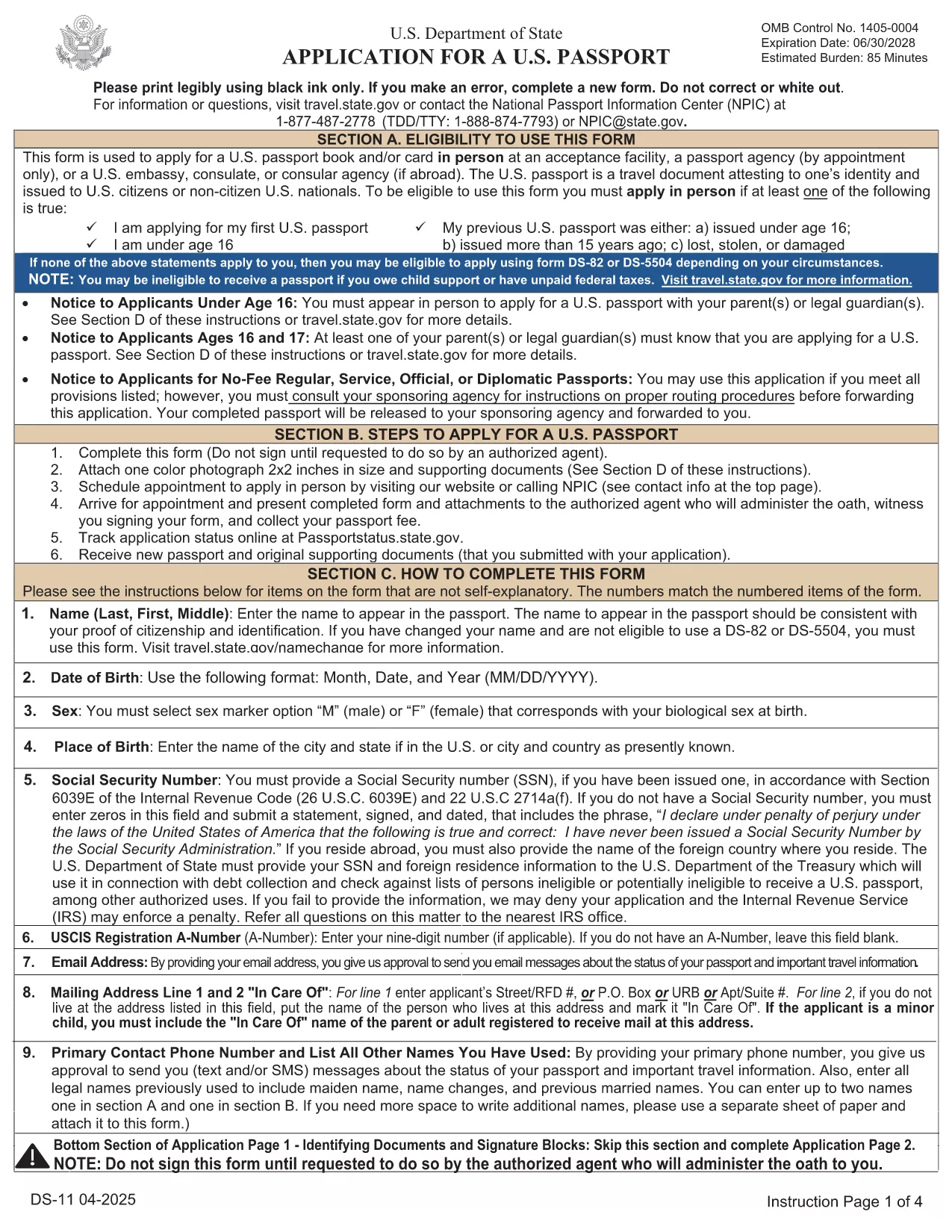
The DS-11 is the official application for first‑time U.S. passports, passports for minors, and replacement of lost or damaged passports. Using Formize’s built‑in PDF filler, you can complete the form online, avoid manual errors, and print a clean, one‑sided copy ready for submission.

What Is the DS-11 Form?

DS-11 is issued by the U.S. Department of State. It collects personal information, citizenship proof, and travel details. You must present the unsigned, completed form at a passport acceptance facility along with supporting documents.

How to Complete the DS-11 with Formize

Follow these simple steps to fill the form directly in your browser—no PDF editor required.

  • Click “Fill out this form” on the page.
  • Wait a few seconds while the Formize PDF Filler loads the official DS-11.
  • Enter your information in each field using the on‑screen keyboard.
  • Use the navigation arrows to move between pages.
  • When finished, click Print to produce a one‑sided copy.

Common Mistakes to Avoid

  • Using colored ink – print in black ink only.
  • Leaving any required box empty – the filler will highlight missing fields.
  • Signing the form before you reach the acceptance facility – sign only on the printed copy.
  • Altering a printed form by hand – any corrections require a new form.

Where to Submit Your Completed Form

Take the printed, unsigned DS-11, your proof of citizenship, a government‑issued photo ID, and a passport‑size photo to any passport acceptance facility (post offices, libraries, or designated clerks). If you need expedited service, schedule an appointment at a regional passport agency.

Download the Official Fillable PDF

For offline use, you can download the original PDF from the U.S. Department of State. The online filler provides the same official form, but the download link is included for reference.

Download DS-11 PDF (official)

DUK
  • Who must use the DS-11 form?

    First‑time applicants, minors under 16, and anyone replacing a lost, stolen, or damaged passport that is more than 5 years old must use DS‑11.

  • Can I submit a signed DS-11 online?

    No. The DS‑11 must be presented unsigned to a passport acceptance agent, who will witness your signature.

  • Do I need a passport photo?

    Yes. Provide one recent, 2×2 inch color photo that meets State Department requirements.

  • How long does processing take?

    Standard processing is 4‑6 weeks after the acceptance facility receives your application. Expedited service reduces this to 2‑3 weeks.

  • Is the Formize filler free?

    Formize offers a free online filler for the DS‑11. No download or software installation is required.

  • What documents accompany the DS‑11?

    You need proof of U.S. citizenship (birth certificate or naturalization certificate), a government‑issued photo ID, a passport‑size photo, and the applicable fee.

  • Can I correct errors after printing?

    If you discover an error, you must fill out a new DS‑11. Hand‑written corrections are not accepted.

KAIP

Kaip nemokamai užpildyti DS-11 internete, atlikdami 5 paprastus veiksmus:

  1. 1
    Open the Formizer Fillable DS-11
    Click the “Fill out this form” button on the page. The Formize PDF Filler will load the official DS-11 automatically.
  2. 2
    Enter Your Information
    Use the on‑screen fields to type your name, date of birth, address, and other required details. The filler validates each entry.
  3. 3
    Review and Print
    After completing all pages, click the Print button. Print a single‑sided copy on white paper using black ink.
  4. 4
    Sign at the Acceptance Facility
    Do NOT sign the printed form until you are in front of a passport acceptance agent.
  5. 5
    Submit Your Package
    Take the printed DS-11, your supporting documents, and payment to the nearest passport acceptance facility.
Formuokite PDF užpildymo programą
APIE

Paso formos

DS-11 yra viena iš paso formų, kurios yra dokumentai, naudojami kreipiantis dėl paso, kuris yra kelionės dokumentas, patvirtinantis jo turėtojo tapatybę ir pilietybę ir leidžiantis keliauti tarptautiniu mastu. Paso formos gali skirtis priklausomai nuo pasą išduodančios šalies, tačiau paprastai jose pateikiama asmeninė informacija apie pareiškėją, pvz., vardas, gimimo data ir gimimo vieta, taip pat informacija apie pareiškėjo tėvus ir visus ankstesnius pasus ar kelionės dokumentus. .

Jungtinėse Valstijose dvi labiausiai paplitusios pasų formos yra DS-11 ir DS-82. DS-11 forma naudojama pirmą kartą besikreipiantiems asmenims, nepilnamečiams arba asmenims, kurie negali naudoti DS-82 formos. DS-82 forma naudojama atnaujinant pasus paštu reikalavimus atitinkantiems pareiškėjams. Abiejose formose reikalaujama, kad pareiškėjas pateiktų asmeninę informaciją ir patvirtinamuosius dokumentus, pvz., paso nuotrauką ir pilietybės įrodymą.

Kitose šalyse gali būti taikomos skirtingos pasų formos ir reikalavimai, tačiau pagrindinis procesas paprastai apima paso prašymo užpildymą, patvirtinančių dokumentų pateikimą ir dalyvavimą pokalbyje su paso pareigūnu vyriausybės įstaigoje arba ambasadoje. Svarbu pažymėti, kad paso prašymo procesas gali užtrukti kelias savaites ar net mėnesius, todėl rekomenduojama kreiptis gerokai prieš bet kokią planuojamą kelionę.

FUNKCIJOS

PDF užpildas

Lengviausias būdas užpildyti DS-11 internete

  • Greitai užpildykite DS-11
    Ieškote būdo greitai užpildyti DS-11 internete? Naudodami internetinį nemokamą PDF formų užpildą sužinosite, kaip redaguoti ir užpildyti šį pdf dokumentą greičiau nei per minutę.
  • Lengva naudoti internetinį PDF redaktorių
    Atsibodo spausdinti PDF failus, kad galėtumėte juos redaguoti prieš nuskaitydami iš naujo ir siųsdami atgal? Redaguoti PDF dokumentus internete nemokamai. Norėdami sutaupyti laiko ir popieriaus, naudokite mūsų internetinį pdf redaktorių.
  • Puikūs įrankiai, visos platformos
    Svarstote, kaip užpildyti DS-11 „Mac“ kompiuteryje, o gal kaip nemokamai naudoti PDF užpildą? Mūsų internetiniai PDF įrankiai veikia visose platformose.
  • Saugi failų saugykla
    Užbaigti „DS-11“ failai saugomi saugioje duomenų bazėje, kurią valdo „Amazon Cloud“ priegloba. Galite bet kada ištrinti failus iš mūsų sistemos. Bet kokiu atveju šie failai automatiškai ištrinami po 24 valandų.
  • Kalbėkitės su DS-11
    Kalbėkite su „DS-11“ naudodami Chatize, kuri yra nemokama PDF skaitymo priemonė. Užduokite klausimų ir gaukite atsakymus iš „DS-11“. Tiesiog spustelėkite aukščiau esantį mygtuką Kalbėtis su dokumentu.

Ištrinti užpildymo seansą

Ištrinti pasirinktą pildymo seansą? Tokiu atveju jūsų pažanga pildant formą bus prarasta.

Ištrinti redagavimo sesiją

Ištrinti pasirinktą redagavimo sesiją? Tokiu atveju jūsų pažanga kuriant ir redaguojant formą bus prarasta.