
Pasirinkite kalbą

DS-5504 Fillable PDF – Name Change, Data Correction & Limited Passport Replacement

  1. Kalba Anglų
  2. Šalis JAV
  3. Veikla Pasas
DS-5504 Fillable PDF – Name Change, Data Correction & Limited Passport Replacement

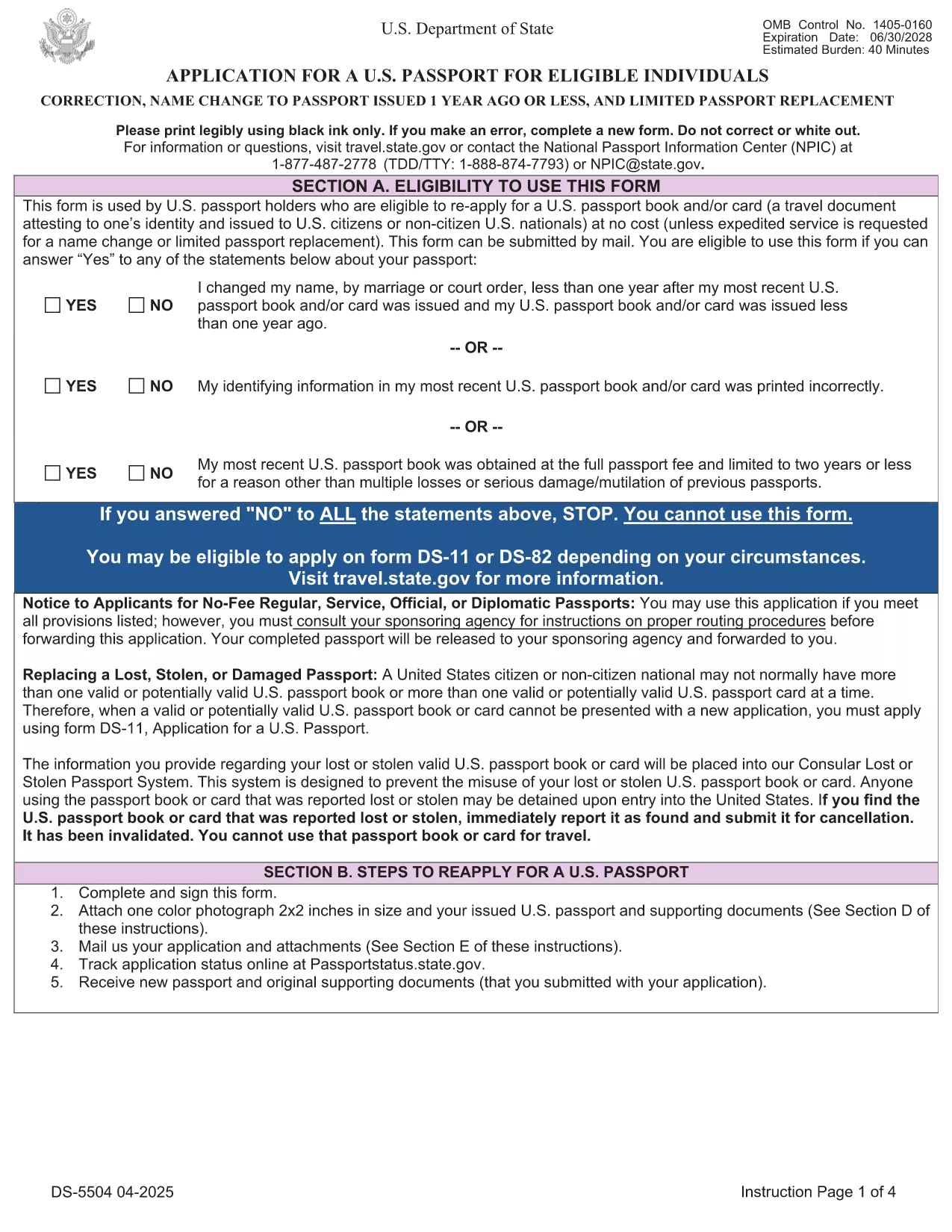
The DS-5504 is the official U.S. Department of State application used when you need to change the name on a passport, correct a printing error, or replace a limited‑validity passport. With Formize’s fillable PDF tool you can complete the form online, avoid manual errors, and print a clean copy ready for submission.

What Is the DS-5504 Form?

DS-5504 is designed for three specific situations:

  • Name change – if your legal name changed within one year of your last passport issuance.
  • Data correction – to fix a typo or incorrect personal information on an existing passport.
  • Limited passport replacement – when a temporary or limited‑validity passport expires or is damaged.

How to Fill Out DS-5504 with Formize

Instead of downloading the PDF and opening a separate editor, simply click the “Fill out this form” button on this page. The Formize PDF Filler app loads in your browser, letting you:

  1. Enter personal details directly into interactive fields.
  2. Upload a passport‑style photo.
  3. Save a draft and return later if needed.
  4. Download the completed, printable PDF with one click.

Common Mistakes to Avoid

  • Using a name change older than one year – the form will be rejected.
  • Leaving the signature line blank or signing on the wrong page.
  • Submitting an incorrect passport number or expiration date.
  • Forgetting to attach the required supporting documents (photo, legal name‑change proof, etc.).

Required Supporting Documents

Depending on your request, you will need to include:

  • Current valid U.S. passport (or limited‑validity passport).
  • One recent color passport photo (2" x 2").
  • Legal name‑change documentation (marriage certificate, court order) – if applicable.
  • Proof of the printing error (e.g., a copy of the original passport showing the mistake).

Where to Submit Your Completed Form

After printing, mail the DS-5504 package to the address listed in the form’s instructions or bring it to a regional passport agency. The application is free of charge; expedited processing is available for a fee.

Need help? Review the official DS‑5504 PDF for detailed instructions.

DUK
  • Can I use DS-5504 for a name change after one year?

    No. The DS‑5504 is only valid for name changes that occurred within one year of your most recent passport issuance. For older changes, use form DS‑82.

  • Is there a fee to file DS-5504?

    The DS‑5504 application itself is free. Fees only apply if you request expedited processing or need a new passport book.

  • Do I need a photo for a data‑correction request?

    Yes. All DS‑5504 submissions require one recent color passport photo, even if you are only correcting printed information.

  • Can I submit the completed form electronically?

    The State Department currently requires a printed, signed PDF with supporting documents. Electronic submission is not accepted for DS‑5504.

  • What if my limited‑validity passport is still valid?

    You can use DS‑5504 to replace a limited‑validity passport that is damaged, lost, or you simply need a full‑validity book. Include the limited passport and a written explanation.

  • How long does processing take?

    Regular processing usually takes 6‑8 weeks. Expedited service (for a fee) can reduce the time to 2‑3 weeks.

  • Can I use Formize on a mobile device?

    Yes. The Formize PDF Filler works on most modern smartphones and tablets, letting you fill out DS‑5504 on the go.

KAIP

Kaip nemokamai užpildyti DS-5504 internete, atlikdami 5 paprastus veiksmus:

  1. 1
    Open the Fillable Form
    Click the "Fill out this form" button on the page. The Formize PDF Filler loads instantly in your browser.
  2. 2
    Enter Your Information
    Complete each interactive field – personal details, passport number, reason for the request, and upload your passport‑style photo.
  3. 3
    Review & Sign
    Double‑check all entries for accuracy, then add your electronic signature in the designated box.
  4. 4
    Download & Print
    Save the completed PDF, print a clean copy on white paper, and attach any required supporting documents.
  5. 5
    Submit to the State Department
    Mail or deliver the package to the address specified in the form instructions, or schedule an appointment at a passport agency.
Formuokite PDF užpildymo programą
APIE

Paso formos

DS-5504 yra viena iš paso formų, kurios yra dokumentai, naudojami kreipiantis dėl paso, kuris yra kelionės dokumentas, patvirtinantis jo turėtojo tapatybę ir pilietybę ir leidžiantis keliauti tarptautiniu mastu. Paso formos gali skirtis priklausomai nuo pasą išduodančios šalies, tačiau paprastai jose pateikiama asmeninė informacija apie pareiškėją, pvz., vardas, gimimo data ir gimimo vieta, taip pat informacija apie pareiškėjo tėvus ir visus ankstesnius pasus ar kelionės dokumentus. .

Jungtinėse Valstijose dvi labiausiai paplitusios pasų formos yra DS-11 ir DS-82. DS-11 forma naudojama pirmą kartą besikreipiantiems asmenims, nepilnamečiams arba asmenims, kurie negali naudoti DS-82 formos. DS-82 forma naudojama atnaujinant pasus paštu reikalavimus atitinkantiems pareiškėjams. Abiejose formose reikalaujama, kad pareiškėjas pateiktų asmeninę informaciją ir patvirtinamuosius dokumentus, pvz., paso nuotrauką ir pilietybės įrodymą.

Kitose šalyse gali būti taikomos skirtingos pasų formos ir reikalavimai, tačiau pagrindinis procesas paprastai apima paso prašymo užpildymą, patvirtinančių dokumentų pateikimą ir dalyvavimą pokalbyje su paso pareigūnu vyriausybės įstaigoje arba ambasadoje. Svarbu pažymėti, kad paso prašymo procesas gali užtrukti kelias savaites ar net mėnesius, todėl rekomenduojama kreiptis gerokai prieš bet kokią planuojamą kelionę.

FUNKCIJOS

PDF užpildas

Lengviausias būdas užpildyti DS-5504 internete

  • Greitai užpildykite DS-5504
    Ieškote būdo greitai užpildyti DS-5504 internete? Naudodami internetinį nemokamą PDF formų užpildą sužinosite, kaip redaguoti ir užpildyti šį pdf dokumentą greičiau nei per minutę.
  • Lengva naudoti internetinį PDF redaktorių
    Atsibodo spausdinti PDF failus, kad galėtumėte juos redaguoti prieš nuskaitydami iš naujo ir siųsdami atgal? Redaguoti PDF dokumentus internete nemokamai. Norėdami sutaupyti laiko ir popieriaus, naudokite mūsų internetinį pdf redaktorių.
  • Puikūs įrankiai, visos platformos
    Svarstote, kaip užpildyti DS-5504 „Mac“ kompiuteryje, o gal kaip nemokamai naudoti PDF užpildą? Mūsų internetiniai PDF įrankiai veikia visose platformose.
  • Saugi failų saugykla
    Užbaigti „DS-5504“ failai saugomi saugioje duomenų bazėje, kurią valdo „Amazon Cloud“ priegloba. Galite bet kada ištrinti failus iš mūsų sistemos. Bet kokiu atveju šie failai automatiškai ištrinami po 24 valandų.
  • Kalbėkitės su DS-5504
    Kalbėkite su „DS-5504“ naudodami Chatize, kuri yra nemokama PDF skaitymo priemonė. Užduokite klausimų ir gaukite atsakymus iš „DS-5504“. Tiesiog spustelėkite aukščiau esantį mygtuką Kalbėtis su dokumentu.

Ištrinti užpildymo seansą

Ištrinti pasirinktą pildymo seansą? Tokiu atveju jūsų pažanga pildant formą bus prarasta.

Ištrinti redagavimo sesiją

Ištrinti pasirinktą redagavimo sesiją? Tokiu atveju jūsų pažanga kuriant ir redaguojant formą bus prarasta.