
Pasirinkite kalbą

PennDOT Form MV-436A – Fillable PDF

  1. Kalba Anglų
  2. Šalis JAV
  3. skyrius PennDOT
  4. Veikla Transporto priemonės registracija
PennDOT Form MV-436A – Fillable PDF

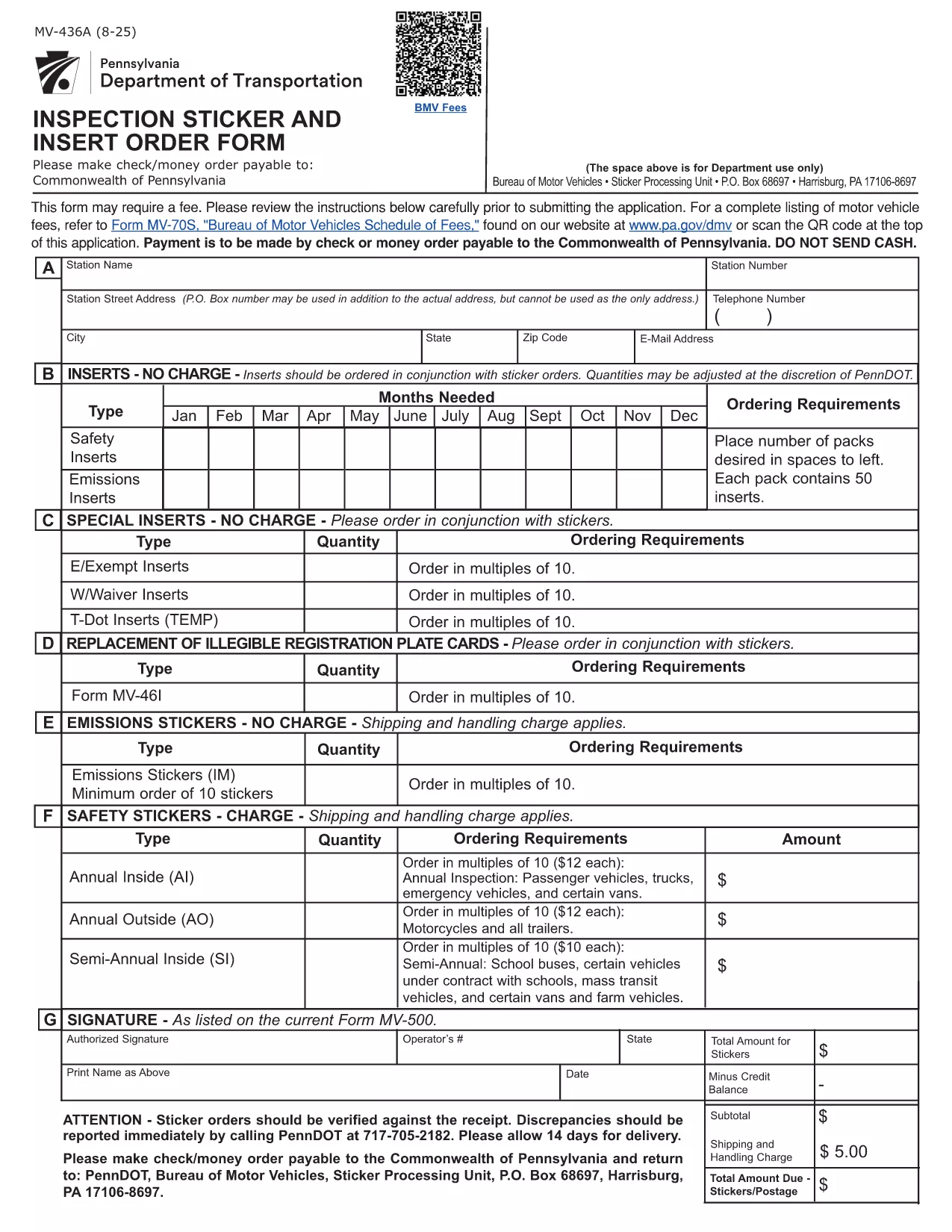
The PennDOT Form MV-436A is the official Pennsylvania Department of Transportation document used for requests such as vehicle title corrections, name changes, and other motor‑vehicle record updates. Instead of printing, printing, and hand‑writing, you can complete the form instantly online with Formize’s fillable PDF viewer.

What Is Form MV-436A?

This form is required when you need to:

  • Correct errors on a vehicle title
  • Change the name of the vehicle owner
  • Request a duplicate title due to loss or damage
  • Update other motor‑vehicle record information

It is issued by the Pennsylvania Department of Transportation (PennDOT) and must be signed by the vehicle owner or an authorized representative.

How to Fill Out MV-436A Online with Formize

Follow these simple steps to complete the form without any PDF editor:

  1. Click the "Fill out this form" button on this page.
  2. Wait a few seconds while the Formize PDF Filler app loads the fillable version of MV‑436A.
  3. Enter your information in each field. The interface highlights required fields and validates data in real time.
  4. When you’re finished, click Save & Download to get a completed PDF you can print or email.

No software download, no Adobe Acrobat needed – just a browser and an internet connection.

Key Fields and Common Mistakes

Pay special attention to these sections:

  • Owner Information – Ensure the name matches the current title exactly.
  • Vehicle Identification Number (VIN) – Double‑check the 17‑character VIN for typos.
  • Signature – The electronic signature must be legible; avoid using generic placeholders.

Common mistake: Leaving the "Date of Birth" field blank or using an incorrect format will cause the form to be rejected.

Where to Submit the Completed Form

After downloading the completed PDF, mail it to:

PennDOT – Bureau of Motor Vehicles
1101 North 12th Street
Harrisburg, PA 17104‑0001

Or bring the printed form to any PennDOT Driver License Center. Include any required supporting documents (e.g., proof of identity, vehicle title).

Download the Official PDF

If you prefer the traditional method, you can download the official, unfilled PDF directly from the Pennsylvania government website. The link below points to the exact file used by PennDOT.

Download MV‑436A (PDF)

DUK
  • Is Form MV-436A available as a fillable PDF?

    Yes. Using Formize, you can fill out the PDF directly in your browser without any additional software.

  • Can I submit the form electronically?

    PennDOT currently requires a printed and signed copy. After filling it online, download, print, and mail or deliver it.

  • What should I do if I make a mistake after saving?

    Open the saved PDF again with Formize, edit the incorrect fields, and re‑save the document.

  • Do I need a Pennsylvania driver’s license to use MV-436A?

    No. The form is for vehicle title and record changes and can be completed by any legal owner, even if they do not hold a PA driver’s license.

  • How long does it take PennDOT to process the form?

    Processing typically takes 7‑10 business days after receipt, provided all required supporting documents are included.

  • Is there a fee for filing MV-436A?

    Yes. Refer to PennDOT’s Schedule of Fees (Form MV-70S) for the current amount, which varies based on the request type.

  • Can I use a mobile device to fill out MV-436A?

    Absolutely. The Formize filler works on smartphones and tablets; just ensure you have a stable internet connection.

  • What if I lose the completed form after downloading?

    You can re‑open the saved PDF with any PDF viewer, but you will need to re‑enter the data. Keeping a digital copy on your computer or cloud storage is recommended.

KAIP

Kaip nemokamai užpildyti MV-436A internete, atlikdami 4 paprastus veiksmus:

  1. 1
    Open the Fillable Form
    Click the "Fill out this form" button on the page. The Formize PDF Filler will open in your browser.
  2. 2
    Enter Your Information
    Type directly into each highlighted field. Required fields are marked with an asterisk.
  3. 3
    Validate and Save
    After completing all sections, click "Save & Download" to receive a completed PDF you can print or email.
  4. 4
    Submit to PennDOT
    Print the saved PDF and mail or deliver it to the PennDOT address listed on the form.
Formuokite PDF užpildymo programą
APIE

Transporto priemonių registracijos formos

MV-436A yra viena iš DMV formų, dar vadinamų Motorinių transporto priemonių departamento formomis, kurios yra dokumentai, naudojami atliekant įvairias operacijas ir procesus, susijusius su motorinėmis transporto priemonėmis. DMV yra vyriausybinė agentūra, atsakinga už vairuotojų pažymėjimų išdavimą, transporto priemonių registraciją ir motorinių transporto priemonių įstatymų vykdymą. Konkrečios galimos DMV formos gali skirtis priklausomai nuo jurisdikcijos, tačiau čia pateikiami keli įprasti pavyzdžiai:

Vairuotojo pažymėjimo formos: šios formos naudojamos norint gauti vairuotojo pažymėjimą arba prašyti pakeisti ar atnaujinti. Paprastai jie reikalauja asmeninės informacijos, tapatybės įrodymo ir gali apimti medicininės informacijos arba vairavimo istorijos skyrius.

Transporto priemonių registracijos formos: šios formos naudojamos motorinei transporto priemonei registruoti DMV. Jie reikalauja informacijos apie transporto priemonę, nuosavybės duomenis ir draudimo įrodymą.

Nuosavybės teisės perdavimo formos: perkant arba parduodant transporto priemonę, šios formos naudojamos nuosavybės teisei perduoti iš vienos šalies kitai. Jiems reikalinga informacija apie pirkėją, pardavėją, transporto priemonės duomenis ir gali būti pirkimo-pardavimo vekselis.

Transporto priemonės atleidimo nuo atsakomybės formos: parduodant arba perduodant transporto priemonės nuosavybės teisę, šiose formose pranešama DMV, kad pardavėjas nebėra atsakingas už transporto priemonę. Tai padeda apsaugoti pardavėją nuo atsakomybės už nelaimingus atsitikimus ar incidentus, susijusius su transporto priemone po pardavimo.

Valstybės numerio ir registracijos atnaujinimo formos: šios formos naudojamos norint atnaujinti transporto priemonės registraciją arba prašyti naujų valstybinių numerių. Paprastai jie reikalauja informacijos apie registruotą savininką, dabartinę registracijos informaciją ir taikomų mokesčių sumokėjimą.

Vairavimo įrašų užklausos formos: šios formos leidžia asmenims DMV pateikti užklausą dėl savo vairavimo įrašų, kuriuose pateikiama informacija apie vairavimo pažeidimus, pažymėjimo būseną ir kitą svarbią informaciją.

Specialios arba suasmenintos valstybinio numerio formos: šios formos naudojamos norint gauti suasmenintus arba specialius valstybinio numerio ženklus, kurie leidžia asmenims tinkinti savo valstybinio numerio ženklą naudodami tam tikrus simbolius ar piešinius.

Tai tik keli pavyzdžiai iš daugelio formų, kurios gali būti pasiekiamos per DMV. Konkrečios formos ir reikalavimai gali skirtis priklausomai nuo jurisdikcijos, todėl svarbu apsilankyti vietinėje DMV svetainėje arba apsilankyti DMV biure, kad gautumėte tinkamas formas pagal jūsų poreikius.

FUNKCIJOS

PDF užpildas

Lengviausias būdas užpildyti MV-436A internete

  • Greitai užpildykite MV-436A
    Ieškote būdo greitai užpildyti MV-436A internete? Naudodami internetinį nemokamą PDF formų užpildą sužinosite, kaip redaguoti ir užpildyti šį pdf dokumentą greičiau nei per minutę.
  • Lengva naudoti internetinį PDF redaktorių
    Atsibodo spausdinti PDF failus, kad galėtumėte juos redaguoti prieš nuskaitydami iš naujo ir siųsdami atgal? Redaguoti PDF dokumentus internete nemokamai. Norėdami sutaupyti laiko ir popieriaus, naudokite mūsų internetinį pdf redaktorių.
  • Puikūs įrankiai, visos platformos
    Svarstote, kaip užpildyti MV-436A „Mac“ kompiuteryje, o gal kaip nemokamai naudoti PDF užpildą? Mūsų internetiniai PDF įrankiai veikia visose platformose.
  • Saugi failų saugykla
    Užbaigti „MV-436A“ failai saugomi saugioje duomenų bazėje, kurią valdo „Amazon Cloud“ priegloba. Galite bet kada ištrinti failus iš mūsų sistemos. Bet kokiu atveju šie failai automatiškai ištrinami po 24 valandų.
  • Kalbėkitės su MV-436A
    Kalbėkite su „MV-436A“ naudodami Chatize, kuri yra nemokama PDF skaitymo priemonė. Užduokite klausimų ir gaukite atsakymus iš „MV-436A“. Tiesiog spustelėkite aukščiau esantį mygtuką Kalbėtis su dokumentu.

Ištrinti užpildymo seansą

Ištrinti pasirinktą pildymo seansą? Tokiu atveju jūsų pažanga pildant formą bus prarasta.

Ištrinti redagavimo sesiją

Ištrinti pasirinktą redagavimo sesiją? Tokiu atveju jūsų pažanga kuriant ir redaguojant formą bus prarasta.