
Pasirinkite kalbą

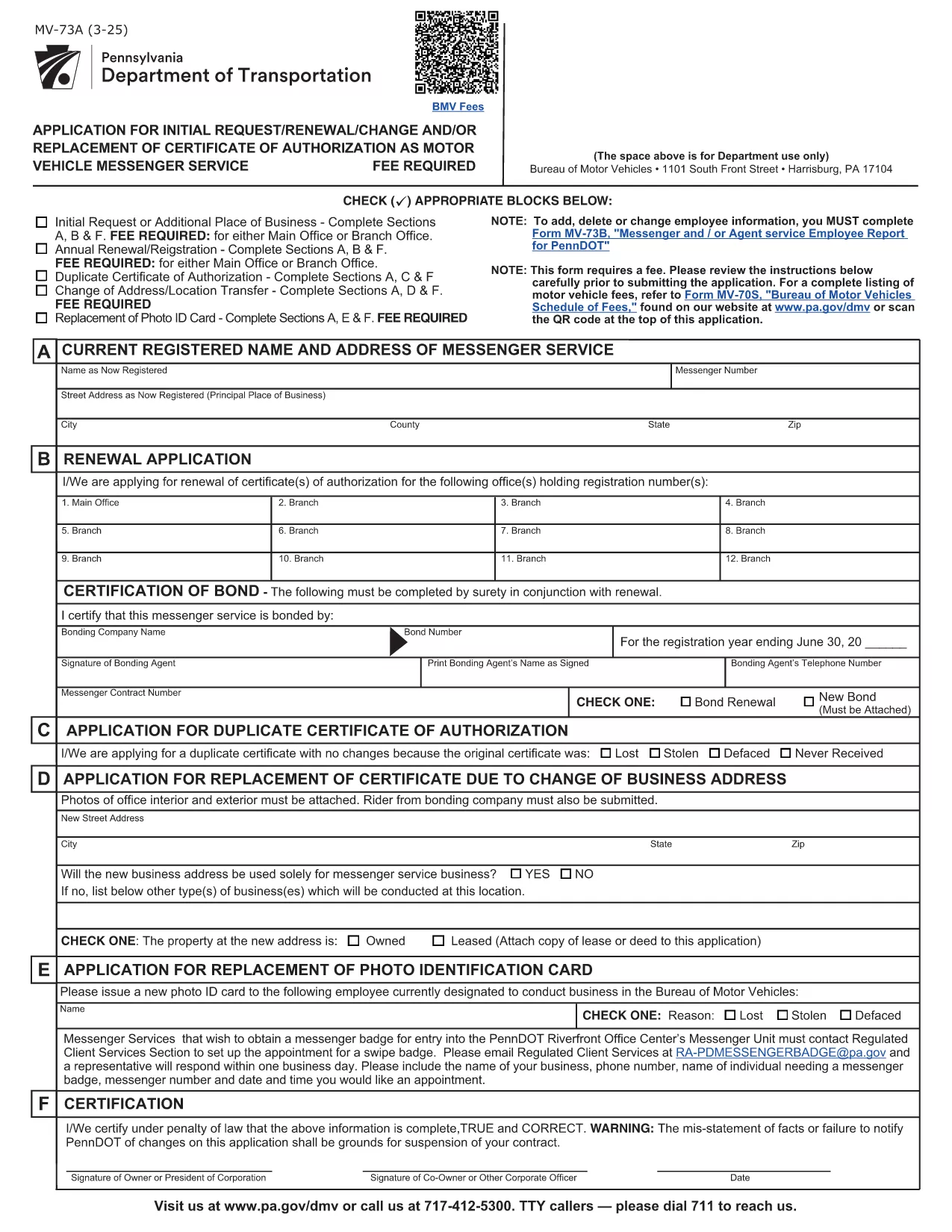
PennDOT Form MV‑73A – Fillable Employee Service Report

  1. Kalba Anglų
  2. Šalis JAV
  3. skyrius PennDOT
  4. Veikla Transporto priemonės registracija
PennDOT Form MV‑73A – Fillable Employee Service Report

What Is Form MV‑73A?

Form MV‑73A is the Pennsylvania Department of Transportation (PennDOT) “Messenger and/or Agent Service Employee Report.” It is required when a messenger, agent, or employee provides services on behalf of a motor vehicle dealer or a registered motor vehicle service provider. The form captures employee details, service type, and any fees associated with the service.

How to Complete the Fillable PDF

Instead of downloading the PDF and editing it manually, simply click the “Fill out this form” button on this page. The Formize PDF Filler app will load the official MV‑73A document, allowing you to type directly into each field, add dates, and select check‑boxes.

Once all required fields are completed, you can review, save, or print the form for submission.

Common Mistakes to Avoid

  • Leaving the “Signature” or “Date” fields blank – both are mandatory.
  • Entering an incorrect employee ID number; double‑check the ID on the employee badge.
  • Using a non‑fillable version of the PDF – the Formize version ensures every field is editable.
  • Forgetting to attach supporting documents (e.g., proof of agency registration).

Where to Submit the Form

After completing the form, submit it to the PennDOT office that issued the original request. Most dealers fax or mail the completed MV‑73A to their local PennDOT Motor Vehicle Services office. Check the instructions on the form for the correct address or fax number.

Download the Official PDF

If you prefer to keep a copy of the original, you can download the official, government‑issued PDF directly from the link below. This file is the source used by the Formize filler.

Download MV‑73A PDF

DUK
  • Do I need Adobe Acrobat to fill out MV‑73A?

    No. The Formize PDF Filler works in any modern browser, so you don’t need Adobe Acrobat or any extra software.

  • Is there a fee to submit Form MV‑73A?

    The form itself is free, but PennDOT may charge a processing fee depending on the service reported. Check the form’s instructions for details.

  • Can I save my progress and finish later?

    Yes. Use the “Save” button in the Formize filler to download a partially‑filled PDF, then reopen it later to continue.

  • What should I do if I make a mistake after submitting?

    Contact the PennDOT office where you submitted the form. They will advise whether you need to submit a corrected MV‑73A or an amendment.

  • Is the fillable PDF compatible with mobile devices?

    The Formize filler is responsive and works on smartphones and tablets, allowing you to complete the form on the go.

  • How long does it take PennDOT to process the form?

    Processing times vary, but most offices complete the review within 7‑10 business days after receipt.

  • Do I need a notary for the signature on MV‑73A?

    A notary is not required for MV‑73A unless specifically stated in the accompanying instructions.

KAIP

Kaip nemokamai užpildyti MV-73A internete, atlikdami 4 paprastus veiksmus:

  1. 1
    Click the Fill‑out Button
    Press the “Fill out this form” button on the page to launch the Formize PDF Filler.
  2. 2
    Wait for the Filler to Load
    The fillable version of MV‑73A will appear in your browser. All fields become editable automatically.
  3. 3
    Enter Your Information
    Type directly into each field, select dates from the calendar widget, and check the appropriate boxes.
  4. 4
    Review, Save, and Submit
    After completing the form, review it for errors, then download or print the completed PDF to submit to PennDOT.
Formuokite PDF užpildymo programą
APIE

Transporto priemonių registracijos formos

Jei turite arba nuomojatės motorinę transporto priemonę, priekabą ar valtį, turite laikytis tam tikrų įsipareigojimų, kad jūsų transporto priemonė būtų teisėtai registruota ir saugi.

MV-73A yra viena iš transporto priemonių registracijos formų, kurios yra dokumentai, naudojami motorinei transporto priemonei įregistruoti atitinkamoje valstijos ar provincijos institucijoje. Šios formos paprastai reikalingos, kai asmuo perka naują ar naudotą transporto priemonę arba kai su transporto priemone persikelia į naują valstiją ar provinciją.

Tikslūs reikalavimai ir formos, reikalingos transporto priemonės registracijai, gali skirtis priklausomai nuo vietos, tačiau paprastai procesas apima informacijos apie transporto priemonę, savininką ir bet kokius transporto priemonės arešto pateikimą.

Kai bus pateiktos registracijos formos ir mokesčiai, valstybės ar provincijos institucija transporto priemonės savininkui išduos registracijos liudijimą arba valstybinį numerį. Ši registracija leidžia teisėtai eksploatuoti transporto priemonę viešuosiuose keliuose ir greitkeliuose.

FUNKCIJOS

PDF užpildas

Lengviausias būdas užpildyti MV-73A internete

  • Greitai užpildykite MV-73A
    Ieškote būdo greitai užpildyti MV-73A internete? Naudodami internetinį nemokamą PDF formų užpildą sužinosite, kaip redaguoti ir užpildyti šį pdf dokumentą greičiau nei per minutę.
  • Lengva naudoti internetinį PDF redaktorių
    Atsibodo spausdinti PDF failus, kad galėtumėte juos redaguoti prieš nuskaitydami iš naujo ir siųsdami atgal? Redaguoti PDF dokumentus internete nemokamai. Norėdami sutaupyti laiko ir popieriaus, naudokite mūsų internetinį pdf redaktorių.
  • Puikūs įrankiai, visos platformos
    Svarstote, kaip užpildyti MV-73A „Mac“ kompiuteryje, o gal kaip nemokamai naudoti PDF užpildą? Mūsų internetiniai PDF įrankiai veikia visose platformose.
  • Saugi failų saugykla
    Užbaigti „MV-73A“ failai saugomi saugioje duomenų bazėje, kurią valdo „Amazon Cloud“ priegloba. Galite bet kada ištrinti failus iš mūsų sistemos. Bet kokiu atveju šie failai automatiškai ištrinami po 24 valandų.
  • Kalbėkitės su MV-73A
    Kalbėkite su „MV-73A“ naudodami Chatize, kuri yra nemokama PDF skaitymo priemonė. Užduokite klausimų ir gaukite atsakymus iš „MV-73A“. Tiesiog spustelėkite aukščiau esantį mygtuką Kalbėtis su dokumentu.

Ištrinti užpildymo seansą

Ištrinti pasirinktą pildymo seansą? Tokiu atveju jūsų pažanga pildant formą bus prarasta.

Ištrinti redagavimo sesiją

Ištrinti pasirinktą redagavimo sesiją? Tokiu atveju jūsų pažanga kuriant ir redaguojant formą bus prarasta.