
Pasirinkite kalbą

Rhode Island TR-9 Vehicle Title Application (Fillable PDF)

  1. Kalba Anglų
  2. Šalis JAV
  3. skyrius Rhode Island DMV
  4. Veikla Transporto priemonės registracija
Rhode Island TR-9 Vehicle Title Application (Fillable PDF)

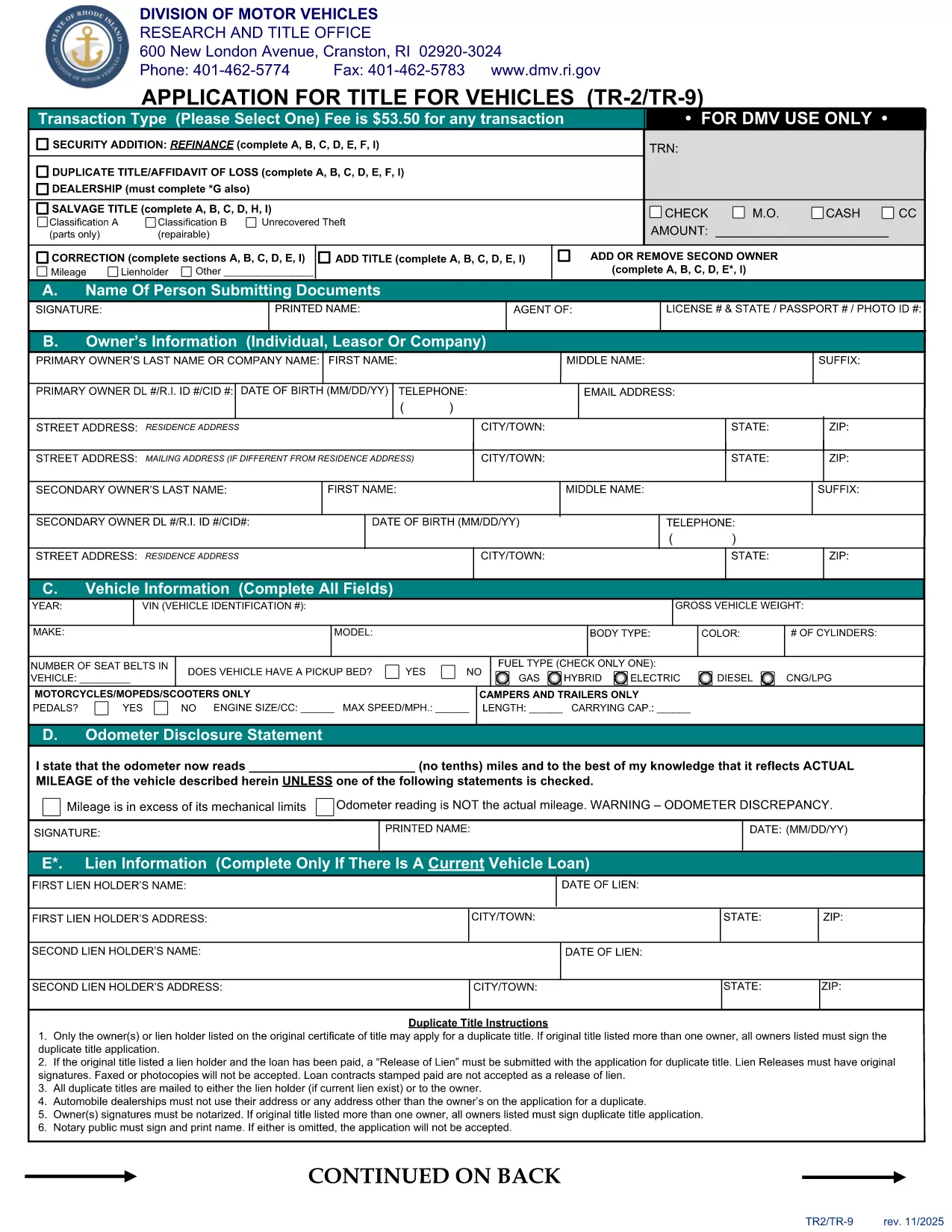
The TR-9 is the official Rhode Island DMV form used to apply for a new vehicle title or to transfer ownership. Historically it was a paper‑only document, but today you can complete it instantly as a fillable PDF.

Formize hosts a secure, browser‑based PDF filler that lets you enter all required information without installing any software. Once you finish, you can download, print, or submit the completed PDF directly to the RI DMV.

  • Fast & free: No printing or scanning required.
  • Secure: Your data stays in your browser until you choose to save.
  • Accurate: Built‑in validation helps you avoid common errors.

Below you’ll find step‑by‑step instructions, tips to prevent mistakes, and answers to the most common questions about the TR‑9 form.

DUK
  • What is the purpose of the TR-9 form?

    The TR-9 is used to apply for a new title, transfer ownership, or correct information on an existing Rhode Island vehicle title.

  • Do I need to print the form after filling it online?

    The Rhode Island DMV still requires a printed, signed copy for most transactions, so print the completed PDF before mailing or delivering it.

  • Is there a fee associated with filing a TR-9?

    Yes, the standard title fee is $53.50 (as of the latest revision). Check the RI DMV fee schedule for any additional charges.

  • Can I save my progress and finish later?

    The Formize filler allows you to download a partially completed PDF at any time. Simply reopen the file later to continue.

  • Is the fillable PDF compatible with Adobe Reader?

    Yes, the PDF is fully compatible with Adobe Acrobat Reader, but using Formize’s online filler provides a smoother, no‑install experience.

  • What common mistakes should I avoid?

    Make sure VIN numbers match the vehicle, signatures are legible, and all required fields are completed. Missing or mismatched data can delay processing.

  • How long does the online filling process take?

    Most users finish the form in under 10 minutes, especially with Formize’s built‑in validation that catches errors instantly.

KAIP

Kaip nemokamai užpildyti TR-9 internete, atlikdami 5 paprastus veiksmus:

  1. 1
    Open the Fillable Form
    Click the "Fill out this form" button on the page. The Formize PDF Filler will launch directly in your browser.
  2. 2
    Wait for the Loader
    Give the app a few seconds to load all fields and validation rules.
  3. 3
    Enter Your Information
    Type in each required field (owner details, vehicle information, signatures, etc.). The filler highlights any missing or incorrectly formatted data.
  4. 4
    Review & Save
    Use the preview button to double‑check your entries, then click "Save PDF" to download the completed form.
  5. 5
    Submit to the DMV
    Print the saved PDF and mail it, or follow any electronic submission instructions provided by the Rhode Island DMV.
Formuokite PDF užpildymo programą
APIE

Transporto priemonių registracijos formos

Jei turite arba nuomojatės motorinę transporto priemonę, priekabą ar valtį, turite laikytis tam tikrų įsipareigojimų, kad jūsų transporto priemonė būtų teisėtai registruota ir saugi.

TR-9 yra viena iš transporto priemonių registracijos formų, kurios yra dokumentai, naudojami motorinei transporto priemonei įregistruoti atitinkamoje valstijos ar provincijos institucijoje. Šios formos paprastai reikalingos, kai asmuo perka naują ar naudotą transporto priemonę arba kai su transporto priemone persikelia į naują valstiją ar provinciją.

Tikslūs reikalavimai ir formos, reikalingos transporto priemonės registracijai, gali skirtis priklausomai nuo vietos, tačiau paprastai procesas apima informacijos apie transporto priemonę, savininką ir bet kokius transporto priemonės arešto pateikimą.

Kai bus pateiktos registracijos formos ir mokesčiai, valstybės ar provincijos institucija transporto priemonės savininkui išduos registracijos liudijimą arba valstybinį numerį. Ši registracija leidžia teisėtai eksploatuoti transporto priemonę viešuosiuose keliuose ir greitkeliuose.

FUNKCIJOS

PDF užpildas

Lengviausias būdas užpildyti TR-9 internete

  • Greitai užpildykite TR-9
    Ieškote būdo greitai užpildyti TR-9 internete? Naudodami internetinį nemokamą PDF formų užpildą sužinosite, kaip redaguoti ir užpildyti šį pdf dokumentą greičiau nei per minutę.
  • Lengva naudoti internetinį PDF redaktorių
    Atsibodo spausdinti PDF failus, kad galėtumėte juos redaguoti prieš nuskaitydami iš naujo ir siųsdami atgal? Redaguoti PDF dokumentus internete nemokamai. Norėdami sutaupyti laiko ir popieriaus, naudokite mūsų internetinį pdf redaktorių.
  • Puikūs įrankiai, visos platformos
    Svarstote, kaip užpildyti TR-9 „Mac“ kompiuteryje, o gal kaip nemokamai naudoti PDF užpildą? Mūsų internetiniai PDF įrankiai veikia visose platformose.
  • Saugi failų saugykla
    Užbaigti „TR-9“ failai saugomi saugioje duomenų bazėje, kurią valdo „Amazon Cloud“ priegloba. Galite bet kada ištrinti failus iš mūsų sistemos. Bet kokiu atveju šie failai automatiškai ištrinami po 24 valandų.
  • Kalbėkitės su TR-9
    Kalbėkite su „TR-9“ naudodami Chatize, kuri yra nemokama PDF skaitymo priemonė. Užduokite klausimų ir gaukite atsakymus iš „TR-9“. Tiesiog spustelėkite aukščiau esantį mygtuką Kalbėtis su dokumentu.

Ištrinti užpildymo seansą

Ištrinti pasirinktą pildymo seansą? Tokiu atveju jūsų pažanga pildant formą bus prarasta.

Ištrinti redagavimo sesiją

Ištrinti pasirinktą redagavimo sesiją? Tokiu atveju jūsų pažanga kuriant ir redaguojant formą bus prarasta.