
Pasirinkite kalbą

Request a Good Standing Certificate – Fillable PDF Form

  1. Kalba Anglų
  2. Šalis JAV
  3. skyrius Secretary of State
  4. Veikla Business Records
Request a Good Standing Certificate – Fillable PDF Form

A Good Standing Certificate (also called a Certificate of Status) proves that a business entity is legally registered, compliant with filing requirements, and authorized to operate. Whether you need it for a bank loan, a contract, or a government filing, the right form and a flawless submission are essential.

What Is a Good Standing Certificate?

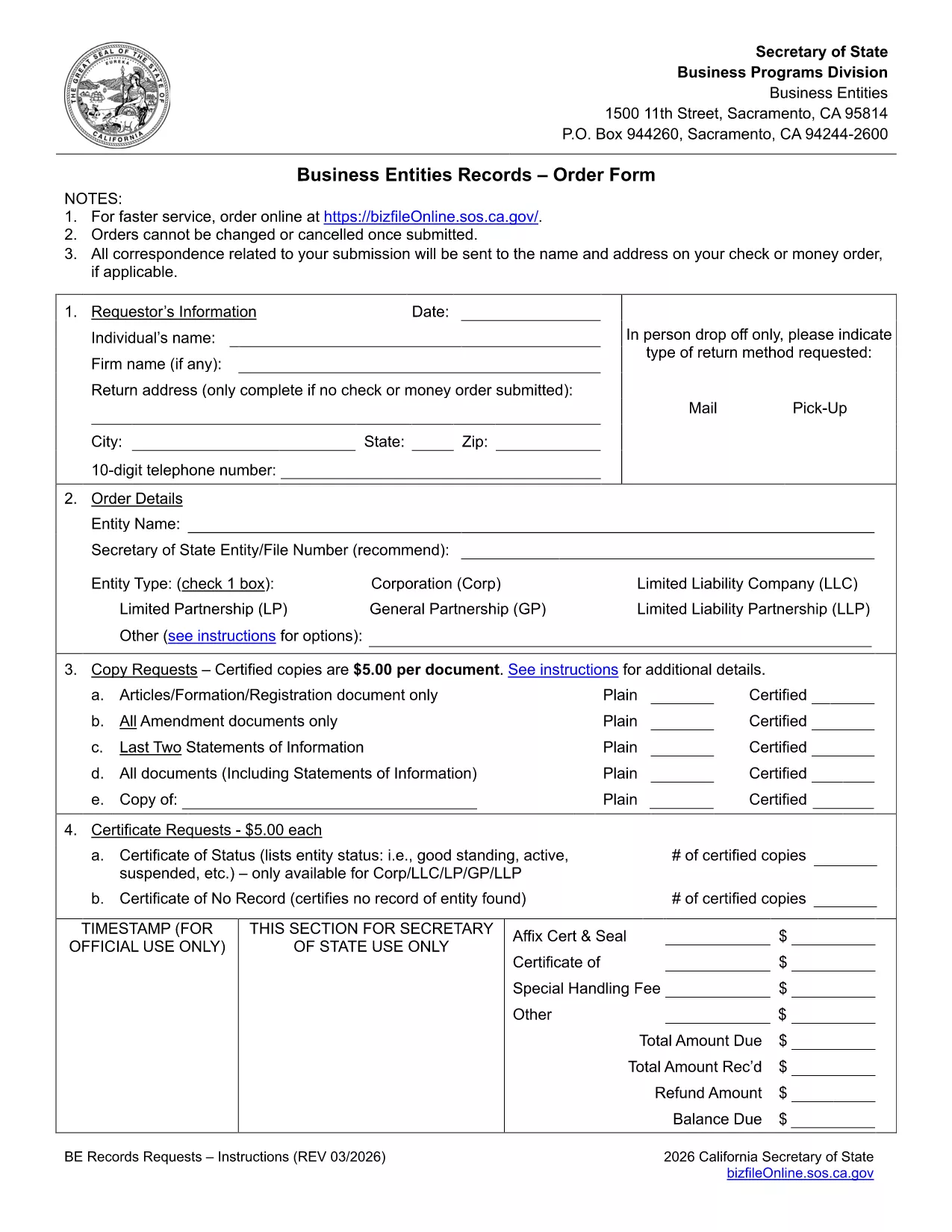
The certificate confirms that the entity is active, has paid all required fees, and is not suspended or dissolved. In California, the Secretary of State issues this document based on the information in the Business Entities Records Request form.

How to Complete the Request Form

Our fillable PDF mirrors the official California form, so you can complete every field online without printing. Follow the steps in the "How‑To" section below, then submit the form to the Secretary of State office.

Fees, Processing Times & Submission Details

  • Fee: $15‑$20 per certificate (varies by entity type).
  • Processing: Typically 5‑10 business days when submitted online.
  • Submission: Upload the completed PDF through the SOS portal or mail it with a self‑addressed stamped envelope.

Common Mistakes to Avoid

  • Leaving the "Entity Number" blank or entering an old number.
  • Forgetting to sign the form – an unsigned request is rejected.
  • Omitting the exact fee amount or using the wrong payment method.
  • Submitting an outdated address; the certificate will be mailed to the address on file.

Download & Fill the Form Instantly

Click the "Fill out this form" button below. The Formize PDF Filler loads in seconds, letting you type directly into each field, save a copy, and submit securely.

DUK
  • What is a Good Standing Certificate used for?

    It verifies that a business is active, compliant, and authorized to conduct business. Lenders, partners, and government agencies often require it.

  • Can I request a certificate for a dissolved entity?

    No. The certificate is only issued for entities that are currently active and in good standing.

  • How much does the certificate cost?

    The fee ranges from $15 to $20 per certificate, depending on the entity type and the number of copies requested.

  • Do I need to provide supporting documents?

    Usually only the completed request form and the correct fee are required. If there are outstanding filings, the SOS may ask for additional paperwork.

  • How long does it take to receive the certificate?

    Standard processing is 5‑10 business days after the form and payment are received. Expedited service is available for an additional fee.

  • Can I get a digital copy instead of a mailed certificate?

    Yes. When you submit the form online through the SOS portal, you can choose to receive a PDF version via email.

KAIP

Kaip nemokamai užpildyti request for good standing certificate internete, atlikdami 4 paprastus veiksmus:

  1. 1
    Open the Fillable Form
    Click the "Fill out this form" button on the page. The Formize PDF Filler app loads in your browser.
  2. 2
    Enter Your Information
    Type directly into each field—entity name, number, address, and purpose of the certificate. All data is saved automatically.
  3. 3
    Review & Sign
    Double‑check every entry, then use the digital signature field to sign the form.
  4. 4
    Submit or Download
    Choose to submit the PDF to the Secretary of State portal or download a copy for mailing. Keep the confirmation for your records.
Formuokite PDF užpildymo programą
APIE

request for good standing certificate šabloną

Naudodami tradicinį PDF dokumento peržiūros ir pildymo funkcijų rinkinį, žiniatinklio programos pranašumus ir interaktyvų išdėstymą, galite užbaigti request for good standing certificate per kelias minutes.

FUNKCIJOS

PDF užpildas

Lengviausias būdas užpildyti request for good standing certificate internete

  • Greitai užpildykite request for good standing certificate
    Ieškote būdo greitai užpildyti request for good standing certificate internete? Naudodami internetinį nemokamą PDF formų užpildą sužinosite, kaip redaguoti ir užpildyti šį pdf dokumentą greičiau nei per minutę.
  • Lengva naudoti internetinį PDF redaktorių
    Atsibodo spausdinti PDF failus, kad galėtumėte juos redaguoti prieš nuskaitydami iš naujo ir siųsdami atgal? Redaguoti PDF dokumentus internete nemokamai. Norėdami sutaupyti laiko ir popieriaus, naudokite mūsų internetinį pdf redaktorių.
  • Puikūs įrankiai, visos platformos
    Svarstote, kaip užpildyti request for good standing certificate „Mac“ kompiuteryje, o gal kaip nemokamai naudoti PDF užpildą? Mūsų internetiniai PDF įrankiai veikia visose platformose.
  • Saugi failų saugykla
    Užbaigti „request for good standing certificate“ failai saugomi saugioje duomenų bazėje, kurią valdo „Amazon Cloud“ priegloba. Galite bet kada ištrinti failus iš mūsų sistemos. Bet kokiu atveju šie failai automatiškai ištrinami po 24 valandų.
  • Kalbėkitės su request for good standing certificate
    Kalbėkite su „request for good standing certificate“ naudodami Chatize, kuri yra nemokama PDF skaitymo priemonė. Užduokite klausimų ir gaukite atsakymus iš „request for good standing certificate“. Tiesiog spustelėkite aukščiau esantį mygtuką Kalbėtis su dokumentu.

Ištrinti užpildymo seansą

Ištrinti pasirinktą pildymo seansą? Tokiu atveju jūsų pažanga pildant formą bus prarasta.

Ištrinti redagavimo sesiją

Ištrinti pasirinktą redagavimo sesiją? Tokiu atveju jūsų pažanga kuriant ir redaguojant formą bus prarasta.