
Pasirinkite kalbą

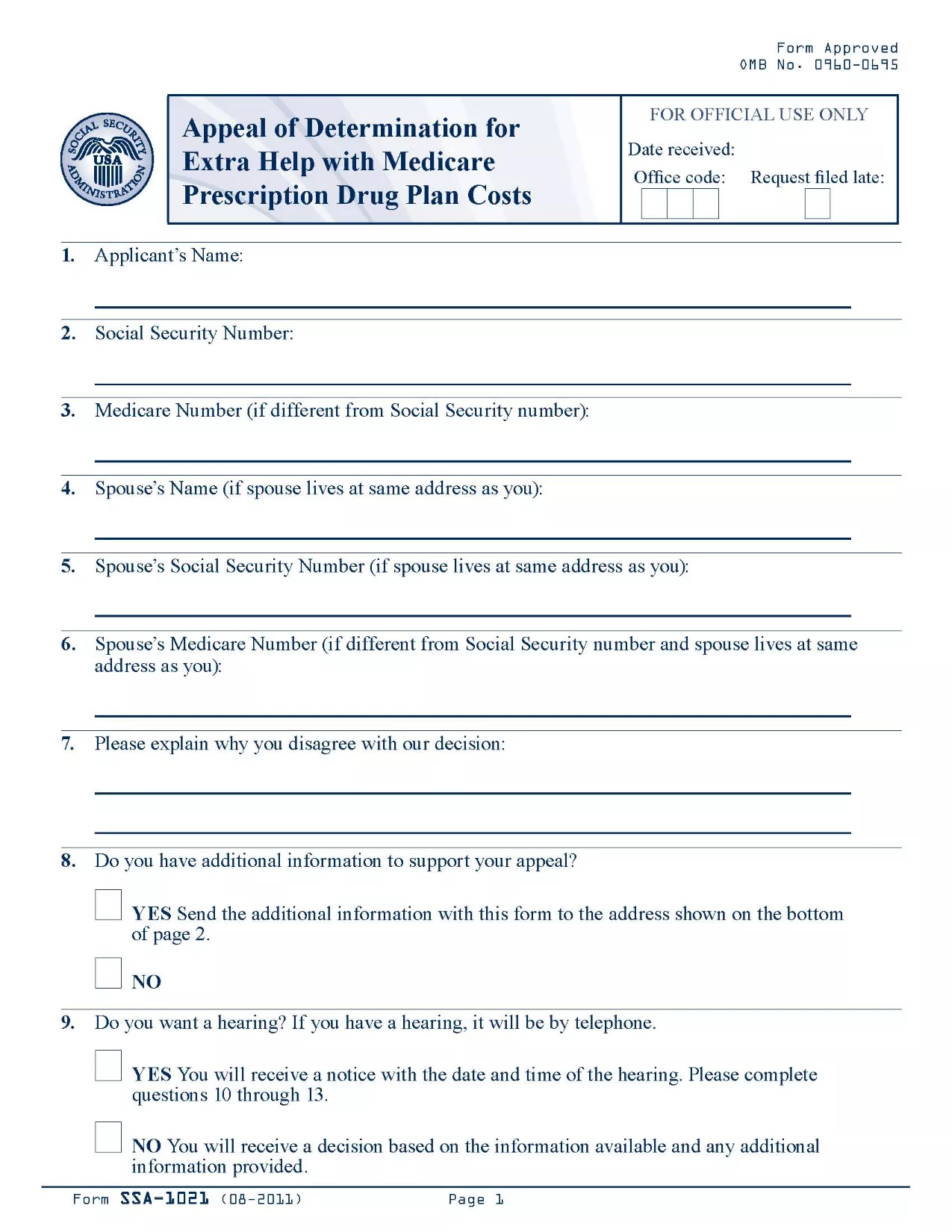
SSA-1021 Appeal of Determination Form (Fillable PDF)

  1. Kalba Anglų
  2. Šalis JAV
  3. Veikla Socialinė apsauga
Užpildykite šią formą
SSA-1021 Appeal of Determination Form (Fillable PDF)

The SSA-1021 is the official Social Security Administration (SSA) form used to appeal a denial of Extra Help with Medicare prescription drug costs. If you received a determination that you are not eligible for the Extra Help program, you can use this form to request a review.

Formize makes the process simple: the PDF is fully fillable online, so you never have to print, scan, or hand‑write anything. Just click the button, fill the fields, and download or save a completed copy.

What is the SSA-1021 Form?

SSA-1021, titled “Appeal of Determination for Extra Help With Medicare Prescription Drug Plan Costs,” collects the information the SSA needs to reconsider your eligibility. It includes sections for personal details, the original determination notice, and the reasons for your appeal.

How to Complete the SSA-1021 Online

Follow the step‑by‑step guide in the How To section below. The Formize PDF filler loads automatically after you click “Fill out this form.”

Common Mistakes to Avoid

  • Leaving any required field blank – the SSA will reject an incomplete form.
  • Providing inaccurate personal information – errors can delay the review.
  • Failing to attach supporting documents (income statements, prescription bills, etc.).

Where to Submit Your Appeal

After completing the form, you can either mail it to the address on your determination notice or upload the PDF through your My Social Security account.

Download the Official PDF

The official, up‑to‑date PDF is available for download below. Clicking the button opens the Formize fillable version, so you can start right away.

Instrukcijos

  • Forma Instrukcijos - Instrukcijos, kaip užbaigti papildomos pagalbos nustatymo su Medicare receptinių vaistų plano išlaidų skundą
DUK
  • What is the deadline to submit an SSA-1021 appeal?

    You must file the appeal within 60 days of the date on your denial notice. Late filings may be rejected.

  • Can I file the SSA-1021 online?

    Yes. With Formize you fill the PDF online, then download the completed form to upload through your My Social Security account or to print and mail.

  • Do I need a PDF editor to complete SSA-1021?

    No. The Formize PDF Filler provides a fully interactive, browser‑based editor—no extra software required.

  • What supporting documents should I include?

    Attach recent income statements, bank statements, prescription drug receipts, and any letters from your Medicare Part D plan that explain the denial.

  • Will filling the form online make the review faster?

    Submitting a complete, legible PDF reduces processing time because the SSA does not need to request clarification.

  • Is the Formize service free?

    Yes. Formize provides free access to fillable government PDFs; there are no hidden fees.

  • Can I edit the form after downloading it?

    Once you download the completed PDF, you can still open it in any standard PDF viewer to add a digital signature if required.

  • What if I make a mistake while filling the form?

    Simply click the “Reset” button in the filler to clear a field, or use the backspace key to correct the entry before saving.

KAIP

Kaip nemokamai užpildyti SSA-1021 internete, atlikdami 5 paprastus veiksmus:

  1. 1
    Click the Fillable Form Button
    On this page, click the bright “Fill out this form” button. The Formize PDF Filler app will open in a new tab.
  2. 2
    Wait for the Formize PDF Filler to Load
    The filler loads the SSA-1021 PDF instantly. A progress bar will show when the document is ready.
  3. 3
    Enter Your Information
    Type directly into each field. Use the tab key or click to move between sections. All fields are validated in real time.
  4. 4
    Attach Supporting Documents
    Use the “Attach File” button next to the relevant sections to upload income statements, prescription receipts, or any other proof.
  5. 5
    Review, Save, and Submit
    When you’re satisfied, click “Save & Download” to get a completed PDF. Print, mail, or upload it to your SSA online account.
Formuokite PDF užpildymo programą
APIE

Socialinės apsaugos formos

SSA-1021 yra viena iš socialinės apsaugos formų, kurios yra dokumentai, naudojami teikiant paraišką dėl įvairių išmokų ir paslaugų, kurias teikia Jungtinių Valstijų socialinės apsaugos administracija (SSA). SSA yra federalinė agentūra, administruojanti programas, skirtas teikti finansinę pagalbą reikalavimus atitinkantiems asmenims ir šeimoms, įskaitant išėjimo į pensiją išmokas, invalidumo išmokas, išmokas netekus maitintojo ir papildomas pajamas už saugumą (SSI).

Kai kurios įprastos socialinės apsaugos formos yra:

Socialinės apsaugos pensijų išmokų paraiška: ši forma naudojama teikiant paraišką dėl išėjimo į pensiją išmokų pagal asmens darbo istoriją ir pajamas.

Socialinės apsaugos neįgalumo pašalpų prašymas: ši forma naudojama norint kreiptis dėl neįgalumo pašalpų, jei asmuo turi fizinę ar psichinę būklę, dėl kurios negali dirbti.

Socialinės apsaugos maitintojo netekimo išmokų prašymas: ši forma naudojama teikiant paraišką dėl išmokų netekus maitintojo, jei asmens sutuoktinis arba vienas iš tėvų mirė ir jie turi teisę gauti išmokas netekus maitintojo.

Medicare registracijos paraiška: ši forma naudojama norint užsiregistruoti Medicare, federalinėje sveikatos draudimo programoje vyresniems nei 65 metų asmenims ir asmenims, turintiems tam tikrų negalių ar sveikatos sutrikimų.

Adreso keitimo forma: ši forma naudojama asmens adresui atnaujinti naudojant SSA.

Prašymo dėl pajamų įrašo forma: ši forma naudojama norint paprašyti asmens pajamų įrašo kopijos, kuri naudojama socialinio draudimo išmokoms apskaičiuoti.

Šias formas galima užpildyti internetu, paštu arba asmeniškai vietos socialinio draudimo įstaigoje. Svarbu atidžiai peržiūrėti ir užpildyti visas reikalingas formas, kad būtų užtikrintas savalaikis ir tikslus socialinio draudimo išmokų apdorojimas.

FUNKCIJOS

PDF užpildas

Lengviausias būdas užpildyti SSA-1021 internete

  • Greitai užpildykite SSA-1021
    Ieškote būdo greitai užpildyti SSA-1021 internete? Naudodami internetinį nemokamą PDF formų užpildą sužinosite, kaip redaguoti ir užpildyti šį pdf dokumentą greičiau nei per minutę.
  • Lengva naudoti internetinį PDF redaktorių
    Atsibodo spausdinti PDF failus, kad galėtumėte juos redaguoti prieš nuskaitydami iš naujo ir siųsdami atgal? Redaguoti PDF dokumentus internete nemokamai. Norėdami sutaupyti laiko ir popieriaus, naudokite mūsų internetinį pdf redaktorių.
  • Puikūs įrankiai, visos platformos
    Svarstote, kaip užpildyti SSA-1021 „Mac“ kompiuteryje, o gal kaip nemokamai naudoti PDF užpildą? Mūsų internetiniai PDF įrankiai veikia visose platformose.
  • Saugi failų saugykla
    Užbaigti „SSA-1021“ failai saugomi saugioje duomenų bazėje, kurią valdo „Amazon Cloud“ priegloba. Galite bet kada ištrinti failus iš mūsų sistemos. Bet kokiu atveju šie failai automatiškai ištrinami po 24 valandų.
  • Kalbėkitės su SSA-1021
    Kalbėkite su „SSA-1021“ naudodami Chatize, kuri yra nemokama PDF skaitymo priemonė. Užduokite klausimų ir gaukite atsakymus iš „SSA-1021“. Tiesiog spustelėkite aukščiau esantį mygtuką Kalbėtis su dokumentu.

Ištrinti užpildymo seansą

Ištrinti pasirinktą pildymo seansą? Tokiu atveju jūsų pažanga pildant formą bus prarasta.

Ištrinti redagavimo sesiją

Ištrinti pasirinktą redagavimo sesiją? Tokiu atveju jūsų pažanga kuriant ir redaguojant formą bus prarasta.