
Pasirinkite kalbą

SSA-131 Fillable PDF – Employer Report of Special Wage Payments

  1. Kalba Anglų
  2. Šalis JAV
  3. Veikla Socialinė apsauga
Užpildykite šią formą
SSA-131 Fillable PDF – Employer Report of Special Wage Payments

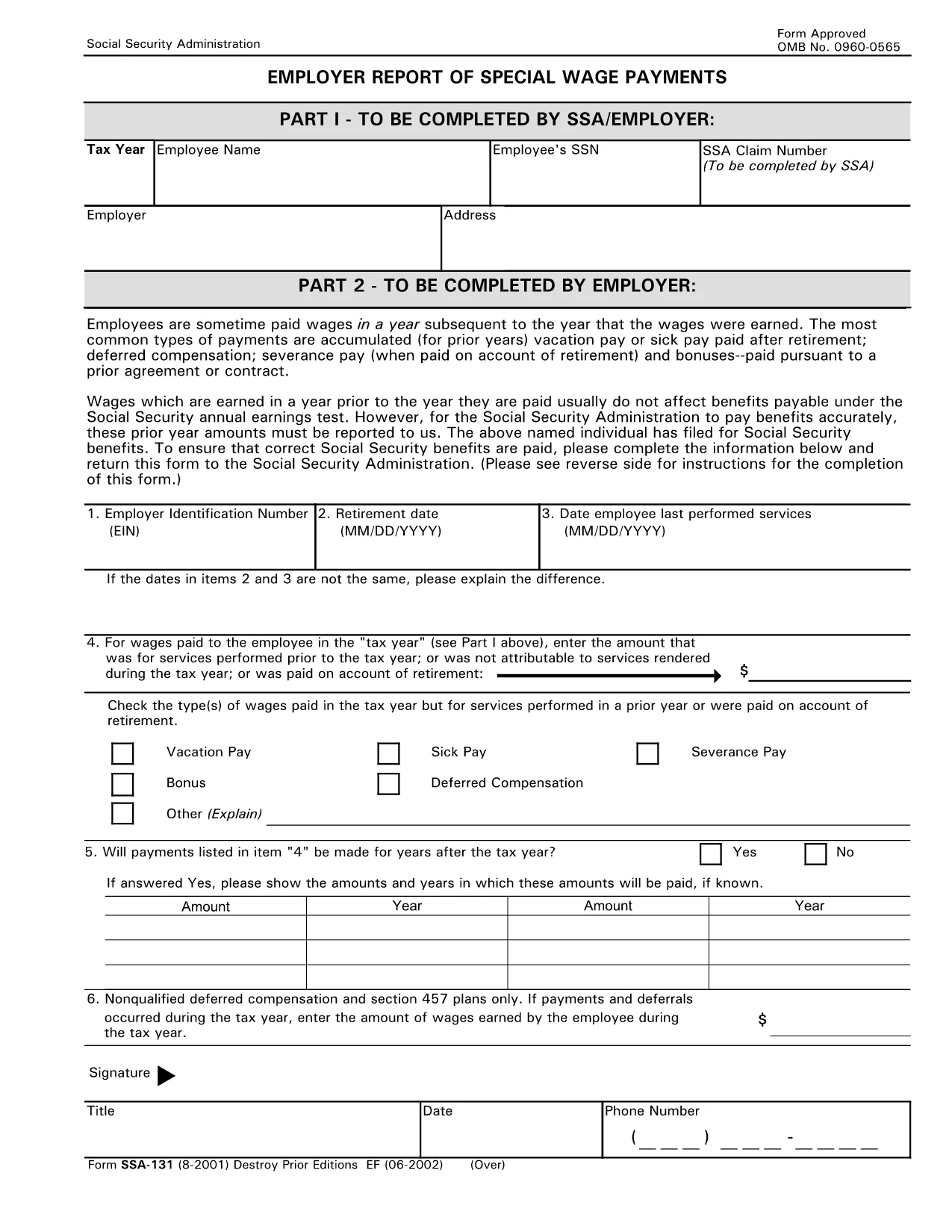
The SSA-131 is the Social Security Administration’s official Employer Report of Special Wage Payments. Employers use this form to report wages that were earned in a prior year but paid after retirement, such as accumulated vacation pay, severance, or deferred compensation. Accurate reporting ensures beneficiaries receive the correct benefit amounts.

What Is SSA-131?

SSA-131 captures the following key details:

  • Tax year of the earned wages
  • Employee’s name, Social Security Number, and SSA claim number
  • Employer’s address and contact information
  • Type and amount of the special wage payment

How to Complete the SSA-131 Form Online

Formize makes the process fast and paper‑free. Follow these steps:

  1. Click the "Fill out this form" button on the page.
  2. Wait a few seconds while the Formize PDF Filler app loads.
  3. Enter the required information in each fillable field. The interface highlights mandatory fields.
  4. Use the built‑in validation to check dates, SSN format, and monetary values.
  5. When you’re done, click "Save & Download" to get a completed PDF you can print or email.

Common Mistakes to Avoid

  • Leaving fields blank: Incomplete forms are rejected by SSA.
  • Mismatching SSN and claim number: Double‑check both numbers before submitting.
  • Incorrect tax year: Report the year the wages were earned, not the year they were paid.
  • Illegible handwriting: Using the fillable PDF eliminates this risk.

Where to Submit the Completed Form

After you download the filled PDF, mail it to the address listed on the reverse side of the form or fax it to the SSA office handling special wage payments. Some regional SSA offices also accept electronic submissions via their secure portal.

Download the Fillable PDF

Click the button below to open the official, fillable SSA-131 PDF in the Formize editor. No software download is required.

Fill out this form

DUK
  • Who must file SSA-131?

    Any employer who pays wages that were earned in a prior year to an employee who is already receiving Social Security benefits must file SSA-131.

  • Can I file SSA-131 electronically?

    Yes. By using Formize’s fillable PDF, you can complete the form online and then email or upload the finished PDF to the SSA’s secure portal where accepted.

  • What is the deadline for submitting SSA-131?

    The form should be submitted as soon as the special wage payment is made. Delays can affect the beneficiary’s benefit calculation.

  • Do I need a signature on SSA-131?

    A signature from an authorized employer representative is required. In the fillable PDF you can type a digital signature or print and sign after downloading.

  • What happens if I make a mistake on the form?

    SSA may reject the form and request a corrected version. Using the fillable PDF reduces errors, and you can download a corrected copy at any time.

  • Is there a cost to use the Formize PDF filler?

    No. Formize provides free, secure access to fillable government PDFs like SSA-131.

KAIP

Kaip nemokamai užpildyti SSA-131 internete, atlikdami 5 paprastus veiksmus:

  1. 1
    Open the Fillable Form
    Click the “Fill out this form” button on the page to launch the Formize PDF Filler.
  2. 2
    Load the Form
    Wait a few seconds while the fillable SSA-131 PDF loads in the browser.
  3. 3
    Enter Required Data
    Complete each highlighted field with accurate information—tax year, employee details, wage amount, etc.
  4. 4
    Validate and Review
    Use the built‑in checks to ensure all numbers and dates are correctly formatted, then review the entire form.
  5. 5
    Save or Submit
    Click “Save & Download” to get a completed PDF you can print, email, or mail to the SSA office.
Formuokite PDF užpildymo programą
APIE

Socialinės apsaugos formos

SSA-131 yra viena iš socialinės apsaugos formų, kurios yra dokumentai, naudojami teikiant paraišką dėl įvairių išmokų ir paslaugų, kurias teikia Jungtinių Valstijų socialinės apsaugos administracija (SSA). SSA yra federalinė agentūra, administruojanti programas, skirtas teikti finansinę pagalbą reikalavimus atitinkantiems asmenims ir šeimoms, įskaitant išėjimo į pensiją išmokas, invalidumo išmokas, išmokas netekus maitintojo ir papildomas pajamas už saugumą (SSI).

Kai kurios įprastos socialinės apsaugos formos yra:

Socialinės apsaugos pensijų išmokų paraiška: ši forma naudojama teikiant paraišką dėl išėjimo į pensiją išmokų pagal asmens darbo istoriją ir pajamas.

Socialinės apsaugos neįgalumo pašalpų prašymas: ši forma naudojama norint kreiptis dėl neįgalumo pašalpų, jei asmuo turi fizinę ar psichinę būklę, dėl kurios negali dirbti.

Socialinės apsaugos maitintojo netekimo išmokų prašymas: ši forma naudojama teikiant paraišką dėl išmokų netekus maitintojo, jei asmens sutuoktinis arba vienas iš tėvų mirė ir jie turi teisę gauti išmokas netekus maitintojo.

Medicare registracijos paraiška: ši forma naudojama norint užsiregistruoti Medicare, federalinėje sveikatos draudimo programoje vyresniems nei 65 metų asmenims ir asmenims, turintiems tam tikrų negalių ar sveikatos sutrikimų.

Adreso keitimo forma: ši forma naudojama asmens adresui atnaujinti naudojant SSA.

Prašymo dėl pajamų įrašo forma: ši forma naudojama norint paprašyti asmens pajamų įrašo kopijos, kuri naudojama socialinio draudimo išmokoms apskaičiuoti.

Šias formas galima užpildyti internetu, paštu arba asmeniškai vietos socialinio draudimo įstaigoje. Svarbu atidžiai peržiūrėti ir užpildyti visas reikalingas formas, kad būtų užtikrintas savalaikis ir tikslus socialinio draudimo išmokų apdorojimas.

FUNKCIJOS

PDF užpildas

Lengviausias būdas užpildyti SSA-131 internete

  • Greitai užpildykite SSA-131
    Ieškote būdo greitai užpildyti SSA-131 internete? Naudodami internetinį nemokamą PDF formų užpildą sužinosite, kaip redaguoti ir užpildyti šį pdf dokumentą greičiau nei per minutę.
  • Lengva naudoti internetinį PDF redaktorių
    Atsibodo spausdinti PDF failus, kad galėtumėte juos redaguoti prieš nuskaitydami iš naujo ir siųsdami atgal? Redaguoti PDF dokumentus internete nemokamai. Norėdami sutaupyti laiko ir popieriaus, naudokite mūsų internetinį pdf redaktorių.
  • Puikūs įrankiai, visos platformos
    Svarstote, kaip užpildyti SSA-131 „Mac“ kompiuteryje, o gal kaip nemokamai naudoti PDF užpildą? Mūsų internetiniai PDF įrankiai veikia visose platformose.
  • Saugi failų saugykla
    Užbaigti „SSA-131“ failai saugomi saugioje duomenų bazėje, kurią valdo „Amazon Cloud“ priegloba. Galite bet kada ištrinti failus iš mūsų sistemos. Bet kokiu atveju šie failai automatiškai ištrinami po 24 valandų.
  • Kalbėkitės su SSA-131
    Kalbėkite su „SSA-131“ naudodami Chatize, kuri yra nemokama PDF skaitymo priemonė. Užduokite klausimų ir gaukite atsakymus iš „SSA-131“. Tiesiog spustelėkite aukščiau esantį mygtuką Kalbėtis su dokumentu.

Ištrinti užpildymo seansą

Ištrinti pasirinktą pildymo seansą? Tokiu atveju jūsų pažanga pildant formą bus prarasta.

Ištrinti redagavimo sesiją

Ištrinti pasirinktą redagavimo sesiją? Tokiu atveju jūsų pažanga kuriant ir redaguojant formą bus prarasta.