
Pasirinkite kalbą

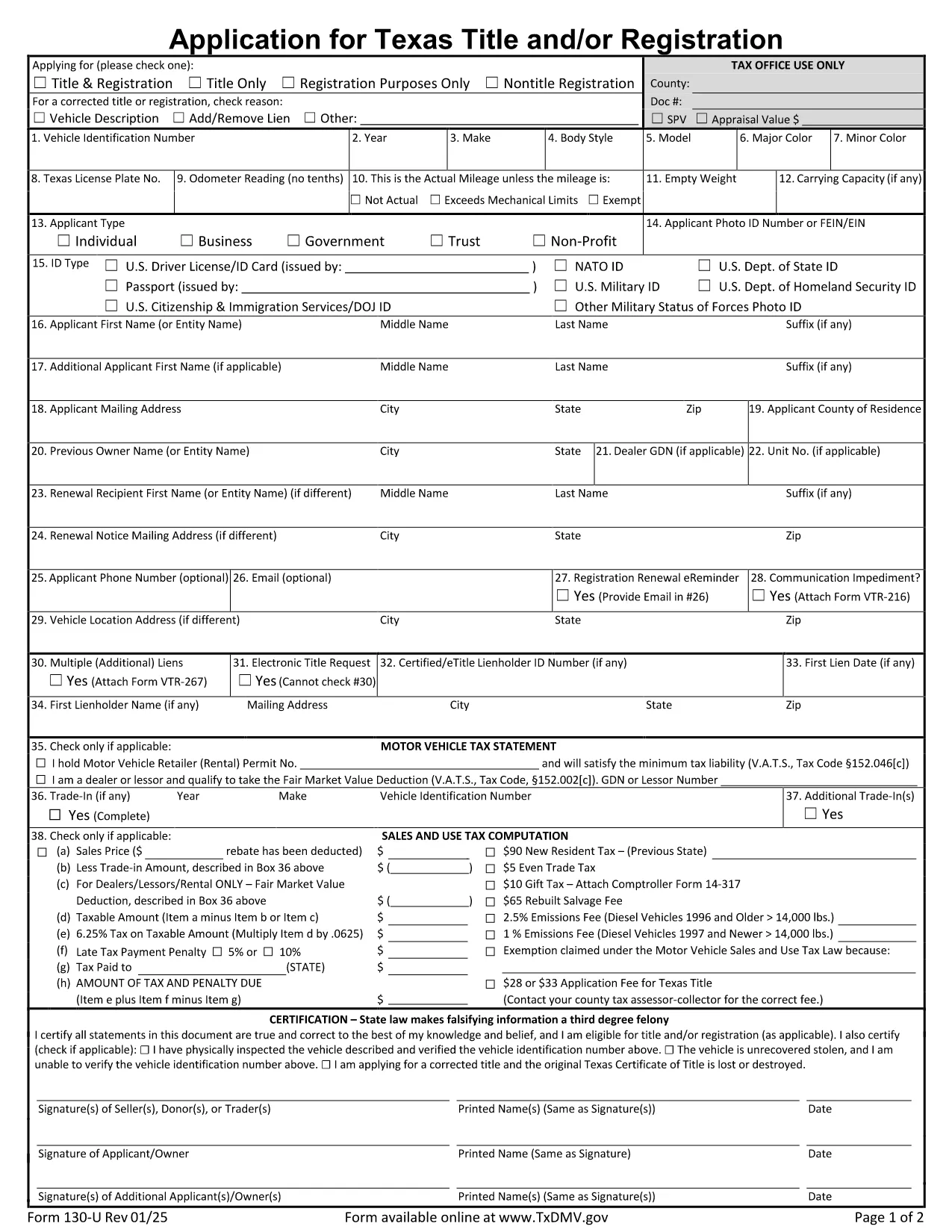
Texas Application Form Registration (Form 130‑U) – Fillable PDF

  1. Kalba Anglų
  2. Šalis JAV
  3. skyrius Texas Department of Motor Vehicles
  4. Veikla Transporto priemonės registracija
Texas Application Form Registration (Form 130‑U) – Fillable PDF

The Texas Application Form Registration (Form 130‑U) is the official document used to request a new title, registration, or both for a vehicle in Texas. Whether you’re buying a car, transferring ownership, or need to register a newly built vehicle, this fillable PDF lets you complete the process quickly without printing or handwriting.

Key benefits of using Formize’s online PDF filler:

  • Instantly editable fields – no PDF editor required.
  • Auto‑save so you never lose your progress.
  • Secure data handling with SSL encryption.
  • Easy download of a completed copy for your records.

What Is Form 130‑U?

Form 130‑U is issued by the Texas Department of Motor Vehicles (TxDMV) and the county tax assessor‑collector. It collects essential information such as vehicle details, owner identification, lienholder data, and the type of registration requested.

How to Fill Out the Texas Registration Form Online

Follow these simple steps to complete the form directly on our page:

  1. Click the “Fill out this form” button below.
  2. Wait for the Formize PDF Filler app to load (usually a few seconds).
  3. Enter the required information in each highlighted field.
  4. Use the built‑in validation to correct any errors before submitting.
  5. When finished, click “Submit” to generate a PDF copy you can print or email.

Common Mistakes to Avoid

  • Incorrect VIN: Double‑check the Vehicle Identification Number; a single digit error can delay processing.
  • Missing signatures: The form requires the owner’s signature and, if applicable, the lienholder’s signature.
  • Wrong address: Use the mailing address registered with the county tax assessor‑collector.

Where to Submit Your Completed Form

After you download the completed PDF, mail it to your local county tax assessor‑collector office or bring it in person. For faster service, you can also submit the form online through the TxDMV portal if your county supports electronic filing.

FAQs About the Texas Registration Application

Below are answers to the most common questions users have about Form 130‑U.

DUK
  • Do I need to print the PDF after filling it out?

    No. You can keep the digital copy for your records, but many counties require a printed version for submission.

  • Can I edit the form after I’ve submitted it?

    Once you click “Submit,” the PDF is locked. To make changes, reopen the original fillable PDF and start over.

  • What fees are associated with Form 130‑U?

    Fees vary by county and vehicle type. Check your local tax assessor‑collector’s website for the exact amount.

  • Is a signature required on the digital form?

    Yes. Use the built‑in signature field to draw or type your signature before submitting.

  • How long does processing take after I mail the form?

    Processing typically takes 7‑10 business days, but it can be faster if you submit electronically.

  • Can I use this form for a vehicle purchased out of state?

    Yes, but you must also provide proof of out‑of‑state inspection and any applicable emissions testing.

KAIP

Kaip nemokamai užpildyti Texas registration form internete, atlikdami 5 paprastus veiksmus:

  1. 1
    Click the Fill‑out Button
    Press the “Fill out this form” button on the page to launch the Formize PDF Filler.
  2. 2
    Wait for the Filler to Load
    A short loading screen appears while the secure filler app prepares the document.
  3. 3
    Enter Your Information
    Complete each highlighted field—VIN, owner details, vehicle description, and registration type.
  4. 4
    Validate and Review
    The filler checks for missing data and format errors; correct any highlighted issues.
  5. 5
    Generate and Save
    Click “Submit” to create a final PDF. Download, print, or email the completed form as needed.
Formuokite PDF užpildymo programą
APIE

Transporto priemonių registracijos formos

Jei turite arba nuomojatės motorinę transporto priemonę, priekabą ar valtį, turite laikytis tam tikrų įsipareigojimų, kad jūsų transporto priemonė būtų teisėtai registruota ir saugi.

Texas registration form yra viena iš transporto priemonių registracijos formų, kurios yra dokumentai, naudojami motorinei transporto priemonei įregistruoti atitinkamoje valstijos ar provincijos institucijoje. Šios formos paprastai reikalingos, kai asmuo perka naują ar naudotą transporto priemonę arba kai su transporto priemone persikelia į naują valstiją ar provinciją.

Tikslūs reikalavimai ir formos, reikalingos transporto priemonės registracijai, gali skirtis priklausomai nuo vietos, tačiau paprastai procesas apima informacijos apie transporto priemonę, savininką ir bet kokius transporto priemonės arešto pateikimą.

Kai bus pateiktos registracijos formos ir mokesčiai, valstybės ar provincijos institucija transporto priemonės savininkui išduos registracijos liudijimą arba valstybinį numerį. Ši registracija leidžia teisėtai eksploatuoti transporto priemonę viešuosiuose keliuose ir greitkeliuose.

FUNKCIJOS

PDF užpildas

Lengviausias būdas užpildyti Texas registration form internete

  • Greitai užpildykite Texas registration form
    Ieškote būdo greitai užpildyti Texas registration form internete? Naudodami internetinį nemokamą PDF formų užpildą sužinosite, kaip redaguoti ir užpildyti šį pdf dokumentą greičiau nei per minutę.
  • Lengva naudoti internetinį PDF redaktorių
    Atsibodo spausdinti PDF failus, kad galėtumėte juos redaguoti prieš nuskaitydami iš naujo ir siųsdami atgal? Redaguoti PDF dokumentus internete nemokamai. Norėdami sutaupyti laiko ir popieriaus, naudokite mūsų internetinį pdf redaktorių.
  • Puikūs įrankiai, visos platformos
    Svarstote, kaip užpildyti Texas registration form „Mac“ kompiuteryje, o gal kaip nemokamai naudoti PDF užpildą? Mūsų internetiniai PDF įrankiai veikia visose platformose.
  • Saugi failų saugykla
    Užbaigti „Texas registration form“ failai saugomi saugioje duomenų bazėje, kurią valdo „Amazon Cloud“ priegloba. Galite bet kada ištrinti failus iš mūsų sistemos. Bet kokiu atveju šie failai automatiškai ištrinami po 24 valandų.
  • Kalbėkitės su Texas registration form
    Kalbėkite su „Texas registration form“ naudodami Chatize, kuri yra nemokama PDF skaitymo priemonė. Užduokite klausimų ir gaukite atsakymus iš „Texas registration form“. Tiesiog spustelėkite aukščiau esantį mygtuką Kalbėtis su dokumentu.

Ištrinti užpildymo seansą

Ištrinti pasirinktą pildymo seansą? Tokiu atveju jūsų pažanga pildant formą bus prarasta.

Ištrinti redagavimo sesiją

Ištrinti pasirinktą redagavimo sesiją? Tokiu atveju jūsų pažanga kuriant ir redaguojant formą bus prarasta.