
Pasirinkite kalbą

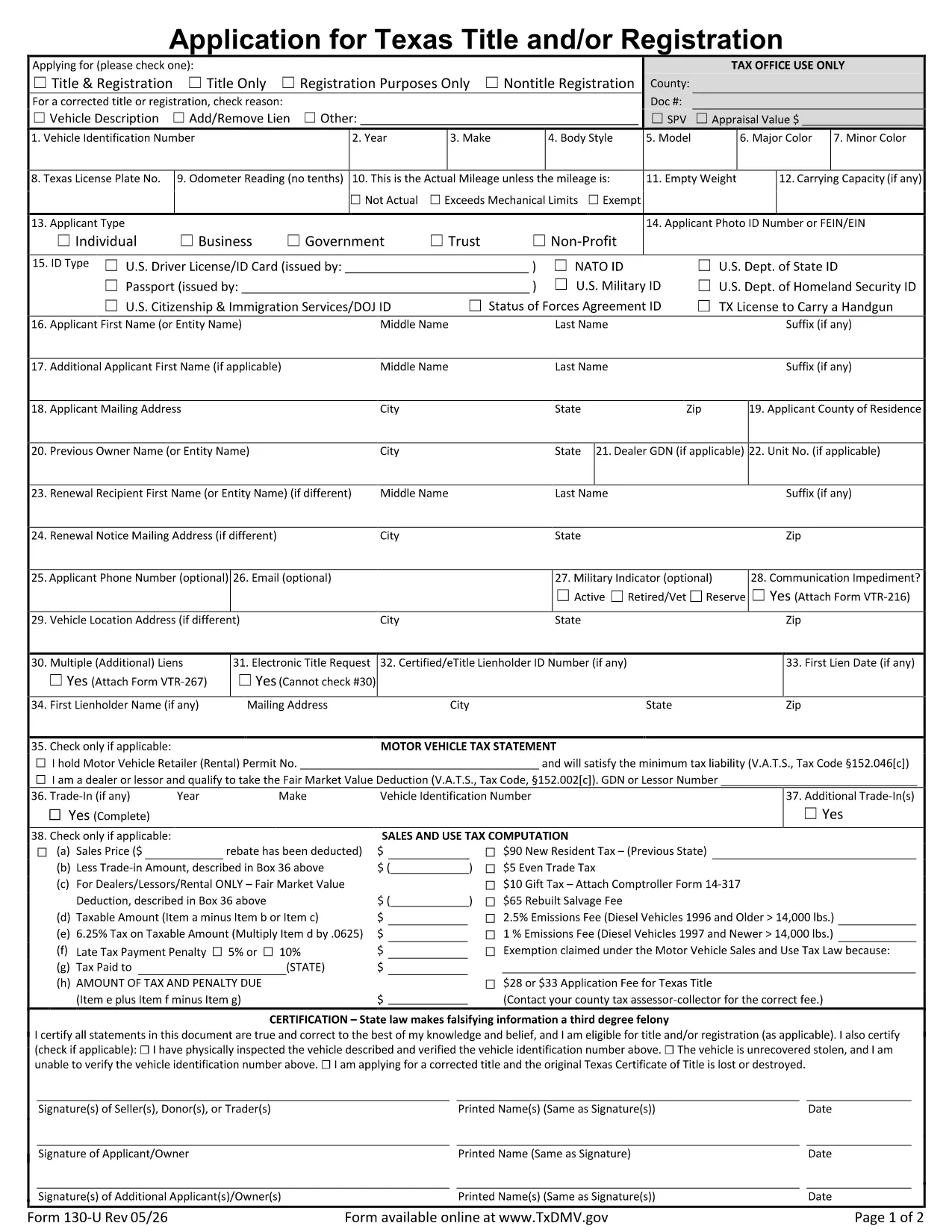
Application for Texas Title and Registration (Form 130‑U)

  1. Kalba Anglų
  2. Šalis JAV
  3. skyrius Texas Department of Motor Vehicles
  4. Veikla Transporto priemonės registracija
Application for Texas Title and Registration (Form 130‑U)

The Texas Application for Title and Registration (Form 130‑U) is the official document you need to obtain a new title, transfer ownership, or register a vehicle in Texas. Instead of printing, printing, and hand‑writing, you can now fill the form online with Formize’s free PDF filler – fast, secure, and completely digital.

Why Use the Fillable PDF Form

Our fillable version retains the exact layout required by the Texas Department of Motor Vehicles (TxDMV) while allowing you to type directly into each field. Benefits include:

  • Eliminate messy handwriting and illegible entries.
  • Save time – the form loads instantly in your browser.
  • Automatic field validation reduces errors.
  • Easy saving and printing for submission.

Step‑by‑Step Guide to Complete the Form

Follow the simple steps below to finish your application in minutes.

  • Step 1: Click the "Fill out this form" button on the page.
  • Step 2: Wait for the Formize PDF Filler app to load (usually a few seconds).
  • Step 3: Enter your personal, vehicle, and ownership details in the highlighted fields.
  • Step 4: Review the completed form for accuracy.
  • Step 5: Download the finished PDF or print it directly for submission.

Common Mistakes to Avoid

Even with a digital form, a few errors can delay processing:

  • Leaving the VIN or Odometer reading blank.
  • Providing an outdated address – the TxDMV requires a current mailing address.
  • Forgetting to attach required signatures.
  • Using the wrong form version; always use Form 130‑U for title and registration.

Where to Submit Your Application

After completing the form, you can submit it in one of three ways:

  • Mail it to your county tax assessor‑collector’s office.
  • Bring the printed form to a local TxDMV regional office.
  • Some counties accept scanned PDFs via email – check with your local office.

Frequently Asked Questions

Answers to the most common questions are listed below (see the FAQ section for more details).

DUK
  • What is Form 130‑U used for?

    Form 130‑U is the official Texas application to obtain a new title, transfer ownership, or register a vehicle with the TxDMV.

  • Can I submit the form electronically?

    Most counties require a printed copy, but some accept a scanned PDF via email. Check with your local tax assessor‑collector.

  • Do I need a notary for this form?

    A notary is not required for Form 130‑U unless your county specifically requests it.

  • How long does it take to process the application?

    Processing times vary by county, typically 7‑14 business days after the form is received.

  • What fees are associated with the title application?

    Fees depend on vehicle type, age, and county; they are payable to the tax assessor‑collector at the time of submission.

  • Is the fillable PDF compatible with mobile devices?

    Yes, Formize’s PDF filler works on most modern smartphones and tablets.

  • What should I do if I make a mistake after saving?

    Open the saved PDF in Formize again, edit the incorrect fields, and re‑save the document.

  • Do I need to attach any additional documents?

    Typically you must include proof of ownership (e.g., bill of sale) and a valid photo ID.

KAIP

Kaip nemokamai užpildyti Texas title application internete, atlikdami 4 paprastus veiksmus:

  1. 1
    Click the Fill Button
    Press the "Fill out this form" button on the page to launch Formize’s PDF filler.
  2. 2
    Wait for the Filler to Load
    The Formize PDF Filler app loads in a few seconds – you’ll see a toolbar and editable fields.
  3. 3
    Enter Your Information
    Type directly into each highlighted field: owner details, vehicle information, and signatures.
  4. 4
    Review and Save
    Double‑check all entries, then click "Save" to download the completed PDF or print it for submission.
Formuokite PDF užpildymo programą
APIE

Transporto priemonių registracijos formos

Jei turite arba nuomojatės motorinę transporto priemonę, priekabą ar valtį, turite laikytis tam tikrų įsipareigojimų, kad jūsų transporto priemonė būtų teisėtai registruota ir saugi.

Texas title application yra viena iš transporto priemonių registracijos formų, kurios yra dokumentai, naudojami motorinei transporto priemonei įregistruoti atitinkamoje valstijos ar provincijos institucijoje. Šios formos paprastai reikalingos, kai asmuo perka naują ar naudotą transporto priemonę arba kai su transporto priemone persikelia į naują valstiją ar provinciją.

Tikslūs reikalavimai ir formos, reikalingos transporto priemonės registracijai, gali skirtis priklausomai nuo vietos, tačiau paprastai procesas apima informacijos apie transporto priemonę, savininką ir bet kokius transporto priemonės arešto pateikimą.

Kai bus pateiktos registracijos formos ir mokesčiai, valstybės ar provincijos institucija transporto priemonės savininkui išduos registracijos liudijimą arba valstybinį numerį. Ši registracija leidžia teisėtai eksploatuoti transporto priemonę viešuosiuose keliuose ir greitkeliuose.

FUNKCIJOS

PDF užpildas

Lengviausias būdas užpildyti Texas title application internete

  • Greitai užpildykite Texas title application
    Ieškote būdo greitai užpildyti Texas title application internete? Naudodami internetinį nemokamą PDF formų užpildą sužinosite, kaip redaguoti ir užpildyti šį pdf dokumentą greičiau nei per minutę.
  • Lengva naudoti internetinį PDF redaktorių
    Atsibodo spausdinti PDF failus, kad galėtumėte juos redaguoti prieš nuskaitydami iš naujo ir siųsdami atgal? Redaguoti PDF dokumentus internete nemokamai. Norėdami sutaupyti laiko ir popieriaus, naudokite mūsų internetinį pdf redaktorių.
  • Puikūs įrankiai, visos platformos
    Svarstote, kaip užpildyti Texas title application „Mac“ kompiuteryje, o gal kaip nemokamai naudoti PDF užpildą? Mūsų internetiniai PDF įrankiai veikia visose platformose.
  • Saugi failų saugykla
    Užbaigti „Texas title application“ failai saugomi saugioje duomenų bazėje, kurią valdo „Amazon Cloud“ priegloba. Galite bet kada ištrinti failus iš mūsų sistemos. Bet kokiu atveju šie failai automatiškai ištrinami po 24 valandų.
  • Kalbėkitės su Texas title application
    Kalbėkite su „Texas title application“ naudodami Chatize, kuri yra nemokama PDF skaitymo priemonė. Užduokite klausimų ir gaukite atsakymus iš „Texas title application“. Tiesiog spustelėkite aukščiau esantį mygtuką Kalbėtis su dokumentu.

Ištrinti užpildymo seansą

Ištrinti pasirinktą pildymo seansą? Tokiu atveju jūsų pažanga pildant formą bus prarasta.

Ištrinti redagavimo sesiją

Ištrinti pasirinktą redagavimo sesiją? Tokiu atveju jūsų pažanga kuriant ir redaguojant formą bus prarasta.